How to Use GPT Image 2 for 1930s Cartoon Key Visuals — A Step-by-Step Guide
A practical, prompt-level guide to generating rubber-hose cartoon key visuals with GPT Image 2, from choosing the scene to publishing the pair.
How to Use GPT Image 2 for 1930s Cartoon Key Visuals
This guide walks through one complete job: turning the Inkwell Isles — a 1930s rubber-hose cartoon world — into four published key visuals with GPT Image 2 and Krea 2. It covers what to prepare, how to write the prompt, how to compare the models and how to publish the results as works of the world. Every image referenced here is a real output from that run, with a public share URL.
What You Need
- A world seed. A Neta Studio world with characters, locations, events, factions and rules — or a one-sentence brief you can turn into one.
- A scene. One subject per render: an establishing shot or a character/event beat, not both at once.
- A style contract. Medium, line, palette and a negative clause, written before you open the generator.
- Two models. GPT Image 2 for detail and architecture, Krea 2 for mood and expression.
- A place to publish. The world's studio, so each output becomes a shareable work instead of a loose file.
Step 1 — Choose the Scene
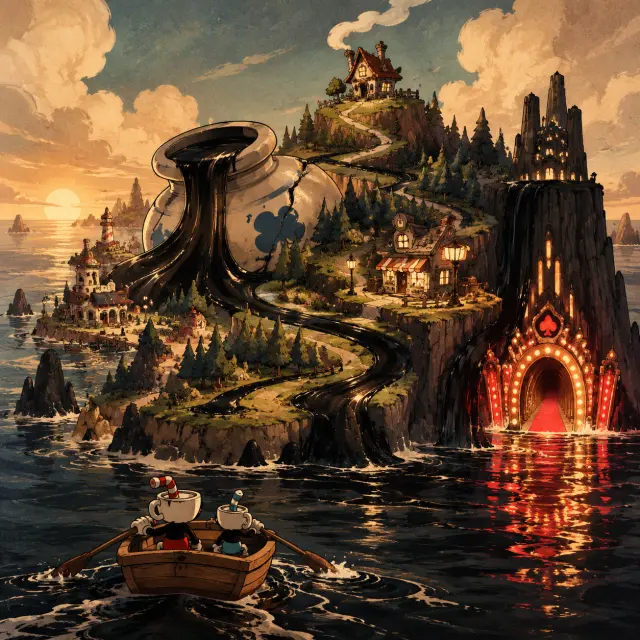
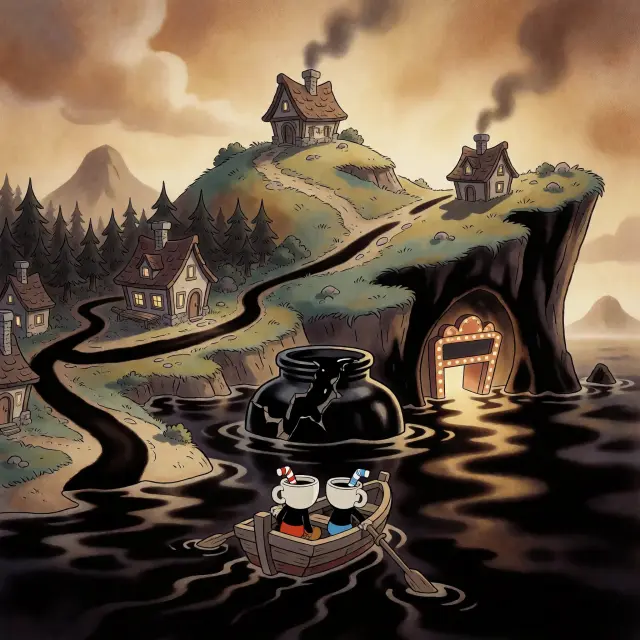
A world key visual needs a route, not a collage. Pick the path the eye should take and make every landmark a stop on it. In the Inkwell Isles, the route is: cracked inkwell at the centre, black ink spilling into the islands, cottage on the crest, pine wood and lit shop, casino door under the cliff, rowboat in the foreground. That single decision gives the model a depth plan and gives the viewer a story. If you are generating a character beat instead, choose a standoff — two figures, one prop that carries the plot, one source of warm light.
Step 2 — Cast the Subject
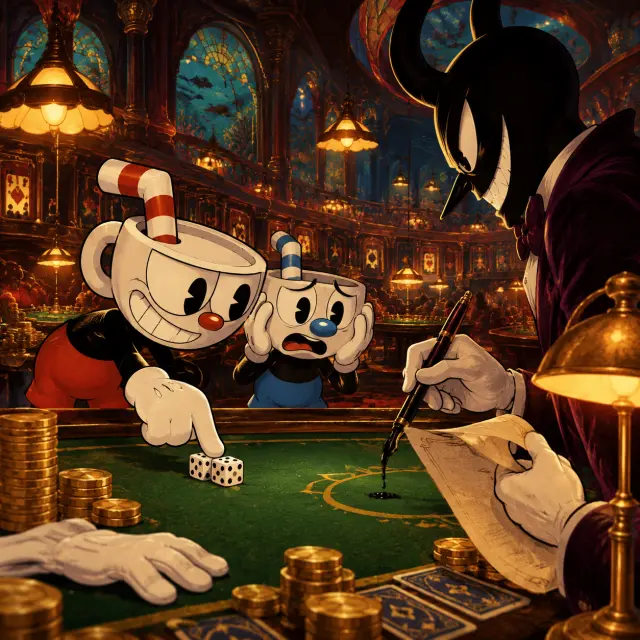
Describe the subject in the language of the style, not the language of a novel. Cuphead is a white porcelain cup head with a red-and-white bendy straw, red shorts, white gloves, a reckless grin and one finger on the dice. Mugman is shorter and rounder, a blue-and-white straw, blue shorts, both hands on his cup-head in alarm. The dealer is a tall plum-velvet silhouette with horns, a razor-thin smile, a contract and a pen that drips living ink. Specific props do more work than adjectives.
If the model adds characters you did not ask for, cut the scene down. A three-figure standoff is already at the limit for a clean rubber-hose composition; a crowd will turn into mush at thumbnail size.
Step 3 — Set the Mood with Light
Rubber-hose cartoons are lit like a stage: one warm key, hard shadow edges, a background that stays flat. Name the key light and the accent. “Warm amber lamplight, deep ink-black shadows, hot casino red and pale porcelain white” gives the model a lighting plan and a palette in one clause. Avoid “cinematic lighting” on its own — it pulls the render toward modern 3D and soft gradients.
Step 4 — Run Both Models
Use the identical prompt on GPT Image 2 and Krea 2. Do not “help” one model with a different description; the comparison is only useful if the only variable is the model. GPT Image 2 will take longer and cost more. Krea 2 will return faster and cheaper. Run the world visual pair first, then the character pair, so the second subject inherits the palette you have already approved.
Step 5 — Compare and Choose
Compare at three sizes: full, storefront crop and thumbnail. GPT Image 2 usually wins the thumbnail for a world visual because its silhouettes are separated by value. Krea 2 often wins the character beat because its light is warmer and its composition more theatrical. Do not force one model to do both jobs. Keep the pair and label which is which; the comparison itself becomes content.
Step 6 — Publish and Iterate
Publish each render as a work of the world, with a title, a one-line summary and the prompt attached. That turns a folder of images into a canon: the next prompt can refer to “the casino visual” and mean a specific, shareable frame. Then iterate on the weaker image only — one variable at a time, usually the camera clause.
Title the work
Name the subject and the model, e.g. “The Night at the Tables — Cuphead & Mugman Key Visual (GPT Image 2)”.
Write the summary
One sentence on what the image shows and what the model did differently. This is what viewers read in the world gallery.
Attach the prompt
Keep the exact prompt with the work so the next creator can reproduce or remix it.
Publish both models
Never publish only the winner. The pair is the evidence and the invitation to compare.
Reuse the canon
Generate the next scene from the same atoms. The palette and props should carry over without a reference image.
Step 7 — Render the World's Turning Point
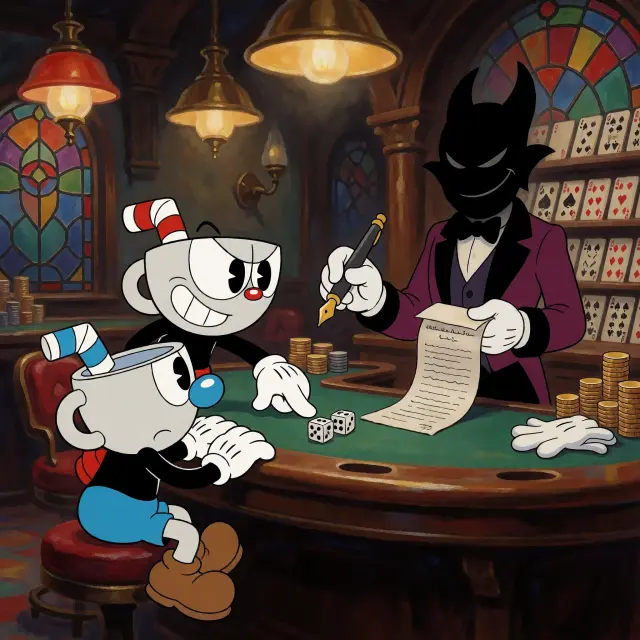
Once the world and the cast are established, generate the event that changes the status quo. In the Inkwell Isles that is the night at the tables: the contract, the pen, the dealer and the two brothers who think they are winning. An event visual is where the style contract pays off, because the audience already knows the place and the palette; all the image has to do is turn the screw.
Prompt Recipes That Work
World establishing shot. “1930s rubber-hose cartoon world key visual, a chain of crooked islands in warm sepia, a cracked inkwell spilling black ink into the sea, hilltop cottage, pine wood, casino door under a black cliff, two cup-headed silhouettes in a rowboat, bold ink outlines, flat cel fills, cream and burnt umber with one hot red, wide panoramic, no text.”
Character standoff. “1930s rubber-hose cartoon character key visual, two cup-headed brothers at a green baize casino table, one leaning forward with a grin, one clutching his cup-head, a tall horned dealer in plum velvet holding a contract and a dripping pen, brass lamps, stained glass, warm amber light, deep ink shadows, vertical poster, no text.”
Location plate. “1930s rubber-hose cartoon location key visual, a carnival island at dusk, striped tents, a ferris wheel, a calliope, a barker in a straw hat, a crowd of rubber-hose animals, warm bulb light, flat painted scenery, cream and umber with one hot red, no text.”
Troubleshooting
- The render looks like modern 3D. Add “flat cel fills, no gradients, no 3D render, no soft shadows” and remove any “cinematic” language.
- The eyes are wrong. Say “solid black pie-cut eyes, no highlights, no pupils” explicitly.
- The limbs have elbows. Add “continuous rubber-hose limbs, no joints, noodle arms and legs”.
- The palette drifts. Replace mood words with a short list: “cream, burnt umber, ink black, one hot red”.
- The render is rejected. Stage the world as an environment with no characters, then add figures in a second pass.
- The composition is busy. Cut to one subject, one prop and one light source.
What's Next After the Poster
A published key visual is a seed, not a finish line. Use it as the style reference for character covers, location plates and event cards. Generate a vertical slice of a playable scene. Animate the rowboat crossing the ink. Write the next contract and render the debtor. The world already holds the laws and the palette; each new work only adds a page.
Frequently Asked Questions
- Do I need a reference image? Not for the first render. Start text-only, then use the published world visual as a reference for later scenes.
- How many renders should I keep? Two per subject, one per model. More than that is iteration, not canon.
- Why does GPT Image 2 cost more? It produces more environmental detail and takes longer; Krea 2 is the fast, cheap alternative.
- Can I put the title in the image? No. Text rendering is unreliable; add typography after generation.
- Can I sell the results? Check the model and platform terms; the world and its atoms are yours to fork and remix on Neta Studio.
Start Your Key Visual
Start from the Inkwell Isles or your own one-sentence cartoon brief. Keep the style contract short and strict, run the same prompt through both models, publish the pair and iterate on the weaker image. The world does the rest.
Start Your Key Visual
A world, a prompt and two models — a rubber-hose poster you can publish today.