
How to Use GPT Image 2 for Anime Key Visuals — A Working Guide
Seven steps from a world atom to a published anime key visual: choose one operation, write six clauses, lock the hour, and compare two models on the same brief. Worked examples from the Your Name: The Thread of Musubi world.
Learn the GPT Image 2 Anime Workflow
Seven steps from a world atom to a published key visual. No theory you cannot render — every step is demonstrated on a real world.
What You Need Before You Start
You do not need a style bible or a folder of references. You need one world with specific nouns and one sentence that describes a single hour. Everything else in this guide is about protecting that sentence from the model's urge to add things you did not ask for.
- A world: at least one character pair, one location, one event and one rule.
- One sentence: who is in the frame, where they are, and what the light is doing.
- One hour: dawn, noon, dusk or kataware-doki. Choose before you write.
- A crop target: 16:9 hero, 4:5 social, or 1:1 thumbnail. This changes the composition.
- A second model: the same brief through Krea 2, as a control.
Step 1 — Read the World Before You Write a Prompt
The prompt is downstream of the world. If the world says the shrine keeps a braided cord and the town hall wants to demolish the shrine, then the key visual has a built-in conflict: old wood against new concrete, a red cord against a grey sky. Read the atoms first and write down the three nouns that carry the most story. Those three nouns go into the prompt before any adjective does.
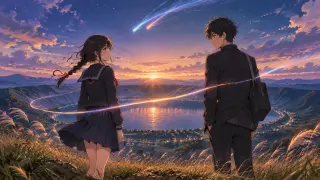
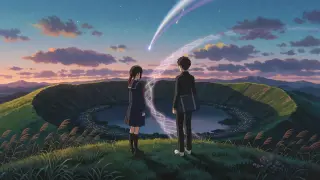
For this world the three nouns are almost always the same: the crater, the cord, the comet. The crater gives scale, the cord gives relationship, the comet gives deadline. A frame with all three is a key visual. A frame with two is a mood piece. A frame with one is wallpaper.
Step 2 — Choose One Operation, Not a Montage
A key visual does one thing. It does not show the town, the school, the shrine and the comet at once. It chooses an operation: witness, approach, threshold, or aftermath. Witness is a back view of two people looking at something. Approach is a figure moving toward a place. Threshold is a door, a stair, a torii. Aftermath is the same place with the light changed.
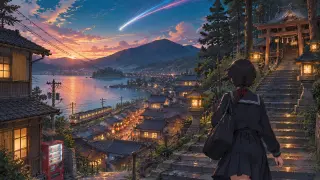
The crater frame is witness. The town frame is approach. Neither is a montage, and that is why both read at thumbnail size. If you cannot name the operation in one word, the prompt is not ready.
Step 3 — Write the Six Clauses in Order
The order is the technique. Medium first, because it selects the rendering system. Place second, because it sets the horizon. Subject third, because it sets scale. Physics fourth, because it gives weight. Light fifth, because it gives mood. Negative last, because it protects the frame from text and logos.
Medium and genre
Anime key visual, 16:9 theatrical composition, hand-painted background.
Place
One location with a horizon and a ground plane. The crater rim above the caldera lake.
Subject
Two figures, described by costume and posture. Back view or three-quarter, never a generic "anime girl".
Physics
Contact shadows, wet stone, wind in reeds, a bag strap under weight, a braid of light in an arc.
Light and weather
The exact hour, the direction of the light, the colour of the shadows, the texture of the clouds.
Negative
No text, no watermark, no logo. Add "no photographic skin" if the model over-renders.
Step 4 — Lock the Light to the Story
Light is not decoration in this world; it is the plot. Kataware-doki exists because the light is between two states. If you render it as a normal sunset, you lose the rule that makes the story possible. The practical instruction is to name both light sources: the last of the sun and the first of the stars. Then name what they do: warm rim light on the figures, cool blue shadows on the stone, a lake that reflects the sky rather than the sun.
Step 5 — Set Size and Quality
Render wider than the final crop. GPT Image 2 accepts sizes from 512 to 3840 pixels per side in multiples of 16, and quality levels from low to high. For a poster, 1536×864 at high quality is the working default; for print, 2048×1152. Do not render the final 4:5 crop directly, because you will lose the composition decisions that made the frame work.
| Hero | 1536×864 · high · png |
| 2048×1152 · high · png | |
| Social | 1024×1280 · medium · jpeg |
| Thumbnail | 1024×1024 · medium · webp |
Step 6 — Run the Same Brief Through a Second Model
The second model is not a backup. It is a control. If Krea 2 produces a frame that reads better at thumbnail size, that tells you the composition is carrying the story and the detail is optional. If GPT Image 2 produces a frame that reads better at full bleed, that tells you the story is in the props. Running both costs little and removes the guesswork.
Step 7 — Publish, Caption and Link
Publishing is part of the craft. A frame with no caption is a screenshot; a frame with a caption is a work. The caption should name the world, the atoms, the hour and the model. The link should open the world, not the generation session. That is what makes the work inspectable, forkable and useful to someone else.
- Name the atoms: Mitsuha, Taki, the Sacred Crater, Kataware-doki at the Crater.
- Name the hour: kataware-doki, not "sunset".
- Name the model: GPT Image 2, 1536×864, high quality.
- Link the world: the studio page, not a private session.
- Keep the prompt: a work without its prompt cannot be reproduced.
Worked Example: From Atom to Published Frame
Here is the full loop on the town brief. The atoms are Mitsuha, Itomori, Miyamizu Shrine and the Pilgrimage to Itomori. The operation is approach. The hour is dusk. The three nouns are the stair, the lantern, the comet. The prompt writes itself from those decisions, and the frame that comes back is the second published work on this page.
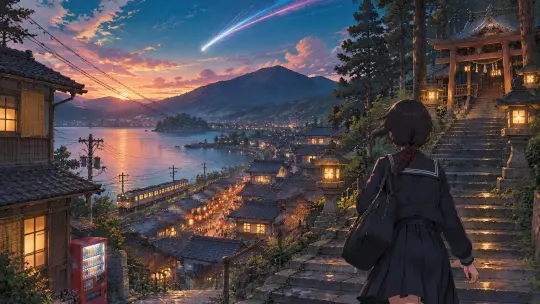
Prompt. Anime key visual, 16:9 theatrical composition, hand-painted background. A small mountain town built around a blue caldera lake at dusk: terraced houses with dark tiled roofs, a shrine on the hill above the town, one railway line along the water, festival lanterns beginning to glow along the main street. In the foreground a middle-school girl in a dark uniform with a red braided cord in her hair climbs wet stone steps toward the shrine, seen from behind. Above the ridgeline a bright comet with a split tail hangs in a teal-and-rose sky, clouds lit from below. Detailed power lines, shutters, vending machines, and cedar trees; soft volumetric haze. Hand-painted anime background art, theatrical feature quality, warm sodium light against cool dusk blues, no text, no watermark, no logo.
Fixing the Five Most Common Failures
Every failure below has a one-line fix. Learn the fixes before you learn the style, because the fixes are what make the style reproducible.
- Frame looks like a collage: remove nouns. One place, two people, one light source.
- Figures look pasted on: add contact shadows, ground texture and a foreground element.
- Sky is too orange: replace "sunset" with the exact hour and the second light source.
- Comet is too big: specify distance, tail length and relative size to the town.
- Fake text appears: strengthen the negative clause and remove signage from the scene.
What a Good Anime Key Visual Must Survive
A key visual has to survive three tests: the thumbnail, the crop and the caption. At thumbnail size it must read as two shapes and a light. At crop it must keep the relationship in frame. With the caption removed it must still suggest a story. If it fails any of the three, the frame is not finished — it is only a render.
The four works in this world were selected because they pass all three tests. The crater frame survives a 1:1 crop because the two figures sit near the centre and the comet sits above them. The town frame survives a 4:5 crop because the stair gives it a vertical spine. Both survive the caption test because the story is in the distance between two people, not in the text.
Take the Guide Into a World
Seven steps, four published examples, one world to fork. Write the six clauses and render the frame.
A practical guide with four real published works from this world. Every image is a router-files asset from the same world.