
How to Use GPT Image 2 for Anime Space Western Key Visuals — A Step-by-Step Guide with a Real Cowboy Bebop World
Seven steps to cel-shaded jazz-noir key visuals with GPT Image 2 — prompts, palette control, model comparison and troubleshooting, proven on four real works from the Cowboy Bebop world.
How to Use GPT Image 2 for Anime Space Western Key Visuals
This guide is a working method, not a list of magic words. It assumes you want a coherent set of cel-shaded space western posters — a ship, a port, an interior, a standoff — that all look like they belong to the same show. Every step was tested on the Cowboy Bebop world on Neta Studio, and the four resulting key visuals are published and linked below.
What You Need Before You Start
- A world — even a small one. Seven characters, five locations and a handful of events is enough.
- A style lock — one sentence that fixes medium, line, colour and shadow.
- One scene per session — a single frame, clearly described.
- Two models — GPT Image 2 for structure, Krea 2 as the atmosphere check.
- A place to publish — so the frame becomes a reference for the next one.
Step 1 — Start From the World, Not the Prompt Box
A blank prompt box produces genre averages. A world produces specifics. Open the Cowboy Bebop world and read the atoms first: who the characters are, what the ports look like, which events changed the map. The prompt is then a pointer at canon rather than an act of invention, and the model has far less room to drift.
Step 2 — Pick One Scene and One Moment
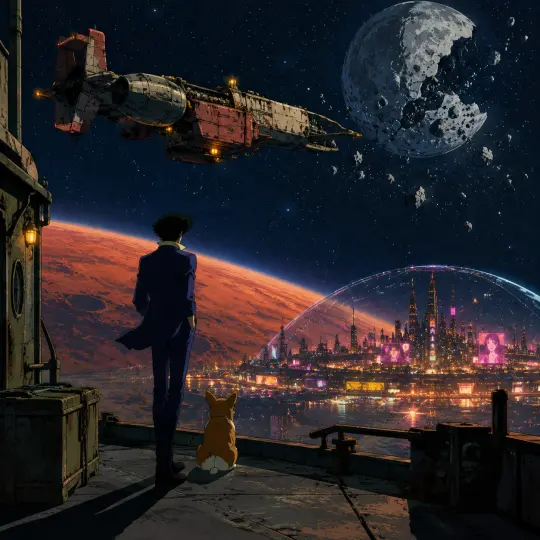
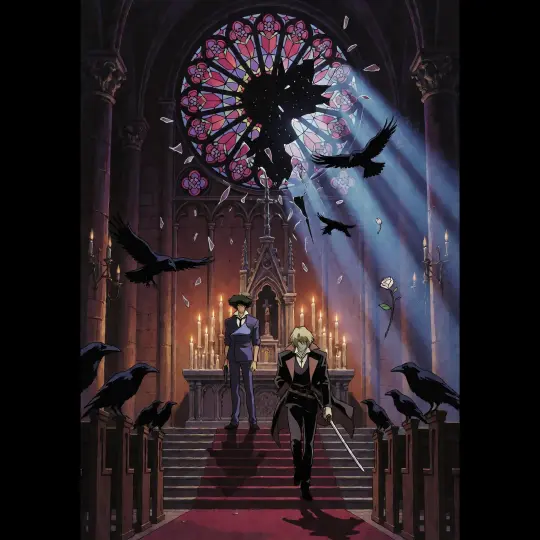
Choose a single timeline beat. Not “the world of Cowboy Bebop”, but “the Bebop drifting above New Tijuana at night” or “the rose window breaking inward during a reunion”. A moment implies a light, a posture and a foreground; a theme implies nothing the model can draw.
Step 3 — Write the Five-Clause Brief
Order matters more than length. GPT Image 2 weights early clauses for subject and late clauses for style, so open with the lock and close by repeating it when the prompt runs long.
Style
1998 anime cel-shaded style; clean hard-edged contours; broad flat local colour; two-step shadows; low texture.
Place
A named canon location plus one landmark: New Tijuana’s neon dome, a cathedral altar, a Callisto jazz bar.
Subject
One figure, one prop, one posture. Height, garment, what the hands are doing.
Moment
The action in this second: the coat pulling in solar wind, the glass suspended mid-fall.
Light and palette
One key, one accent. Warm amber against cold blue; candle-amber against moonlight; magenta neon against indigo.
Step 4 — Lock the Cel-Shading Mechanics
Cel shading is not a filter; it is a set of drawing decisions. Say them explicitly: closed contours, flat fills, one or two hard shadow layers, a single light direction, no gradients, no photographic texture. If the model starts producing soft painterly blends, the style clause has been overruled by a later, more concrete noun — move the clause to the end.
Step 5 — Render With GPT Image 2
Generate at the largest aspect your use case needs. A wide frame for the world cover, a vertical frame for an event poster. Keep the prompt attached to the output: the model rewrites prompts internally, and the revised version is the most reliable record of what actually produced the frame.
Step 6 — Run the Atmosphere Check
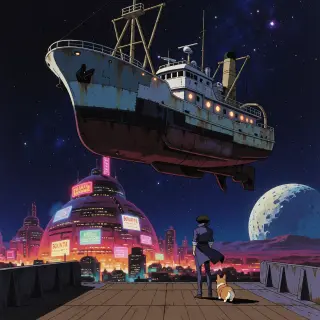
Send the identical prompt to Krea 2. If both models produce a recognisable version of the same scene, your brief is genuinely specified. If only one does, the prompt is leaning on that model’s bias — usually structure in GPT Image 2’s case, mood in Krea 2’s. Rewrite the weak clause before you touch the seed.
Step 7 — Iterate on Wording, Not Seeds
Most disappointing frames are under-specified, not unlucky. Before re-rolling, ask which clause is missing: is the place named, is the prop present, is the light single? Change one clause at a time so you learn what the model heard. Re-rolling the same prompt teaches you nothing except variance.
Troubleshooting the Common Failures
- It looks photoreal. The style clause is too abstract. Name the line, the fill and the shadow steps.
- Everything glows. Too many lights. Keep the key and the accent, delete the rest.
- The figure vanished. State foreground placement and relative scale: “small in the lower third, ship filling the upper two thirds”.
- The costume is wrong. Name the garment, its colour and one accessory; do not describe the character’s personality.
- The sign is gibberish. Describe the sign’s shape and colour, not its words.
A Prompt Library for This Genre
World cover. “1998 anime cel-shaded space western: a patched fishing trawler drifting above a neon dome city on Mars, a lanky hunter in a blue suit on the open deck with his back to camera, a Corgi at his heel, the broken Moon behind; warm amber running lights against cold blue shadow, magenta neon below; clean contours, flat colour, two-step shadows, film grain, wide hero composition, no text.”
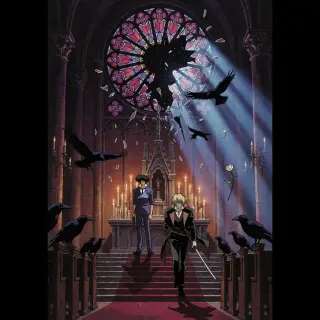
Event poster. “1998 anime cel-shaded space western: a candlelit cathedral on Mars, a stained-glass rose window shattering inward, one hunter at the altar and one blond man descending the choir steps with a katana, ravens in the pews, a single white rose falling; moonlight key against candle-amber accent; hard shadows, burgundy and cold blue, vertical hero composition, no text.”
Port plate. “1998 anime cel-shaded: a frozen moon port at night, fuel lines and cargo cranes, one lit bar with a saxophone silhouette in the window, no hero figure; sodium work lights against blue snow, flat colour, hard shadow edges, wide establishing shot.”
Keeping a Set Consistent
Consistency is a palette problem before it is a character problem. Fix four things across every frame: the contour weight, the number of shadow steps, the two-light rule, and the accent colour. If those four hold, a cathedral interior and a neon port will still read as the same show even when nothing else matches.
Publishing the Result
Publish each frame as a work of the world. That attaches it to the canon, gives it a share link, and turns it into a reference for the next session. Four published frames — a wide cover, a vertical event poster and their atmosphere counterparts — are enough to define a house style for an entire project.
Where to Go Next
Once the core set exists, extend sideways: a location plate with no hero, a prop study, a second character in contrasting light. Each addition is cheap, and each one makes the world’s visual library more useful to whoever forks it next.
Put the method to work on a real world
Four published key visuals, one jazz-noir canon, two models — start from the Bebop and add the next frame.