
How to Use GPT Image 2 for Anime Spirit-World Key Visuals — A Step-by-Step Guide with a Real Spirited Away World
Six steps to banner-ready anime spirit-world key visuals with GPT Image 2 — prompts, model comparisons, and troubleshooting, proven on real works from the Spirited Away world.
How to Use GPT Image 2 for Anime Spirit-World Key Visuals
A practical, step-by-step guide to generating banner-ready anime spirit-world key visuals with GPT Image 2, using a real Neta Studio world — Spirited Away — as the worked example. By the end you will know how to choose a scene, cast a subject, control the light, run the two-model comparison, and publish covers that stay on-canon.
What You Need
- A world seed — fork the Spirited Away world or write a one-sentence spirit-world brief.
- A scene — a character, a location, a faction, and a moment worth a cover.
- A model pair — GPT Image 2 for detail, Krea 2 for atmosphere.
- Thirty minutes — a handful of covers in one session, published as works.
Step 1 — Choose the Scene
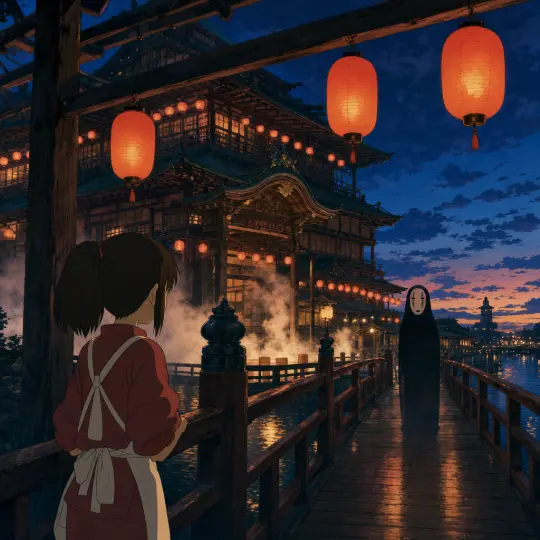
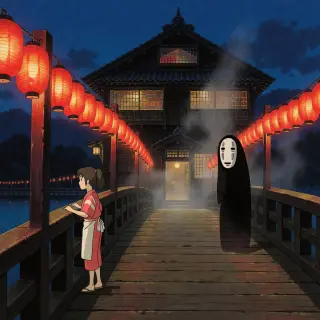
Start with a scene that has visual conflict. Spirited Away offers several: a lantern bridge at dusk, a cleansing at the baths, a boiler room at work, a silent train across flooded water. Pick the one with the clearest power dynamic — a small figure against a great lit space is the fastest cover to read.
Step 2 — Cast the Subject
Name the character and their moment. A girl in a red-and-white work dress at a railing gives the bathhouse scale and the folklore at once; a tall white-masked spirit in a black robe gives the frame its quiet threat. The subject is what a viewer identifies with in the first half-second.
Prompt template: "[a subject] in [a place], [a moment], [an elemental accent], [a light]. Anime cel-painted key art, flat local color, designed hard shadow, selective line art, no text, no watermark." Fill it once and reuse it — consistency is what makes a set of covers feel like one world.
Step 3 — Set the Mood with Light
Light is the fastest way to make a key visual read as key art. Amber-lantern dusk sells wonder; steam-and-teal daylight sells work and warmth; a single furnace glow sells the hidden engine of the place. State the light explicitly — "amber-lantern dusk", "steam and teal pool water", "furnace glow" — and the model will build the palette around it.
Step 4 — Run Both Models
Run the exact same prompt through GPT Image 2 and Krea 2. On Neta Studio both renders publish as works of the world, side by side, so the comparison is the deliverable rather than an afterthought. GPT Image 2 answers with detail and structure; Krea 2 answers with mood and atmosphere.
Step 5 — Compare and Choose
Compare the pair against your art direction. Detail-first suits covers, title screens, and storefront banners; atmosphere-first suits mood pieces, teasers, and backgrounds. When the two are close, pick the one that survives a thumbnail crop — that is the frame a viewer actually sees first.
Step 6 — Publish and Iterate
Every render publishes as a shareable work of the world. Iterate by re-prompting the same scene with one variable changed — the light, the subject, or the moment — or by forking the world and rewriting its canon. The loop is the method: prompt, render both, compare, publish, repeat.
Write
Prompt the scene, subject, and light in one sentence.
Render
Run GPT Image 2 and Krea 2 on the same brief.
Compare
Publish both as works; compare against your direction.
Iterate
Re-prompt, fork, or build the next work from the same world.
Prompt Recipes That Work
- Lantern bridge at dusk — "a great timber bathhouse for the gods at dusk, red paper lanterns strung along a bridge, steam over still water, a girl in a red-and-white work dress at the railing, anime cel-painted, flat color, designed hard shadow, no text".
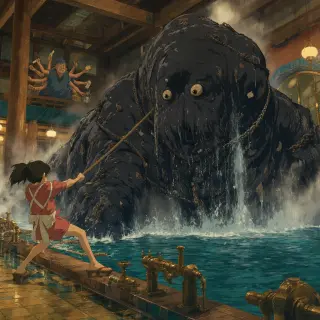
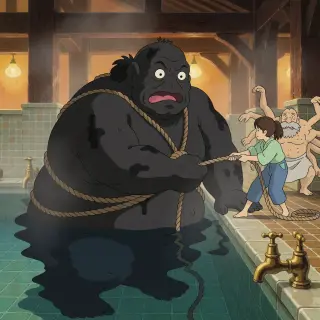
- The cleansing — "a colossal muck-covered spirit heaved into a steaming bathhouse pool, iron chains sunk into its black hide, a small girl hauling on a rope at its edge, teal water and brass taps, cel-painted anime, hard shadows".
- The boiler room — "a quiet boiler room lit by furnace glow, an old many-armed foreman and a scatter of soot sprites, brass pipes and stacked firewood, warm amber against deep shadow, no text".
- The water train — "a silent train running across flooded water at dusk toward a forest cottage, one small passenger at the window, indigo sky and lantern reflections, flat color and selective line art".
Troubleshooting
- Too realistic — add stronger style cues: "anime cel-painted key art, flat local color, designed hard shadow, not photography".
- Accidental text — add "no text, no watermark, no typography" and keep titles out of the prompt.
- Wrong palette — restate the world’s colors: "deep indigo dusk, warm amber lanterns, teal water".
- Too busy — cut one element; a cover with two figures reads better than one with six.
- Model drift — re-anchor on the world seed: fork the world instead of re-typing style notes.
What's Next After the Poster
The key visuals in this guide are public works of the Spirited Away world — covers you can study, fork, and build on. Once the six steps are second nature, use the same workflow on the world’s other scenes, or fork the world and rewrite its canon to make the covers your own.
Step 7 — Render the World's Hardest Day
Once the steps are second nature, stress-test them on an event: the Stink Spirit’s bath, the cleansing that reveals a river spirit hidden under years of filth. Event covers are harder — one colossal subject, motion, water, and a whole room of smaller figures — which makes them the best proof that your prompt and your world seed are doing the work.
Frequently Asked Questions
- Can I follow this guide without the Spirited Away world? Yes — the steps are model-general. The world simply supplies a ready-made seed to practice on.
- Should I always run both models? For key visuals, yes — the comparison is fast and it makes the direction decision obvious.
- How do I keep a set consistent? Keep the world seed and the style cues fixed; vary only the scene, subject, and light.
- Where do the covers live? Every render publishes as a shareable work of the world on Neta Studio.
Start Your Key Visual
Follow the six steps with GPT Image 2 — fork the Spirited Away world, run the pair, and publish your first cover. Your next anime spirit-world key visual is one prompt away.
Start Your Key Visual
Follow the six steps with GPT Image 2 — your anime spirit-world key visual is one prompt away.