How to Use GPT Image 2 for Cel-Shaded Platformer Key Visuals — A Step-by-Step Guide with a Real Mushroom Kingdom World
Learn how to use GPT Image 2 for cel-shaded platformer key visuals: scene selection, subject casting, light control, and the GPT Image 2 vs Krea 2 comparison workflow — with real outputs from a 25-atom Mushroom Kingdom world.
How to Use GPT Image 2 for Cel-Shaded Platformer Key Visuals
A practical, step-by-step guide to generating banner-ready cel-shaded platformer key visuals with GPT Image 2, using a real Neta Studio world — The Mushroom Kingdom — as the worked example. By the end you will know how to choose a scene, cast a subject, control the light, run the two-model comparison, and publish covers that stay on-canon.
What You Need
- A world, not a prompt. Fork The Mushroom Kingdom (25 atoms) or create a world with at least one character, one location and one event.
- A reference image. The world's existing key visual is your style anchor; attach it as a reference if you want the palette to carry over.
- Two models. GPT Image 2 for detail and Krea 2 for expression. Both are available in the studio.
- Aspect ratio. 16:9 for storefront and press use, 2:3 for character covers.
- No expectation of text. GPT Image 2 is not a typography tool; add titles afterward.
Step 1 — Choose the Scene
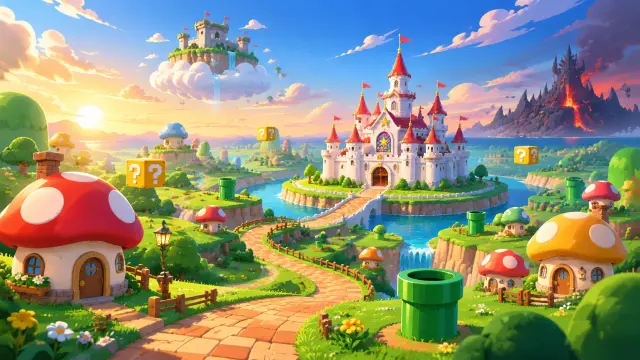
Start with a scene that has visual conflict. The world offers five: the Grassland Plains at golden hour, the castle across its moat, the Underground Caverns, the Sky Land blockade, and the airship over the towers at dusk. A world visual wants a route — foreground, mid-ground, destination. An event visual wants a turn — something has just happened, or is about to. Pick one job before you write a single adjective.
Step 2 — Cast the Subject
Name the character and the moment. Mario mid-jump is a different poster from Mario standing at the gate. Luigi noticing the loose brick is a different story from Luigi running. Peach carried aloft is the inciting incident; Peach in the throne room is the cost of losing it. Vague subjects produce vague covers, so give the model a body, a direction and a beat.
Prompt template: “[a subject] in [a place], [a moment], [an action or expression], [light], [cel-shaded style clause], 16:9 cinematic game key art, no text, no watermark.” If you are generating an environment-only cover, replace the subject clause with a scale marker: “no characters, a single brick path leading to the gate.”
Step 3 — Set the Mood with Light
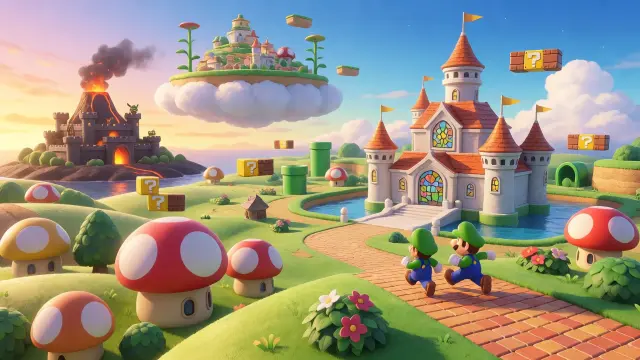
Light is the fastest way to make a platformer cover read as a key visual rather than a screenshot. Golden hour gives the plains warmth and long shadows. Dusk turns the castle into a silhouette and makes an airship threatening. Cavern light is blue with one warm coin glow. Volcanic light is orange from below, which makes every figure look like it is standing in front of a furnace. State the time of day and the direction of the light; do not leave it to the model's default noon.
Step 4 — Run Both Models
Run the exact same prompt through GPT Image 2 and Krea 2. On Neta Studio both renders are attached to the same world and both can be published as works, which is what makes the comparison useful later. Do not rewrite the prompt between models on the first pass — you want to see the model difference, not the prompt difference.
Step 5 — Compare and Choose
Compare the pair against your art direction. Detail-first suits a storefront capsule, a press kit or a pitch deck, where the viewer needs to understand the world at a glance. Expression-first suits a key art poster, a social card or an announcement, where the viewer needs to feel the tone. If neither is on-model, the problem is usually the world clause, not the model: check that the castle, the pipes and the palette in the prompt match the canon.
Step 6 — Publish and Iterate
Every render publishes as a shareable work of the world. Iterate in public: publish both models, then publish the re-prompt that fixed the horizon or the tower count. The set becomes a record of how the world's visual language was decided, which is more useful to a collaborator than a single polished image. If a render is off-canon, fix the atom before you fix the prompt.
Publish
Publish both renders as works of the world, each with its own share URL.
Label
Tag one as the world visual and one as the event visual so the set stays legible.
Compare
Put them side by side against the canon — palette, props, architecture, mood.
Re-prompt
Change one clause at a time. If the castle is wrong, fix the castle sentence, not the whole prompt.
Fork
Fork the world with the improved visual language and let the next person start from your canon.
Step 7 — Render the World's Turning Point
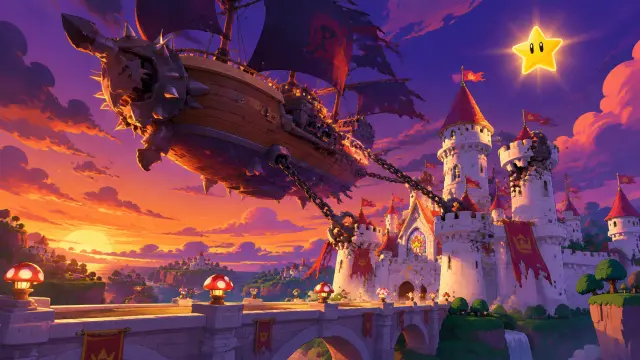
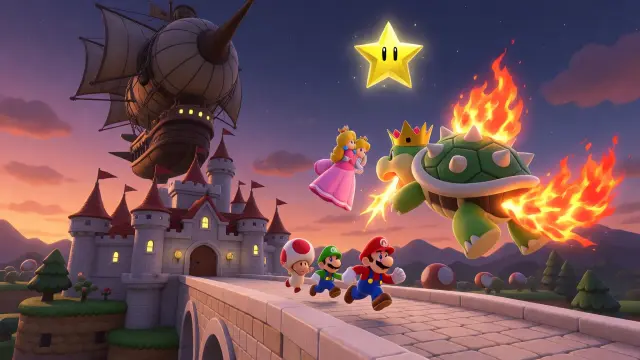
Once the steps are second nature, stress-test them on an event. The kidnapping brief is the hardest in this world because it has to carry a villain, a victim, a hero and a deadline in one frame. GPT Image 2 solves it environmentally: airship, chains, torn banners, an empty bridge, a star in a violet sky — the crime has already happened. Krea 2 solves it dramatically: the princess aloft, Bowser in fire, the brothers running. Render both, and you have a before-and-after pair for the same beat.
Prompt Recipes That Work
Recipe A — world establishing shot. “Key visual for an original cel-shaded 3D platformer game world. A single wide panoramic establishing landscape at golden hour with no characters: sunlit rolling green hills and round mushroom-shaped houses in the foreground, a winding brick path leading to a gleaming white storybook castle with stained-glass windows and a moat, floating yellow question blocks and green warp pipes, a cloud island with a small fortress drifting in the blue sky, a dark volcanic fortress on a black island in the far distance with lava glow. Discrete toon value steps, graphic highlights, hard-edge cel shading transitions, clean vibrant local colors, ambient occlusion, low-texture game surfaces. 16:9 cinematic game key art, no text, no logo, no watermark, no UI, no people.”
Recipe B — event cover. “Key visual for a cel-shaded 3D platformer game event at dusk: a huge spiked airship with dark sails hangs low over a gleaming white castle, its anchor chain and grappling hooks locked onto the towers, banners torn, a stone bridge below with toadstool-shaped lanterns, a golden Power Star blazing in the violet sky. Warm orange and deep violet palette, cel-shaded 3D game render, hard-edge shading transitions. 16:9 cinematic game key art, no text, no logo, no watermark, no people.”
Recipe C — character cover. “A cheerful plumber hero in a red cap and blue overalls mid-jump over a brick ledge, question blocks above, a green pipe below, a white castle out of focus behind, cel-shaded 3D game render, discrete toon value steps, clean local colors, 2:3 character cover, no text.”
Troubleshooting
- The image looks plastic, not cel-shaded. Your style clause is too weak. Add “discrete toon value steps, hard-edge shading transitions, low-texture game surfaces” and remove any words like “photoreal” or “octane”.
- The castle is in the wrong place. Split the prompt into foreground, mid-ground and background sentences; models follow ordered spatial lists better than a single run-on description.
- The model refuses the prompt. Character-heavy prompts can trip similarity filters. Remove the character clause, render the environment, then add the cast in a second pass or in Krea 2.
- Text appears in the image. Add “no text, no letters, no signage, no watermark, no UI” to the negative clause and never mention a title.
- Two renders look like different worlds. Attach the first render as a reference image and re-run; or fork the world and edit the palette atom so the canon carries the consistency.
What's Next After the Poster
The key visuals in this guide are public works of The Mushroom Kingdom, and they are starting points rather than finished deliverables. From here you can generate character covers for the seven atoms, location plates for the five locations, a playable scene from the kidnapping event, or a short video of a pipe descent. The world stays the same; only the camera changes.
Frequently Asked Questions
- How many attempts does a good cover take? Usually two or three. The first pass establishes the map, the second fixes a landmark, the third fixes the light.
- Should I use a reference image? Yes if you need palette consistency across a set. Attach the world's existing key visual and describe only what changes.
- Can I do this without a world? You can, but you will spend the saved time re-describing the canon on every prompt — and the results will not match each other.
- Which model is better for characters? Krea 2, in this world's tests. GPT Image 2 is better for the empty establishing shot.
- Can I sell the result? Check the model and platform terms; the world and its atoms are forkable and remixable on Neta Studio.
Start Your Key Visual
Follow the seven steps with GPT Image 2 — fork The Mushroom Kingdom, choose a scene, cast a subject, set the light, run both models, compare, and publish. The world already has 25 atoms and four published works, so your first cover starts from canon rather than a blank page.
Start Your Key Visual
Follow the seven steps with GPT Image 2 — your cel-shaded platformer key visual is one prompt away.