
How to Use GPT Image 2 for Co-op Fairytale Key Visuals
A step-by-step guide to generating co-op fairytale key visuals with GPT Image 2 — using four real works published from the It Takes Two world on Neta Studio.
Why This Guide Exists
A practical, step-by-step guide to generating banner-ready co-op fairytale key visuals with GPT Image 2 — using four real works published from the It Takes Two world on Neta Studio. You will learn the prompt anatomy, the two-doll staging rule, the two-model comparison workflow, and how to keep every frame on-canon.
What You Need Before You Start
- A world seed — fork It Takes Two, or write a one-sentence brief about two people who cannot finish anything alone.
- A room — the Shed, the Tree, the Cuckoo Clock, the Garden, the Snow Globe, the Attic.
- A pair — two characters with one prop each, and one object that needs both of them.
- A model pair — GPT Image 2 for detail, Krea 2 for atmosphere.
- Twenty minutes — two briefs, four renders, four published works.
Step 1 — Start From the World, Not the Prompt Box
Open the world and read the atom cards before you write a word. The Shed card tells you what is on the wall; the Cody and May cards tell you what each one carries. A prompt that quotes the canon produces a frame that belongs to the world. A prompt invented from memory produces a generic fantasy couple.
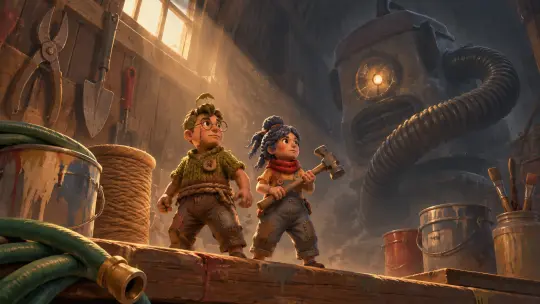
Step 2 — Write the Six-Clause Brief
Medium
"Cinematic co-op fairytale key visual, hand-painted game 3D." Lock the rendering system first.
Room
One named room and what it teaches: the Shed (cooperation), the Tree (alliance), the Clock (time).
Pair
Both characters, both props, one posture each. Cody with glasses and a screwdriver; May with a scarf and a hammer.
Shared object
The mechanism between them: a jammed latch, a two-hand door, a tool that needs nails and a hammer.
Light
One hard blade of window light through dust. One source, one weather.
Negative
No text, no watermark, no logo, no border, no third character.
Step 3 — Cast Both Dolls
Give each figure one prop that is useless alone. The screwdriver needs the hammer; the match needs the fuse. Hold the posture neutral — standing, braced, mid-reach — because the prop is doing the acting. If one character starts to dominate the frame, add "equal focal distance, neither cropped" and re-render.
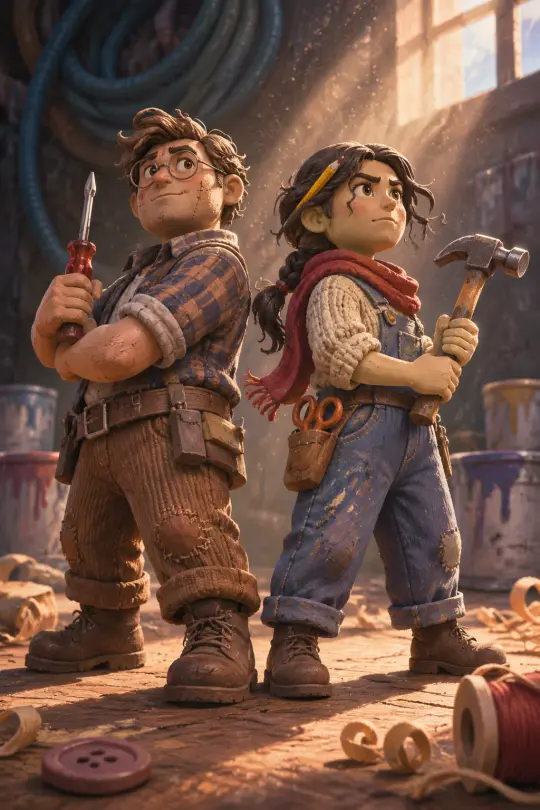
Step 4 — Light the Marriage
A single hard source that crosses both faces says "same moment, same problem". Two sources say "two separate stories". Put the light behind and above — a high window or a crack in the shed door — and let dust make it visible. Keep the background one value darker than the pair.
Step 5 — Render the Same Brief in Two Models
Run the identical prompt through GPT Image 2 and Krea 2 without edits. GPT Image 2 will give you material and weight; Krea 2 will give you colour and silhouette. Do not "fix" the prompt between models — the comparison is only useful if the brief is constant.
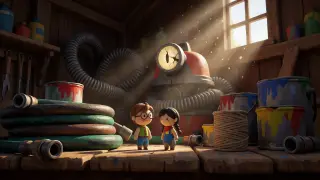
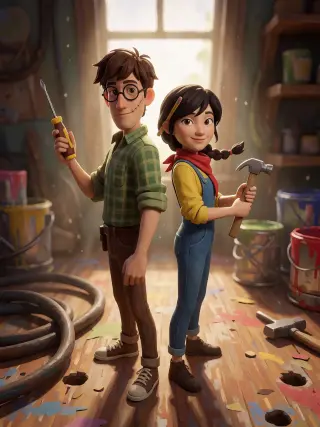
Step 6 — Read the Comparison Honestly
- Inspect at 100% — if the props, hands and material hold, GPT Image 2 wins the hero slot.
- Shrink to 200px — if the pair and the colour still read, Krea 2 wins the feed slot.
- Check the rule — can you tell that neither figure can finish the task alone? If not, the composition failed, not the model.
- Write it down — keep the clause that fixed the frame; it becomes part of the world's prompt canon.
Step 7 — Publish the Frame as a Work
Attach each render to the world as a work. In Neta Studio a published work gets its own share page, keeps its prompt and model attached, and becomes a reference for the next render. Two models, two works, one room — that is the unit of progress.
Prompt Library
World key visual — the Shed. "Cinematic co-op fairytale key visual, hand-painted game 3D. Interior of a garden shed at cathedral scale: two tiny clay dolls on a workbench among coiled hoses, paint cans and hanging tools; one hard blade of window light, dust motes; a monstrous vacuum cleaner with a cracked headlamp eye in the deep background. Controlled warm-cool planes, visible brushwork, readable silhouettes. No text, no watermark, no logo, no border, no third character."
Character pair — Cody & May. "Full-body poster of two hand-painted clay dolls standing back to back on a giant workbench: Cody with round wire glasses, a stitched seam on one cheek, rolled flannel sleeves and a screwdriver; May with a dark braid, a red scarf, a pencil behind her ear and a hammer. One hard blade of window light between them, dust motes, coiled hose and paint cans blurred behind. No text, no watermark, no third character."
The clock room. "Brass-and-wood town inside a grandfather clock, gears as streets, repeating arches, a clockwork bird bursting from a little door, two tiny dolls running the minute hand. Symmetrical composition, warm brass against dust blue, one hard light. No text, no watermark."
Common Mistakes
- Writing "a couple" — the model will pick one. Name both people and both props.
- Skipping the shared object — without it the frame is a portrait, not a co-op scene.
- Asking for two lights — rim light plus window light splits the story. Choose one.
- Upscaling a square — request the native 16:9 or portrait size instead.
- Adding a third character — it will steal focus. Forbid it explicitly.
Checklist Before You Publish
- Both figures are fully in frame and at equal focal distance.
- Both props are legible and held correctly.
- The shared obstacle is visible without explanation.
- One light source, one weather, no text or watermark.
- The prompt and the model are recorded on the work.
- The second model's render is published beside it for comparison.
Where to Go Next
Fork the world, pick the next room — the Tree, the Clock, the Garden — and run the same six clauses. The four published works on this page are your baseline: match their density, then push the scale.
Start Your Co-op Fairytale Key Visual
Follow the seven steps with GPT Image 2 — two dolls, one frame is one prompt away.