How to Use GPT Image 2 for Dark Fantasy Art — The Prompt, the Light and the Post-Check
A working guide to GPT Image 2 for dark fantasy: the style contract, the depth stack, the two literal prompts behind four published key visuals, and the seven failures to check for.
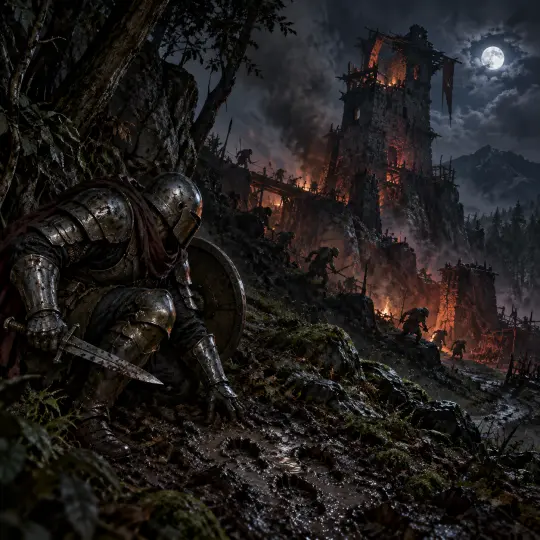
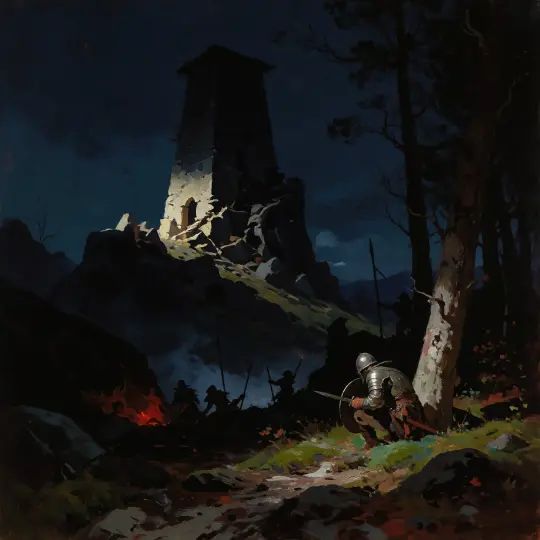
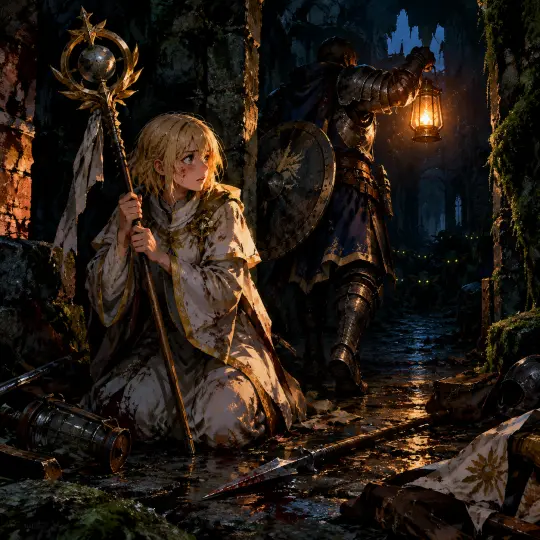
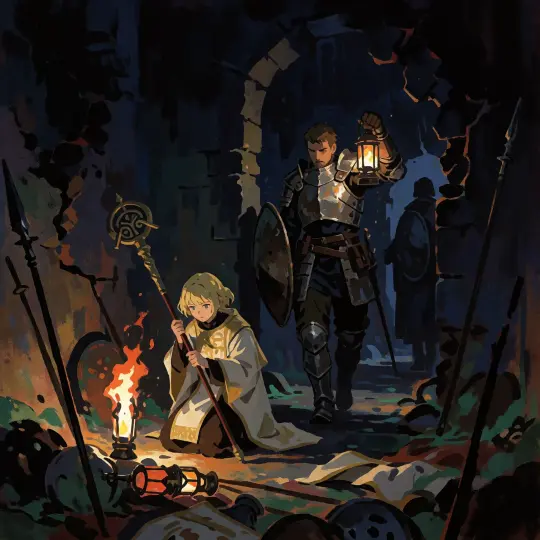
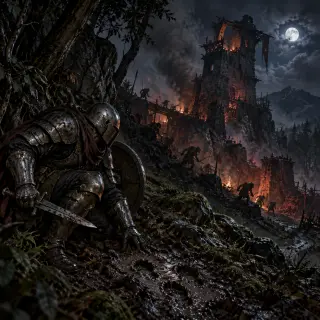
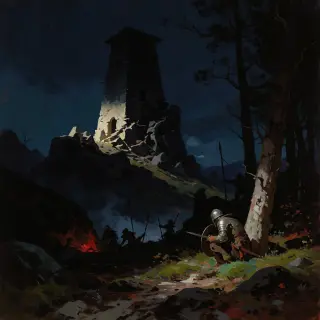
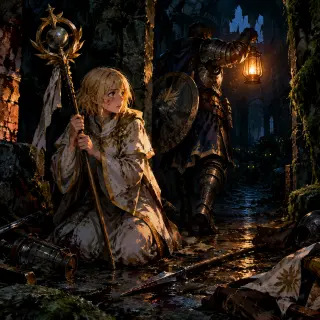
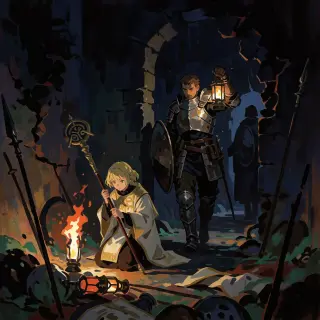
This guide is written from four images that actually shipped: a watchtower world key visual and a Priestess character key visual, each generated twice — once with GPT Image 2, once with Krea 2 — inside the Goblin Slayer world on Neta Studio. Every prompt quoted below is the literal text used, at 1024×1024, with no post-processing. If you follow the order, you will get images in the same register.
The method is not a secret prompt. It is a sequence of decisions made before the model is asked to render anything: read the world, write the style contract, build the depth stack, cast the frame, light one thing, and check the result small. GPT Image 2 is very good at the middle of that sequence and very willing to make the first and last decisions for you — which is exactly why you have to make them yourself.
Before You Prompt: Read the World
Goblin Slayer is a world about preparation, and that includes the art. Before writing a word of prompt, read the four rules. Goblins breed in weeks, rank decides who gets sent where, the gods roll dice, and the code is a procedure. Those four facts decide what a good image looks like: nests are cramped, adventurers are ranked and underpaid, luck is real, and every scene should look like it was planned by someone who expected to die.
- Strong beats a watchtower throat lit from below, a knight reading tracks in mud, a novice kneeling among broken spears, a farm seen from the treeline
- Weak beats the party standing together, a hero portrait with no action, a landscape with no threat, a monster roaring at the camera
- The test describe the frame in one sentence with a verb in it. If the verb is "is", pick another beat
A second test: does the frame contain a decision? The watchtower image contains two — where the knight enters, and whether the fire is a warning or a trap. The Priestess image contains one — whether Goblin Slayer stops for her. Images without a decision are illustrations; images with one are key visuals.
Step 1 — Write the Style Contract First
The style contract is the first sentence of every prompt in this world, and it never changes. It names the medium, the value structure, the light rule and the palette. Put it at the front so the model commits to a register before it starts composing, and repeat it verbatim across the set so four images look like one campaign.
Dark tonal digital painting in a tenebrist painterly style: large dark shapes, broken ink-like edges, thick-thin brushwork, a single restrained light direction, compressed dark values with deep indigo, blood red, jade green and bone white.
Two failure modes are prevented by this sentence alone. The first is the smooth digital painting that GPT Image 2 defaults to when it is not told otherwise. The second is colour drift: without a named four-colour palette, the model will add a fifth and sixth colour to make the image "work", and the set stops matching.
Step 2 — Build the Depth Stack
Tenebrism is a depth trick, not a darkness trick. The frame needs three readable planes: something close and dark, something mid-ground where the action is, and something far that establishes scale. In the watchtower image those are the tree and the knight (close), the slope with the goblins (mid), and the burning tower and moon (far). Each plane has its own value range and its own light source.
Write the stack explicitly, in order, before the cast: "foreground treeline and a crouched figure; mid-ground slope with small figures between rocks; background a collapsed tower with a fire inside and a moon above." If you write the cast first, GPT Image 2 will happily put all three figures on the same plane and the image will read as a poster whether you wanted one or not.
Step 3 — Cast the Frame
One to three figures, each with a silhouette, one piece of kit and one action. "A silver-ranked adventurer in battered plate" is a silhouette. "Crouched at the treeline reading tracks" is an action. Together they are a character; separately they are a costume description. The same rule applies to the goblins: "small silhouettes moving between the rocks" is enough, and it is better than a paragraph about goblin anatomy.
- Silhouette first state the shape before the detail — tall and armoured, small and wiry, kneeling and cloaked
- One prop a raised lantern, a short sword, a staff with the Earth Mother’s symbol. One is a story; five is a catalogue
- One wound a torn strap, mud to the knee, a dented pauldron. Damage is how this world says "veteran"
- Ninety words of cast, maximum if the cast block is longer than the place block, the image will be about the costume
Step 4 — Light One Thing
Every frame in this world has one decision about light, and the prompt should state it as a physical cause, not as a mood. "Lit from below by goblin cookfires" is a cause. "Dramatic lighting" is a wish. The cause gives the model a direction, a colour and a reason — and it gives the image a place for the eye to land.
The best single light source in this setting is fire, because it justifies warm colour inside a cold palette and because it can be off-frame. A cookfire below the frame, a lantern just outside it, a burning village behind the ridge: all of them let you light the subject without showing the lamp. The second-best is the moon, but only if you accept that it is cold, distant and unhelpful — which is exactly what the world thinks of the gods.
Step 5 — Check the Frame at 512 px
Before you judge an image, shrink it. A dark fantasy frame has to survive a thumbnail, because that is how it will be seen on a world page, a share card and a phone. If the silhouette and the light source still read at 512 pixels, the composition is sound. If it turns to mud, no amount of detail will save it.
Generate four candidates
Same prompt, four runs. GPT Image 2 varies composition more than you expect; the best of four is usually much better than the first.
Shrink to 512
If the figure and the fire still read, the value structure works. If not, rewrite the light sentence rather than adding detail.
Compare against the pair
Put it next to the other model’s render. Different is fine; off-world is not. Check the palette and the edge quality.
Keep the pair
Publish both. The comparison is more useful to readers than a single hero image, and it proves the prompt, not the luck.
The Two Prompts, Verbatim
These are the exact strings used. They are long by design: the style contract takes the first sixty words, and the rest is place, light, cast, aftermath and a negative list. Nothing in them is decorative — every clause is doing a job that the model would otherwise decide for itself.
Prompt 1 — world key visual
Dark tonal digital painting in a tenebrist painterly style: large dark shapes, broken ink-like edges, thick-thin brushwork, a single restrained light direction, compressed dark values with deep indigo, blood red, jade green and bone white. A frontier watchtower at night, half collapsed into a hillside, its stone throat lit from below by goblin cookfires and smoke; in the foreground a silver-ranked adventurer in battered plate and a sealed round helmet, crouched at the treeline with a short sword and small round shield, reading tracks in the mud; crude goblin spears and small silhouettes moving between the rocks behind him; wet moss, mud, cold moonlight, one red ember glow; muddy boots and counted bodies, no heroism, cinematic wide composition, epic dark-fantasy frontier scale, no text, no watermark, no logo.
Prompt 2 — character key visual
Dark tonal digital painting in a tenebrist painterly style: large dark shapes, broken ink-like edges, thick-thin brushwork, a single restrained light direction, compressed dark values with deep indigo, blood red, jade green and bone white. Inside the ruined watchtower after an ambush: a fifteen-year-old priestess with short blonde hair in white and gold vestments, kneeling in torchlight and clutching a staff crowned with the Earth Mother's symbol, her face streaked with fear and resolve; broken spears, scattered novice gear and a fallen lantern around her; a tall armored adventurer in battered plate steps past her into the dark corridor holding a raised lantern, his round shield forward; goblin eyes glinting beyond the firelight, wet stone, jade-green moss; tense, intimate, cinematic vertical character poster, no text, no watermark, no logo.
Note the negative list at the end of each: no text, no watermark, no logo. It is short because GPT Image 2 respects a short negative list and starts ignoring a long one. The style contract already forbids the things that matter — readable text, extra characters, merged identities, generic beautification.
What Came Back
Both prompts produced usable images on the first run, which is unusual and worth examining. The world prompt returned a late-night exterior with a clear depth stack and a fire inside the tower. The character prompt returned two figures, two light sources and a readable aftermath. Both kept the palette; neither added text.
Model Notes: GPT Image 2 vs Krea 2
The comparison is not a ranking. GPT Image 2 is a scene renderer: it builds depth, material and secondary action, and it costs more. Krea 2 is a poster engine: it compresses to silhouette, pushes atmosphere, and costs a tenth as much. In a world-building workflow you want both, because a world page needs plates and a cover needs a poster.
| Decision | Which model |
|---|---|
| Scene with a cast | GPT Image 2 — it keeps the second and third figure, and the props that explain them. |
| Cover or thumbnail | Krea 2 — fewer elements, stronger read at small sizes, far cheaper to iterate. |
| Style fidelity | GPT Image 2 follows the contract more literally; Krea 2 interprets it as a mood. |
| Speed | Krea 2 is faster. GPT Image 2 is slower and varies more between runs. |
| Text and heraldry | Neither is reliable. Avoid legible text; suggest heraldry with shapes, not words. |
Seven Failures and Their Fixes
These are the seven failures that actually appeared across the four renders and their rejected siblings. Each fix is a prompt change, not a retouch — if the frame is structurally wrong, regenerating is faster than repairing.
- Over-rendered detail in the dark — the darks lose weight and the image turns grey. Fix: add "compressed values, large lost edges, one bright focal area".
- The cast drifts to the centre — every figure ends up on the same plane. Fix: write the depth stack explicitly, plane by plane.
- Clean armour, new clothes — the world stops reading as a frontier. Fix: name one specific piece of damage per figure.
- A fifth colour appears — usually a warm orange or a teal. Fix: repeat the four-colour palette and say "nothing else".
- The fire is off-frame but the frame is warm — the light has no cause. Fix: state where the fire is and which surfaces it hits.
- The face is too pretty — remove beauty words, add "weathered, unidealised, tired".
- The image needs a caption to work — the decision is missing. Fix: go back to Step 3 and give the figure an action, not a pose.
Putting It to Work in the World
The last step is the one most guides skip: attach the image to something. In Neta Studio a generated image can be linked to the world, published as a shareable work, and used as a reference for the next generation. That is what turns four images into a set, and a set into a world page that looks like it has a canon rather than a mood board.
Generate inside the world
Open the world first. The style contract and the atoms are already loaded, so the prompt inherits canon instead of inventing it.
Run the pair
GPT Image 2 for the scene, Krea 2 for the poster, same size. Publish both — the comparison is the proof.
Attach and share
Link the work to the world so it appears on the world page and gets a stable share URL.
Write the caption as a prompt note
Say what the image decides, not what it depicts. That is what makes a gallery read like a world.
What to Practise Next
If you want to get good at this register quickly, practise in this order: a location plate with no characters, the same location with one figure for scale, a character in an arch with one light, and finally a two-figure scene with an aftermath. Each step adds exactly one difficulty. Most people jump straight to the two-figure scene and conclude the model cannot do dark fantasy.
The world is the shortcut. Twenty-five atoms already contain the answers to the questions a prompt would otherwise have to ask: what the tower looks like, what the guild pays, what the priestess wears, why the fire matters. Read the world first, and the prompt gets shorter every time.
Write your own dark fantasy prompt
Open the Goblin Slayer world, copy the style contract, and run the four-pass loop. Two models, one world, and a comparison worth publishing.
One world, four published works, two models
The prompts on this page are copy-paste ready — and every image came from the same 25 atoms.