
How to Use GPT Image 2 for Dark Fantasy World Key Visuals
A seven-step guide to dark fantasy key visuals with GPT Image 2: world-first prompting, the six-clause brief, one-light discipline and an honest Krea 2 comparison.
Why This Guide Exists
A practical, step-by-step guide to generating dark fantasy world key visuals with GPT Image 2 — written from four published frames rather than from a feature list. Every prompt in this guide was rendered twice, once by GPT Image 2 and once by Krea 2, so the advice is testable: if a step does not change the picture, it is not in here.
What You Need Before You Start
- A world with atoms — characters, locations, events and factions. Ashen Vigil ships with 21; seven characters and five locations are enough for a first poster.
- One sentence of exchange — who pays, what they pay, and what the world gets in return. Without this, you are generating a costume.
- GPT Image 2 access plus Krea 2 if you want the comparison. Both are listed in the model picker; no reference image is required for either.
- A place to publish — a world you own, so the render becomes a work with a share page rather than a file on a desktop.
Step 1 — Start From the World, Not the Prompt Box
Open the world and read the atom cards before you write a word. The Cinder Citadel card tells you that the fortress is built ring upon ring around the fire, which gives you the architecture for free. The Greaves card tells you that he follows a knight he cannot name, which tells you why he is kneeling and what should be missing from his head. Writing prompts from atom cards is faster than inventing a scene, and it keeps the fifth frame consistent with the first.
Step 2 — Write the Six-Clause Brief
Format
“Semi-realistic dark fantasy game key visual, 16:9.” Commit to the object type first so the model stops hedging.
Place
One location, described as architecture. Rings of basalt, a stair, a brazier. No landscape, no establishing sweep.
Transaction
Who is paying and what records it: a sealed ledger, a brand through the breastplate, a rope of knots.
Crowd
Posture, not headcount. “Hooded pilgrims ranked on the stair, each holding a clay token.”
Material
Packed ash, rusted plate, wet basalt, kelp-green hair. Materials are where GPT Image 2 earns its cost.
Light and negative list
One source with a direction and a colour, then: no text, no letters, no watermark, no logo, no UI.
Step 3 — Choose the Light Source
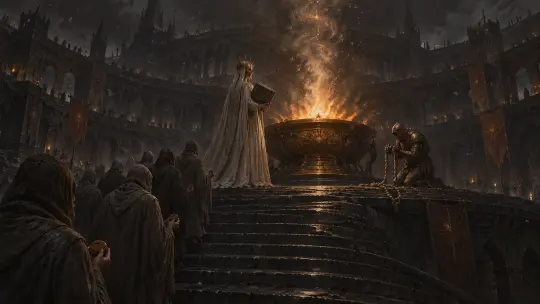
Tenebrism is a rule about sources, not about darkness. Pick one: the Vigil Flame (ember orange), dusk on the Ossuary Road (cold blue), the Drowned Nave (green water-light), a lantern at the Ash Market (warm ochre). Then say “single light source, no fill, no second light” in the prompt, because every image model wants to add a helpful rim light and every added source dissolves the genre.
Step 4 — Cast the Figure That Carries the Rule
Give the frame one figure whose job is visible. The priestess sets the price; the knight cannot finish paying; the bellringer counts what is left. If your figure could be swapped into another fantasy setting without changing the composition, the world is not in the frame yet — go back to the atom card and take one object from it.
For a portrait frame, keep the prop in the lower third and the light on the prop side. GPT Image 2 will happily fill a portrait with detail, so reserve the top third if the image needs a title.
Step 5 — Render the Same Brief in Two Models
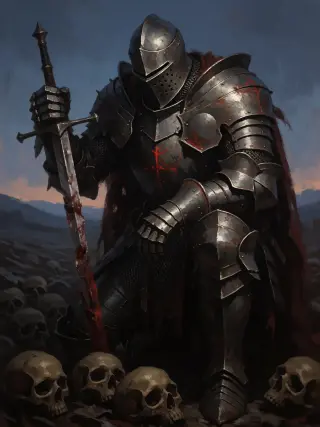
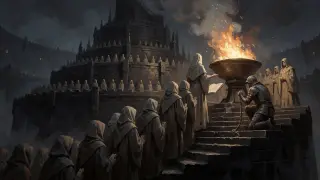
Run the identical prompt through GPT Image 2 and Krea 2 without edits. GPT Image 2 will give you material, crowds and closed props; Krea 2 will give you a cleaner silhouette and a poster with fewer tonal steps. Neither run is wasted: the pair is the deliverable, because it shows what the brief actually contains.
Keep the prompt identical, including the negative list. The moment you rewrite one model's prompt to compensate, the comparison becomes an opinion.
Step 6 — Read the Comparison Honestly
- Check the props first. Did the ledger stay closed? Is the bellringer kneeling at a rail or chained? Props are where a model's reading shows.
- Check the light second. Count the sources. Two sources means the genre has slipped, regardless of how good the render looks.
- Check the ash third. Is it falling, settling or rising? A model that renders ash as texture has read the material clause.
- Decide by use. Inspected frame → GPT Image 2. Thumbnail or poster → Krea 2. Store hero → GPT Image 2 at 2048×1152.
Step 7 — Publish the Frame as a Work
Attach each render to the world as a work. In Neta Studio a published work gets its own share page that records the prompt, the model and the world it came from — which is what makes the comparison evidence rather than a claim. It also becomes the fork point: a reader can inherit the twenty-one atoms and stage their own version of the same debt.
Prompt Library
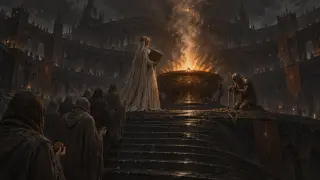
- World key visual: “Semi-realistic dark fantasy key visual, 16:9. A black basalt citadel built in rings around a bronze brazier; a masked high priestess in ash-white robes stands with her back to camera holding a sealed ledger; hooded pilgrims with clay name-tokens climb the spiral stair; a deaf bellringer kneels at the rail with a knotted rope; ash falls continuously; ember-orange single light source; charcoal, ash grey, dull bronze. No text, no letters, no watermark, no logo, no UI.”
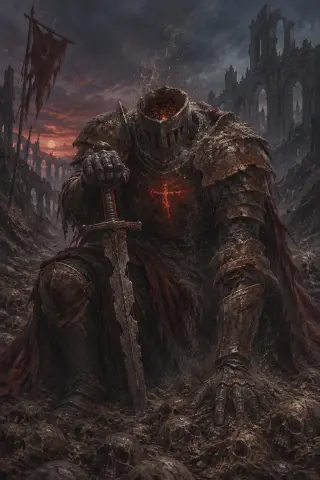
- Character frame: “Dark fantasy character key visual, portrait. A faceless knight of packed grey ash inside rusted plate, no head beneath the helm, only drifting cinders and a faint ember glow; kneeling on a road paved with nameless skulls, a broken sword planted point-down; a red oath-brand glows through the breastplate; ash sifts from the joints; cold blue dusk, one restrained rim light. No text, no letters, no watermark, no logo, no UI.”
- Location plate: “Flooded gothic nave under a lake, pews underwater, a choir of drowned singers with kelp-green hair still singing, shafts of green water-light through broken windows, one candle on the altar, no other light source.”
- Faction beat: “A leaning tower of stacked bells above a fog sea, one rope hanging to the ground, a deaf bellringer in rusted plate holding it with both hands, grey dawn, bells in silhouette, single light source.”
Common Mistakes
- Two light sources. The fastest way to lose the genre. Say “single source, no fill” out loud in the prompt.
- Naming the mood instead of the material. “Grim and atmospheric” changes nothing; “packed ash, rusted plate, wet basalt” changes everything.
- Crowds by headcount. “A crowd of pilgrims” becomes wallpaper. Posture and rank become people.
- Letting the prop drift. Re-state the ledger, brand or rope in the negative list if the model keeps opening or replacing it.
- Rendering before choosing a ratio. Cropping a square into a 16:9 hero loses the stair, and the stair is the story.
- Publishing without the world. An image without atoms is a stock photo; a work attached to a world is a portfolio.
Checklist Before You Publish
- The frame has one light source and one direction.
- One prop records the transaction and is readable at thumbnail size.
- The crowd (if any) is described by posture and rank.
- The ash is doing something specific: falling, settling or rising.
- The prompt is stored with the work, not in a scratch file.
- Both models were run on the identical brief and both renders are attached.
- The share page links back to the world studio.
Where to Go Next
Fork the world, pick the next location — the Ash Market, the Drowned Nave, the Bell Tower of Saint Orra — and run the same six clauses with a different light source. Three frames in, you will have a look book; five frames in, you will have a pitch.
Follow the Seven Steps with GPT Image 2
One world, one light source, one debt — a publishable dark fantasy frame is one prompt away.