How to Use GPT Image 2 for Deltarune Art — The Prompt, the Palette and the Post-Check
The exact prompts behind two published Deltarune key visuals, the cast block that keeps characters on-model, and the eight-point check that catches a failed pixel render.
Use GPT Image 2 for Deltarune art
A working guide to GPT Image 2 for Deltarune fan art: the prompt structure, the palette lock, the exact text that produced two published key visuals — and the eight failures to check for.
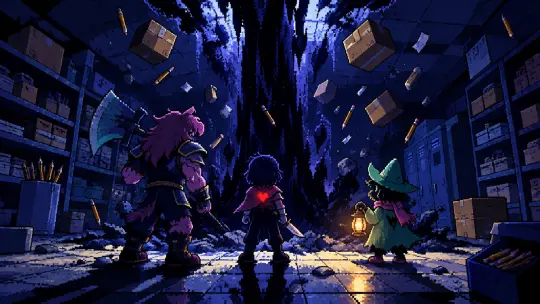
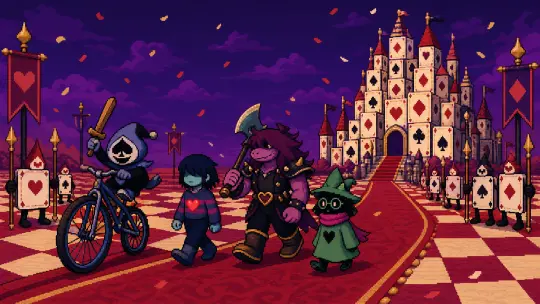
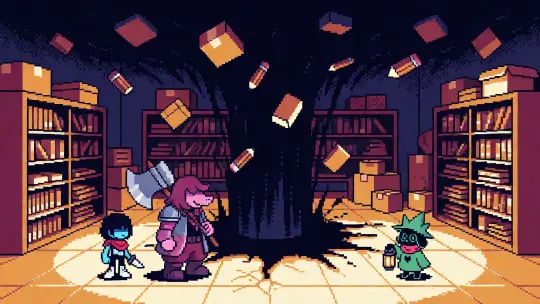
This guide is written from two images that actually shipped: a Dark Fountain key visual and a Card Kingdom parade, both generated with GPT Image 2 inside the world Deltarune: Fountains of the Dark, both published, both run a second time through Krea 2 for comparison. Every prompt below is the literal text used, not a cleaned-up summary. If you follow the order, you will get images in the same register.
Before You Prompt: Read the World
GPT Image 2 is not the bottleneck. The bottleneck is knowing what Deltarune looks like when it is not being a meme. The setting has a narrow visual grammar: indigo and near-black for the Dark Worlds, bone white and cream for interiors, one hot crimson for the SOUL and the Card Kingdom, amber for lanterns and screen glow, and square pixels with stepped shadows over all of it. Read the four rules of the world before writing anything, because each rule implies a camera position.
A fountain only opens where a Lightner's will has been pressed into the ground — so the camera goes to the floor, not the sky. Darkners are made of forgotten objects — so the props in the room are the cast's ancestors, and they should be visible. The SOUL can save and load — so a small red light is always a legitimate compositional anchor.
Step 1 — Choose a Beat, Not a Character List
A key visual needs a moment that is already changing. "The party" is not a beat; "the party arriving at the fountain" is. Pick the turn: the door opening, the parade starting, the broadcast beginning, the bunker humming. If you cannot say what happened one second before the frame, the image will read as a lineup.
- Strong beats the fountain opening, Lancer arriving on the bicycle, the closet door closing behind them, Tenna counting down
- Weak beats the cast standing together, a character portrait with no action, a landscape with no event
- The test describe the frame in one sentence with a verb in it. If the verb is "is", pick another beat
Step 2 — Write the Cast Block and Never Change It
Consistency comes from repetition, not from reference images. Write one block per character — silhouette, clothing, prop — and paste it verbatim into every prompt. The model will vary the pose, the light and the angle; it will keep the shape. Here are the four blocks used in the published works.
- Kris — a silent teenage human with a knife at their side and a faint red heart glowing through their chest.
- Susie — a towering purple monster in battered armor with a huge axe over one shoulder.
- Ralsei — a gentle dark prince in a green robe and pointed hat holding a lantern.
- Lancer — a small round prince in a blue-and-black jester outfit with a spade-shaped face, riding a bicycle too big for him.
Step 3 — Write the Style Contract Before the Subject
Put the medium and the palette in the first two sentences. If they arrive at the end, the model has already committed to smooth illustration and will only add a pixel filter. The contract has four parts: register (16-bit), palette (24 colours, named), pixel rule (nearest-neighbour, square, crisp), and shadow rule (three steps, selective dithering).
The exact sentence used: "Authentic hand-placed 16-bit pixel art, limited 24-color palette of deep indigo, bone white, crimson and warm amber, crisp nearest-neighbor square pixels, three-step pixel shadows, selective dithering, clearly separated value planes, readable at thumbnail size." It is repetitive, it is unglamorous, and it is the difference between a scene and a filter.
Step 4 — Set Size and Quality
For a 16:9 key visual, ask for 2048×1152 at high quality. For an avatar or a square crop, 1024×1024 is enough. Do not ask for 32×32: no current model produces reliable native sprite resolution, and the pixel grid is better controlled by generating large and downscaling with nearest-neighbour in an editor.
- Key visual 2048×1152, high quality — detail survives a storefront crop
- Poster or cover 1024×1536, high quality — leave the title space empty
- Avatar 1024×1024, high — one figure, one prop, one light
- Sprite base 1024×1024 on a flat background, then downscale to 64 or 32 yourself
Step 5 — Generate, Then Judge at Thumbnail Size
Generate four candidates
Same prompt, four runs. GPT Image 2 varies composition more than you expect; the best of four is usually much better than the first.
Shrink to 128 pixels
If the silhouette and the light source still read, the pixel art is structurally sound. If it turns to mush, the value planes are not separated enough.
Check the palette
Count colours. If you see smooth gradients or a colour that is not in the four, the style contract lost — rewrite it, do not patch the image.
Keep the pair
Run the winning prompt once on Krea 2 as well. The flat version is often the better poster, and the comparison is worth publishing.
The Exact Prompt: Dark Fountain
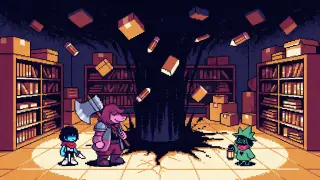
16:9 key art for the dark fantasy RPG world "Deltarune: Fountains of the Dark". Deep beneath a small American town's school supply closet, a black fountain of ink-dark light erupts out of the concrete floor, a jagged pillar of darkness swallowing the ceiling and scattering cardboard boxes and pencils into the updraft. In the foreground three small figures stand on cracked tile: Kris, a silent teenage human with a knife at their side and a faint red heart glowing through their chest; Susie, a towering purple monster in battered armor with a huge axe over one shoulder; Ralsei, a gentle dark prince in a green robe and pointed hat holding a lantern. Authentic hand-placed 16-bit pixel art, limited 24-color palette of deep indigo, bone white, crimson and warm amber, crisp nearest-neighbor square pixels, three-step pixel shadows, selective dithering, clearly separated value planes, readable at thumbnail size. No text, no logo, no watermark, no border.
Why it works: the first sentence fixes the format and the world; the second builds the room; the third delivers the wound; the fourth blocks in the cast with silhouette and prop; the last two lock the palette and the pixel rules and close the loopholes (no text, no logo, no border).
The Exact Prompt: Card Kingdom Parade
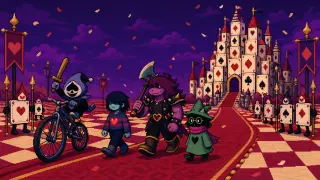
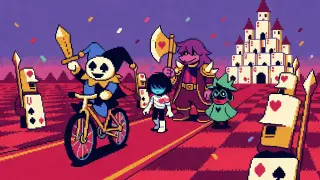
16:9 scene art for the RPG world "Deltarune: Fountains of the Dark": the Card Kingdom, a crimson plain of checkered fields under a violet sky, with a castle built from stacked playing cards rising in the distance. In the middle ground Lancer, a small round prince in a blue-and-black jester outfit with a spade-shaped face, rides a bicycle too big for him and waves a wooden sword. Beside him walk Kris, a silent teenage human in a striped shirt with a red heart glowing at their chest, Susie, a towering purple monster in spiked armor carrying an axe, and Ralsei, a soft dark prince in a green robe and pointed hat. Red carpet unrolls across the checkered ground, card soldiers stand at attention, confetti drifts. Authentic hand-placed 16-bit pixel art, limited 24-color palette of crimson, cream, deep indigo and gold, crisp nearest-neighbor square pixels, three-step pixel shadows, selective dithering, clear separated value planes, readable at thumbnail size. No text, no logo, no watermark, no border.
The change of method: this prompt is a procession, so the order of characters is the composition. Lancer first on the bicycle, the party at three different heights, the castle last as a silhouette. Card soldiers and confetti are framing devices, not subjects.
Step 6 — The Eight-Point Post-Check
- Palette count four named colours plus black and white — anything else is drift
- Pixel edges zoom to 400%. Edges should be stair-stepped, not blurred
- Shadow steps three values per material, no soft gradients
- Silhouette test shrink to 128px; if a character disappears, the value contrast is wrong
- Cast accuracy axe, lantern, knife, bicycle — one prop per character, present and readable
- Text leakage any legible signage means the negative list failed
- Light source one source, consistent shadows; amber in a Dark World, cream in an interior
- Crop safety the frame should still work as a 1:1 avatar and a 16:9 banner
Step 7 — Fix the Four Common Failures
- Looks like smooth digital painting — the style contract is too late or too vague. Move it to sentence one and name the palette size.
- Too dark to read — add a warm light source inside the frame (a lantern, a screen, the SOUL) and ask for separated value planes.
- The castle is as detailed as the cast — say explicitly: "the castle stays a silhouette, distant, low-detail".
- Characters merge into one blob — give each figure a different height and a distinct prop, and reduce the count to three.
Step 8 — Publish Into the World
A render is not finished when it looks good; it is finished when it is attached to the world it came from. Publishing the image as a work of Deltarune: Fountains of the Dark does three things: it records the prompt and the model, it makes the image remixable, and it gives the next generation a fixed reference for palette and cast. That is how four images start behaving like a body of work instead of four lucky outputs.
What to Do Differently on the Next Image
Generate a third subject from the same world — Castle Town at lantern-light, or the bunker door in the pines — using the same cast block and the same style contract, and change only the place and the light. If the result sits next to the first two without a caption, the world is working. If it does not, the problem is almost always the palette sentence, not the subject.
The long-term move is to stop writing prompts from scratch. Keep a small library: one cast block, one style contract, one negative list, four place blocks. A new image becomes a two-line edit, and the world stays coherent while the scenes multiply.
Frequently Asked Questions
- Do I need a reference image of Kris or Susie? No. A fixed cast block — silhouette, clothing, prop — is enough to hold a character across renders in this style.
- Is GPT Image 2 better than Krea 2 here? For a scene with depth and props, yes. For a flat poster or an avatar, Krea 2 is faster, cheaper and often cleaner.
- Why does my image look like a filter? The pixel constraints arrived too late. Medium, palette and pixel rule belong in the first two sentences.
- Can I generate a sprite sheet directly? Not reliably. Generate one figure on a flat background, then downscale and tile it in an editor.
- Can I publish the result? Yes, as a work of the world on Neta Studio. Check IP and model terms before any commercial use.
Run the Prompt Yourself
Two published key visuals, one world, two models — the prompt is copy-paste ready.