
How to Use GPT Image 2 for Dishonored Character Key Visuals
A step-by-step guide to generating Dishonored-style character key visuals with GPT Image 2: read the world, choose the frame, write the six clauses, render the masked protector and the room that rules him, then compare against Krea 2 without rewriting a word.
How to Use GPT Image 2 for Dishonored Character Key Visuals
This guide walks through one complete job: turning a written brief for Corvo Attano into a character key visual that belongs in a coherent set, then repeating the same sentence on a second model so you learn something from the comparison. It assumes no prior prompting experience beyond being able to describe a room.
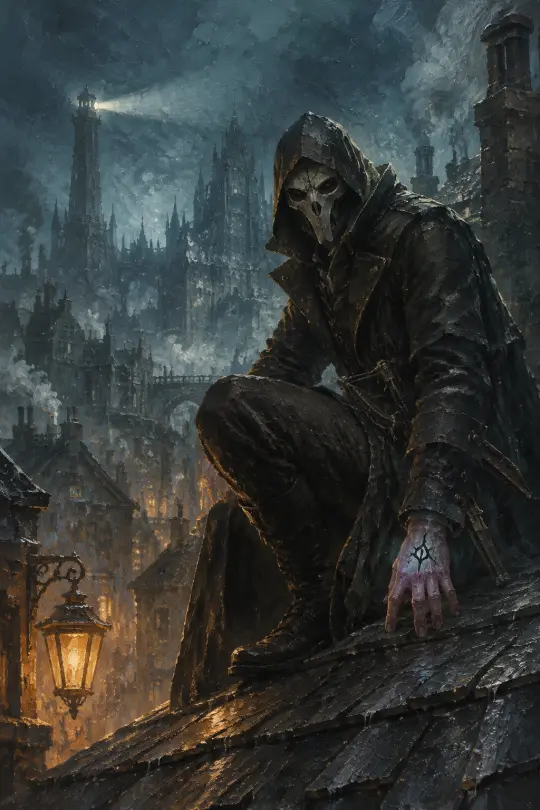
What You Are Actually Making
A character key visual is not an illustration of a character. It is a reference image that answers production questions: what does the coat look like from the front, where does the mask sit, what colour is the light, how big is the person next to the architecture. If the image cannot answer those questions, it is a mood board, not a key visual.
The target for this world is impasto oil painting: broad opaque strokes, broken palette-knife edges, layered paint masses and detail only where it identifies the subject. That constraint is what keeps a soot-and-teal palette legible instead of turning it into brown mud.
Step 0: Read the World Before You Write a Prompt
The most common failure in character generation is writing a prompt before deciding what the world looks like. Spend five minutes on the atoms: who the character is, what they want, where they stand in the hierarchy, and what the one warm light in their life is.
For Corvo the answers are unusually clear. He is the Royal Protector, he has been framed and tortured, he stands on the rooftops between the palace and the plague, and the one warm light is a street lantern he cannot afford to be seen beside. That is a picture before it is a prompt.
Step 1: Choose the Frame
Vertical 1024×1536 for a person. Horizontal 1536×1024 for architecture. Do not generate a character on a wide canvas and crop later; the model composes for the frame it is given, and a cropped poster loses the negative space that made it work.
The character frame wants the figure on one third, with the city receding on the other two. That asymmetry is what makes the image feel like a still from a level rather than a portrait against a backdrop.
Step 2: Build the Six Clauses
Write the brief as six clauses in a fixed order. The order is not cosmetic: the model weights early tokens more heavily, and the costume must arrive before the lighting.
Subject and role
Name and job. “Corvo Attano, Royal Protector of Dunwall.” Not “a sad assassin”.
Costume and props
High-collared dark coat, deep hood, carved bone-white mask with dark eye slits, folding crossbow at the belt, the Outsider mark on the left hand.
Place
A rain-slick slate rooftop high above the city, wet chimneys and crooked spires behind, a distant lighthouse beam cutting the fog.
Light
Cold teal backlight, one warm amber whale-oil lamp below, volumetric mist, dramatic rim light.
Style engine
Thick impasto oil painting, visible broad brushstrokes, palette-knife broken edges, layered opaque paint masses, warm-cool value planes, restrained ridge texture, painterly handmade illustration.
Negative clause
No text, no letters, no signage, no watermark, no logo, no UI, no HUD.
Step 3: Choose the Model Deliberately
GPT Image 2 is the materials engine. It resolves the grain of bone, the soot on a lantern and the seams in a coat, it accepts reference images for continuity, and it is slower and pricier per frame. Krea 2 is the silhouette engine: fast, cheap, expressive, text-only, and prone to smoothing detail into shape.
Use GPT Image 2 when the frame has to survive as a reference. Use Krea 2 when you are still deciding what the character looks like. Using both on the same sentence is the cheapest way to learn which one your next ten images need.
Step 4: Set the Controls and Render
The published frame used gpt-image-2 at 1024×1536 with quality set to high, one render, no seed hunting. High quality matters more in this style than in photoreal work, because the whole image is edges and the small props are the evidence that a human made the coat.
Resist the urge to render four variants. A comparison between models is only useful if both got one attempt on the same sentence. Variant hunting turns a test into a lottery.
Step 5: Read the Result Like an Art Director
Check the frame in this order: silhouette at thumbnail size, then materials, then costume accuracy, then light, then text leaks. Most bad frames fail at step one and get fixed by simplifying the pose rather than by adding adjectives.
The Corvo frame passes because the hood, mask and crossbow read as one shape at 200 pixels, and because the warm lamp sits exactly where the eye needs a rest from the teal. If either of those fails, rewrite clause two, not clause five.
Step 6: Repeat the Brief on a Second Model
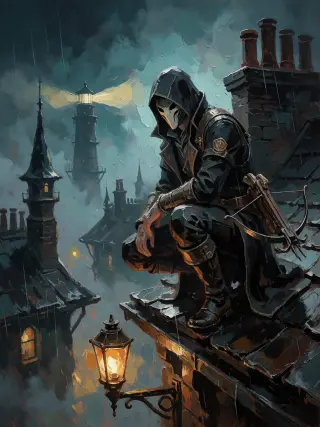
Send the identical text to Krea 2. Do not adjust it for the model, and do not add “illustration” or “poster” to help it along. The differences you see are the model's actual bias, which is what you wanted to learn.
In this pair, Krea 2 keeps the composition and loses the material. The mask becomes a white shape, the crossbow becomes a suggestion, and the rain becomes a texture over the sky. That is not a defect; it is a poster, and posters are supposed to prioritise shape.
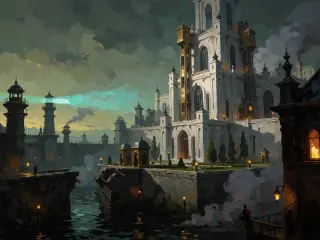
Step 7: Build the Second Frame for the Same World
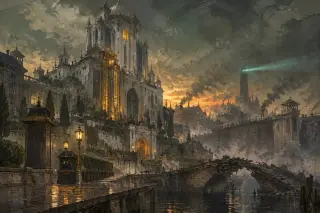
A character needs a room. Use the same six clauses with architecture as the subject, and add a seventh instruction: a human-scale object for scale. Tiny lanterns on a quay or a figure on a bridge are what make a keep look colossal.
The Dunwall Tower brief keeps the light and style clauses word for word. Only clauses one, two and three change. That is how a set stays coherent without a reference image.
The Style Rules That Keep a Set Together
- One style sentence, repeated verbatim. Never paraphrase the impasto clause between images.
- Two light keys. Cold teal distance, one warm amber source. No third key unless the story demands it.
- Five values. Soot black, bone white, brass, teal, one fire colour. Everything else is a mixture of those.
- Wet stone, not chrome. Reflections come from rain and river water.
- Fixed negative clause. The last sentence is identical in every brief you write for this world.
Five Mistakes That Waste Renders
- Writing the plot. The model cannot stage “he is grieving”. Write the pose and the lamp; let the viewer do the grieving.
- Describing a mood instead of a place. “Gritty and dark” produces a generic filter. “A rain-slick slate roof above a plague quarantine” produces a scene.
- Forgetting the negative clause. Street scenes will invent shop signs, and one legible word ruins a key visual.
- Chasing variants. Four renders of one sentence teaches you less than one render of four sentences.
- Changing two variables at once. If you change the model and the brief, you have learned nothing about either.
A Prompt You Can Copy
Character brief, full text. Character key visual for a gaslit steampunk fantasy world. Corvo Attano, Royal Protector of Dunwall: a quiet, scarred man in a dark high-collared coat with a deep hood, a carved bone-white mask with dark eye slits over his face, a folding crossbow at his belt, and the black mark of the Outsider glowing faintly on his exposed left hand. He crouches on a rain-slick slate rooftop high above plague-ridden Dunwall at night, wet chimneys, crooked spires and a distant lighthouse beam cutting cold blue fog behind him, one warm amber whale-oil lamp burning below. Style: thick impasto oil painting, visible broad brushstrokes, palette-knife broken edges, layered opaque paint masses, warm-cool value planes, restrained ridge texture, painterly handmade illustration. Composition: vertical cinematic character poster, figure on the right third, cold teal backlight against warm amber rim, volumetric mist. No text, no letters, no signage, no watermark, no logo, no UI, no HUD.
Change the name, the costume, the props and the place. Keep the light, style and negative clauses intact. That is the whole method, and it scales to every character in the world.
Cost, Time and Repeatability
The character frame billed at roughly three and a half cents; the Krea 2 version at one cent. The four-frame set on this world came in under ten cents and a few minutes of wall-clock time. At that price, the expensive part of the job is deciding what the character is about, not rendering them.
Repeatability is the real test. If you can hand the same six clauses to a collaborator and get a frame that belongs in the same set, the brief is finished. If you have to explain the vibe, it is not a brief yet.
Who This Guide Is For
Quality Checklist Before You Publish
- Does the silhouette read at 200 pixels?
- Are there at least two distinct materials in the frame?
- Is there exactly one warm object?
- Is the costume identifiable without the caption?
- Is there any legible text, signage or watermark? If yes, re-render.
- Would this frame sit next to the other three without looking like a different world?
GPT Image 2 vs Krea 2 for This Job
| Criterion | GPT Image 2 | Krea 2 |
|---|---|---|
| Material truth | Excellent | Suggestive |
| Silhouette | Good, can crowd | Excellent |
| Continuity via reference | Supported | Not supported |
| Speed | Slower | Fast |
| Cost per frame | ~$0.034 | $0.010 |
| Text rendering | Capable — but forbidden here | Avoid |
From One Frame to a World
Once the two-frame set exists, the world page, the tool page and the use-case page can all point at the same four works. Nothing is illustrated twice and nothing is claimed without a published image behind it.
That is the practical argument for documenting the brief: the images become evidence, and the evidence is reusable.
Make the First Frame
Take the six clauses, keep the negative sentence and render one character for a world that does not exist yet. Then render the room they are standing in.
Every image in this guide is a published work of the Dishonored world on Neta Studio, rendered with GPT Image 2 and Krea 2 from the briefs reproduced above.