
How to Use GPT Image 2 for Dream-Heist Key Visuals — A Working Guide
Seven steps from a world atom to a published dream-heist key visual: choose one operation, write six clauses, keep the material honest, and compare two models on the same brief. Worked examples from the Inception: Dreamshare world.
Why Dreams Need Architecture
A dream-heist story is not about magic. It is about professionals who build a place convincing enough that a stranger will believe a thought is their own. That means the visuals cannot be fog and floating rocks. They have to look like architecture with one rule removed: a boulevard folded at a right angle, a corridor rotating in zero gravity, a fortress that exists only in a memory of a hospital. The impossible thing must be specific, and everything around it must behave.
This guide is the method that produced four published frames in the Inception: Dreamshare world with GPT Image 2 and GPT Image 2.5. It is written so you can run it on that world or on your own, and it assumes no special plugins — only a prompt, a model and a place to publish.
What You Need Before You Prompt
Four things should exist before you type anything. Without them, the prompt becomes a mood board and the model has to invent the movie.
A world with atoms. Named characters, named locations and a stated visual style. One location. The specific room or street you are visualising, with its own objects. One operation. The single law of physics you are going to break. A destination. The surface the frame will live on: world cover, share card, gallery tile, article header.
Step 1: Read the World Before You Write
Open the world and read the location card, not the prompt history. The card already contains the nouns that make the frame specific: the Atelier has drafting tables, paper models and a window full of grey Paris light; the rotating hotel has brass sconces, deep green walls, gilt mirrors and a patterned carpet. A model cannot infer those details from the phrase dream hotel, and a reader can tell immediately when you have.
For the two frames in this guide, the nouns came directly from the world: Haussmann facades, awnings, parked cars, wet cobblestones for the boulevard; waistcoat, rolled shirtsleeves, brass sconces, patterned carpet for the corridor. Nothing in the prompt was invented that the world did not already imply.
Step 2: Choose One Operation
The single most common failure in this genre is asking for two impossible things at once. A street that folds and floods and glows is not a heist frame; it is a screensaver. Pick one verb and let the rest of the image stay ordinary.
Fold for scale and topology. Rotate for the body and disorientation. Flood for time pressure. Collapse for climax. Mirror for identity and doubling. Each produces a different composition, and mixing them produces mud.
Ask a second question before you commit: does this operation change the architecture, the body or the light? A fold changes architecture. A rotation changes the body. A flood changes the light and the horizon. Choosing the category first tells you where to spend your prompt detail.
Step 3: Build the Six-Clause Brief
The template has six clauses and a fixed order. It is deliberately boring, because a fixed structure is what makes two generations comparable. If you rewrite the template for every model, you are measuring your own adjectives instead of the outputs.
Medium and genre
Semi-realistic painterly dream-heist key visual, cinematic wide shot. Lock the rendering system first.
Place
Name the real city and the real building type. Specificity here is what keeps the frame out of generic fantasy.
Operation
One broken law, stated as a fact: folds over itself at a right angle, rotates in zero gravity.
Witness
One or two figures in dark coats, backs to camera, at human scale. They tell the viewer how to stand.
Physics and light
Wet stone reflecting rooftops, floating dust and paper, brass against deep green, overcast light, thin rain.
Negative clause
No text, no logos, no glow, no particles — the four words that remove most fantasy drift.
Step 4: Set Size and Quality
Generate the composition cheaply and the detail expensively. A square frame at medium quality answers the only question that matters early: does the operation read? Once it does, re-render at high quality in the final ratio. For a world cover, 1536x1024 landscape is enough; a share card wants 1024x1536; a gallery grid wants a square.
Do not upscale a weak composition. The fold either reads at thumbnail size or it does not, and no amount of resolution will add a hinge that was never there.
Step 5: Generate, Inspect, Re-render
Inspect in a fixed order. First the operation: can you name the impossible thing in one second? Second the witness: is there a human scale, and does their posture agree with the gravity? Third the material: do the stone, fabric and metal each behave like themselves? Fourth the negative clause: is there any text, logo or glow that crept in?
If it fails, fix one thing per re-render. Changing five clauses at once teaches you nothing about which one worked. The frames in this guide took two passes each: the first to prove the operation, the second to correct the witness scale and remove a stray glow.
A Worked Example: The Folding Boulevard
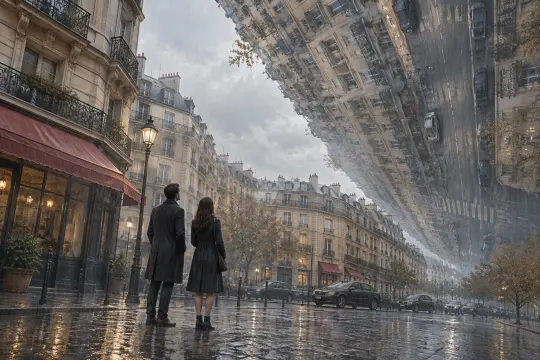
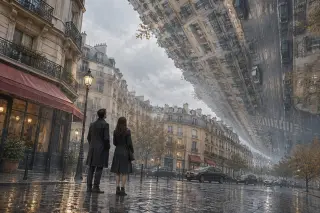
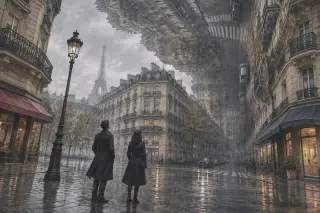
The brief: a Paris boulevard folding over itself at a right angle, at golden-grey late afternoon, with two witnesses on the pavement. The fold is chosen because it is the most legible impossible gesture in the canon — a street is a plane, and lifting it ninety degrees turns the whole image into a statement about direction.
Prompt. Semi-realistic painterly dream-heist key visual, cinematic wide shot: a Paris boulevard folding over itself at a right angle, a whole street of Haussmann facades, awnings and parked cars rising vertically into an overcast sky, wet cobblestones reflecting the upside-down rooftops, two small figures in dark coats standing on the pavement looking up, pale grey-blue light, thin rain, muted ochre and slate palette, restrained film grain, no text, no logos.
A Worked Example: The Rotating Corridor
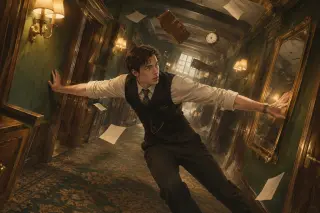
The brief: an art-deco hotel corridor rotating in zero gravity, with one man braced between the walls. Rotation is chosen because it tests the body instead of the city. A corridor exists to contain a single direction; take that away and the figure becomes the only stable object in the frame.
Prompt. Semi-realistic painterly dream-heist key visual, cinematic interior: an art-deco hotel corridor rotating in zero gravity, doors and framed mirrors tilting away from the floor, a man in a dark waistcoat and rolled shirtsleeves braced between two walls, floating dust and loose sheets of paper, warm brass sconces against deep green walls, patterned carpet sliding sideways, hard one-point perspective, restrained film grain, no text, no logos.
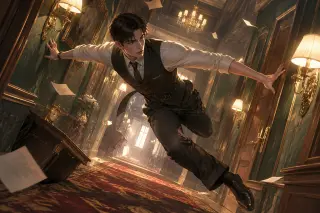
Notice what is absent from both prompts: no mention of a dream, no mention of surrealism, no colour grading language. The word dream encourages glow, haze and floating islands. The operation — fold, rotate — is what actually produces the image.
Comparing Models Fairly
Run the identical brief through both models at the same size, publish both, and let the comparison stand. GPT Image 2 is the document: it protects architecture, contact and material, which makes it the better choice for store pages, thumbnails and anywhere the frame will be cropped. GPT Image 2.5 is the poster: wider gesture, cleaner diagonal, more air, better at stopping a scroll. Neither is universally better; the surface decides.
Publishing the Result
Publish each frame as a work of the world, with its prompt and model attached. A published work is a permanent share link that inherits the world's atoms, appears in the world gallery and can be remixed. The four frames in this guide are published works from the Inception: Dreamshare world, which means you can open them, read the briefs and compare them without trusting a screenshot.
Generate
Run the six-clause template at the ratio you need.
Select
Keep the frame that answers a question before the caption does.
Attach
Publish it as a work of the world, with prompt and model recorded.
Compare
Run the same brief on the other model and publish both.
Fork
Let someone else change an atom and generate the next frame.
Seven Rules That Keep Frames Out of Fantasy
These are the rules that survived four generations and two models. They are all negative rules, because the genre is defined by what you refuse to add.
1. One operation per frame. 2. No glow, no particles, no lens flares. 3. Real city, real building type, real street furniture. 4. A witness at human scale, usually with their back to camera. 5. Name the material: stone, brass, wool, wet asphalt. 6. Let the sky stay ordinary; the architecture is the event. 7. Publish the prompt with the frame, so the next person can argue with the method instead of the picture.
The corollary is worth stating plainly: if the frame needs a caption to explain what is impossible, the prompt described an atmosphere. If the frame explains itself at thumbnail size, the prompt described an operation. That is the whole guide compressed into one test.
Explore the World
The world is public and the four key visuals are live. Fork it, change one atom, and generate the frame you actually want to see: the inside of the fold, the moment before the corridor turns, the look on the face that the waistcoat is trying not to show. Then publish it next to the originals and let the comparison do the arguing.
Put This Guide to Work
Four published frames, two models, one world — the next frame is yours to make.