
How to Use GPT Image 2 for Fortnite Key Visuals — A Step-by-Step Guide
Six steps from a one-sentence brief to a published battle-royale art set — using real GPT Image 2 and Krea 2 outputs from the Fortnite: Fracturefall world on Neta Studio.
How to Use GPT Image 2 for Fortnite Key Visuals
This guide walks the full workflow — from a one-sentence brief to a published battle-royale art set — using the Fortnite: Fracturefall world as the worked example. Every output shown here is real: 26 atoms, 12 auto-generated covers, and four image works, all produced with GPT Image 2 and Krea 2 on Neta Studio.
What You Need
- A Neta Studio account (neta.art)
- Access to the GPT Image 2 model
- One sentence about the art you want — scene, hero, time of day
- Optional: a style sentence you can reuse in every prompt
Step 1 — Lock the Visual Style
Battle-royale art lives or dies on its visual register. Lock a one-sentence style before generating anything: 'stylized Fortnite adventure with saturated colors, crisp cel-shaded forms' — then add the palette and the era. The Fracturefall brief carried that sentence into every cover, poster, and landmark, which is why the set reads as one world.
Step 2 — Write the Key Visual Brief
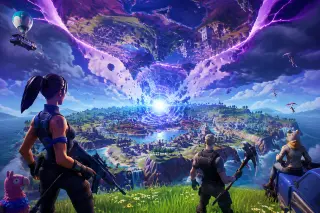
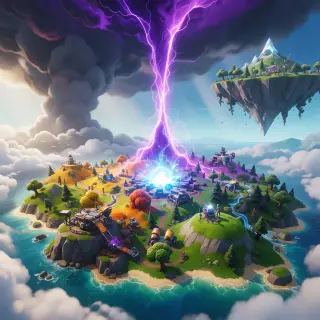
The key visual brief for Fracturefall was: 'a stylized battle-royale island torn between realities, an inverted second island hanging upside down above the clouds, a brilliant blue-white Zero Point core pulsing at the island's center, saturated colors, crisp cel-shaded forms, no text.' A specific scene beats a vague request: name the place, the physics break, the light, and the one signature element.
Step 3 — Run the Model Comparison
Send the same brief to GPT Image 2 and Krea 2 in the same studio. GPT Image 2 delivers the clean cel-shaded render with fine detail, Battle Bus and gliders in frame; Krea 2 returns a warmer, more expressive painterly pass with a towering purple rift. Compare, choose — or keep both and let the world carry two posters.
Step 4 — Generate Landmark Art
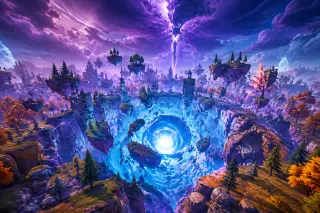
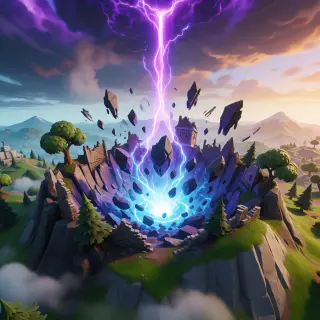
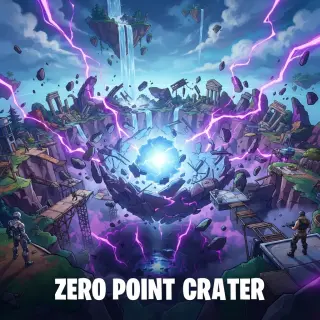
The key visual sets the palette; the landmark poster proves the place. For Fracturefall, the same Zero Point Crater brief was rendered twice: GPT Image 2 with gravity-defying ruins and a splitting rift-beam, Krea 2 with a newly formed crater and suspended rock shards. The studio also auto-generated a Zero Point Crater location cover for the atom card.
Step 5 — Carry the Style Across the World
Every atom card can carry the same style: open the character cards and the location cards, check that the covers match the key visual palette, and re-queue any cover that drifts. The style sentence is the contract — every prompt reuses it, so the set stays coherent.
Pro move: fix the style sentence before generating covers — every cover, poster, and landmark inherits it.
Step 6 — Publish and Fork
Every image work gets a shareable router-files URL the moment it renders. The world itself is public and forkable: anyone can inherit the 26 atoms and 12 covers, rewrite what they want, and run the same art pipeline on their own premise. That is the difference between an image and a world — an image ends; a world forks.
Prompt Cheat Sheet
Key visual: 'A <landmark> at <time>, <signature elements>, <visual style>.'
Landmark: 'A <location> where <physics break>, <storm lighting>, <visual style>.'
Cover: '<Character or location name>, <signature detail>, cel-shaded stylized key art, no text.'
Model Comparison Summary
GPT Image 2 — flagship key visuals: clean cel-shaded renders, fine detail, strong prompt discipline. Choose it for final posters.
Krea 2 — fast, expressive painterly passes: iterate a brief, build mood boards, explore styles before committing.
Troubleshooting
- The render looks generic — add a signature element (an inverted island, a glowing Zero Point core, a purple rift) and name the exact physics break.
- Covers don't match the key visual — lock the style sentence before generating covers, then re-queue covers after editing atom facts.
- Text appears in the image — add 'no text, no logos, no watermarks' to the prompt and keep compositions clean.
FAQ
How long does an art set take? The Fracturefall set — one key visual, one landmark pair, plus 12 covers — was completed in a single studio session.
Do I need to code? No. The images, covers, and pages are all generated; you edit cards, not code.
Can I create Fortnite-style art? Yes — canon-inspired art with original execution and no licensed assets reproduced verbatim.
Go Create Your Key Visual
Six steps, one world, and four image works — that is the GPT Image 2 battle-royale art pipeline. Fracturefall was drawn from one sentence; yours can be too.
Follow the six steps with GPT Image 2 — <span class="ml-highlight">your battle-royale art set</span> is one sentence away
Lock the style, draft the brief, run the comparison, generate the set, publish, and fork.