
How to Use GPT Image 2 for Metal Gear Key Visuals
A practical, settings-level walkthrough: six clauses, one room, two models, and the four published key visuals this method produced.
How to Use GPT Image 2 for Metal Gear Key Visuals
This guide is the working method behind the four key visuals published in the Metal Gear: The Patriots’ Shadow world: two prompts, two models, four frames. It assumes you have a world with editable character, location and event cards, and it assumes you want a frame that looks like a still from a thriller rather than a poster of a soldier.
Everything below is copy-pasteable. The settings are the ones used for the published works, the prompts are verbatim, and the comparison against Krea 2 uses the identical text so you can reproduce the difference yourself.
What You Need Before You Write a Prompt
- A world card for the operator — silhouette, gear, posture, what they are looking at
- A world card for the place — three materials, one structural feature, one source of failure
- One light source that works and one that is failing (beacon, sodium lamp, darkness)
- A human ruler for scale — a railing, a ladder, a catwalk, a doorway
- A negative clause saved somewhere you can paste it every time
Step 1 — Choose the Argument, Not the Character
Decide what the frame has to say before you decide who is in it. “One person is small inside a machine built to replace him” gives you a camera height, a figure-to-walker ratio and a lens. “Cool soldier” gives you nothing. In this world the argument is usually ownership: who controls the soldier, and what does that look like at four storeys tall?
Step 2 — Pick the Fortress That Sets the Light
The location card is a lighting plan. Shadow Moses is floodlights in snowfall and a hangar door opening onto darkness. Mother Base is dusk, orange work lights and rain squalls. Outer Heaven is harsh noon and dry red dust. Big Shell is white struts, blue ocean and hard overhead sun. Choose the card that already contains the contrast your scene needs.
Step 3 — Fix the Settings
For key art, use 1536×1024 landscape at quality high and PNG output with an opaque background. The wide ratio leaves room for the machine and the human ruler in the same frame; high quality is what keeps film grain from turning into compression noise in the dark water.
| Parameter | Value | Note |
|---|---|---|
| model | gpt-image-2 | Detail-first; slower and pricier than Krea 2 |
| size | 1536×1024 | Landscape hero. Use 1024×1536 for a character still |
| quality | high | Keeps grain, wet steel and gradients clean |
| output_format | png | JPEG smears dark water and film grain |
| background | opaque | The room is the background |
Step 4 — Write the Six Clauses in Order
Rendering system
35mm anamorphic film still, photoreal, visible film grain, cold steel-blue and sodium-orange palette, deep soft shadows.
Composition
Wide establishing shot, high camera looking down into the room — or a low one-point corridor for a standoff.
Place
Three materials and one structural feature: black-site hangar in frozen rock, flooded service bay, torn roof panel, crane gantries.
Subject
Full-body operative, seen from behind, one hand on the rail, codec earpiece glowing. No face.
Wrong-physics detail
Snow falling through the tear onto a machine standing in still black water.
Negative clause
No readable text, no watermark, no logo, no illustration, no painterly style, no anime.
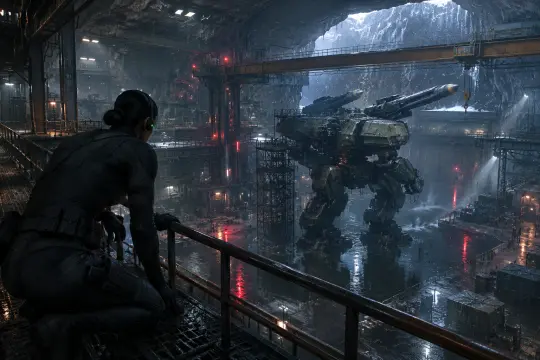
Step 5 — Render the Hangar Prompt
Paste the full brief below into GPT Image 2 at the settings above. Do not shorten it: the length is what stops the model from replacing your room with a generic sci-fi corridor.
35mm anamorphic film still, photoreal, visible film grain, cold steel-blue and sodium-orange palette, deep soft shadows. Wide establishing shot, high camera looking down into a vast underground hangar of a black-site military base carved out of a frozen mountain: a four-storey bipedal walking tank with nuclear-tipped rail cannons stands in a flooded service bay at the centre, surrounded by scaffolding, crane gantries and cable trunks, snow blowing in through a torn roof panel, red hazard strobes reflected in the still black water. A lone operative in a dark grey sneaking suit and a headset crouches on a catwalk in the left foreground, seen from behind, one gloved hand on the rail, a tranquilizer pistol holstered at the thigh, a codec earpiece glowing faint green. Wet concrete, oil drums, stencilled crates, drifting steam, volumetric searchlights, quiet observational framing, low contrast haze. Restrained military-thriller realism, cinematic depth of field. No readable text, no watermark, no logo, no illustration, no painterly style, no anime.
Step 6 — Render the Corridor Prompt
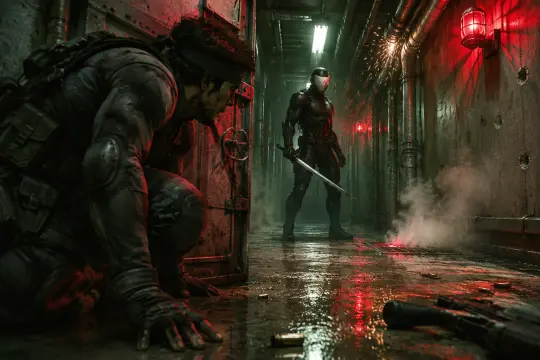
The second scene tests the model harder: two bodies in one narrow space. Fix each body to the architecture and put the evidence of the fight on the floor.
35mm film still, photoreal, visible film grain, crimson emergency light against cold fluorescent green, heavy shadow. Tight corridor composition, low camera, one-point perspective down a narrow service corridor of a nuclear disposal facility: a lone operative in a dark grey sneaking suit kneels behind an open blast door, one hand pressed flat to the wet floor, while a cybernetic ninja in a matte-black exoskeleton and a cracked white visor blocks the corridor ahead, a long katana held low, sparks falling from a severed ceiling conduit. Steam venting from a floor grate, fresh bullet impacts in the wall, a discarded rifle on the floor, a red rotating beacon strobing across both figures. Handheld documentary framing, tense stillness between moves, shallow focus on the ninja’s visor. Grounded military science-fiction realism, cinematic grain. No readable text, no watermark, no logo, no illustration, no painterly style, no anime.
Step 7 — Run the Same Text on Krea 2
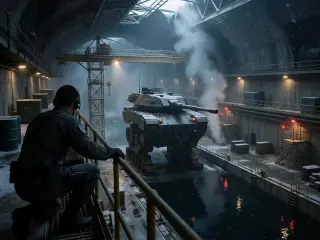
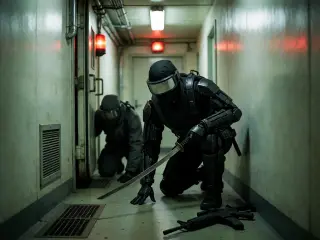
Change nothing but the model and the size Krea 2 allows (1024×768 or 1024×1024). The point of the second render is not a backup image; it is a second reading of the same brief, which tells you which parts of your prompt were doing the work.
How to Read the Difference
Compare silhouettes first, props second, depth third. If the silhouettes are identical and the props differ, GPT Image 2 is doing more staging. If the silhouettes are cleaner but the roles merge, Krea 2 is optimising for the thumbnail. Neither is wrong; they are answering different questions.
| What to check | GPT Image 2 | Krea 2 |
|---|---|---|
| Human ruler | Full body, back to camera, readable at a glance | Small dark silhouette, readable but generic |
| Scale | Walker displaces water; three planes hold | Walker centred on a clean apron; flatter |
| Props | Rifle, casings, conduit, cable trunks | One rifle, fewer secondary props |
| Two-body staging | Operative and cyborg stay separate | Roles can merge into one armoured figure |
| Thumbnail read | Good, but busier | Excellent — the reason to keep it |
Step 8 — Fix the Brief Before the Seed
If the machine looks like a toy, add the human ruler. If the concrete looks dry, add the water. If the bodies merge, name the cover and the distance. Re-rolling with a missing clause produces a different failure, not a better image.
Step 9 — Publish With the Prompt Attached
Publishing the work inside the world keeps the prompt, the model and the cards together. That is what makes the frame reusable: the next creator forks the brief rather than reverse-engineering the picture, and your comparison stays honest because the source text is public.
Prompt Blocks You Can Reuse
- Rendering: 35mm anamorphic film still, photoreal, visible film grain, deep soft shadows.
- Scale: a lone operative seen from behind on a catwalk, full body, small against the machine.
- Material: wet concrete, still black water, oil drums, stencilled crates, sagging cable trunks.
- Light: sodium work lamps overhead, red hazard strobes in the water, volumetric searchlights from the gantries.
- Time: snow blowing through a torn roof panel, steam venting from a floor grate, sparks from a severed conduit.
- Negative: no readable text, no watermark, no logo, no illustration, no painterly style, no anime.
How Long Should the Prompt Be?
Long enough to name every element you would notice if it were missing. The hangar prompt runs about 170 words and the corridor prompt about 150. Below 80 words the model starts substituting stock solutions — a generic corridor, a generic soldier, a generic fog — and the frame stops belonging to the world.
Do You Need Reference Images?
Not for these two frames. GPT Image 2 accepts reference images, and they help when you need a specific face or a costume carried over. For establishing shots the world cards plus a long text brief are enough, and they keep the prompt portable between models — which is the whole point of running Krea 2 on the same text.
Common Mistakes in This Genre
- Starting from a title. A franchise name gives the model a mood, not a room. Start from the argument and the fortress card.
- Describing a person, not a position. “Crouched behind the blast door, hand flat on the floor” beats “badass soldier”.
- Skipping the negative clause. It is the cheapest single line in the prompt and it prevents half the drift.
- Chasing detail over staging. A clean standoff beats a busy frame where nobody can tell who is winning.
- Forgetting the exit. A corridor needs a door, a grate or a darkness to imply where this is going.
Where to Go Next
Once the two scenes work, push the camera in for a character still on the same light rig, then pull back for a fortress exterior. The palette and the negative clause stay the same, which is how a set of images starts to look like one world instead of five unrelated renders.
Start Creating
Two prompts, two models, four published frames — now write the room only you would choose.