How to Use GPT Image 2 for OMORI World Art — The Two-World Rule, Crayon Line and the Small White Rectangle
A step-by-step guide to GPT Image 2 for OMORI-style world art: read the world, write the style contract, build the depth stack, plant one wrong object, and check the frame at thumbnail size — with both literal prompts published.
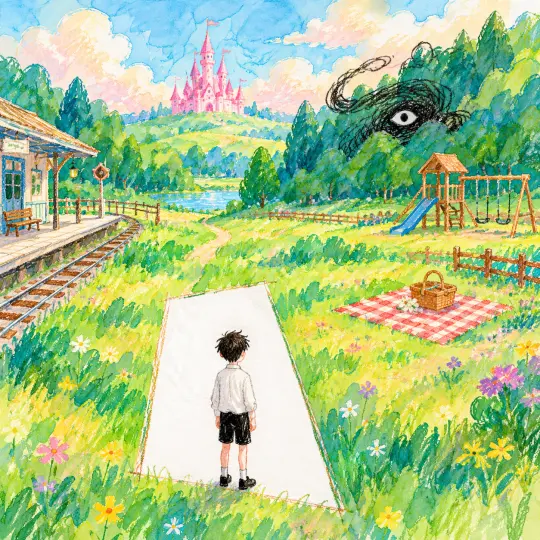
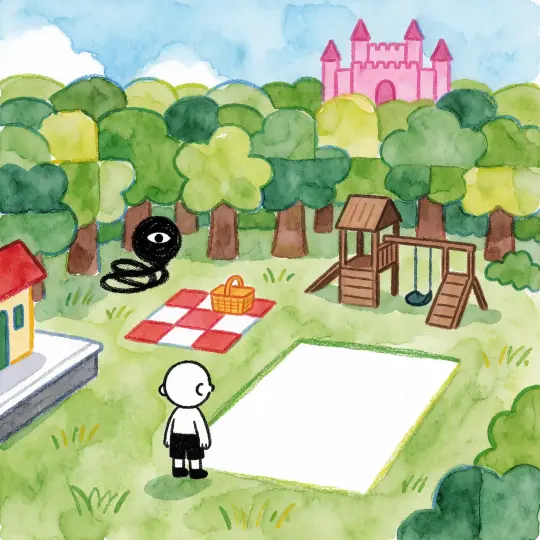
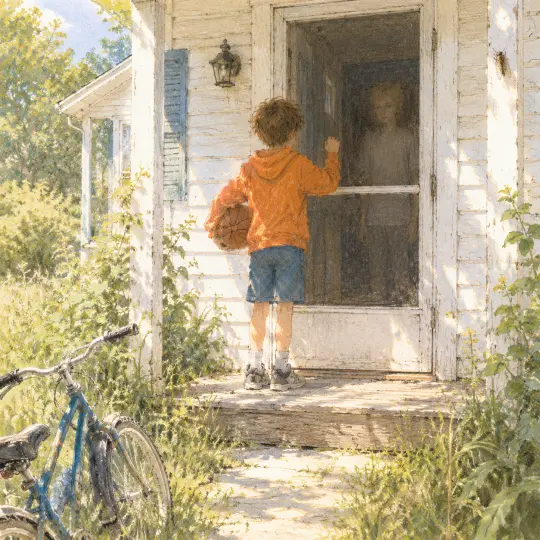
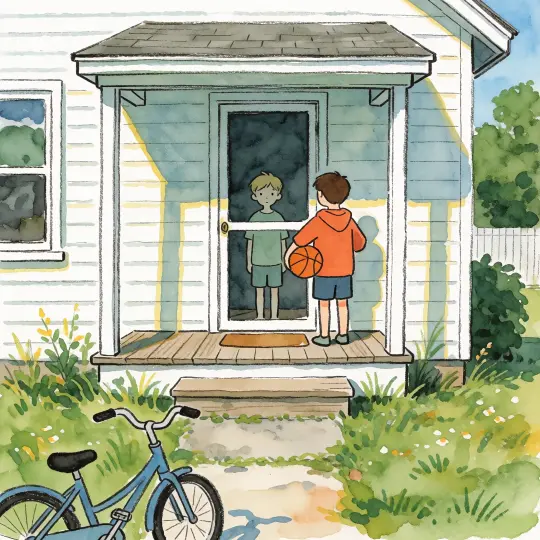
This guide is the method behind four published OMORI key visuals. It assumes you already have a world — 25 atoms, a cast and a style — and want GPT Image 2 to draw it without turning it into generic indie-horror wallpaper. The whole approach fits in one sentence: describe a place with good manners, then put one impossible thing in it.
The examples use OMORI — Headspace and Faraway Town: 8 characters, 6 locations, 5 events, 3 factions and 3 rules of dream logic. Every prompt below is literal and copy-paste ready. Both the GPT Image 2 and Krea 2 results are published, at 1024×1024, with no reference images and no retouching, so you can check each step against an actual output rather than a claim.
Before the Prompt: Read the World
The most common failure is not a bad model setting; it is a prompt written from memory. Memory gives you the fandom's idea of OMORI — a monochrome boy, a red hand, a light bulb — because those are the images that get reposted. The world page gives you the actual furniture: a train station, a picnic blanket, a playground, a candy-pink castle, a casino on the water, a porch with a screen door. Those are drawable. Icons are not.
- The place Pick one location and one time of day. "Headspace, late afternoon" is a frame. "OMORI" is a mood board.
- The furniture Write down four objects that must be in the frame. The station bench, the picnic basket, the swing set, the flag on the castle.
- The cast One figure. Name what they are doing with their body, not what they are feeling. "Back turned, standing at the edge" is drawable.
- The wrong thing One detail that does not belong: a blank white rectangle, an eye-scribble, a bike left where it fell. This is the story.
- The rule What the image must never show: text, a logo, a second light source, a second character, realistic shading.
Step 1 — Choose Which World You Are In
OMORI has two visual grammars and they are not interchangeable. Headspace is bright, handmade and generous: crayon green, candy pink, soft afternoon, no hard shadows. Faraway Town is hot, pale and over-lit: white clapboard, overgrown grass, a screen door, a sky with no clouds. Decide before you write a word. A prompt that mixes them produces the generic "sad indie game" look the world is trying to avoid.
| Headspace frame | Faraway Town frame | |
|---|---|---|
| Palette | Crayon green, candy pink, sky blue | Bone white, faded blue, hot yellow-green |
| Light | Soft diffuse afternoon | Harsh overhead summer sun |
| Edges | Waxy, broken, hand-drawn | Straight, architectural, still handmade |
| Depth | Deep, painted, layered washes | Shallow, frontal, porch-stage |
| Wrong object | A white rectangle, an eye-scribble | A boy behind glass, a bike on the lawn |
| Do not show | Realistic shading, text, UI | Blood, a body, a monster |
Step 2 — Write the Style Contract Once
A style contract is eight lines of material instructions that you paste into every prompt. It is not a mood. It names the medium, the line, the wash, the white, the colour, the light, the detail budget and the bans. Write it once, then stop editing it. The contract is what makes two images look like one world.
Medium: mixed crayon and transparent watercolor illustration.
Line: waxy crayon outlines that break, overlap and leave paper grain.
Wash: transparent overlapping watercolor layers; edges may diffuse naturally.
White: paper white reserved for the brightest light, never painted over.
Colour: waxy brights with pastel washes; local colour stays identifiable.
Light: soft diffuse light built from washes, no realistic light-shadow steps.
Detail: large rounded simplified shapes; detail budget of one odd object per frame.
Forbid: photography, PBR, heavy digital paint, comic inking, text, logos, watermarks, extra characters.
Notice that the contract does not mention OMORI. It should work for any location in the world. If you find yourself adding "in the style of OMORI", delete it: that phrase pulls the model back toward the fandom's most repeated images and away from the place you just described.
Step 3 — Build the Depth Stack
Foreground
The object nearest the camera and the figure if there is one. For the world frame: the white rectangle in the grass, the boy at its edge, flowers along the bottom edge.
Middle distance
Where the scene happens. The picnic blanket, the playground, the path, the train platform. This band carries most of the narrative information.
Horizon
One silhouette that tells you where you are. The pink castle on the hill. The treeline. The roofline of the house across the street.
Sky
One weather. A soft blue afternoon with stacked clouds, or a white-hot summer sky with nothing in it. Do not ask for both.
If you only give the model objects, it arranges them like a sticker sheet. If you give it bands, it builds a place. The bands also make the image legible at small sizes, because each one has a different value.
Step 4 — Plant Exactly One Wrong Object
The wrong object is the difference between a nice illustration and an OMORI image. It must be singular, physical and undescribed in emotional terms. "A sense of dread" is not an object. "A blank white rectangle of paper cut into the meadow" is. The model can render paper; it cannot render dread.
- The white rectangle A doorway-shaped absence in the grass. Reads as a hole in the page, not a portal effect. Best for world key visuals.
- The eye-scribble A black ink tangle with one white eye. Put it at the treeline, not in the centre. It should look like it was drawn by the same hand as everything else.
- The cut photograph A photo album open on a blanket, one rectangular gap where a picture should be. Best for a lore or prop image.
- The bike on the lawn A bicycle dropped mid-ride beside a porch. Ordinary, but it says someone arrived in a hurry and did not leave.
- The flag at half-mast A candy-pink castle with one flag lowered. A single change to a cheerful silhouette that recolours the whole frame.
Step 5 — Write the Literal Prompt
Put it together in one paragraph: medium, geography, foreground figure, wrong object, style contract, negative list. Keep it under 200 words. The prompt below is the exact text used for the world key visual, not a cleaned-up version.
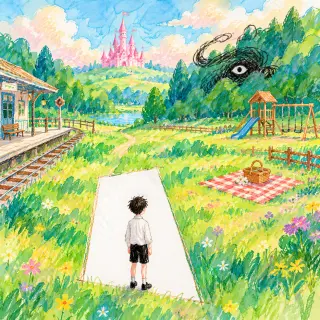
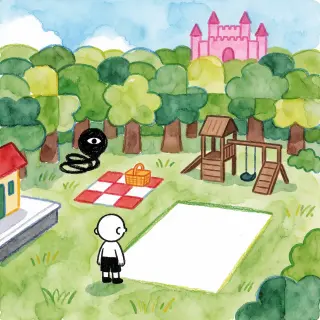
Hand-drawn crayon and transparent watercolor illustration, square composition. A single wide view of Headspace: a bright handmade country of patchwork crayon-green forest, a red-and-white picnic blanket with a wicker basket, a small wooden playground, a candy-pink castle far on the horizon, and a little train station platform at the left edge. In the foreground a pale, expressionless boy in black-and-white clothes stands with his back to the viewer at the edge of a blank white rectangle of paper that cuts unnaturally into the meadow, like a doorway into an empty room. A black scribble with a single white eye coils at the treeline behind him. Waxy broken crayon outlines, reserved white paper, transparent overlapping watercolor washes, pastel brights, soft diffuse light, no realistic shading, no text, no letters, no logo, no watermark.
Two things are easy to miss. First, the rectangle is described as "paper", not as a door or a portal, which keeps the dream hand-drawn. Second, the negative list is at the end, where it acts on the whole prompt rather than on the last object mentioned.
Step 6 — Run the Pair, Not the Single
Draft on the fast model
Run the composition on Krea 2 at 1024×1024. You are checking the depth stack and whether the wrong object reads. Two drafts is usually enough.
Fix the composition in words
If the rectangle is too small, say "a large blank white rectangle occupying the lower third". Do not add adjectives about mood; move the object.
Finish on GPT Image 2
Re-run the winning composition at quality=high. Keep the prompt identical so the only variable is the model.
Publish both with captions
The pair is the evidence. Caption what each model invented, and say plainly that nothing was retouched.
Step 7 — Check the Frame at Thumbnail Size
Zoom out until the image is 200 pixels wide. If you cannot tell where you are and what is wrong, the composition is not finished, no matter how good the full-size render looks. This check catches the two most expensive mistakes: too much detail in the middle distance, and a wrong object that disappears when the image is small.
| Check | Pass | Fail |
|---|---|---|
| Place | You can name the location in one second | It reads as a generic meadow or porch |
| Figure | One clear silhouette with a posture | A crowd, or a figure merged with the background |
| Wrong object | Visible at 200px without hunting | Only visible at full size |
| Palette | Two or three dominant colour groups | Muddy midtones across the whole frame |
| Text | None | A sign, a title, a watermark, a UI chip |
| Medium | Crayon line and watercolour wash | Plastic, photographic or heavy digital paint |
| Edges | Broken, waxy, handmade | Uniform, vector-clean, airbrushed |
| Story | One question the frame asks | A pretty picture with nothing withheld |
If a frame fails only the "story" row, do not re-render. Add the wrong object to the prompt and try again; composition is usually fine, and the missing thing is the withholding.
Step 8 — Caption What You Invented
Every model invents. GPT Image 2 added flowers along the bottom edge, a station sign and a flag on the castle; none of those were in the prompt. Krea 2 invented the exact shape of the playground and the castle crenellations. Say so in the caption. The honesty is not a legal disclaimer; it is what makes the comparison useful to the next person trying the same thing.
Common Mistakes, and the Line That Fixes Them
A Second Worked Example: The Porch
The same eight steps produce a Faraway Town frame. The geography is now a stage: porch, door, hallway, lawn. The wrong object is a person who should be visible and is not. The style contract is identical — only the light and palette change, from soft afternoon to harsh summer sun.
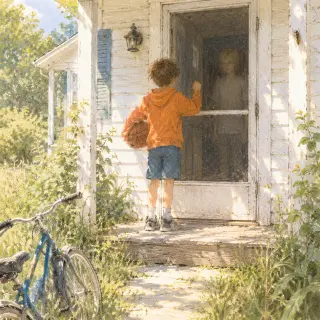
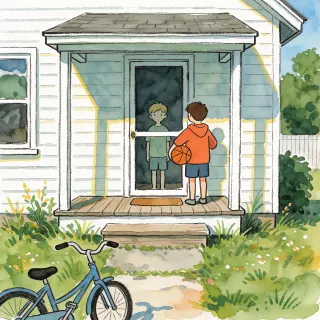
Hand-drawn crayon and transparent watercolor illustration, square composition. A sunlit front porch of a small white clapboard house in late summer: a boy in an orange hoodie holds a basketball under one arm and knocks on a closed screen door. Behind the glass is a dark hallway where a pale, silent boy stands just out of the light. Overgrown lawn, a bicycle on the path, cicada heat in the air, one wooden step worn smooth. Waxy broken crayon outlines, transparent watercolor washes, reserved paper white for the harsh sunlight, soft diffuse shadows, handmade childlike rendering, quiet and warm with something wrong underneath. No text, no letters, no logo, no watermark.
The result is the second published pair. GPT Image 2 keeps the reflection in the screen and the depth of the hallway; Krea 2 flattens the porch into a symmetrical plate where the two boys become positions on a stage. Both are correct readings of the same instructions, which is exactly why the pair is worth keeping.
Draw your own door
Open the world, copy the contract and run the eight steps. Start with the place you can describe in four objects, then add the one thing that should not be there.
Read the world, then make the image
The world page has all 25 atoms; the tool page has the full parameter and failure-mode reference.
OMORI — Headspace and Faraway Town is a fan-built world on Neta Studio. OMORI and its characters belong to OMOCAT. The four published images were generated at 1024×1024 with GPT Image 2 and Krea 2, without reference images or post-processing. All prompts are published in full so the method can be reproduced.