
How to Use GPT Image 2 for Samurai Key Visuals — A Working Guide
Seven steps from a world atom to a published samurai key visual: choose one place, stage one event, write six clauses, inspect in a fixed order, and compare two models on the same brief. Worked examples from the Ghost of Tsushima world.
Why Samurai Stories Need Specific Places
A samurai story is not about swords. It is about a person whose entire identity has been organized around a set of forms, standing in a place where the forms have stopped working. The sword is just the most photogenic part of the argument. That is why the weakest samurai images are the ones with nothing in them but a warrior and a sunset: there is no place for the code to fail.
This guide is the method that produced four published frames in the Ghost of Tsushima world: two scenes, two models, one brief each. It is written for a creator who already has a world — or wants one — and needs the images to look like they came from the same island rather than the same stock folder.
What You Need Before You Prompt
Four things should exist before you type anything. Without them, the prompt becomes a mood board and the model becomes a slot machine.
- A world with atoms. Named characters, named locations and a stated visual style. Ghost of Tsushima has eight characters, six locations and a semi-realistic painterly style.
- One place per frame. Komoda Beach or the Sakai cemetery, not “Tsushima.”
- One event per frame. A landing, a duel, a vigil, a poisoning.
- A destination size. 1536×1024 for a cover, 3:4 for a card, 2:3 for a poster.
Step 1: Read the World Before You Write
Open the location card, not the prompt history. The card already contains the nouns that make the place specific: black sand, broken banners, a leaning maple, a stone lantern, terraced fields below. Those nouns are worth more than any adjective you can invent, because they are the things the world has agreed to be true.
For the two frames in this guide, every object came directly from the world. Nothing in the prompt was invented to sound cinematic. The cinematic effect is a by-product of specificity.
Step 2: Choose One Event, Not a Theme
The most common failure in this genre is asking for a theme instead of an event. “The tragedy of honor” is a theme. “The minute after the samurai army has been destroyed, and one man is still standing” is an event. The first gives the model nothing to stage; the second gives it a before, an after and a body.
Ask a second question before you commit: does the event change the architecture, the body or the light? A landing changes the beach. A duel changes the space between two people. A poisoning changes the meaning of a castle. If the event does not change anything visible, it is not an image yet.
Step 3: Build the Six-Clause Brief
The template has six clauses in a fixed order. It is deliberately boring, because a fixed order is what makes two generations comparable and what stops the model from spending its attention on the wrong thing.
Medium and style
Semi-realistic painterly cinematic key visual, 16:9, visible brushwork, controlled hard edges, rich mid-tones, volumetric mist. Lock the rendering system first.
Subject and wardrobe
A lone samurai in battered dark lamellar armor, torn rain-cloak, sword held low. Or an older lord in formal pale armor, wide straw hat, katana in a formal guard. Armor is identity.
Place and weather
Black sand, broken banners, spent arrows, a leaning red maple, a fleet in the mist. Or moss-covered graves, wet stone, terraced fields, a stone lantern. Nouns, not moods.
One event
“The minute after a lost battle.” “Two men at guard in a graveyard, neither has moved.” State it as a fact; the model stages facts.
Light and palette
Cold breaking sun, wet charcoal, bone white, dried-blood red, cold sea blue. Or violet twilight, moss green, maple crimson, tarnished gold from one lantern.
Refusals
No text, no letters, no watermark, no logo, no modern objects, no fantasy armor, no glow. The negative clause is not optional.
Step 4: Set Size and Quality
Generate the composition cheaply and the detail expensively. A 1024-wide pass at medium quality is enough to test layout; a final cover at 1536×1024 or 2048×1152 deserves high quality. Do not upscale a weak composition. The crop will not save it, and the extra pixels will only make the failure more legible.
Keep the subject out of the outer 15% of the frame. You will need that margin for a 3:4 card crop, a caption overlay or a title. A composition that only works at one aspect ratio is a wallpaper, not an asset.
Step 5: Generate, Inspect, Re-render
Inspect in a fixed order and stop at the first failure. Fixing one clause per re-render is how you learn what the model is actually responding to; fixing five at once teaches you nothing.
Event
Can you name what just happened in one second at thumbnail size? If not, the frame is a wallpaper, not a key visual.
Scale
Is there a body that tells you how large the fleet, the tree or the castle is? An empty landscape has no stakes.
Material
Do sand, lacquered iron, hemp cloth and leaf each read as different substances? Mush at 100% is a failure even if the thumbnail is pretty.
Light
One source, one shadow direction, no accidental bloom. Glow is the fastest way to make history look like a trailer.
Text
Banners, gravestones and armor plates should be blank or abstract. Any invented alphabet is a cleanup job.
Corners
Extra hilts, floating arrows, half-rendered figures. The edges are where models hide their mistakes.
A Worked Example: Komoda Beach
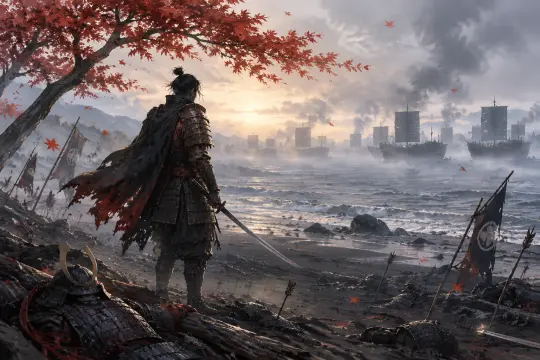
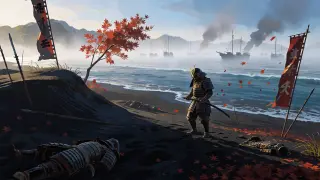
The brief: dawn on Komoda Beach, the morning after the samurai army was destroyed. A lone swordsman stands three-quarters away from camera, sword lowered, on black sand littered with broken banners, spent arrows and a fallen helmet. The sea is a wall of mist with the silhouettes of a Mongol fleet. One red maple leans over the dune.
Prompt. Semi-realistic painterly cinematic key visual, 16:9, for a historical samurai open-world game set on Tsushima island, autumn 1274. Dawn on Komoda Beach: black sand littered with broken banners, arrow-shot samurai armour and abandoned spears after a lost battle; the sea behind is a wall of mist with the dark silhouettes of a Mongol invasion fleet and low black-hulled ships; in the foreground a lone samurai in battered dark lamellar armour, half-lit by a cold breaking sun, stands three-quarters away from camera, sword lowered, red maple leaves blowing past him; a single red-leafed maple leans over the dune; distant smoke columns; palette of wet charcoal black, bone white, dried-blood red and cold sea blue; visible brushwork, controlled hard edges, rich mid-tones, volumetric mist, epic scale, no text, no letters, no watermark, no logo.
A Worked Example: The Sakai Cemetery
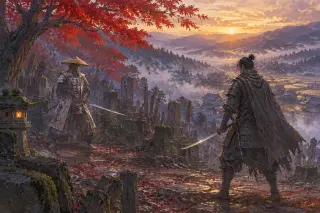
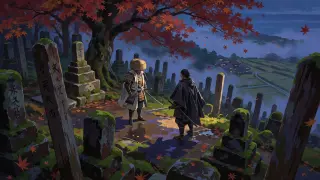
The brief: autumn twilight on a hillside graveyard above Omi. Two samurai face each other alone among moss-covered graves under ancient red maples. The older lord in formal pale armor and a wide straw hat holds a katana in a formal guard; the younger swordsman in dark worn armor and a rain-cloak answers with a half-drawn blade. Long violet shadows, wet stone, drifting leaves, terraced fields and a sea of fog below.
Prompt. The Duel at the Sakai Cemetery, semi-realistic painterly cinematic key visual, 16:9, historical samurai tragedy, autumn twilight on a hillside graveyard above Omi village. Two samurai face each other alone among moss-covered stone graves and leaning wooden grave markers, beneath ancient red maples shedding leaves; the older lord in formal white-and-grey armour with a wide straw hat holds a katana in a formal guard, the younger swordsman in dark worn armour and a rain-cloak answers with a half-drawn blade, both very still, faces unreadable; long violet shadows, wet stone, drifting leaves, distant terraced fields and a sea of evening fog below; palette of deep indigo, moss green, maple crimson and tarnished gold; visible brushwork, controlled hard edges, volumetric light, epic and intimate, no text, no letters, no watermark, no logo.
Notice what is absent from both prompts: no mention of a mood, no “epic,” no “cinematic masterpiece,” no camera brand. The frames are cinematic because the light is specific and the objects are real, not because the prompt asked for cinema.
Comparing Models Fairly
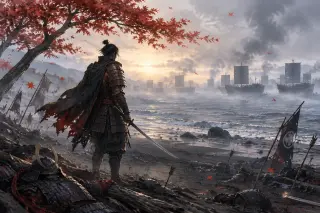
Run the identical brief through both models at a matched ratio, publish both, and let the differences speak. GPT Image 2 will give you more to inspect: dents, moss, a flame, a blade with one narrow highlight. Krea 2 will give you a stronger first read: a bigger silhouette, a flatter sky, a composition that survives a 300-pixel thumbnail. Neither is a failure. They are different jobs.
The Five Mistakes That Cost the Most
These are the failures that survive a second look, which makes them the expensive ones. All five are fixable in the prompt.
Mood instead of place
“Epic samurai battle” returns a poster of a genre. Name the beach, the banners, the arrow, the fleet.
Two events
A duel and a burning castle and a storm is three images fighting. Pick the one that carries the story.
Costume drift
Models default to horned helmets and impossible lacquer. Write the historical armor clause every time.
Fog as glow
“Dramatic lighting” often returns bloom. Ask for volumetric mist and a cold low sun instead.
Dirty corners
Text, extra hilts and floating arrows live at the edges. Crop in and inspect before publishing.
Publishing the Result
Publish each frame as a work of the world, with its prompt and model attached. Keep the comparison pair in the same collection so the next creator can see what changed between models. Link the work to the world studio, not just to the image file. A published work with its prompt is a reusable asset; a loose PNG is a screenshot.
Attach the prompt
The exact six-clause brief, not a summary. The prompt is the most valuable part of the work.
Name the model and size
GPT Image 2, 1536×1024, high quality. Size and model explain most of the visual difference.
Link the world
The work belongs to Ghost of Tsushima. Link the world studio so the image has a context.
Publish the pair
Keep the Krea exploration beside the GPT final. The comparison is the teaching material.
Write an honest caption
Say what the frame is and what it cost. “Detail-first, slow, more to inspect” is more useful than “stunning.”
A Checklist You Can Reuse
Before you generate: world read, one place chosen, one event chosen, destination ratio known, six clauses written, negative clause included. After you generate: event legible, human scale present, materials distinct, one light source, no invented text, corners clean. If any of the last six fail, re-render one clause at a time.
That is the whole method. It is not glamorous, and it will not make a bad world interesting. But it will make a good world look like a place instead of a prompt, which is the only thing a key visual is for.
The world is public and the four key visuals are live. Fork it, change one atom, and generate the frame that only your version of Tsushima could produce.
Put This Guide to Work
Four published frames, two models, one world — the next frame is yours to make.