
How to Use GPT Image 2 for Sci-Fi World Key Visuals
A step-by-step guide to using GPT Image 2 for grounded sci-fi key visuals: the six-clause brief, two worked examples from Half-Life, a Krea 2 comparison and a publishing checklist.
What You Will Make
This guide walks through generating a grounded sci-fi key visual with GPT Image 2, using the Half-Life world as the source of truth. By the end you will have two published frames — a world frame and an occupation frame — each with its prompt, its model and its own share page, plus a Krea 2 comparison that shows what the other model does with the same sentence.
Before You Start
You need a world with a rule, not just a mood. Write down four things before you open the generator: the founding mistake, the authority that resulted from it, the cost ordinary people pay, and the one impossible element you are willing to draw. If you cannot fill those four lines, no prompt will save the frame.
- Founding mistake: an authorised accident, not a natural disaster.
- Authority: who governs now, and what furniture proves it? Checkpoints, rations, screens.
- Cost: what a normal person has already lost. A hand, a leg, a name, a decade.
- One impossibility: the single thing in the frame that could not exist here.
Step 1 — Read the World Before You Prompt
Open the world and read the cards in order: rules first, then characters, then locations, then events. The order matters, because the rules decide what the locations are allowed to look like. In the Half-Life world the three operative rules are simple: the rift is a door, the suit is life support, and the occupation is administrative before it is violent.
Then choose the two sentences that will govern your prompt. For this world they are: a sample was inserted into an over-tuned spectrometer, and a city learned to queue for its own water. Everything else in the frame is a consequence of one of those two.
Step 2 — Choose the Consequence
A consequence is the smallest unit of plot: somebody pays for something somebody else authorised. Pick one per frame. If you try to show the accident, the evacuation and the occupation in one image, you will get a collage.
Step 3 — Write the Six Clauses
The recipe is the same one used for the four published works on this page. Write it in this order, because the model weights the opening clauses more heavily than the closing ones, and put the negative list last where it acts as a fence around everything else.
Style and medium
“Photorealistic 3D CG render, cinematic 16:9, physically based rendering.” Name the render language before the subject.
Place and materials
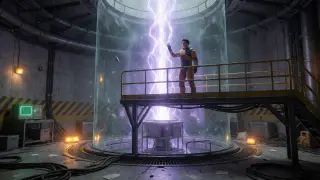
“Black Mesa test chamber: concrete, steel catwalk, cable trays, yellow hazard stripes.” Materials make the room believable.
The one impossibility
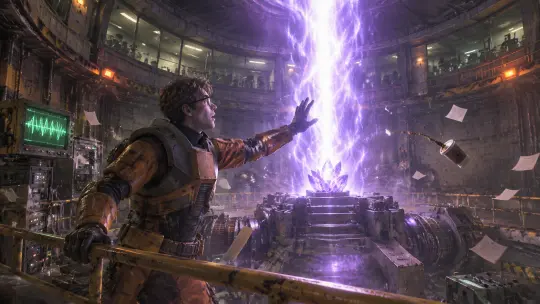
“A violet-white column of rift energy rising out of the sample cart.” One only.
The witness and the cost
“A young physicist in a scuffed orange HEV suit, one hand raised, stunned rather than heroic.”
Light in two colours
“Emergency amber strobes against cold rift violet, long hard shadows, smoke in the air.”
The fence
“No text, no logos, no watermark, no HUD, no extra limbs, no anime proportions.” Repeat it every time.
Step 4 — Render the World Frame
Render the accident brief at 2048×1152 with quality high. Read the result in this order: silhouette, planes, materials, faces, light. If the silhouette fails, stop — no amount of detail will rescue it. If the planes are flat, rewrite the place clause with a foreground object; a catwalk rail or a console edge is usually enough.
If the rift is blowing out the subject, move the subject laterally in the prompt (“on the left third of the frame”) rather than asking for less light. The model responds to position more reliably than to intensity.
Step 5 — Render the Occupation Frame
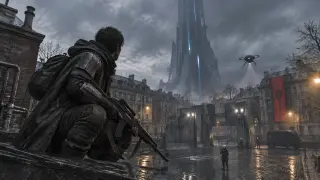
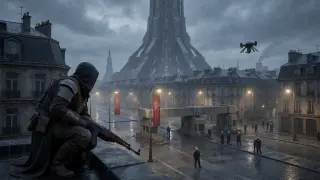
The second frame tests the opposite skill. Write a place that explains the world without an event: a rooftop, a plaza, a checkpoint, a spire. Keep the same palette and the same camera height so the two frames can sit next to each other on a page without looking like different projects.
Step 6 — Run the Comparison
Send the identical sentence to Krea 2 once. The point is not to find a winner; it is to learn what your prompt is actually saying. If Krea 2 produces a cleaner poster from the same words, your brief was probably a poster brief. If it loses the room, your brief was doing real staging work and GPT Image 2 was carrying it.
- Keep the prompt identical. Change one word and the comparison is worthless.
- Record both sizes. The models returned 1672×941 and 2048×1152 for the same 16:9 brief.
- Publish both. A comparison doubles the content and proves the world can survive interpretation.
Step 7 — Fix the Frame, Not the Model
Most bad grounded sci-fi renders are prompt problems wearing a model costume. A missing cost, a second impossibility, a crowd with no roles, a HUD that crept in through the word “screen” — each has a one-line fix. Re-render the same idea before you change models; changing models resets every other variable.
The most useful fix in this genre is to add a witness. A frame with an actor and a record — a guard watching a queue, a scientist watching a gauge — reads as a story. A frame with nobody looking reads as a wallpaper, however good the light is.
Step 8 — Publish the Work
Publish each render as a work attached to the world, with the prompt and the model recorded. The share page is the reproducible artefact: it carries the world, the brief and the result in one link, which is exactly what a collaborator needs in order to disagree with you productively.
A work page carries the argument
Prompt, model, world and image together. Anyone can re-run the prompt or fork the world.
A world page carries the rules
The cards are the source of truth. Works are evidence that the cards can produce images.
A comparison carries the insight
Two models, one sentence. That is the only benchmark that survives a version bump.
Prompt Template You Can Reuse
Photorealistic 3D CG render, cinematic 16:9, physically based rendering. [PLACE], with [MATERIAL 1], [MATERIAL 2] and [MATERIAL 3]. A single [IMPOSSIBILITY] at the centre of the frame. [WITNESS] in the [POSITION], [COST made visible], expression [EMOTION rather than power]. [DOMINANT LIGHT with colour] against [ACCENT LIGHT with colour], [ATMOSPHERE: dust / rain / smoke] catching the light. No text, no logos, no watermark, no HUD, no extra limbs, no anime proportions.
Fill every bracket with a noun you could photograph. If a bracket needs an adjective to make sense, the world card is not specific enough yet.
Common Mistakes
Checklist Before You Publish
- Style clause first; subject second; materials third.
- Exactly one impossible element, named once.
- One dominant light and one accent, both with colours.
- A named witness whose posture shows the cost.
- Camera height and focal length specified.
- Negative list includes text, logos, watermark, HUD.
- Prompt, model and size recorded next to the image.
- The frame reads at 1200 px wide and at 300 px wide.
Frequently Asked Questions
- How long does one frame take? Two or three renders at high quality, plus one comparison. Composition is the slow part, not generation.
- Do I need the newer model? Test it with the same six clauses. The recipe transfers; the version number is the least interesting variable.
- Can I use this recipe for fantasy? Yes, but “grounded” comes from materials and authority. Keep the checkpoint and lose the laser.
- What if the crowd looks like a texture? Give three people a named job and the rest will follow.
- Should I publish failures? Publish comparisons. A failed frame next to a fixed one is the most useful thing on the page.
Next Steps
Once the two frames hold together, extend the set. The accident gives you the room, the occupation gives you the street, and the cast gives you the doorway. Render one plate per faction, then one portrait per character, and you will have an art department rather than a portfolio.
Put the Guide to Work
Put the guide to work: fork the world, keep the six clauses, and publish the comparison.
The four works in this guide are published from the Half-Life world and keep their prompts. Fork it, rewrite the founding mistake, and the recipe will still hold.