
How to Use GPT Image 2 for Superhero Comic Key Visuals — A Step-by-Step Guide with a Real Invincible World
Six steps to banner-ready superhero comic key visuals with GPT Image 2 — prompts, model comparisons, and troubleshooting, proven on real works from the Invincible world.
How to Use GPT Image 2 for Superhero Comic Key Visuals
A practical, step-by-step guide to generating banner-ready superhero comic key visuals with GPT Image 2, using a real Neta Studio world — Invincible — as the worked example. By the end you will know how to choose a scene, cast a subject, control the light, run the two-model comparison, and publish covers that stay on-canon.
What You Need
- A world seed — fork the Invincible world or write a one-sentence superhero brief.
- A scene — a hero, a city, a faction, and a moment worth a cover.
- A model pair — GPT Image 2 for detail, Krea 2 for atmosphere.
- Thirty minutes — a handful of covers in one session, published as works.
Step 1 — Choose the Scene
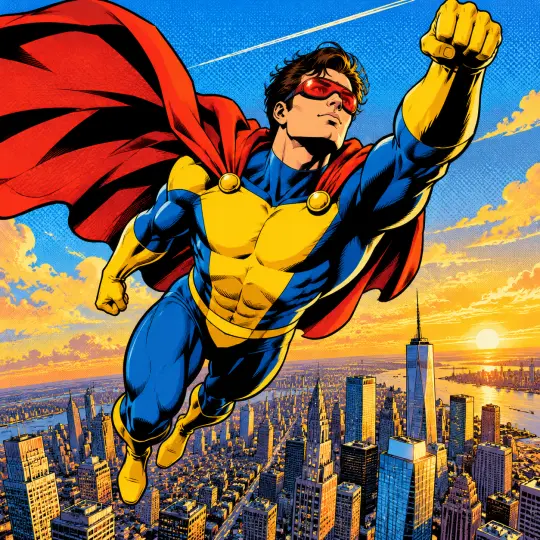
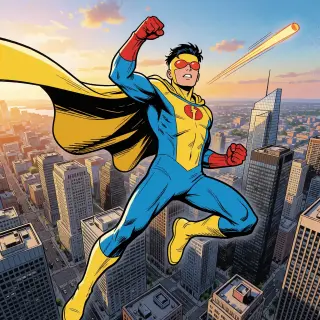
Start with a scene that has visual conflict. Invincible offers several: a hero above a city at golden hour, a father-and-son showdown in the ruins, a covert agency at work, a grey lunar plain where hard answers surface. Pick the one with the clearest power dynamic — a figure against a world is the fastest cover to read.
Step 2 — Cast the Subject
Name the hero and their moment. A teenager in a yellow-and-blue suit with red goggles gives the city scale and the genre at once; a tall caped father in red and white gives the frame its threat. The subject is what a reader identifies with in the first half-second.
Prompt template: "[a subject] in [a place], [a moment], [an elemental accent], [a light]. Bold American comic ink and flat color, halftone ben-day dots, hard black shadows, no text, no watermark." Fill it once and reuse it — consistency is what makes a set of covers feel like one world.
Step 3 — Set the Mood with Light
Light is the fastest way to make a key visual read as key art. Golden hour sells heroism; ash-grey overcast sells confrontation; a single hard shadow sells danger. State the light explicitly — "golden hour", "ash-grey ruins", "one hard shadow" — and the model will build the palette around it.
Step 4 — Run Both Models
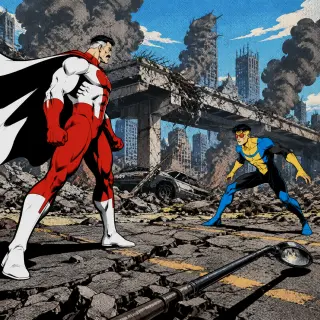
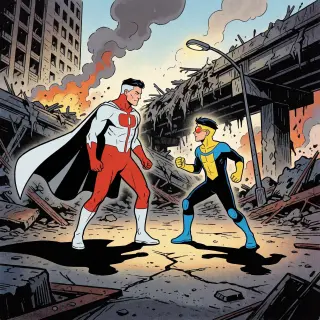
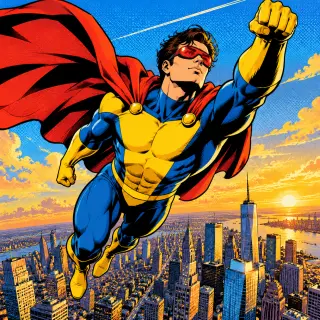
Run the exact same prompt through GPT Image 2 and Krea 2. On Neta Studio both renders publish as works of the world, side by side, so the comparison is the deliverable rather than an afterthought. GPT Image 2 answers with detail and structure; Krea 2 answers with mood and atmosphere.
Step 5 — Compare and Choose
Compare the pair against your art direction. Detail-first suits covers, title screens, and storefront banners; atmosphere-first suits mood pieces, teasers, and backgrounds. When the two are close, pick the one that survives a thumbnail crop — that is the frame a reader actually sees first.
Step 6 — Publish and Iterate
Every render publishes as a shareable work of the world. Iterate by re-prompting the same scene with one variable changed — the light, the subject, or the moment — or by forking the world and rewriting its canon. The loop is the method: prompt, render both, compare, publish, repeat.
Write
Prompt the scene, subject, and light in one sentence.
Render
Run GPT Image 2 and Krea 2 on the same brief.
Compare
Publish both as works; compare against your direction.
Iterate
Re-prompt, fork, or build the next work from the same world.
Prompt Recipes That Work
- Hero above a city — "a young hero in a yellow-and-blue suit with red goggles hovering above a sprawling American city at golden hour, cape whipping in the wind, one fist raised, bold black ink and flat color, halftone dots, no text".
- Father and son — "a tall caped father in a red-and-white suit and his son in yellow and blue circling each other across the ruins of a shattered city, cracked asphalt, torn steel, drifting ash, hard black shadows".
- The agency — "a covert defense agency war room buried under a city, wall screens and maps, silhouetted agents, cold blue monitor light, no text".
- Alien horizon — "a one-eyed alien and a half-Viltrumite standing on a grey cratered plain under an alien sun, two small figures against a vast sky, flat color and bold ink".
Troubleshooting
- Too realistic — add stronger style cues: "bold variable-width black ink, flat local color, halftone ben-day dots, not photography".
- Accidental text — add "no text, no watermark, no typography" and keep titles out of the prompt.
- Wrong palette — restate the world’s colors: "primary colors, solid black, a few hard shadows".
- Too busy — cut one element; a cover with two figures reads better than one with six.
- Model drift — re-anchor on the world seed: fork the world instead of re-typing style notes.
What's Next After the Poster
The key visuals in this guide are public works of the Invincible world — covers you can study, fork, and build on. Once the six steps are second nature, use the same workflow on the world’s other scenes, or fork the world and rewrite its canon to make the covers your own.
Step 7 — Render the World's Worst Night
Once the steps are second nature, stress-test them on an event: the Revelation, the night a father tells his son the truth and nearly kills him for refusing to kneel. Event covers are harder — two subjects, motion, and a broken environment — which makes them the best proof that your prompt and your world seed are doing the work.
Frequently Asked Questions
- Can I follow this guide without the Invincible world? Yes — the steps are model-general. The world simply supplies a ready-made seed to practice on.
- Should I always run both models? For key visuals, yes — the comparison is fast and it makes the direction decision obvious.
- How do I keep a set consistent? Keep the world seed and the style cues fixed; vary only the scene, subject, and light.
- Where do the covers live? Every render publishes as a shareable work of the world on Neta Studio.
Start Your Key Visual
Follow the six steps with GPT Image 2 — fork the Invincible world, run the pair, and publish your first cover. Your next superhero comic key visual is one prompt away.
Start Your Key Visual
Follow the six steps with GPT Image 2 — your superhero comic key visual is one prompt away.