
How to Use GPT Image 2 for Tidegate Key Visuals
A practical, six-step method for turning a Tidegate atom pair into a published key visual: choose the threshold, write six clauses, stage the door, light it like a tide, render wide, and compare both models on the same brief.
Introduction
Most AI fantasy art fails for a boring reason: the brief describes a mood instead of a place. “Dark harbor, lantern, fog” produces a beautiful image that could belong to any coastal story ever told. Tidegate gives you a better starting point, because the world has rules that can be written down and checked. A door opens at the ninth hour of the ebb. A crossing costs a name, a year or a home. The bell keeps permission, not time.
This guide shows how to use GPT Image 2 to turn those rules into a key visual, step by step. It is the same method used for the four published works on the world and tool pages, so you can open them side by side and see exactly what each clause does.
What You Need Before You Start
- A world board. Fork Tidegate so the characters, locations, events and factions are already loaded.
- One atom pair. A location plus a faction, or a character plus an event. Two atoms is enough; five is noise.
- The model. GPT Image 2, quality high, PNG output, opaque background.
- A crop plan. Decide whether the frame is a wide world card or a vertical keeper portrait before you render.
Step 1 — Choose an Atom Pair
Do not start with “the world.” Start with two atoms that already disagree a little. The tension between them is what the image will be about, and it is also what stops the model from falling back on generic harbor imagery.
Step 2 — Write the Six-Clause Brief
The recipe is six clauses in a fixed order. Each clause constrains the next, so the order matters more than the wording. Put the rendering system first, because it stops the model reaching for illustration; put the negative clause last, because it closes the door on typography and painterly drift.
Rendering system
35mm film still, photoreal, visible film grain, warm low lamp light, desaturated bone-white and warm grey, deep soft shadows.
Composition
Wide establishing shot with a low camera — or vertical environmental portrait. Name it explicitly.
Place and threshold
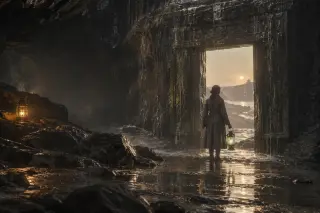
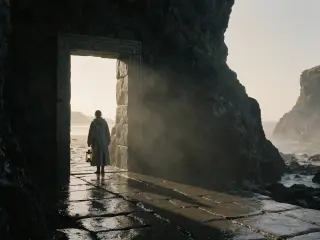
The cave, the black basalt, the drowned stone doorway, the carved lintel, the seawater sheeting down it.
Subject and faction
Who is at the door, what they wear, what they carry, which faction that garment belongs to.
Wrong-physics detail
The coast instead of rock, the sea light inside the frame, the water that does not obey the cave.
Negative clause
No readable text, no watermark, no logo, no illustration, no painterly style, no anime.
Step 3 — Stage the Doorway
A Tidegate frame is built around a threshold, so stage it like a stage set. The cave is the room, the doorway is the proscenium, and the figure is the actor who has to decide whether to walk through. Put the door on a third line, not dead centre, and give the camera a low, patient position.
Then decide what is on the far side. A pale coast means the door is working. Grey water means the tide is against you. A second lantern on the rocks means someone is already waiting. None of these are decoration; each one is a sentence in the story you are about to tell.
Step 4 — Light It Like a Tide
Tidegate lighting is economic. Every source should tell the viewer who is paying for the space. Keep the cave almost colourless and let the door be the brightest thing in the frame.
- Lantern amber — the working light. Warm, low, always held by someone.
- Green glass — the Tidewarden signature. A small accent, never the whole image.
- Green visor — the Exchange. Put it on a face in a vault of brass cages.
- Sea light — pale, overexposed, always beyond the threshold.
Step 5 — Render Wide, Crop Late
The published crop is rarely the rendered crop. Render at 1536×1024 for a world card, keep the lintel in the middle third, and crop to the card afterwards. A square render loses the cave and the coast; a tall render loses the causeway. For keeper portraits, 1024×1536 gives you room to crop without cutting the lantern off at the wrist.
| Output | Size | Why |
|---|---|---|
| World card | 1536×1024 | 3:2, room for the cave, the door and the coast |
| Keeper hero | 1024×1536 | 2:3, lantern and pendant both survive |
| Phone wallpaper | 1088×1920 | 9:16, render taller than you need |
Step 6 — Compare Models, Publish Both
Run the identical brief through GPT Image 2 and Krea 2. GPT Image 2 gives you the textured, populated version; Krea 2 gives you the graphic, thumbnail-proof version. Publish both, and let the crop decide which one goes to the store page.
Common Mistakes and Fixes
- Saying “game” or “poster”. Both pull in UI furniture. Say “key visual” and “film still.”
- No negative clause. Dark harbor art attracts accidental typography. Always close with “no text, no watermark, no logo.”
- A door with no destination. Add the coast. Otherwise the model paints a dark rectangle and stops.
- Clean dry stone. Water is the clock. Keep “seawater sheeting down the lintel” in every prompt.
- A belt of forty keys. One brass tally-key reads; forty read as costume jewellery.
Most “bad” Tidegate generations are not model failures. They are brief failures: a missing coast, a pose that hides the toll, or a door that was never given a destination. Fix the brief before you re-roll the model.
A Worked End-to-End Example
Here is the full loop on one frame, from atom to published work. The atom pair is the Saltglass Caves plus the Tidewardens; the subject is Maren Voss; the model is GPT Image 2.
Atom pair
Location: the Saltglass Caves. Faction: the Tidewardens. Character: Maren Voss, keeper of the Ninth Bell.
Six clauses
Rendering system, wide establishing shot, cave and drowned door, warden from behind with lantern and tally-key, coast beyond, negative clause.
Render wide
1536×1024, quality high, PNG, opaque.
Second model
The identical brief through Krea 2 at 1024×768. Publish both.
Publish
Attach both frames to Tidegate as works, with the prompt and atoms. Forkable.
Where to Go Next
Once the six-clause brief is automatic, the interesting work begins: choosing atom pairs that contradict each other. Put the lighthouse keeper in the Customs Exchange. Put a Salt Cartel captain in the Bell Tower. Put the Closing Tide inside the Auction of Keys. The world is at its best when two of its own rules disagree.
Start Creating
Six clauses, two models, four published works — now render the door only you would choose.