
How to Use GPT Image 2 for Violet Evergarden Key Visuals
This is a working guide, not a gallery tour. It assumes you have the world open and want a frame that reads as Violet Evergarden: the right body, the right uniform, the right objects, the right silence. Every clause below was used on the published works in this world, and the failures are the ones we actually hit.
The model does not know the series. It knows what you write down. The guide is a way of writing down the parts that make the character legible.

Before You Write a Prompt
Do three things first. Pick the material card the image is for. Decide what the image has to prove. Choose whether you are generating a scene or a portrait. The answers change the prompt more than any adjective.
Pick the card
Character, location, event or commission. A character cover wants a face and a body; a commission wants two people and an object; a location wants depth and weather.
Name the proof
What must a viewer be able to say after one second? "She has mechanical hands." "This is a postal house." "He is watching her leave." Write that sentence down before the prompt.
Choose scene or portrait
A portrait isolates the body against a background. A scene puts the body in a room with an action. Never ask for both; the model will split the difference and produce a mannequin.
Step 1: Lock the Medium
Start with the rendering system. This world uses anime cel-painted key art: flat colour base, designed hard shadow, limited mid-tones, selective line art. If you skip this clause, GPT Image 2 will default to a photograph or a 3D render with a cinematic grade, and no amount of character description will bring it back.
Anime cel-painted key art, 16:9. Flat colour base, designed hard shadow, limited mid-tones, selective line art, painted edges only at the focal point.
Step 2: Describe the Body and the Hands
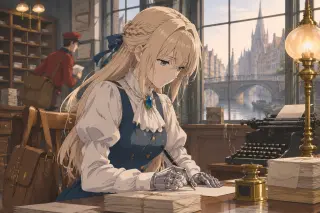
This is the clause that decides whether you get Violet or a lookalike. Write age, build, hair, eyes, and the prosthetics. Then write the gloves and their state. The mechanical arms run from the elbow down: articulated silver, visible wrist and knuckle joints, a faint seam at the elbow. In public, white gloves to the elbow. In a private scene, gloves off or pushed back.
A slim young woman, pale blonde hair half-pulled back, steady blue eyes, white high-collared blouse, blue bodice and skirt, deep blue brooch at the throat; articulated silver prosthetic forearms from the elbow down, visible wrist and knuckle joints, white gloves pushed back.
Step 3: Build Leiden Around Her
A room is not a backdrop; it is a set of facts about the world. Gaslight, brass, wool, stone, paper, canal water. The postal house has stacks of sealed letters, a typewriter, an inkwell, a lamp, tall windows, and a bridge outside. Name three of those objects, not ten. The model will add the rest, and the rest is where the errors live.
A canal-side postal office at dawn: a wooden writing desk, stacks of sealed envelopes, a brass inkwell, a black typewriter, one lit gas lamp; tall windows showing stone bridges and a canal in morning mist.
Step 4: Stage One Emotion
Do not write an adjective. Write an action that implies it. "She has stopped writing and is reading the sentence she just wrote" gives the model a body, a gaze and an object. "She is sad" gives it a frown. The world's emotional register is restraint; the image should look like someone holding something back, not someone performing grief.
She has stopped writing and is looking at the sentence she just wrote, the pen still in her right hand, the left hand flat on the paper.
Step 5: Choose Size and Quality
Use 1536×1024 for a landscape scene and quality high. The hands and the letter stacks need the extra pass. If the image is destined for video, 2048×1152 works; if it is a portrait card, 1024×1536. Do not use a square frame for a room scene; it crops the evidence.
Size 1536×1024
Landscape 3:2. Enough room for a desk, a seated figure and a window. The published dawn frame uses this size.
Quality high
The finger joints and the paper edges are the first things to soften at lower quality. High is slower, but it is the difference between a prosthesis and a glove.
PNG output
Keeps flat colour clean. WebP is fine for the web; avoid JPEG for large areas of single colour.
Step 6: Compare Against Krea 2
Run the same prompt through Krea 2 once. It is fast and flat, and it tells you which parts of your prompt are doing the work. If Krea 2 produces a readable scene without the prosthetics, your prompt is leaning too hard on detail and not enough on identity. If GPT Image 2 produces a dense room but Krea 2 produces a stronger silhouette, you have found the poster version of the same scene.

Troubleshooting
These are the failures we hit while making the published works, and the clause changes that fixed them. None of them required a new model or a new seed.
- The hands disappearMove the hands into the foreground and name the joints. "Articulated silver prosthetic forearms, individual finger joints, wrist seam" is stronger than "mechanical arms."
- The face driftsAttach a character cover as a reference and stop re-describing the face in text. Let the reference carry identity; let the prompt carry scene.
- The room is wrongReplace adjectives with materials and objects: gas lamp, brass inkwell, stone bridge, canal mist, wool coat. Remove one object per iteration until the frame is quiet.
- The image is a poster, not a sceneAdd a second body and an object between them. A client, a letter, a photograph, a bill. The world is about transactions, not poses.
A Complete Worked Prompt
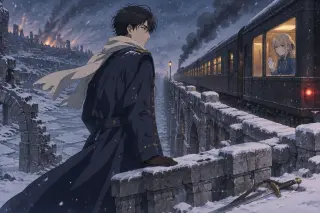
This is the full prompt behind the published bridge image, with the clauses in the order that worked. Use it as a template: keep the skeleton, change the scene, and leave the medium and the body alone.
Anime cel-painted key art, 16:9, for a literary post-war fantasy. The last night of the Great War at the Intense front: a ruined stone bridge over a frozen river under falling snow and distant artillery smoke. A tall dark-haired officer in a long navy greatcoat, white scarf and leather gloves stands alone at the bridge rail, looking back toward a departing troop train. In the lit window of the last carriage, a young pale-blonde girl in a blue military coat presses a white-gloved hand to the glass. Warm lamplight against cold blue snow, drifting embers, a broken sabre half-buried in the snow. Tender and devastating; clean cel shading, hard-edged shadow, limited mid-tones, selective line art. No text, no logos.
What Good Looks Like
A good frame in this world passes four tests. The body is Violet's, not a cosplayer's. The room could only be Leiden. There is one object that implies a transaction. And the emotion is being held back, not performed. If all four are true, the model has done its job and the card can carry the image.
A bad frame usually passes one test loudly and fails the other three quietly. A beautiful face in a modern room is still a bad frame. A perfect postal house with a generic blonde is still a bad frame. Judge the image against the world, not against the prompt.
Use the Guide on a Real Scene
The world, the cast and the four published key visuals are ready. Open the studio, pick a card and run the prompt skeleton — or start from neta.art with the world as your seed.
Guide for GPT Image 2 inside the Violet Evergarden world. Example images are the world's published works. Independent fan work; not affiliated with Kyoto Animation. Open the world studio.