How to Use GPT Image 2 for Zelda World Art — The Prompt, the Light and the Small Check
A working guide to GPT Image 2 for Zelda-style world art: read the world, write the style contract, build the depth stack, light one thing, and check the frame at thumbnail size — with both literal prompts published.
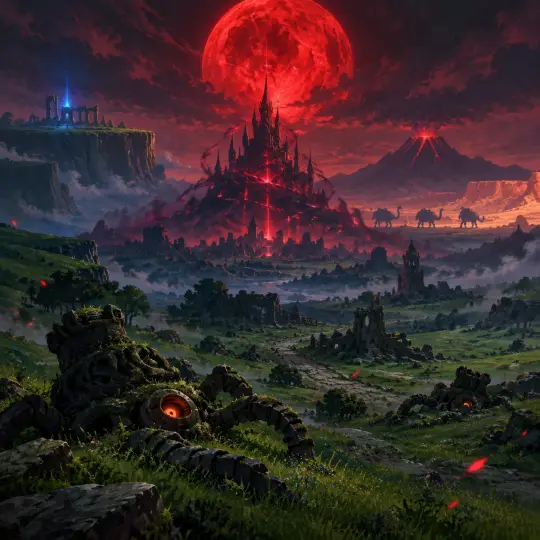
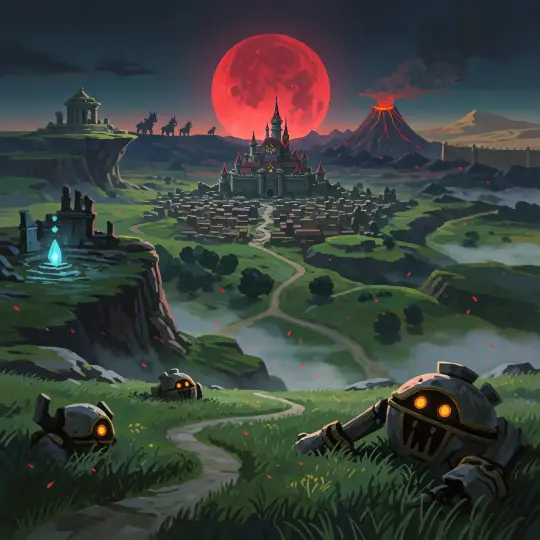
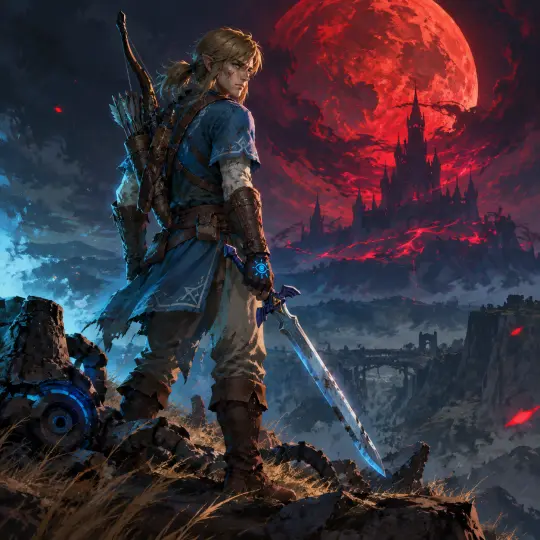
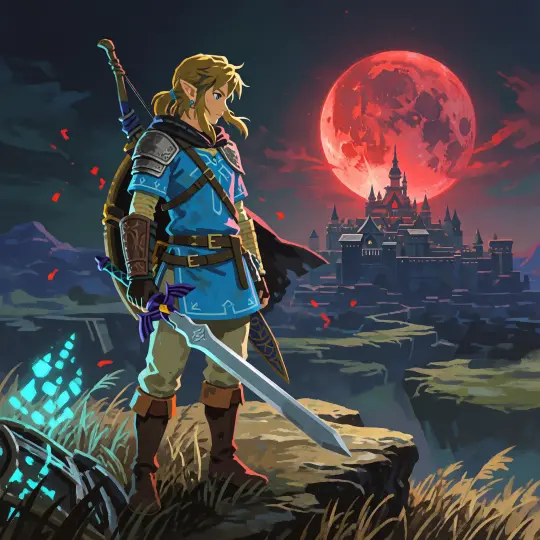
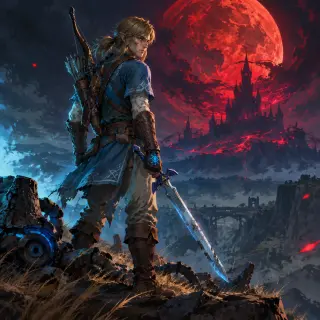
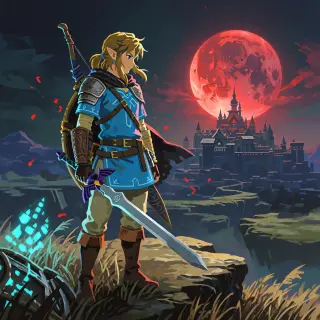
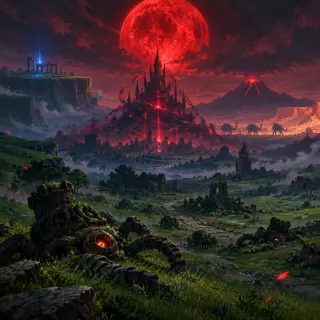
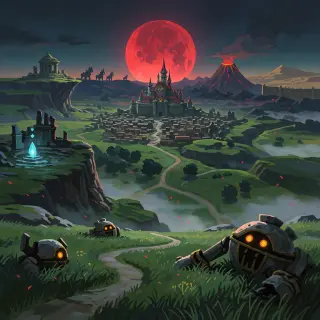
This guide is written from four images that actually shipped: a Hyrule world key visual and a Link character poster, each generated twice — once with GPT Image 2, once with Krea 2 — inside Hyrule: The Blood Moon Age on Neta Studio. Every prompt quoted below is the literal text used, at 1024×1024, with no reference image and no post-processing. If you follow the order, you will get images in the same register.
The method is not a secret prompt. It is a sequence of decisions made before the model is asked to render anything: read the world, write the style contract, build the depth stack, cast the frame, light one thing, and check the result at thumbnail size. GPT Image 2 is very good at the middle of that sequence and very willing to make the first and last steps your job.
| Quick facts | |
|---|---|
| Goal | A Zelda world key visual and a character poster that match one world |
| Model | GPT Image 2, 1024×1024, quality high |
| Comparison | Krea 2 on the identical prompts, same size |
| Prompts | 2, published in full below |
| World | Hyrule: The Blood Moon Age — 26 atoms |
| Time | About one sitting for the pair; iteration is the expensive part |
| Rule | One frame, one light direction, one story |
Before You Prompt: Read the World
Hyrule: The Blood Moon Age is a world about a failing seal, and that fact should be visible in every image. Before writing a word of prompt, read the four pressures: the seal is thinning, the tribes are stalling, the machines are still hostile, and the knight cannot remember why he should care. Those four facts decide what a good image looks like. The castle should look like a lock under load. The landscape should look lived-in and abandoned at the same time. The knight should look repaired rather than chosen.
- Strong beats a cocooned castle pierced by red veins, a plateau shrine glowing in a dead landscape, a knight with a chipped sword and mismatched repairs, dead Guardians in the grass
- Weak beats a hero posing with a green hat, a generic fantasy castle on a hill, a party lineup, a monster roaring at the camera, a landscape with no evidence of history
- The test describe the frame in one sentence. If the sentence contains a mood but no place, the prompt is not ready.
Write the Style Contract First
The style contract is the part of the prompt that does not change between images. Write it once, keep it under eighty words, and paste it into every prompt in the set. For this world the contract is Commercial Game Painterly: broad visible painted planes, hard structural edges, large connected colour groups, deep shadows, a few saturated accents, detail only on face, hands and signature props.
| Quick facts | |
|---|---|
| Medium | High-finish commercial game painting |
| Shaping | Broad visible painted planes; structural grouping before detail |
| Edges | Hard at turns and focal points; soft only on organic and distant forms |
| Colour | Large connected local colour, deep shadows, blood red + shrine cyan accents |
| Detail budget | Face, hands, signature props; large surfaces quiet |
| Negative list | Line art, airbrush gradients, PBR glass, photo skin, 3D look, text, logos, watermarks |
Build the Depth Stack Before You Add Anything
A world key visual is a depth stack before it is a picture. Decide the three bands and what each one owes the story. Foreground: evidence (dead Guardian plating, tall grass, a broken road). Middle distance: the problem (the cocooned castle, the castle town, the plateau edge). Background: the scale (the blood moon, the volcano, the desert wall, the Divine Beast silhouettes). If you cannot name what is in each band, the model will fill the gaps with generic fantasy.
Foreground — evidence
Broken Guardian machines half-buried in grass, orange eyes dim, red embers drifting. This tells the viewer a war happened here.
Middle distance — problem
The castle wrapped in a red-black cocoon, its spires pierced by glowing veins, the ruined castle town at its feet. This is the thing the image is about.
Left anchor — history
The Great Plateau, cut off and high, with a ruined temple and one cold blue shrine-light. This is where the knight woke.
Right anchor — geography
A volcano with a red caldera and the pale wall of the desert. This is the size of the kingdom.
Horizon — scale
Four Divine Beasts silhouetted like patient animals. This is the technology that turned.
Sky — clock
An enormous blood-red moon and thin embers. This is how much time is left.
Light One Thing, Then Let the Rest Fall
The single most common failure in AI fantasy art is democratic lighting: everything is lit, so nothing is. Choose one dominant source and one accent. In the world image the dominant source is the blood moon, with the castle's Malice veins as a secondary glow and the shrine cyan as a cold accent. In the character image the moon is warm and red on one side, the shrine is cold and cyan on the other, and the face is caught between them. That is not decoration; it is the argument of the world rendered as light.
Write the light into the prompt as a direction, not an adjective. 'Warm red moon light from the right, cold cyan shrine rim-light from the left' is usable. 'Dramatic lighting' is not. GPT Image 2 will honour a direction and ignore a mood word.
The Literal World Prompt
This is the exact text used for both world images. It is long, and every clause earns its place: geography, evidence, light, style, negative list. Do not shorten it on the first attempt; shorten it only after you know which clause the model is ignoring.
Key visual for the dark fantasy game world "Hyrule: The Blood Moon Age". A single wide panoramic establishing landscape at night with no characters: a vast green kingdom of hills and dead roads under an enormous blood-red moon; in the middle distance Hyrule Castle stands wrapped in a red-black cocoon of Malice, its spires pierced by glowing veins, the ruined Castle Town spread at its feet; to the left the high cut-off table of the Great Plateau with a ruined temple and a cold blue shrine-light; to the right a volcano with a red caldera and a distant desert wall; four mechanical Divine Beasts silhouetted on the horizon like patient animals; broken Guardian machines half-buried in grass in the foreground, their orange eyes dim; thin red embers drifting in the air; mist in the valleys. High-finish commercial game painting, shaping form with broad visible painted planes and strong structural grouping, solid brush-shaped hard edges at structural turns and focal points, limited soft edges on organic and distant areas, large connected local color and value groups, deep-color shadows, a few saturated accent colors of blood red and shrine cyan, detail concentrated on identity and signature props, large surfaces quiet and connected. Cinematic lighting, clear focal subject and readable depth layers, epic and oppressive mood. No text, no letters, no logo, no watermark, no UI, no people, no creatures.
The Literal Character Prompt
The character prompt keeps the world clauses and adds one figure with a condition. Note what is specified: age range, hair, scar, clothing repairs, the glove, the sword's condition, the expression, the two lights, and what is underfoot. The model does not need a biography; it needs visible evidence of one.
Character key visual for the dark fantasy game world "Hyrule: The Blood Moon Age": Link, the knight who was supposed to die a hundred years ago. A single figure, full body, standing on a windswept cliff edge of the Great Plateau at night, three-quarter view, facing the distant castle. He is a lean young man with long ash-blond hair tied back, a scarred right cheek, a worn and repaired blue Champion's tunic with faded white embroidery, leather bracers, a traveler's bow and quiver on his back, and the Master Sword held low in his right hand, its blade faintly blue and chipped; his left hand is wrapped in a fingerless glove marked with a dimly glowing Sheikah eye. Behind him the enormous blood-red moon rises over Hyrule Castle, wrapped in a red-black cocoon of Malice with glowing veins; red embers drift past his shoulder; dead grass and broken Guardian plating lie at his feet; cold cyan shrine-light rim-lights his left side, warm red moon light his right. Determined, exhausted, unsmiling expression. High-finish commercial game painting, shaping form with broad visible painted planes and strong structural grouping, solid brush-shaped hard edges at structural turns and focal points, limited soft edges on organic turns, large connected local color and value groups, deep-color shadows, a few saturated accents of blood red and shrine cyan, detail concentrated on face, hands and the sword, large surfaces quiet and connected. Cinematic character poster, clear focal subject and restrained background, vertical hero composition. No text, no letters, no logo, no watermark, no UI, no extra characters, no monsters.
Read the Result at Thumbnail Size
Before you inspect the detail, shrink the image to 200 pixels wide and look at it for three seconds. A world key visual has to survive a card, a share sheet and a search result. If the composition collapses into mush at thumbnail size, no amount of detail will save it. This is also the fastest way to see what the model actually decided, as opposed to what you hoped it would decide.
- Check one Can you tell where the light comes from at 200 pixels? If not, the light is too democratic.
- Check two Is there one clear focal shape? If the castle and the moon and the plateau all compete, the frame has no subject.
- Check three Does the image tell you something happened before the shutter? Dead machines, repairs and grassed roads are the cheapest way to buy history.
- Check four Is there any text, crest or UI artefact? If yes, re-run with the negative list and avoid words like 'poster' or 'title'.
- Check five Does it still look like the same world as the other images in the set? If not, the style contract drifted.
Model Notes: GPT Image 2 vs Krea 2
Run both models on the same prompt once per project. The point is not to rank them; it is to learn what each one does to your world. GPT Image 2 builds a scene you could walk into: it resolves distance, weather and materials, and it will place six kinds of shadow in one frame. Krea 2 builds a cover: it simplifies gear, strengthens silhouette and flattens colour into readable groups. Both are correct answers to different questions.
| Use | Model | Why |
|---|---|---|
| Establishing shot | GPT Image 2 | Depth, weather and material truth |
| Cover or thumbnail | Krea 2 | Silhouette and flat colour read at small sizes |
| Character with gear | GPT Image 2 | Repairs, straps, scars and props stay legible |
| Mood exploration | Krea 2 | Cheap, fast variations before committing |
| Published comparison | Both | Same prompt, same size, no post-processing |
| Final world canon | Both | Keep the pair; the difference is the art direction |
One practical habit: generate the establishing shot on GPT Image 2 first, then run the identical prompt on Krea 2. If Krea 2 produces a better cover from the same text, you have learned something about your prompt. If it produces a different world, the prompt was carrying too little geography and too much mood.
Iterate Without Losing the World
Iteration is where most sets fall apart. The first image is on-model, the fifth is a different kingdom, and nobody can say when it happened. The fix is to change one axis at a time and to keep the style contract fixed. Geography, weather, evidence, cast and light are the axes. Change one, regenerate, compare against the anchor image. If two axes moved, you will not know which one broke the world.
Keep an anchor
Choose the best image from the first run and never overwrite it. It is the reference for every later comparison.
Change one axis
Weather, viewpoint, evidence, cast or light. One only.
Re-run the same contract
Paste the style contract unchanged. Do not 'improve' it mid-set.
Compare small
Put the new image next to the anchor at 200 pixels. If the silhouette language changed, stop.
Record the prompt
Store the exact text and the model name with the file. An image without its prompt cannot be reproduced or defended.
Publish the pair
When you run a comparison, publish both images and both model names. The comparison is more useful than the winner.
Publish the Comparison, Not Just the Winner
A world page with one image is a mood board. A world page with a matched pair is a method. Publishing both models on the same prompt does three things: it proves the world is a system rather than a lucky generation, it gives other creators a reproducible starting point, and it makes the style contract legible. The four works on this page exist for that reason: two prompts, two models, one world.
Keep the language precise. Say which model made which image, quote the prompt, state the size and the absence of post-processing. Do not claim the model 'understands' the franchise; it understands the frame you gave it. That honesty is what makes the guide useful after the next model release.
Write your own Hyrule prompt
Open the world, copy the style contract, and run the six-step loop. Start with the establishing frame, then the character, then the comparison. The prompts on this page are copy-paste ready.
One world, four published works, two models
The prompts on this page are copy-paste ready — and every image came from the same 26 atoms.
Platform: Neta Studio · Type: Guide · GPT Image 2 for Zelda world art · World: Hyrule: The Blood Moon Age · Works: Hyrule Under the Blood Moon (GPT Image 2 / Krea 2) · The Knight Who Should Have Died (GPT Image 2 / Krea 2)