
How to Use Krea 2 for Interstellar Key Visuals — A Step-by-Step Guide with a Real Space Opera World
Seven steps to painterly interstellar key visuals with Krea 2 — prompts, scale control, palette logic, model comparison and troubleshooting, proven on four real works from The Meridian Debt.
How to Use Krea 2 for Interstellar Key Visuals
This guide is a working method, not a list of magic words. It assumes you already have a world with rules, or that you are willing to borrow one. Every step is demonstrated on The Meridian Debt, an original interstellar-style space opera built in Neta Studio, using the same four published frames that appear on the world page. By the end you should be able to produce a key visual that belongs to a specific place, not a generic science-fiction wallpaper.
What You Need Before You Start
- A world with at least one location and one social rule. A premise is not enough; you need a place and a cost.
- One scale object: a caged star, a ring habitat, a corridor through a sun.
- One human witness: a role, a silhouette and a reason to be there.
- A two-source light plan: one key, one fill, and a reason for both.
- Aspect ratio and destination: store hero, thumbnail, visual-novel background, trailer frame.
Step 1 — Start From the World, Not the Prompt Box
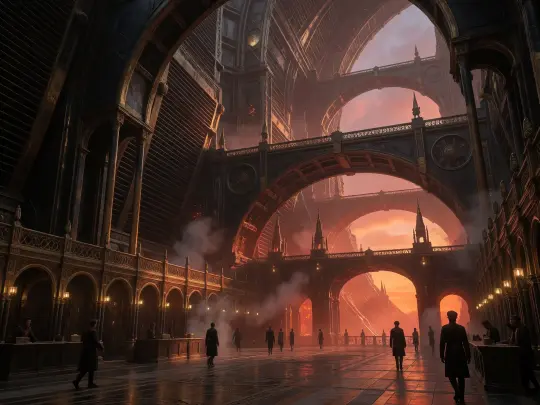
A blank prompt box produces genre averages. A world produces specifics. Open The Meridian Debt and read the location entry for Cinder Court: a capital built into the radiator ring of Gate One, where the light never fully goes out. That single sentence gives you architecture (radiator ring), light (never fully dark), class (who lives there) and a visual contradiction (a city lit by a star it is killing). You cannot invent that from “futuristic city at night”.
Step 2 — Pick One Scene and One Moment
Choose a single timeline beat, not the world in general. Not “The Meridian Debt”, but “shift change at Cinder Court on the night the Sable Sun loses forty years”. The moment supplies a crowd, a mood and a reason for the light to be wrong. Krea 2 responds to that specificity: the figures become commuters rather than extras, and the architecture becomes a workplace rather than a set.
Step 3 — Write the Six-Clause Brief
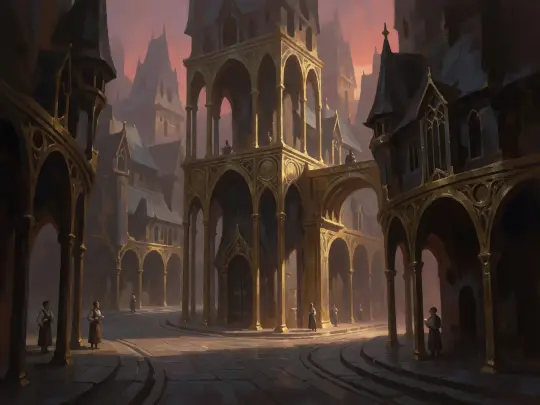
Order matters more than length. Krea 2 weights early clauses for medium and mood, middle clauses for scale and subject, and late clauses for light and atmosphere. Keep the whole brief under 120 words; beyond that the model starts averaging. Write the clauses as sentences, not comma-separated tags, because Krea 2 responds to syntax and rhythm as much as to nouns.
Medium and mood
“Semi-realistic painterly space opera key visual, elegiac and awe-struck.”
Scale object
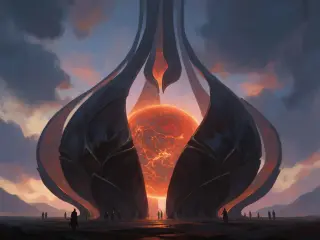
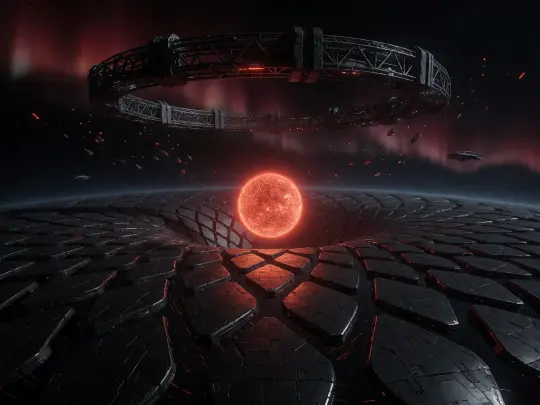
“A red dwarf caged inside a black petal lattice.”
Place
“The approach plain of the Sable Sun, black plates under a rose-gold sky.”
Subject
“A thin line of pilgrims and auditors, small and dark, walking toward the gate.”
Light
“The star is the only key; the cage is a silhouette; cold starlight fills the rest.”
Exclusions
“No text, no watermark, no logo, no UI, no cartoon shading.”
Step 4 — Lock the Painterly Style
Krea 2 drifts toward whatever rendering system you name first. If you say “cinematic still”, it produces a film frame with photographic skin and lens flare. If you say “concept art”, it produces hard-surface grey. For this world, say “semi-realistic digital painting” and add the specific mechanics: continuous volume, controlled soft and hard edges, rich mid-tones, visible brushwork, paper grain. Those phrases keep the image in the same family across a set.
- Do say: semi-realistic digital painting, continuous volume, controlled edges, rich mid-tones, visible brushwork.
- Do say: volumetric haze, dust, steam, wet stone, ash sky.
- Do not say: photoreal, 8K, octane render, hard-surface concept art, cel shaded.
- Do not say: cinematic still or film frame unless you want photographic skin and lens artefacts.
Step 5 — Render With Krea 2
Generate the widest frame your destination allows. A 16:9 or 21:9 hero establishes the palette, the scale and the horizon that every later frame will inherit. Render three to five variations at the same brief and pick by silhouette, not by detail: at thumbnail size, the silhouette is the poster. Only after you have a wide frame that works should you generate closer frames or character plates.
Step 6 — Run the Structure Check
Send the identical brief to GPT Image 2. If both models produce a recognisable version of the same place, the brief is doing its job. If Krea 2 gives you atmosphere but GPT Image 2 gives you a different building, the architecture clause is underspecified. The comparison is a diagnostic, not a competition: it tells you which part of the prompt is load-bearing.
Step 7 — Iterate on Wording, Not Seeds
Most disappointing frames are under-specified, not unlucky. Before you re-roll, change one clause: add a human witness, remove a colour, name the second light, replace an abstract noun with an object. Re-rolling the same prompt teaches you nothing; editing the sentence teaches you which words the model is actually listening to. Keep a small prompt log beside the published works so the next person can see the edits.
Troubleshooting the Common Failures
- Looks like a planet, not a cage. Add “black lattice petals, no planetary surface, the star is contained”.
- Looks like fantasy. Remove “cathedral”, “throne” and “robes”; add “transit hall, ledger, work lamps”.
- No sense of scale. Add a line of human figures in the lower third and one foreground object.
- Too dark to read. Name a fill source: “cold starlight on wet stone, blue-grey ambient”.
- Colours drift between frames. Fix the palette in words: rose-gold, rust, slate, cold starlight, one warm accent.
A Prompt Library for This World
Cinder Court, wide. Semi-realistic painterly space opera key visual: a vast brass-and-iron transit hall inside the radiator ring of a caged star, rose-gold light falling through stacked arches, wet stone, crowds of clerks and pilots in dark coats, steam and incense, one warm lamp against cold blue shadow, cinematic wide, no text.
The Sable Sun, approach. Semi-realistic painterly space opera key visual: a red dwarf caged inside a black petal lattice, a ring habitat above a field of black plates, a thin line of pilgrims on the approach, rose-gold and rust palette, volumetric haze, awe and dread, cinematic wide, no text.
Rim Station Hallow, dock. Semi-realistic painterly space opera key visual: a welded city of decommissioned hulls, cargo cranes, cold blue work lamps, a pilot in a harness crossing a gantry, refugees waiting in the dark, rust and sodium orange, no text.
Keeping a Set Consistent
Consistency is a palette problem before it is a character problem. Fix four things across the set: the medium phrase, the light logic, the palette and the horizon height. If every frame shares those four, the images will read as one production even when the subjects differ. Write the four constants at the top of your prompt log and paste them into every brief. Then vary only the scale object, the place and the witness.
Publishing the Result
Publish each frame as a work of the world, with its prompt and model recorded. That attaches it to the canon, puts it in the world gallery, and makes it available for comparison and remix. A published work is also a quality gate: if you cannot say which atom the frame illustrates, it is not ready. The four frames in this guide are published works of The Meridian Debt, not private experiments.
Where to Go Next
Once the core set exists, extend sideways. Generate a location plate with no humans. Generate the Quiet Archive as a vertical rack corridor. Generate the Tenth Meridian as a seam of un-light with all colour removed. Then fork the world and change one rule — make the debt transferable, make the lamps conscious, make the Tenth Meridian answer — and see how the images change. The method is portable; the world is yours.
Put This Guide to Work
Nine caged stars, four published frames and one working method — generate the next frame in The Meridian Debt.