
AI Isometric Game Maker — Build 2.5D Worlds in Browser
Make your own ai isometric game maker
Describe an isometric world and play it instantly — diamond grid, depth sorting and click-to-move, all in the browser. No code, no export. Free.
An AI isometric game maker takes a written scene description and gives back a playable 2.5D world: a diamond tile grid, a camera locked to a 45 degree yaw, props sorted from back to front, and a character you can send anywhere with a click. Neta Studio does this in the browser. You type the sentence, the composer places terrain and props on the grid, and you press Play. No engine install, no export step, no build pipeline.
The parts that normally eat a weekend are the parts already wired up: the 2:1 projection, the depth sort, and the screen-to-tile inverse transform behind click-to-move. What you actually control is the layout, the tile set, the character, the movement rules, and how far the camera is allowed to move.
One sentence → an isometric world
The composer is the first screen. One text field, a map size in tiles, and a tile size. You describe the scene the way you would describe it to a level designer, generate, and land in the editor with a diamond-grid world already assembled. The default is 64 by 64 tiles at 64 by 32 pixels per tile, which puts a full screen of world inside one orthographic camera with no zoom required.
What comes back is four layers. Ground stores one terrain id per tile and is merged into a single mesh, not one mesh per tile. Props sit on registered footprints: a 1x1 barrel, a 3x3 house, a 2x4 dock that has to touch a water edge. Entities are kept separate from props because they move and need pathfinding data. Lighting and fog sit on top and do not affect sort order.
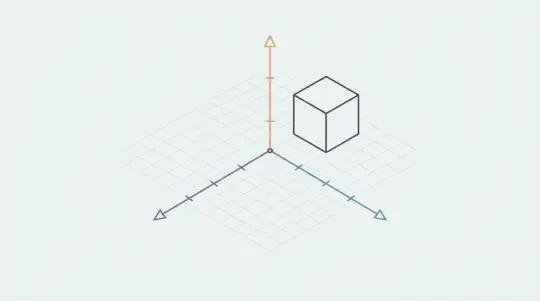
The camera is set to a 45 degree yaw and a pitch that matches a 2:1 diamond exactly, which is atan(0.5), about 26.57 degrees, not the 30 degrees most tutorials quote. Projection is orthographic, so there is no perspective divide and a tile at the far edge of the map is the same pixel size as a tile at the near edge. Depth sorting is active before you ever press Play.
What the composer decides for you
It picks terrain distribution, prop density per biome, and a palette that stays inside one atlas. More importantly it registers footprints, which is the thing that keeps occlusion correct later. If you ask for a harbour town you get docks, crates, and a water edge, but it will not know that the dock has to touch water unless you say so.
What you still place by hand
Repaint terrain with the brush, drag props from the library, and set spawn points. Anything with a rule attached, like a bridge that has to span a river, you place yourself. The composer gives you a starting layout, not a finished level.
01
Write the scene description in the composer field.
02
Set map size and tile size. 64x64 tiles at 64x32 pixels is the default for a walkable map.
03
Generate the world and look at it from the fixed isometric camera.
04
Repaint terrain and move props. Each prop registers its footprint when it is dropped.
05
Drop a character on a walkable tile, then press Play to test click-to-move.
The diamond grid and depth sorting, handled
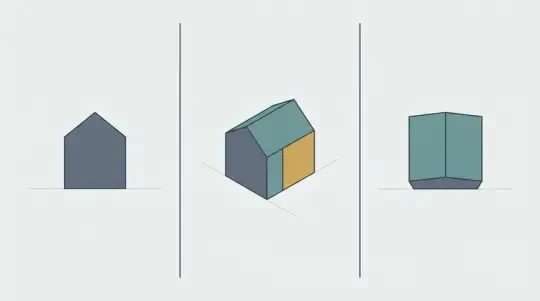
An isometric tile is a square rotated 45 degrees and squashed to half height. With tileW = 64 and tileH = 32, the world-to-screen transform is sx = (x - y) * 32 and sy = (x + y) * 16. That is the entire projection. It is not a true isometric projection, it is dimetric at roughly 26.57 degrees, which is exactly why 2:1 diamonds land on whole pixels and a true 30 degree isometric grid does not. The 2:1 ratio is chosen because it foreshortens both axes equally and lets every sprite be drawn for a single camera angle.
Depth order under this projection is the painter's algorithm: draw the object with the smaller tileX + tileY first. That holds until two objects share a diagonal. A fence at (5, 3) and a character at (4, 4) both produce the key 8. Whichever order the sort returns draws on top, and if the sort is not stable the order flips between frames and the pair flickers at the seam. The second break is height. A sprite anchored at its center sorts by its middle pixel, so a 96 pixel lantern draws over a character standing in front of its base. Anchors belong at the bottom center of the sprite, on the tile the object occupies.
The third break is size. A 3x3 building sorted as one object with key 20 will draw over a character at (9, 12), key 21, even though that character is standing in front of the building's left column. The engine reads the registered footprint and slices anything larger than 1x1 into per-column strips, so the character passes in front of one column and behind the next. It is the same reason a long wall cannot be a single sprite.
- Sort keyPrimary key is tileX + tileY. Secondary is the footprint edge, tertiary is a stable entity id, so equal keys never swap between frames.
- Footprint registrationEvery prop declares its tile footprint on placement. A 2x2 prop will not overlap a 1x1 path tile unless you allow it.
- Per-column slicingProps wider than one tile are split into strips and sorted per strip. A few extra draw calls, no walk-behind glitch.
- Anchor at feetSprites pivot at bottom center. A center pivot breaks occlusion for anything taller than one tile.
- Merged groundGround tiles are merged or instanced by terrain id. A 4096 tile map is one draw call per terrain, not 4096 draw calls.
Click-to-move on a real tile grid
This starts with the inverse of the projection. Take the pointer position, subtract the camera origin and any letterbox offset, then compute tileX = (sx / 32 + sy / 16) / 2 and tileY = (sy / 16 - sx / 32) / 2, then floor both. Get the sign wrong on the second term and the character walks to the mirror tile across the diamond center. That is the bug you will spend an afternoon on.
If the camera can rotate or move freely, do not cache that inverse. Cast a ray from the camera through the pointer, intersect the ground plane, and convert the world hit point to tiles with the same formulas. The raycast version is a few lines and survives every camera change.
Then validate. The clicked tile may hold a prop footprint, be water, be outside the map, or be unreachable. Clamp out-of-bounds coordinates, check the occupancy grid, and run A* over 8 neighbours with a diagonal cost of 1.414 and no corner cutting between two blocked tiles. Move in tiles per second rather than pixels per second, so speed stays constant when you change tile size. Walk through tile centers along a smoothed spline with an arrival radius of about 0.05 tiles, or the character stutters at every waypoint.
01
Convert the pointer into tile coordinates with the inverse transform, or raycast the ground plane if the camera rotates.
02
Clamp to map bounds and query the occupancy grid for props, water, and blocked terrain.
03
Run A* from the character's current tile to the target tile.
04
Move along the path in tiles per second with a smoothed spline and a small arrival radius.
05
Re-path on a new click and cancel the old path instead of queuing both.
Isometric genres you can build
Four genres cover most isometric projects, and they differ in occupancy rules and in time, not in projection. A city builder lives on multi-tile footprints, a road network that has to connect, and a build mode that previews a footprint before placement. Tactics is turn-based, so pathfinding runs for many units at once and range highlighting is drawn straight onto the diamond grid. A dungeon crawler uses small maps and tight corridors, where per-column wall slicing matters most because the camera never moves. An action RPG is real-time, so steering, attack states, and animation blending matter more than pathfinding elegance.
What stays identical across all four: the 2:1 diamond, the sort key, the feet anchor, and the inverse transform on click. Switching genre mid-project changes occupancy rules and the update loop, not the renderer.
| Genre | What changes | What stays the same |
|---|---|---|
| City builder | Multi-tile footprints, road connectivity, build preview and rotation | Diamond grid, sort key, click-to-place inverse transform |
| Tactics | Turn queue, range and line-of-sight overlays, per-unit path previews | Diamond grid, per-column slicing, feet anchors |
| Dungeon crawler | Small maps, wall columns, fog and line of sight | 2:1 projection, depth sort, tile-to-screen formulas |
| Action RPG | Real-time steering, attack states, animation blending | Grid, occupancy grid, click-to-move as the touch fallback |
Play it now — in the browser
Every world here runs in the browser with no install and no export. The scene graph is Three.js, the renderer is WebGL2 with a WebGL1 fallback, and the map loads as merged ground geometry plus instanced props. You press Play and you are walking. Share the world and someone else is walking in it on their own machine, at the same 45 degree yaw.
On phones the same click path runs through pointer events, so a tap is a click. Tap targets are tiles, which means a slightly imprecise tap on a 1-tile prop still resolves to the right tile. Pinch zoom is off by default on maps under 32 tiles across because the 2:1 diamond is already legible at phone width. If frame rate drops, cut prop count before you cut map size; instancing helps more than deleting terrain.
Mini World
Mini World is the small-map case: a compact diamond island, a handful of props, one character, click-to-move across the whole thing. It is the fastest way to watch ground merging and per-tile sorting behave, because you can see the entire map at once and there is nowhere for a bad sort key to hide.
The Cyclops' Island
The Cyclops' Island is the case where occlusion actually matters: tall props, wall columns, and a character that walks behind them. Watch a building corner as the character passes it. The strip in front draws over the character, the strip behind draws under it, and at no point does the character pop through the wall.
Agent Sprite Forge
Agent Sprite Forge produces character sheets drawn for the isometric angle, with the pivot already at bottom center and the frame height matched to your tile height. Keep the camera at the default yaw and one sheet is enough. Enable camera rotation and you need a sheet per yaw step, because a sprite drawn for 45 degrees reads wrong at 90.
Walk into the world it belongs to
A sprite is a character with nowhere to stand. The last step is the one nobody else offers: take the sheet you just built and put it in a world someone can walk around in — a small island, a planet, a rainy street corner. Every world on this site was made from one written description and published as a page you can play.
FAQ
Do I need to write code to make an isometric game here? +
No. You describe the world, repaint tiles, place props and a character, and press Play. Scripting only enters the picture for custom rules, like a bridge that collapses when a lever is pulled.
How is depth sorting handled when two objects share a row? +
The primary key is tileX + tileY, with a stable tie-break so equal keys never swap between frames. Props larger than one tile are sliced into per-column strips, so a character can pass in front of one column and behind the next.
Should I use sprite characters or 3D meshes? +
Both render, but they behave differently. Sprites are cheap, keep the 2:1 look, and are locked to the yaw angle they were drawn at. 3D meshes rotate freely with the camera and cost more per character because of skinning and lighting.
Can the camera rotate? +
Yes, in fixed yaw steps of 45 degrees by default. Free rotation works with 3D props but breaks sprite characters, which need a sheet per yaw step. The sort key is recomputed for the new yaw.
Does it work on mobile? +
Yes. Taps resolve as clicks, pathfinding and sorting run the same code path, and the canvas scales to the viewport. Keep prop counts moderate on older phones, and reduce props before you reduce map size.
Can I export the world to another engine? +
There is no export step. The world runs in the browser and is shared as a link. Rebuilding it elsewhere means recreating the tile map and re-exporting the sprite sheets.
What tile size should I use? +
64 by 32 pixels is the default and reads well on desktop and phone. Drop to 32 by 16 for large strategy maps where you want more tiles on screen, or go to 128 by 64 for a dungeon crawler with detailed props. Whatever you pick, the click math uses tileW/2 and tileH/2, so change it in one place.
Back to the 3D Game Builder
All 31 finished 3D worlds, games and scenes live on one page — every one of them playable.