GPT Image 2 1930s Cartoon Key Visual Generator — Rubber-Hose Worlds in Ink and Cream
Use GPT Image 2 to turn a cartoon world seed into a poster-grade rubber-hose key visual: bold ink contours, pie-cut eyes, flat vintage fills and a disciplined cream-and-umber palette.
Generate a 1930s Cartoon Key Visual with GPT Image 2
Describe an inked archipelago, a casino under the sea or a pair of cup-headed brothers, and get a poster-grade rubber-hose key visual with clean contours and a controlled vintage palette.
What Is the GPT Image 2 1930s Cartoon Key Visual Generator?
It is a prompt-driven image workflow built on GPT Image 2 and grounded in a Neta Studio world. You give it the world — the cast, the islands, the casino, the laws of ink — and a scene. GPT Image 2 returns a key visual in the 1930s rubber-hose idiom: continuous ink contours, solid pie-cut eyes, noodle limbs, white gloves, flat cel fills and a narrow vintage palette. Because the prompt is attached to a canon, the image is not a one-off pastiche. It is a frame from a specific world, with a specific cottage on a specific hill and a specific debt waiting under the sea.
Why Use GPT Image 2 for Cartoon Key Visuals
GPT Image 2 is unusually good at spatial information: it builds a readable depth stack, keeps architecture straight, and places props where a viewer can find them. That matters for a world key visual, where the job is to explain a place in one frame. It also holds a palette well when the palette is stated as a rule rather than a mood.
It is not the cheapest or the fastest model. It is the one you use when the image has to survive a storefront crop, a press thumbnail and a pitch deck without falling apart. For 1930s cartoon work, that means one strong silhouette, a clean floor line and a background that reads as painted scenery — all things GPT Image 2 handles with less prompting than most alternatives.
The World Behind the Generator
The demonstration world is the Inkwell Isles: a 1930s rubber-hose cartoon archipelago where nothing dies, every soul can be signed away, and two cup-headed brothers are working the Devil's collection route in reverse. The world ships with 25 atoms — six characters, five locations, five events, four factions and three laws of ink. The visual style is fixed in the world: 1930s rubber-hose cartoon illustration, bold fluid black outlines, black cream and muted red, flat vintage animation fills. Every prompt inherits that contract.
What Makes a 1930s Rubber-Hose Key Visual
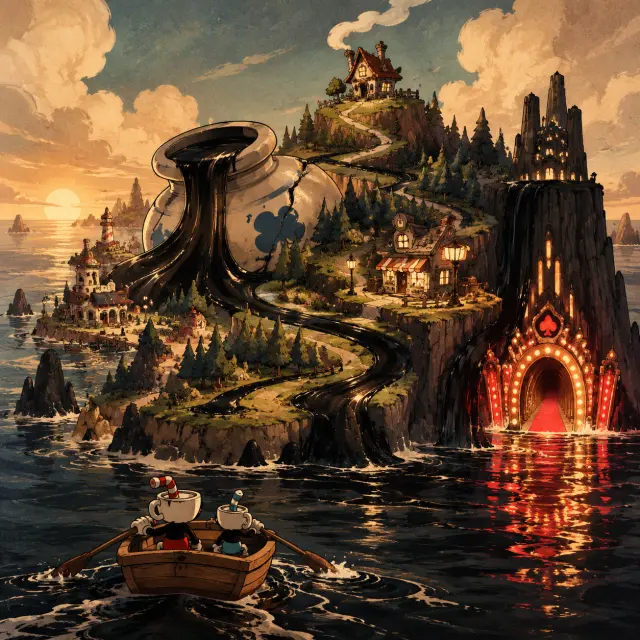
A rubber-hose key visual is a set of constraints before it is a picture. Limbs are continuous curves with no elbows or knees. Heads are simple solids — cups, mugs, teapots, dice — with pie-cut eyes and crescent mouths. Gloves are white and oversized. Outlines vary in weight but never break into sketchy texture. Fills are flat, with at most one soft shadow. The palette is cream, black and umber, plus one saturated accent that tells the eye where to look. Composition is theatrical: a stage floor, a central silhouette, a background painted like a flat. GPT Image 2 follows all of this when the prompt names it explicitly.
State the world first
“A chain of crooked cartoon islands inked in warm sepia, a cracked inkwell spilling black ink into the sea.” Give the model a place before you give it a style.
Block the camera
“Wide panoramic establishing shot, foreground rowboat, mid-ground cottage and pine wood, distant casino cliff.” GPT Image 2 uses this as a depth plan.
Name the drawing rules
“1930s rubber-hose cartoon, bold fluid black outlines, noodle limbs, pie-cut eyes, white gloves, flat cel fills, visible painterly texture.”
Restrict the palette
“Cream, burnt umber, deep ink black, muted teal and one hot casino red.” A short list is stronger than a mood adjective.
Exclude the modern
“No text, no watermark, no logo, no 3D render, no gradients, no modern anime faces.” The negative clause protects the style.
Real Outputs from the Generator
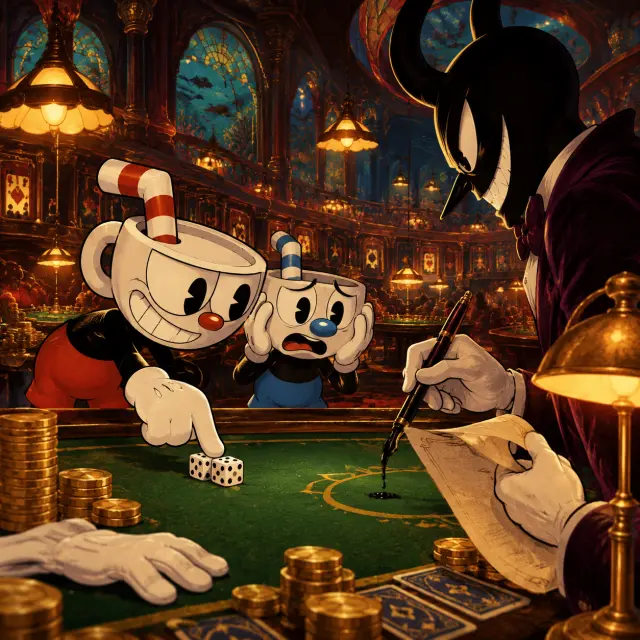
Four works were generated for this world, two subjects through two models. The GPT Image 2 pair is shown here: the world visual and the casino-table character visual. Both use the same palette, the same ink-contour logic and the same stage-like composition, even though one is a landscape and the other is a standoff. That consistency is the point of generating from a world rather than from a prompt library.
Prompt Anatomy
The prompt that produced the world visual has five moving parts. Read it as a contract, not a description.
- Medium: 1930s rubber-hose cartoon dark comedy, rendered as a rich painterly poster.
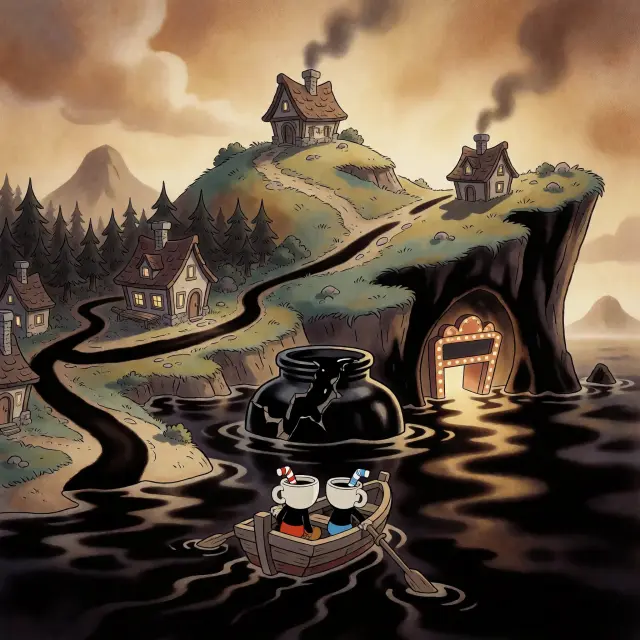
- World: a chain of crooked islands in warm sepia, rubber-hose towns over a churning inky sea, a cracked ceramic inkwell spilling black ribbons that become the islands.
- Landmarks: hilltop cottage with a smoking chimney, a dark pine wood, a lit shop, a colossal black cliff opening into a casino doorway under the water.
- Scale figure: a small wooden rowboat with two cup-headed silhouettes, one red straw and one blue straw, tiny against the isles.
- Style lock: bold clean ink outlines, soft airbrushed cel shading, visible painterly texture, vintage proportions, warm low light, no text or watermark.
Model Comparison: GPT Image 2 vs Krea 2
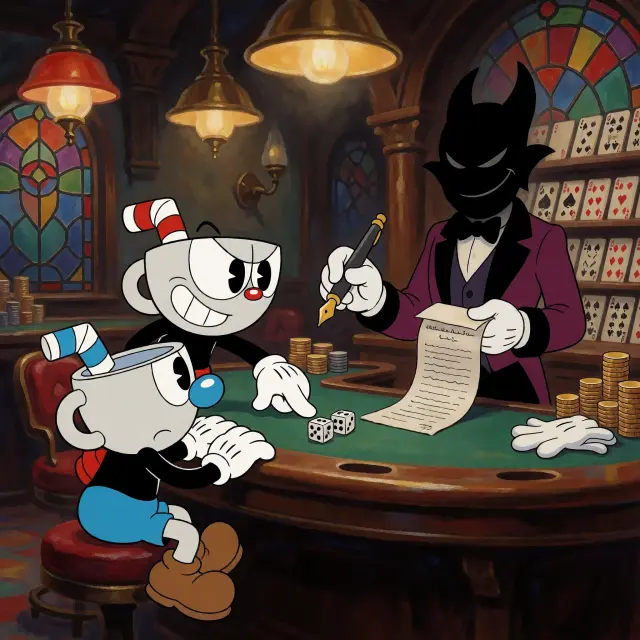
Same prompt, two models, two different jobs. GPT Image 2 builds the world as architecture: a clear foreground-to-background stack, straight horizon logic, props used as scale markers and enough detail to crop. Krea 2 builds it as a poster: flatter shapes, warmer light, a stronger graphic silhouette and a more theatrical read. GPT is slower and more expensive; Krea is fast, cheap and more expressive. For a cartoon world, the pair is more useful than either alone — GPT explains the place, Krea sells the mood.
The Casino Table Cover
The character visual is the stress test. GPT Image 2 had to hold two comedic cup-headed designs, a tall horned dealer, a green baize table, brass lamps, stained glass and a contract with a dripping pen — and still keep the eye moving from Cuphead's grin to Mugman's panic to the paper. It did it by treating the scene as a stage: a clear floor line, three figure groups, one hot red accent and a single warm key light. The result reads as a poster at thumbnail size and as a story at full size.
Generate the world first, then the moment. A model that has already been shown the cottage, the casino and the palette will place a new scene inside the same world. Start with the establishing shot, publish it, then use it as the visual reference for character and event prompts.
Use Cases
Cartoon world bibles and pitch decks. Indie game storefront capsules. Tabletop campaign covers and location cards. Animation pitch boards that need a consistent 1930s look. Music and podcast artwork for anything with a jazzy, sinister streak. Social teasers for a world launch. And fan projects that want to reinterpret a familiar rubber-hose idiom as an original setting rather than a screenshot collage.
Who It Is For
Worldbuilders who think in images. Game designers who need a cover before the vertical slice. Writers who want a visual anchor for a tone. Art directors who need a fast, coherent mood board. And anyone who wants to test a style contract across two models before committing to a production pipeline.
Limitations
GPT Image 2 is slower than lightweight models and favors detail over motion; dynamic action poses need explicit staging. Character-heavy prompts can trip third-party similarity filters, so lean into environment-first compositions when a render is rejected. Text rendering is unreliable on both models — never put a title in the image; add typography afterward. And a model cannot invent canon: if the cottage needs a specific chimney or the casino a specific sign, state it in the prompt or edit the atom first.
Frequently Asked Questions
- Is this a GPT Image 2-only workflow? No. GPT Image 2 is the detail model in the pair; Krea 2 is used for the mood-first alternative, and both results are published as works.
- How long does a render take? It depends on the model and queue; GPT Image 2 is the slower of the two, Krea 2 the faster.
- Can I keep the same character across images? Yes — keep the atom description stable and reuse the same style clause. The world is the consistency layer.
- Does it work for non-cartoon worlds? The workflow does; the style clause does not. Swap the medium and palette clauses for the look you need.
- Where do the published images live? As works of the Inkwell Isles world, each with a public share URL.
Start Creating
Start from the Inkwell Isles or your own one-sentence cartoon brief. Keep the style contract short and strict, run the same prompt through GPT Image 2 and Krea 2, and publish both. The comparison is the portfolio.
Start Creating
One prompt, two models, a rubber-hose world you can keep generating from.