
GPT Image 2 Akira Anime Key Visual Generator — Neo-Tokyo, Neon and Psychic Scale
A GPT Image 2 workflow for Akira-style anime key visuals: elevated highways, crater stadiums and psychic awakenings rendered with real 1980s cel materials. Built and proven on the Neo-Tokyo 2019 world with four published works.
Generate an Akira Anime Key Visual
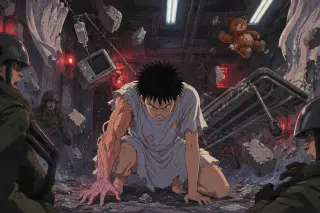
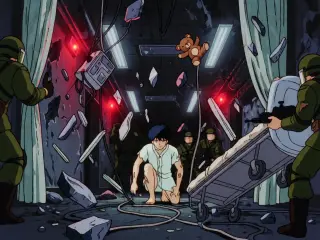
One brief, two models, four published frames: a red motorcycle on a rain-slick highway and a hospital corridor that has stopped holding still.
What Is the GPT Image 2 Akira Anime Key Visual Generator?
This is a working recipe for GPT Image 2, not a wrapper with a logo on it. It turns a world brief into a poster for an Akira-style story: a city rebuilt on a crater, a stadium floodlit above the ruins, a sixteen-year-old whose arm has become a pressure vessel. The output is a single frame that can open a world page, a store card or a share link — and still read after it has been cropped.
What It Generates
The generator is tuned for five operations that cover most of the genre. Each one is a verb rather than a mood, which is why a single model can render all of them without a style change. Because the operations are concrete, they survive translation into an image: a prompt that asks for a lifted road produces a road; a prompt that asks for dread produces a purple haze.
Lift a highway above a crater, a stadium above a ruin, a ward above a checkpoint. Flood a lower street until the neon has no horizon. Suspend a corridor, a gurney and a teddy bear until gravity becomes optional. Detonate a crater rim without turning the frame into a firework. Frame a small rider against a very large building, because scale is the whole argument.
Why GPT Image 2 for Neo-Tokyo
Neo-Tokyo is a material problem disguised as a psychic one. The highway only works if the asphalt looks wet. The stadium only works if the truss looks like it was engineered. The awakening only works if the hospital gown looks like cheap cotton and the gurney wheels look scuffed. GPT Image 2 is unusually good at this kind of physical continuity: it keeps objects identical across an impossible event, and it understands that a room is a set of surfaces before it is a mood.
Model Settings That Matter
Only three settings change the outcome for this genre: size, quality and format. Size decides whether the composition is a poster or a social card. Quality decides whether the fine architecture survives a crop. Format decides whether the file drops into a page without conversion. Iterate at low quality and only spend high quality on the frame that has already proved its composition.
size 1536x1024 for a landscape poster, 1024x1536 for a vertical share card, 1024x1024 for a gallery tile. quality high for hero frames that will be inspected, medium for iteration. format PNG for archival frames, WebP for page assets. rule do not upscale a weak composition; a road either reads at thumbnail size or it does not.
The Prompt Formula
Every frame in this world uses the same six clauses in the same order. Change the nouns; keep the structure. That is what makes a series look like a series instead of six unrelated images, and it is what makes a model comparison meaningful.
Medium and genre
1980s theatrical anime key visual, hand-painted cel animation, cinematic wide shot — locks rendering before content.
Place
A real piece of infrastructure: an elevated concrete highway, a floodlit Olympic stadium on a crater rim, a sealed hospital corridor.
Subject
One person, one vehicle or one body. A nineteen-year-old in a red jacket on a red sport bike; a pale sixteen-year-old in a torn gown.
Operation
Exactly one broken law: the stadium sits on the crater it hides, the corridor has lost gravity, the arm has become a pressure vessel.
Physics and light
Wet asphalt reflecting sodium lamps, steam from vents, red emergency light against cold fluorescent tubes, torn curtains lifted by pressure.
Negative clause
No text, no watermark, no logos, no modern glossy rendering — the clause that keeps the frame in 1988.
Example 1: The Elevated Highway
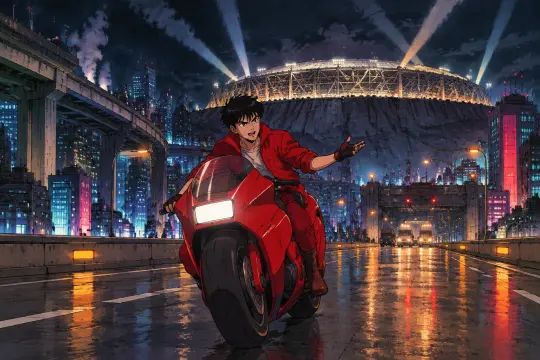
The highway is the easiest establishing shot in the world and the hardest one to keep from looking like stock cyberpunk. The fix is specificity: name the road type, the stadium, the checkpoint, the weather and the rider’s posture. A road is a direction; a stadium is a destination; a checkpoint is a reminder that the city is managed. Put all three in one frame and the image has politics without a caption.
Prompt. 1980s theatrical anime key visual, hand-painted cel animation with hard specular highlights and dense hand-painted backgrounds, cinematic wide shot: Neo-Tokyo at night in 2019, a rebuilt megacity of elevated concrete highways and neon canyon streets standing on the crater of the old capital; a nineteen-year-old gang leader in a bright red jacket rides a red sport motorcycle down the elevated highway toward camera, lean and cocky, one hand off the bars; behind him the floodlit Neo-Tokyo Olympic Stadium rises over the crater rim, searchlights sweeping the clouds; steam from vents, wet asphalt reflecting sodium orange and cyan neon, distant military checkpoint lights, a vast dark sky; 1980s anime film cel, visible paint texture, strong rim light, high contrast, dramatic perspective, epic scale, no text, no watermark, no logos.
Example 2: The Awakening Corridor
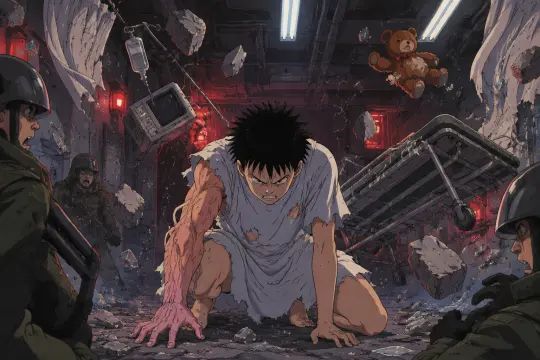
The awakening tests the body. A hospital corridor is a container built around one direction; remove that direction and the human figure becomes the only stable object. The prompt must specify contact — knees on the floor, one hand planted, a gown torn at the shoulder — or the model produces a boy flying, which belongs to a different franchise. The room should look wrecked by pressure, not by fire.
Prompt. 1980s theatrical anime key visual, hand-painted cel animation with hard specular highlights, cinematic interior: Tetsuo Shima, a pale sixteen-year-old in a torn white hospital gown, crouched in the center of a wrecked military laboratory corridor beneath the hospital; his right arm is swollen with veined psychic energy, a halo of broken concrete, glass and medical equipment floating around him, wires and torn curtains lifted by pressure; red emergency lights and cold fluorescent tubes, soldiers in riot gear frozen at the edges of the frame, one gurney overturned, a shredded teddy bear drifting; 1980s anime film cel, visible paint texture, deep shadows, strong rim light, claustrophobic composition, no text, no watermark, no logos.
GPT Image 2 vs Krea 2
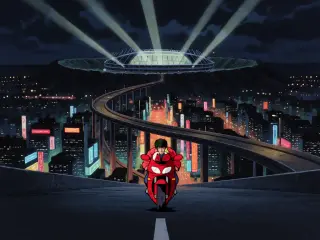
The same two briefs were also run through Krea 2. The difference is consistent across both scenes. GPT Image 2 gives you a document: correct street furniture, plausible reflections, dust that behaves like matter, fabric with weight. Krea 2 gives you a poster: a wider gesture, cleaner silhouettes, fewer values, and a composition that survives a very small crop.
Use the comparison as a decision tool rather than a scoreboard. If the frame will be inspected — a world page, a reference sheet, a store card with a zoom — GPT Image 2 is doing more work per pixel. If the frame will be seen for half a second in a feed, Krea 2 is doing more work per glance.
What GPT Image 2 Gets Right
Three strengths matter for this genre. First, physical continuity: an object keeps its identity across an impossible event. Second, perspective agreement: the highway converges correctly, so the stadium feels like it is at the end of the road rather than pasted behind it. Third, restrained rendering: the cel look stays graphic without becoming a filter, and the neon stays an accent rather than a fog.
Where it needs help: it will sometimes add a second impossible operation if the prompt implies one, and it can soften very fine architectural detail in small crops. Both are prompt problems, not model problems — the first is solved by naming one verb, the second by generating at the final ratio and inspecting the thumbnail before you commit.
Render and Publish Workflow
Open the world studio, copy the atom you want to visualise, write the six-clause brief and generate. Publish each frame as a work of the world with its prompt and model recorded. The four frames on this page are published works with live share links, which means the comparison can be inspected by anyone who opens the world — not just by the person who ran the generation.
Copy the atom
Open the elevated highway or the Nursery in the world and copy its nouns into the place clause.
Write the brief
Medium, place, subject, operation, physics and light, negative. Keep every clause concrete.
Render both models
Run the identical brief through GPT Image 2 and Krea 2 at the final ratio. Do not rewrite the prompt between models.
Publish the work
Attach prompt and model, publish both frames to the world, and let the share links carry the comparison.
Why Publish to the World
A key visual that lives only in a downloads folder is a dead end. Published as a work, it inherits the world’s atoms, appears in the world gallery, and becomes available for remixing. It also makes the prompt auditable: anyone can see which model, which brief and which scene produced the frame, which is the only honest way to compare two models.
Explore the World
Start with the wide shot. It defines the palette, the geometry and the social logic that every later frame will inherit. For this world, the easiest first frame is the elevated highway at night; the most useful second frame is the awakening corridor at body level. Publish both, then decide which one belongs on the page — and keep the other as the argument for why.
Create Your Own Frame
Four published frames, two models, one world — the next one is yours.