
GPT Image 2 Alan Wake Key Visual Generator — Psychological Horror Covers from One Prompt
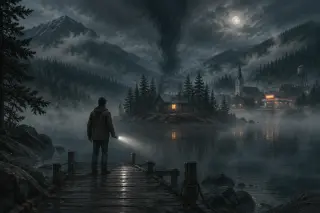
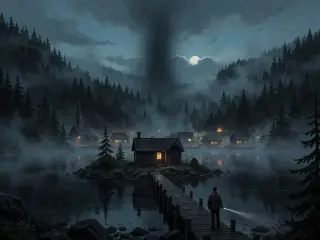
From one prompt to a cinematic Alan Wake-style key visual — a lit cabin across black water, a flashlight beam in the fog, Deerfest going dark — rendered by GPT Image 2 and compared with Krea 2.
Generate an Alan Wake Key Visual
From one prompt to a cinematic psychological-horror key visual — a town on a haunted lake, a diner that never closes, a writer with a flashlight — rendered by GPT Image 2
What Is the GPT Image 2 Alan Wake Key Visual Generator?
It is a GPT Image 2 workflow tuned for small-town supernatural horror: a single frame that shows a safe interior, a dark exterior, and a small figure who has to step outside. GPT Image 2 is the detail-first model in the pair — it holds separated value planes, legible landmarks, rain and lamplight, and the kind of small decisions (a reflection on wet planks, a lit window across the water) that make a frame feel photographed rather than assembled.
Why Use GPT Image 2 for Alan Wake Covers
- Detail density — a town-and-lake cover has to hold a pier, a cabin, a church steeple, a diner sign and a sky full of weather; GPT Image 2 keeps them legible in one frame.
- Landmark discipline — the cabin window, the steeple, the neon sign and the treeline stay where you put them, which is what makes a world recognisable.
- Film-still light — a single hard source plus a single warm practical produces large dark shapes and a focal point instead of a flat illustration.
- Pairing — the same prompt through Krea 2 gives an atmosphere-first alternative for thumbnails and feeds.
The World Behind the Generator
The test world is Alan Wake: Bright Falls — a logging town of nine hundred on a volcanic lake that makes creative work real. The seed gives the model a fixed vocabulary: Cauldron Lake and Diver’s Isle, the Oh Deer Diner, the church steeple, the fog road into Elderwood, the cabin with one warm window, Deerfest bunting, red flares, and a wall of living darkness. The palette is wet charcoal and teal night with one amber lamp and one violent red; the mood is quiet, damp, and about three days too late.
What Makes an Alan Wake-Style Key Visual Read
Three things, in order. First, a clear threshold: the end of a pier, a diner doorway, the edge of the treeline, the county line. Second, one warm light in a cold field: a cabin window, a neon sign, a flare, a flashlight. Third, a small figure with a readable silhouette: Alan’s jacket and raised flashlight, Sarah’s hat and shotgun, a Taken’s axe. If those three are present, the image reads as this world even before the details arrive.
Establish the threshold
Put the pier, the door, or the road on one third — safety on one side, the dark on the other.
Promise the depth
Add fog, a treeline, a black lake, or a corridor so the frame implies a world beyond the light.
Place one warm light
A cabin window, a diner sign, a flare, or a flashlight beam gives the eye a place to land and the image its mood.
Real Outputs from the Generator
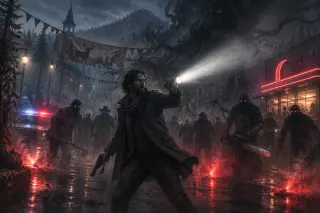
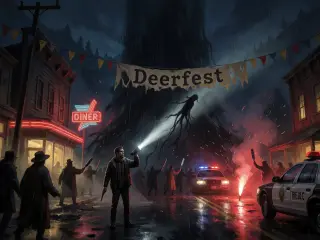
Four works were generated from the world: a world key visual of Cauldron Lake at dusk in two models, and Deerfest night in two models. The world pair shows the difference between an inventory and an invitation; the event pair shows the difference between a scene and an icon. Both pairs came from the same two prompts, so the comparison is a fair one.
Prompt Anatomy
- Subject and moment — “a lone writer on a wet pier at dusk” or “a novelist in the rain facing a crowd of shadow-faced figures”.
- World anchors — Cauldron Lake, Diver’s Isle, the Oh Deer Diner, the church steeple, Deerfest bunting, the Elderwood treeline.
- Light — “a hard white flashlight beam cutting into fog”, “one warm window across black water”, “red flares on wet asphalt”.
- Palette — wet charcoal, teal night, one amber lamp, one violent red; keep the contrast high and the shadows large.
- Render — “cinematic painterly Pacific Northwest gothic horror, semi-realistic digital painting, visible brushwork, high contrast, no text, no watermark”.
Model Comparison: GPT Image 2 vs Krea 2
GPT Image 2 wins on information density: more layers, sharper landmarks, better rain and lamplight, and a frame that rewards a long look. Krea 2 wins on clarity: fewer elements, stronger silhouettes, a cover that survives a 200-pixel thumbnail. Run both, then choose by where the image will live — storefront or feed. The comparison is not a contest; it is a second opinion you get for free.
The Deerfest Event Cover
Event covers are where GPT Image 2 earns its place. The Deerfest brief has to hold a hero, a crowd, a vehicle, a light source and an idea without turning into a blur. GPT Image 2 stages it: Alan mid-stride with the flashlight up and the revolver down, the Taken emerging from the rain in layers, the cruiser’s light bar smeared across the asphalt, the diner glowing. The result reads as a moment in a story rather than an illustration of a fact.
From Prompt to Published Work
Choose a world → Write the prompt → Render with GPT Image 2 → Compare with Krea 2 → Publish as a work → Fork and remix
Use Cases
Storefront capsules and banner art for horror games and interactive thrillers. Key art for a tabletop campaign set in a town with a secret. Thumbnails for lore videos and Let’s Plays. Location cards and scene backgrounds for a visual novel or an interactive map. Concept boards for a pitch that needs a mood before it needs a budget.
Who It Is For
Indie studios that need a cover before the art pipeline exists. Solo creators building a world in public. Game masters who want a consistent look for a campaign. Writers who need a visual pitch. Artists who want a detail-first base to paint over, and a cleaner Krea 2 version to compare against.
Limitations
GPT Image 2 is slower and more expensive than lightweight models, and it can over-render small textures if the prompt asks for too much. It does not know the source games’ canon, so names, palette, and rules have to come from the world seed. Krea 2 is faster but simplifies hands, faces, and small props. Neither model replaces the world-building: the image is only as coherent as the atoms behind it.
Frequently Asked Questions
- Is this an official Alan Wake tool? No — it is a Neta Studio workflow demonstrated on an AI-generated, fan-style world inspired by Alan Wake.
- Can I generate without the world? Yes, but the world seed is what keeps the palette, cast, and landmarks consistent across images.
- How long does a render take? GPT Image 2 is the slower of the two; expect a detailed frame rather than an instant draft.
- Can I publish the result? Every render publishes as a work of the world, with a shareable page and a fork point.
Start Creating
Fork Alan Wake: Bright Falls, run the prompt through GPT Image 2, and publish the result as a work. If you want a second opinion, run the same prompt through Krea 2 and compare the pair side by side.
Start Creating
Generate your cinematic Alan Wake key visual with GPT Image 2 — cover-ready, canon-consistent, published as a work.