
GPT Image 2 Anime Key Visual Generator — Cinematic Twilight Posters
A GPT Image 2 workflow for anime key visuals: twilight craters, festival towns and splitting comets rendered with real material logic. Built and proven on the Your Name: The Thread of Musubi world with four published works.
Generate a Cinematic Anime Poster with GPT Image 2
One sentence, six clauses, one frame. Start from the GPT Image 2 anime key visual generator and build a poster that survives the crop.
What This Tool Page Covers
This is a working page for GPT Image 2 as an anime key visual generator. It covers the model's real settings, the six-clause prompt recipe, two worked examples from a published world, the places where the model breaks, and an honest comparison against Krea 2 on identical briefs. Every image on this page is a published work from the Your Name: The Thread of Musubi world, not a demo render.
- Model: GPT Image 2, text-to-image with optional reference images.
- Best at: detailed architecture, costume continuity, small narrative props, long briefs.
- Weak at: extreme stylisation, fast iteration, any frame that needs a graphic silhouette first.
- Use it when: the frame will be inspected, cropped or printed at full bleed.
Why GPT Image 2 for Anime Key Visuals
GPT Image 2 is not the fastest image model and it is not the cheapest. It is, however, unusually good at following a long spatial brief. That is the core skill of an anime key visual: placing a shrine, a stair, a train and two people in one frame at the correct relative scale, with the light coming from the right place. The model treats the prompt like a layout instruction, not a vibe.
The trade-off is speed. A high-quality wide render takes time, and the model can over-texture a painterly sky if the prompt does not lock the medium. The fix is not a shorter prompt. It is a more specific first clause and a stricter negative clause.
The Model at a Glance
These are the settings that matter for poster work. Everything else is secondary. The goal is not to use every parameter; it is to remove the variables that cause a frame to fail after you have already paid for it.
| Model | gpt-image-2 |
| Input | Text, plus optional reference images |
| Sizes | 512–3840 px per side, multiples of 16 |
| Quality | low / medium / high / auto |
| Formats | png / jpeg / webp |
| Best use here | 16:9 or 3:2 hero posters at high quality |
Size, Quality and Format Settings That Matter
Anime key visuals are horizontal by default, but the published crop is rarely the rendered crop. Render wider than you need, then crop to the platforms you actually use. The table below is the working set for this world: 16:9 for the hero, 4:5 for social, 1:1 for thumbnails.
| 1536×864 | 16:9 hero, high quality — used for both GPT Image 2 works on this page |
| 2048×1152 | Large hero for print or full-bleed web |
| 1024×1280 | 4:5 social crop — generate wider, then crop |
| 1024×1024 | 1:1 thumbnail — keep the comet in the upper third |
The Prompt Recipe: Six Clauses
The recipe is the same one used to produce both published GPT Image 2 frames in this world. It is intentionally boring. Boring prompts are repeatable, and repeatable prompts are the only way to compare models fairly.
Medium and genre
Anime key visual, 16:9 theatrical composition, hand-painted background. Lock the rendering system first.
Place
One location, one horizon, one ground plane. A crater rim above a caldera lake. Not a crater, a town and a city.
Subject
Two figures, named by costume and posture, not by emotion. Emotion is the job of light and distance.
Physics
Weight, contact, reflection, wind. A bag strap pulls; reeds bend; lanterns reflect on wet stone.
Light and weather
Name the hour precisely. Kataware-doki is not sunset. It is the overlap of day and night.
Negative clause
No text, no watermark, no logo. Repeat it every time; models forget.
Worked Example 1 — The Crater at Kataware-doki
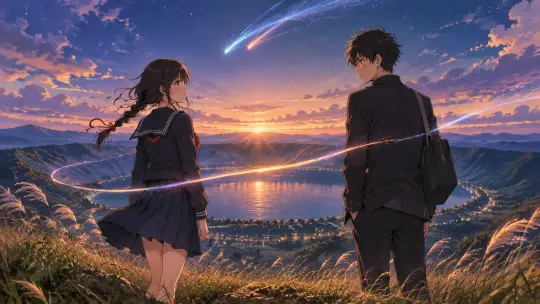
The first brief is the emotional centre of the world: two people who have not yet met in the same timeline, standing on the rim of a crater while the comet breaks apart above them. The prompt names the hour, the costumes, the physical evidence and the negative clause. GPT Image 2 renders the braid of light as an arc inside the landscape rather than a graphic overlay, which is the detail that makes the frame feel like a film still.
Prompt. Anime key visual, 16:9 theatrical composition, hand-painted background. The grass-covered rim of a volcanic crater above a caldera lake at kataware-doki, the violet hour when day and night overlap. Two teenagers stand a few paces apart on the ridge: a girl in a dark school uniform with a red braided cord tied into her hair, and a boy in a black jacket with a shoulder bag, both seen three-quarter from behind, faces only half-turned. Between them the air shimmers like a braid of light, threads of sunset and early starlight crossing in a soft arc. Above, a comet has split into two glowing fragments with one long pale tail. Far below, a small town's lights ring the dark lake; reeds bend in the wind. Cinematic anime lighting, painted clouds with warm rim light and cool blue shadows, delicate line work, rich mid-tones, natural film grain, no text, no watermark, no logo.
Worked Example 2 — The Town at Dusk
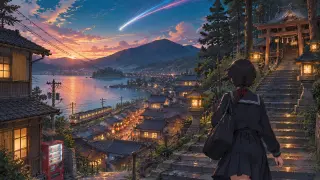
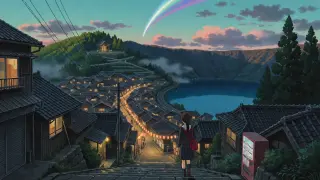
The second brief moves the camera into the town and changes the job: instead of a mythic landscape, the frame has to carry an entire settlement. The prompt stacks the hill in readable layers — shrine, steps, roofs, train, lake — and lets the festival lanterns provide the warm light. GPT Image 2 keeps the layers distinct, which is why the frame still works when it is cropped to a vertical.
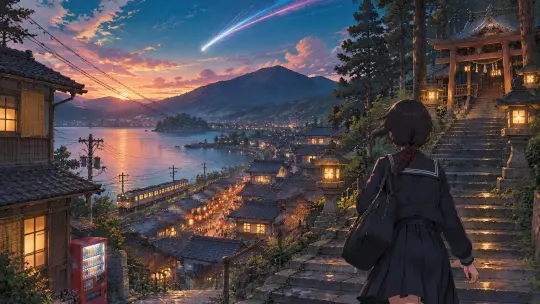
Prompt. Anime key visual, 16:9 theatrical composition, hand-painted background. A small mountain town built around a blue caldera lake at dusk: terraced houses with dark tiled roofs, a shrine on the hill above the town, one railway line along the water, festival lanterns beginning to glow along the main street. In the foreground a middle-school girl in a dark uniform with a red braided cord in her hair climbs wet stone steps toward the shrine, seen from behind. Above the ridgeline a bright comet with a split tail hangs in a teal-and-rose sky, clouds lit from below. Detailed power lines, shutters, vending machines, and cedar trees; soft volumetric haze. Hand-painted anime background art, theatrical feature quality, warm sodium light against cool dusk blues, no text, no watermark, no logo.
GPT Image 2 vs Krea 2 on the Same Brief
The comparison is only useful if the brief is identical. Both models received the same text, no references, the same world atoms. GPT Image 2 produced the detail-first frames; Krea 2 produced the atmosphere-first frames. The difference is not quality. It is where each model spends its attention.
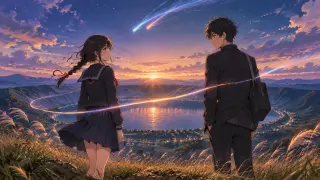
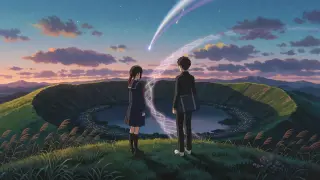
At thumbnail size, Krea 2 often wins: two shapes, one ring, one comet. At full bleed, GPT Image 2 wins: the frame rewards inspection, and the story is in the small props. If you need one asset for both, render GPT Image 2 for the hero and Krea 2 for the social card.
Where GPT Image 2 Breaks
The failures are predictable, which is good news. GPT Image 2 over-renders painterly texture when the medium clause is vague; it adds pseudo-text when a frame contains signage; and it can produce a comet that looks like a decorative ribbon if the physics clause does not establish distance and scale. All three are fixable in the prompt.
- Over-texture: add "hand-painted background, soft airbrush, no photographic skin".
- Pseudo-text: add "no text, no signage, no watermark, no logo" and avoid shop fronts.
- Ribbon comet: specify "distant, high in the sky, one long pale tail, smaller than the town".
- Melting costumes: name garments and materials, not just colours.
- Flat foreground: demand wet stone, contact shadows and foreground reeds.
A Repeatable Production Loop
Treat the model as one step in a loop, not a slot machine. The loop below is what produced the four published works in this world, and it is short enough to run without a project manager.
Pick four atoms
One character pair, one location, one event, one rule. That is enough for a key visual.
Write the six clauses
Keep the order. Change one clause at a time when iterating.
Render wide
16:9 at 1536×864 or larger, high quality. Do not render the final crop.
Compare models
Run the same text through Krea 2. Keep both; publish the one that survives your real crop.
Publish with provenance
Attach the prompt, the model and the world. A captioned work is reusable; an orphan image is not.
Publishing and Reuse
A published work is more than a file. It carries the world it came from, the atoms it used, the prompt that produced it and the model that rendered it. That is what makes it useful to other people: they can fork the world, change one atom, and generate a related frame without starting from zero. The four works on this page are published exactly that way, and every image URL is a real asset from this world.
Build Your Own Anime Poster
Take the six-clause recipe, point it at a world with real atoms, and publish the frame that survives the crop.
GPT Image 2 settings, prompt recipe and four real published works from this world.