
GPT Image 2 BioShock Rapture Key Visual Generator
A documented GPT Image 2 workflow for BioShock: Rapture key visuals: the six-clause prompt, the real settings, the failure modes and four published renders from a GPT Image 2 vs Krea 2 comparison on identical briefs.
One sentence, six clauses, one drowned ballroom. Start from the GPT Image 2 BioShock Rapture key visual generator and render the city before the lights go out.
What This Page Covers
This is a working page for GPT Image 2 used as a BioShock: Rapture key visual generator. It documents the exact prompts, settings and failure modes behind four published renders in this world: two briefs, each sent once to GPT Image 2 and once to Krea 2. The page is opinionated. It says where GPT Image 2 is worth the extra seconds and where it is the wrong tool.
The short version: GPT Image 2 is the stronger model for wet architecture, material weight and social density. Krea 2 is the stronger model for a clean cover. Run one prompt through both before you commit to a campaign.
What GPT Image 2 Does Better Here
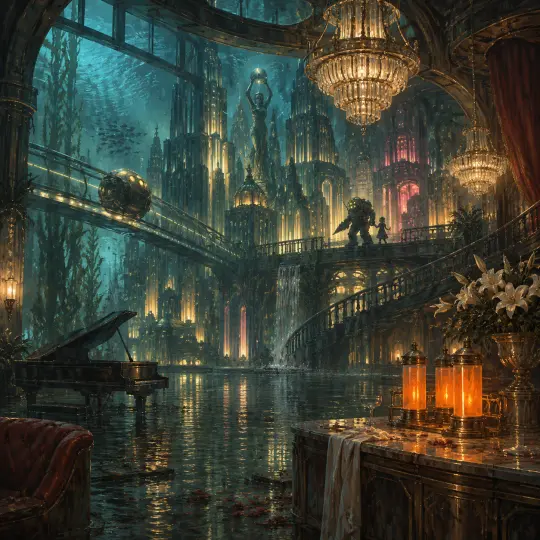
GPT Image 2 is not the fastest image model available, and it is not the cheapest. What it does unusually well in this genre is hold a physical room together. The flooded ballroom render keeps four depth planes legible at once — wet foreground, marble bar, piano, bathysphere track — while the chandeliers, reflections and amber canisters agree on a single light logic. That sounds like a small thing until you compare it with a model that flattens the same brief into a poster.
The second strength is human weight. In the bathysphere frame the survivor's back fills the left third, the jacket is wet through, the door is beaded with water and the Little Sister is small enough to be a real child. GPT Image 2 understands that dread comes from scale and texture, not from a monster pose. It also renders readable incidental text less often than you might fear, which matters when a stray sign can ruin an otherwise clean frame.
The Model's Real Settings
These are the settings used for the four published renders. Nothing exotic: a square frame, one image per call, a text-only prompt and a negative clause inside the prompt itself. The models were not given a reference image, a style LoRA or a post-process pass.
- Model: gpt-image-2 (provider: OpenAI Images).
- Frame: 1:1 square, 1254×1254, one image per request.
- Prompt: one paragraph, six clauses, negative list inline.
- References: none.
- Cost: about $0.05 per render at the time of publication; Krea 2 was about $0.01.
- Latency: tens of seconds per frame; budget for iteration, not for live previews.
The Six-Clause Recipe
Subject with a job
A founder at a podium; a survivor with no memory; a surgeon between operations. A role gives the model a body language to draw.
Room with a history
Name the room and the event it survived: a ballroom after New Year, a hospital wing after a cosmetic trial, a dock at low tide. History makes the props mean something.
Consequence in progress
Add a verb that costs something: draining, locking, selling, stitching, hiding. The frame should catch an action already underway.
One dominant light
One key and one accent. Warm chandelier plus amber canisters; cold glass light plus one red exit sign. Two equal keys turn the politics into decoration.
Restrained palette
Five colours at most: brass, oxblood, ivory, deep teal, ADAM amber. Forbid clean cyberpunk neon and generic steampunk gears.
Explicit negatives
No text, no watermark, no logo, no dry floors, no scuba gear, no modern signage. The negative list is part of the art direction.
Worked Example 1: The Flooded Ballroom
The brief: a panoramic cross-section of Rapture, with a flooded art-deco ballroom in the foreground, chandeliers hanging in still water, a half-sunken grand piano, glowing amber ADAM canisters on a marble bar, a bathysphere gliding along an elevated track beyond the glass and a Big Daddy with a Little Sister on a balcony above. Cold teal water against warm brass, one volumetric shaft, painterly brushwork, no text.
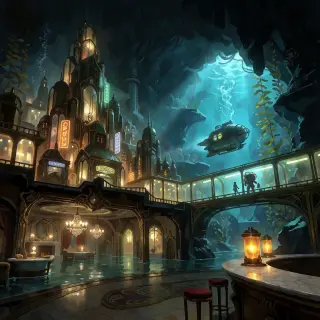
What worked: the room stayed a room. The reflection in the flooded floor doubles the chandelier instead of smearing it, the amber canisters give the eye a warm anchor, and the bathysphere reads as a vehicle on a track rather than a floating egg. The model also respected the negative list: no logos, no signage, no modern objects. What failed: the pseudo-text on the distant neon signs is decorative gibberish. At full size it reads as texture rather than language, which is acceptable here but would be fatal on a poster with a headline.
Worked Example 2: The Fall of Rapture
The brief: New Year's Eve, 1960. A lone survivor in a dark bomber jacket steps out of a brass bathysphere into a flooded art-deco concourse. Opposite him, a hulking Big Daddy in a riveted diving suit guards a small Little Sister in a stained dress, her eyes glowing faintly amber as she clutches a glass syringe of ADAM. A collapsed staircase, sparking wires, torn New Year bunting and floating champagne glasses. Warm amber and sickly green against deep teal, volumetric haze, no text.
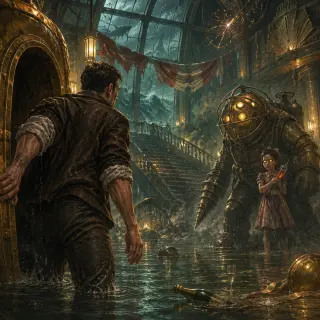
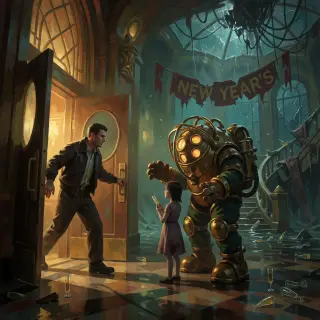
What worked: scale. The Big Daddy is genuinely large next to the child, the bathysphere door is genuinely heavy, and the waterline is consistent across the floor. The survivor is seen from behind, which lets the viewer occupy him without the model needing a face. What failed: the torn bunting is more legible as fabric than as a date; if the year matters, put it in the caption, not in the render. GPT Image 2 also tends to add one extra light source in the background. Ask for one dominant light and one accent, then accept that the model will sometimes add a third for depth.
Where GPT Image 2 Breaks
Three failures show up repeatedly in this genre. First, incidental text: distant signs, posters and banners turn into pseudo-language. Second, small anatomy: hands wrapped around a door frame or a syringe can lose a finger when the subject is backlit. Third, over-detail in the far plane: the model will happily fill a distant balcony with a crowd of extra silhouettes that compete with your subject. All three are fixable in the prompt, and none of them are reasons to abandon the model.
- Kill the text: add "no text, no signage, no posters, no readable lettering" and move any essential wording to the caption.
- Protect the hands: specify what the hands hold and keep the hand in the lit zone; do not silhouette a hand against a bright doorway.
- Thin the background: name the far plane explicitly ("empty balcony", "no crowd", "one distant figure") instead of hoping the model restrains itself.
Prompt Hygiene Checklist
- Does the prompt name a role, not just a person?
- Does it name a room with a history?
- Does it include a verb that costs something?
- Is there exactly one dominant light plus one accent?
- Are there five colours or fewer?
- Is there an explicit negative list?
- Is the aspect ratio stated before generation, not fixed by cropping later?
- Would the frame still make sense without the caption?
Cost and Iteration Budget
A practical budget for this genre is three GPT Image 2 attempts per final frame and two Krea 2 attempts per cover. At roughly five cents and one cent respectively, a two-frame comparison costs well under a dollar, which is cheaper than a single hour of retouching. The expensive part is not the render; it is the sentence. Spend the time on the six clauses and the first attempt will usually be close.
GPT Image 2 vs Krea 2 on Identical Briefs
The four renders on this page are two briefs rendered twice. The comparison is intentionally unglamorous: same sentence, same square frame, no references. GPT Image 2 protects material logic, depth and human weight. Krea 2 protects silhouette, colour separation and thumbnail readability. If the image has to be inspected, GPT Image 2 usually wins. If it has to be clicked, Krea 2 often wins.
The useful output is not a winner. It is a pair of images that show what each model sacrifices. Publish both, caption the difference honestly, and let the reader choose the trade-off for their own frame.
From Frame to World
A key visual is not the end of the pipeline; it is the proof that the world can be seen. Once the frame works, the same cards can generate a portrait series, a district plate book or a four-poster timeline. The model stays the same; only the subject clause changes.
Prompt → Key Visual
Use the six clauses to produce one frame that can carry a landing page. Keep the negative list fixed across the set.
Key Visual → Set
Swap only the district and the character. The palette, light logic and material rules stay locked, so the set feels authored rather than sampled.
Set → World
Attach the renders to the world and let the cards explain them. The images become evidence, not decoration.
Frequently Asked Questions
- Is this an official GPT Image 2 BioShock tool? No. It is an independent world and a documented workflow; GPT Image 2 is the model used for the renders.
- Why square frames? They work as cards, covers and social images without a second crop. A wide frame is better for a hero banner; choose one and state it in the prompt.
- Can I get readable text? Not reliably in this style. Put the words in the caption or add them in a layout tool.
- Does a reference image help? For a recurring character, yes. For a single establishing frame, a tighter prompt is cheaper and usually better.
- How many renders should I publish? Two per brief is enough to show the comparison; more becomes a gallery without an argument.
Build Your Own Rapture Frame
The world is public and forkable. Take the six clauses, keep the brass and the pressure, and render one room where the bill comes due.
The Rapture world on this page keeps the prompts and the four published key visuals together. Fork it, change one card, and run the same comparison again; the difference between the models will tell you more than any model ranking.