
GPT Image 2 Calendar World Key Visual Generator — Grids, Clocks and Living Events
GPT Image 2 is the detail-first model for calendar-world key visuals: grids that recede correctly, crowds that stand on the same ground plane, and small repeated objects that survive a crop. This page documents its real settings and the exact prompts behind four published works from Everwhen.
Generate a Calendar World Key Visual with GPT Image 2
One sentence, six clauses, one frame. Start from the GPT Image 2 calendar world key visual generator and build a poster that survives the crop.
What This Tool Page Covers
This is a working page for GPT Image 2 as a calendar world key visual generator. It covers the settings that matter, the six-clause prompt recipe used to produce the four published works on this page, two worked examples with their full briefs, and the predictable ways the model fails on grid-and-clock subject matter.
- The real parameters — size, quality, format — and when each one changes the result.
- A six-clause prompt structure that keeps calendar worlds from collapsing into UI screenshots.
- Two complete briefs, run identically through GPT Image 2 and Krea 2, with both outputs published.
- A production loop you can repeat per world instead of per image.
Why GPT Image 2 for Calendar-World Key Visuals
GPT Image 2 is not the fastest image model and it is not the cheapest. It is, however, unusually good at holding a complex spatial argument together: a grid that recedes correctly, a tower that sits on the grid, a crowd that stands on the same ground plane, a sky divided into two time-of-day panels without the seams turning into mush.
Calendar worlds need exactly that. The subject is architecture plus population plus rule. If the grid bends, the world stops reading as a calendar. If the crowd is missing, the world stops reading as a civilisation. GPT Image 2 pays for the detail you need in both places, and it renders small repeated objects — clock faces, door numbers, awnings — without turning them into noise.
The Model at a Glance
These are the settings that matter for poster work. Everything else is secondary. The goal is a frame that reads at card size and still rewards a full-size look, so favour resolution and a wide ratio over stylistic knobs.
| Setting | Value for calendar key visuals |
|---|---|
| Model | gpt-image-2 |
| Size | 1536×1024 landscape (2048×1152 for print) |
| Quality | high for hero frames; medium for iteration |
| Output format | png for posters, webp for web cards |
| Input | text only; reference images optional, not needed for a first pass |
Size, Quality and Format Settings That Matter
Calendar key visuals are wide by default, but the published crop is rarely the rendered crop. Render at 1536×1024 or wider, keep the horizon in the middle third, and crop late. A square render forces you to choose between the tower and the crowd; a wide render lets both exist and lets the crop decide.
| Use | Size | Quality |
|---|---|---|
| World landing hero | 1536×1024 | high |
| Event card | 1536×1024 | high |
| Feed thumbnail test | 1024×1024 | medium |
| Print poster | 2048×1152 | high |
The Prompt Recipe: Six Clauses
The recipe is the same one used to produce both published GPT Image 2 frames in this world. It is ordered on purpose: each clause removes a failure mode from the next. Keep the whole brief under 120 words; long prompts do not fail because the model cannot read them, they fail because the important clause gets buried.
Medium and genre
Lock the rendering system first: "western cartoon flat-block storybook illustration, world key visual". Without this, the model defaults to product art.
Scale object
One enormous thing that fixes the camera: a city built on a calendar grid, a bazaar hung with a thousand clocks, a tower of stacked white days.
Subject
One Entry or one group, named by role, costume and posture — "four members of the Decline in long black coats and white gloves" — not by emotion.
Physics and ornament
Two or three rule-made details: a glass jar holding a golden clock-hand, a white receipt unspooling from a doorway, a bronze robe stitched with grid lines.
Light and palette
Two named sources and one palette logic: hard daylight through a grate, one warm glow inside the jar, everything else falling to brown and green.
Negative clause
No interface, no buttons, no screenshots, no logos, no legible UI text, no watermark. Repeat every time; this is the clause models forget fastest.
Worked Example 1 — Everwhen, the World Key Visual
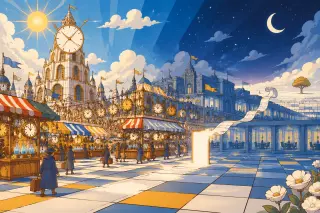
The first brief is the whole continent in one frame. The job is geography: show a city built directly on a calendar grid, with the All-Day Spire on the left, the Time Zone Bazaar in the centre, the blue Grid capital on the right, the Margins blooming at the far edge, and TBD crossing the composition diagonally as a white doorway trailing receipt paper.
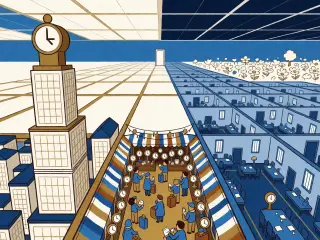
Prompt. Western cartoon flat-block storybook illustration, world key visual of Everwhen, a continent where scheduled time is territory. A city built directly on a giant calendar grid; on the left a tower of stacked white days with bronze grid windows and a blank numberless clock; in the centre a bazaar on the seam of two calendars with striped awnings and hundreds of hanging clocks; on the right blue low-ceilinged meeting-room corridors; at the far edge a blank white country with paper flowers. A white doorway-shaped absence with receipt-paper edges crosses the grid, leaving blank paper beneath it. Sky split into day and night panels. Flat color blocks, dark brown outlines, minimal shading. No interface, no buttons, no logos, no legible UI text, no watermark.
Worked Example 2 — The Daylight Coup
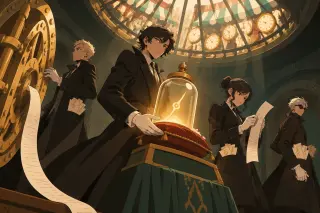
The second brief moves the camera underground and changes the job from geography to staging. The vault beneath the Bazaar holds the hour the continent loses every year. Four members of the Decline surround it, each with a job in the frame: one holds the jar, one keeps the door, one reads the receipt, one is already leaving. The receipt is the story — it runs from the open lock across the floor and off-frame.
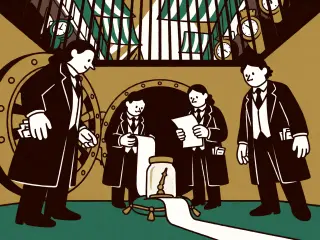
Prompt. Western cartoon flat-block storybook illustration, event key visual of the Daylight Coup. A vault chamber beneath a market: a circular brass door hanging open, a single long white receipt unspooling to the floor where the lock should be. In the centre a stolen hour glows inside a glass jar on a velvet cushion, a small golden clock-hand curling inside it. Around the jar, four members of the Decline in formal black and white — long coats, white gloves, neat ties, stacks of declined invitation cards in their pockets: one holds the jar, one keeps the door, one reads the receipt, one turns to leave. Above them a grate showing striped awnings and hanging clocks, one shaft of hard daylight. Flat color blocks, dark brown outlines, minimal shading. No interface, no buttons, no logos, no legible UI text, no watermark.
GPT Image 2 vs Krea 2 on the Same Brief
The comparison is only useful if the brief is identical. Both models received the same text for both subjects, with only the size parameter changed to fit each model's supported range. No prompt edits, no reference images, no retries with different wording.
GPT Image 2 spends its budget on population and texture. It gives you merchants with luggage, individual clock faces, cloud structure, foreground flowers, and a receipt with a visible curl. Krea 2 spends its budget on composition. It gives you a grid you can read from across the room, a single vanishing point, and silhouettes that hold at 300 pixels. At thumbnail size Krea 2 often wins; at full size GPT Image 2 does.
Where GPT Image 2 Breaks
The failures are predictable, which is good news. On calendar subject matter GPT Image 2 tends to over-render texture, invent legible-ish signage, and drift toward interface furniture when the prompt mentions anything product-shaped. It also loves clocks, and will fill a market with them until the frame becomes noise.
- Accidental UI. Words like "dashboard", "planner" or "app" pull the render toward a product shot. Remove them and add the negative clause.
- Clock soup. Unbounded clocks at random hours. Fix: give them one rule — "all stopped at nine minutes past" — and confine them to one band.
- Over-texture. Painterly noise on what should be flat blocks. Fix: say "flat color blocks, minimal shading" twice, or switch to Krea 2 for that frame.
- Receipt spaghetti. The paper strip multiplies. Fix: "a single long receipt" and place it explicitly from door to floor.
A Repeatable Production Loop
Treat the model as one step in a loop, not a slot machine. The loop below is what produced the four published works on this page: one world, two subjects, two models, four frames, all attached to the same atom set.
Pick one atom pair
One event and one location, or one character and one location. Never "the whole world" twice in a row.
Write the six clauses
Medium, scale, subject, props, light, negative. Keep it under 120 words and read it aloud before rendering.
Render wide at high quality
1536×1024 or wider, quality high for the hero frame. Accept the first pass; do not chase wording.
Run the same brief on Krea 2
Same text, Krea's size range. The pair is the deliverable, not either image alone.
Publish both and attach
Attach to the world so the next prompt inherits them. A published frame is a reference, not a trophy.
Publishing and Reuse
A published work is more than a file. It carries the world it came from, the atoms it used, and the brief that produced it, so the next person can fork the world and generate a companion frame instead of starting from a blank prompt. That is the difference between a gallery and a world.
Start Creating
Take the six-clause recipe, point it at a world with real atoms, and publish the frame only you would choose.