
GPT Image 2 Co-op Fairytale Key Visual Generator
GPT Image 2 as a co-op fairytale key visual generator: the real settings, the six-clause recipe, two worked examples from the It Takes Two world, and where the model breaks.
Generate a Co-op Fairytale Key Visual with GPT Image 2
One sentence, six clauses, one frame. Start from the GPT Image 2 co-op fairytale generator and build a poster that holds two people in the same moment.
What This Tool Page Covers
This is a working page for GPT Image 2 as a co-op fairytale key visual generator. It covers the model's real settings, the six-clause prompt recipe, two worked examples from a published world, the places where the model breaks, and an honest comparison against Krea 2 on identical briefs. Every image here is a published work from the It Takes Two world, not a demo render.
- Model: GPT Image 2, text-to-image with optional reference images.
- Best at: material texture, prop density, two-subject staging, hands and tools, small narrative objects.
- Weak at: speed, cheap iteration, graphic silhouette-first compositions.
- Use it when: the frame will be inspected, cropped, printed or used as a store page hero.
What GPT Image 2 Does Better Than Anything Else Here
GPT Image 2 is not the fastest image model available, and it is not the most stylish. What it does better than any model in this comparison is build a room out of objects. Ask for a shed and you get a wall of tools with specific grips, a hose with weight and a memory of being coiled, paint cans dented at the rim, and dust that behaves like a physical material. That density is what makes a miniature world feel lived in rather than staged.
The Model's Real Settings
- Size: request 2048×1152 for a 16:9 hero, 1024×1536 for a portrait character pair. Both are native; do not upscale a square.
- Quality: high for anything that will be inspected. Medium is fine for iteration, low only for thumbnails.
- Reference images: optional, and best used for palette or costume continuity — not for copying composition.
- Output format: PNG for key art, WebP for feed variants. JPEG cannot preserve a transparent background.
- Speed: slower than Krea 2 by a wide margin. Budget two-pass iteration, not ten.
The Six-Clause Recipe for Co-op Fairytale Frames
Medium and genre
"Cinematic co-op fairytale key visual, hand-painted game 3D." Locks the rendering system before content.
Place with a rule
One named room and what it teaches: the Shed, the Tree, the Cuckoo Clock, the Garden.
The pair, by prop
Cody with wire glasses and a screwdriver; May with a red scarf and a hammer. Posture, not emotion.
The shared object
The two-hand mechanism between them: a jammed latch, a door that needs nails and a hammer.
One light, one weather
A single hard blade of window light through dust. No second source.
Negative clause
"No text, no watermark, no logo, no border, no third character." Last line, every time.
Worked Example 1: The Shed Awakens
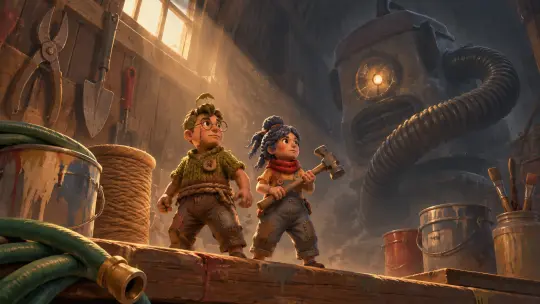
The first test is the world's front door. The brief asks for three planes in one frame: the dolls on the bench, the tool wall behind them, and Hoover in the dark. GPT Image 2 kept all three separate, gave the hose a believable weight, and made the vacuum's cracked headlamp the only warm source in the back half of the frame. The dolls sit low, which is correct — the room should tower.
What worked: the paint cans are dented, the twine has a visible wind, and the light falls across both faces at the same angle. What needed a second pass: the glasses read slightly thick at thumbnail size, and the machine's hose initially curled into the foreground. Both were fixed with clauses, not with a different model.
Worked Example 2: Cody & May
The second test is the opposite skill. No weather, no horizon — just two figures on a bench, back to back, each holding a tool. GPT Image 2 built them from material: flannel weave, scuffed knees, the stitched seam down Cody's cheek, the hammer worn at the head. The composition is a true two-subject frame, with the light splitting between them rather than favouring one.
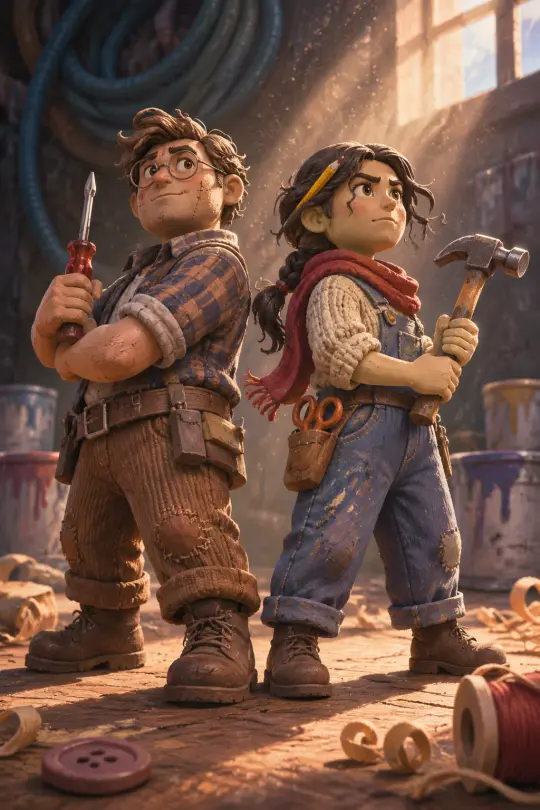
What worked: the props are held correctly, the boots carry dust, and the wood shavings on the floor establish scale without a single word of explanation. What you should watch: at portrait sizes the model will happily add a third small object that reads as a character. The negative clause is not optional.
Where GPT Image 2 Breaks
- Hands on small props — at 1024px the fingers around a screwdriver can merge. Render portrait at 1024×1536 or larger.
- Graphic flatness — asking for "poster, flat colour" fights the model's material bias. Use Krea 2 for that.
- Speed — a high-quality hero can take minutes. Iterate at medium, finish at high.
- Text and signage — any label on a paint can will drift. Keep the world wordless.
None of these are fatal. They are budget lines. Plan the frame around what the model is good at and it will out-resolve every cheaper alternative.
GPT Image 2 vs Krea 2 on Identical Briefs
Both It Takes Two prompts were run through both models with no edits. The pattern is consistent: GPT Image 2 wins on material, weight and inspection; Krea 2 wins on colour, silhouette and speed. On the Shed, GPT gave a room with a history and Krea gave a diorama with a clock-faced vacuum. On the pair, GPT gave stop-motion clay and Krea gave a clean animated feature.
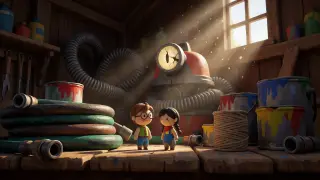
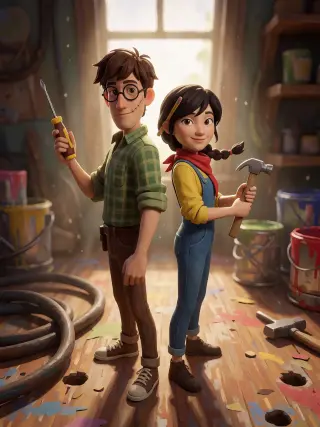
The honest conclusion: GPT Image 2 wins any frame that will be inspected, and loses any frame that has to be understood in half a second at 200px. Publish both and let the world hold the argument.
Prompt Hygiene Checklist
- Name both characters and both props — never "a couple".
- Name one room and one shared object; delete every second location.
- One light source, one weather. Remove rim light, glow and "cinematic bloom".
- Say "equal focal distance, neither cropped" to protect the two-subject frame.
- End with the negative clause: no text, no watermark, no logo, no border, no third character.
From Frame to World
A key visual is not the end of the pipeline; it is the proof that the world is coherent. In Neta Studio the frame is published back into the world as a work, attached to the same atoms that produced it. The next render starts from that reference instead of a blank page.
Frame → Store page
Use the GPT Image 2 shed as the hero and the character pair as the second scroll panel. They share a palette, so the page reads as one product.
Frame → Trailer plate
Use the Krea 2 shed as a wide plate behind a title, then cut to the GPT Image 2 pair for the beat that needs a face.
Frame → World canon
Publish both models' answers side by side. The pair becomes the visual reference for every later render of that room.
Cost and Iteration Budget
The practical workflow that keeps quality high without burning budget is to spend the first pass at medium quality on two compositions, pick one, then finish it at high. GPT Image 2 is priced per image with a wide range, so the expensive call should be the one you keep.
- Pass 1 — medium quality, 1024-wide, two compositions, five minutes.
- Pass 2 — high quality, 2048-wide, the chosen composition with corrected clauses.
- Pass 3 — only if the frame is a hero: portrait or alternate crop from the same prompt.
Frequently Asked Questions
Is GPT Image 2 good at two-character frames? Yes, better than most, provided you name both props and ask for equal focal distance. Without those clauses it defaults to a single hero.
Why does my vacuum cleaner look like a monster? Because the prompt says "monstrous sentient vacuum". If you want a household object, remove the adjective and keep the cracked lens.
Can I use a reference image for the dolls? Yes, for costume and palette continuity. Do not use it for composition — the world's two-subject rule should come from the prompt.
Which model should I publish? Both. The comparison is the asset; the share pages let you show the pair without choosing.
Build Your Own Co-op Fairytale Frame
Take the six-clause recipe, point it at a world with real atoms, and publish the frame that survives the crop.
The It Takes Two world is open: fork it, swap the room, keep the two-subject rule, and add your pair to the comparison.