
GPT Image 2 Crime-Drama Key Visual Generator — Sun-Bleached, Evidence-Grade Posters
The GPT Image 2 crime-drama key visual generator renders grounded, evidence-grade posters — desert RVs, stainless labs, cheap motels and very careful people — proven on a real Albuquerque world with four published key visuals on Neta Studio.
Generate a Crime-Drama Key Visual
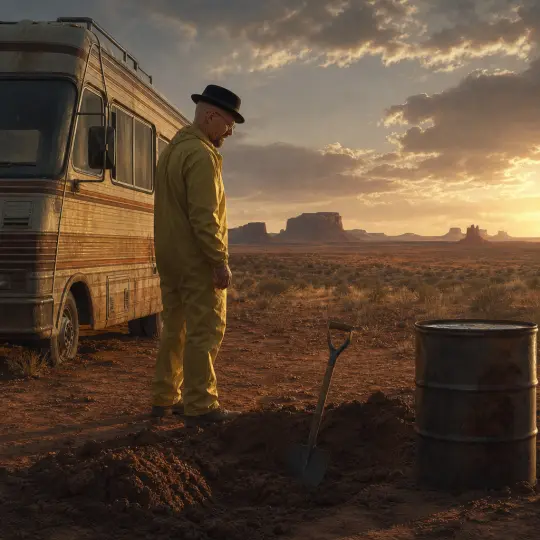
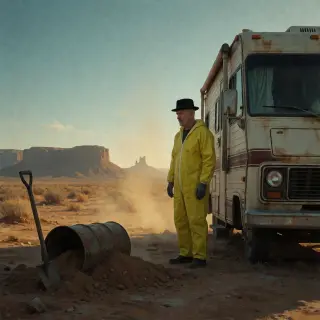
From one world brief to a sun-bleached desert frame — an RV, a fresh hole, a steel drum and a man in a yellow coverall — rendered by GPT Image 2
What Is the GPT Image 2 Crime-Drama Key Visual Generator?
The GPT Image 2 crime-drama key visual generator is the structure-first route to grounded crime art. GPT Image 2 does not try to win on mood alone; it builds a frame out of material facts. Vehicle panels have trim and rust. Fabric has weight and folds. Concrete reflects light because it is wet. A laboratory looks like a place where work happens, not a place where a poster was designed. For a genre that lives or dies on believability, that is the useful bias.
This page is about one model used deliberately, not about a universal best. Every frame below was generated from the Breaking Bad world on Neta Studio, with the same briefs also run through Krea 2 so the differences are visible rather than asserted.
What GPT Image 2 Does Well in This Genre
Material honesty. Metal reads as metal, dust as dust, fabric as fabric. Atmospheric recession. Mesa layers step back at believable intervals instead of collapsing into a painted backdrop. Foreground evidence. A shovel, a drum or a tray of crystal sits in the frame with weight and contact shadow. Architecture. A corridor has a plan, a ceiling height and a reason to exist. Small text control. If a sign is required, GPT Image 2 is the model most likely to spell it; for this genre the safer choice is still to ban text entirely.
The Test World: Breaking Bad
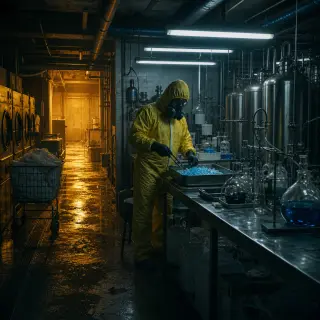
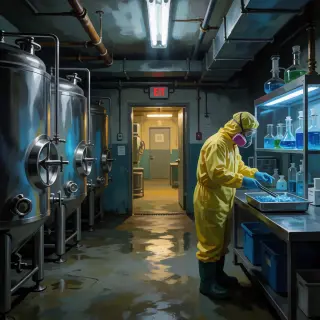
Everything here was rendered against a real canon: the Breaking Bad world in Neta Studio. Eight characters, six locations, six events and four factions, all editable. The two scenes used for this test are the ones that define the visual range of the genre: To'hajiilee at golden hour, where the story is horizontal and empty, and the Superlab, where the story is vertical, industrial and sealed. If a model can hold both, it can hold the world.
Prompt Anatomy for GPT Image 2
GPT Image 2 rewards ordered, concrete prompts. Put medium and genre first, then place, then subject and costume, then the single piece of foreground evidence, then light, then a negative clause. It is less tolerant of poetic language than Krea 2 and much more tolerant of technical nouns: "wet concrete", "anodised aluminium", "sodium spill", "restrained film grain". If a word would appear in a location scout's notes, the model can use it.
Medium and genre
Semi-realistic painterly crime-drama key visual, cinematic wide shot.
Place
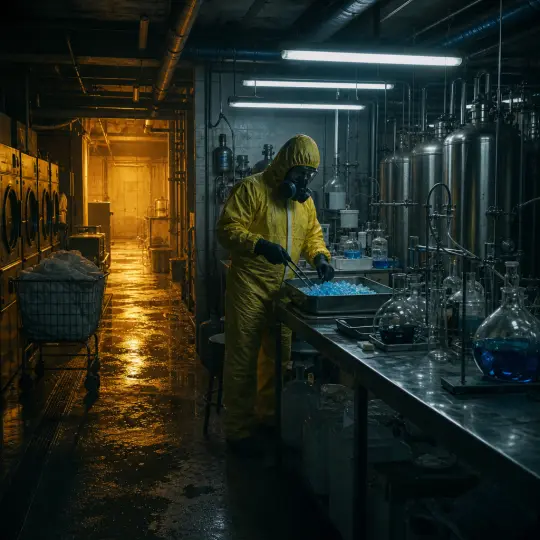
To'hajiilee mesa country at golden hour, or an underground pharmaceutical-grade laboratory beneath an industrial laundry.
Subject and costume
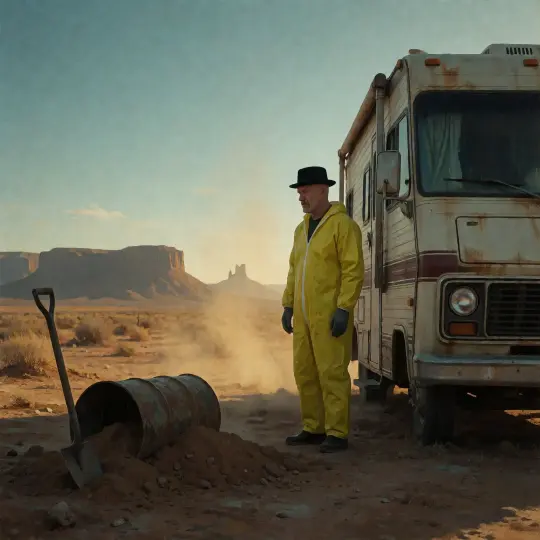
A bald middle-aged man in a black black fedora and a yellow work coverall; or a figure in a cleanroom coverall and respirator.
Evidence
An empty steel drum and a shovel on turned earth; or a steel tray of blue crystal and a pair of tongs.
Light and palette
Low golden sun, heat haze, ochre dust and cold teal shadow; or cold fluorescent against warm sodium spill from a corridor.
Negative
No text, no logos, no watermark, restrained film grain.
Step 1 — Name the Place Before the Person
Most failed crime prompts start with a character. Start with the place instead, because the place decides the composition. "Mesa country west of Albuquerque at golden hour" gives you a horizon, a sky ratio and a light direction. "A man in a hat" gives you a portrait. Once the place is fixed, the person becomes a scale object rather than a subject, and the frame starts behaving like a story rather than a headshot.
Step 2 — Make the Costume Specific
Costume is the cheapest way to make a character legible without describing a face. A black black fedora and a yellow work coverall carry the entire premise in two colour blocks: civilian clothes on top, industrial labour underneath. GPT Image 2 reproduces that contrast reliably, including the way the coverall catches dust at the cuffs. Describe the garment, not the actor; the model will supply a believable person.
Step 3 — Put One Piece of Evidence in the Foreground
A crime frame needs one object that implies an action already in progress. A shovel beside a fresh hole. A steel drum with its lid off. A tray of blue crystal and a pair of tongs. The object should be close enough to have texture and far enough from the subject to create a triangle of attention: object, person, horizon. Without it the image is a landscape; with it, the landscape becomes a scene.
Step 4 — Light the Lie, Not the Room
GPT Image 2 will happily light everything evenly, which is the fastest way to lose the genre. Name one key source and one fill, and give them different colour temperatures. In the desert, the key is a low sun and the fill is a cool sky bounce. In the lab, the key is cold overhead fluorescence and the fill is warm sodium spill from the corridor. The temperature contrast does the moral work: the warm light is the ordinary world, and it is always just outside the room where the crime happens.
Step 5 — Ban Text and Logos
Crime drama is full of signage: motel signs, product packaging, police cruisers, menus. Models still misspell short words, and a misspelled sign destroys the documentary illusion faster than any anatomical error. Add "no text, no logos, no watermark" to every prompt, then crop or composite any signage you actually need. GPT Image 2 is better at text than most models, but "better" is not "reliable", and the genre cannot afford a visible error.
Where GPT Image 2 Needs Help
Hands and tools. Tongs, triggers and door handles can merge; describe the grip or crop the hand. Deep perspective. Long corridors can drift into funhouse geometry; add "straight one-point perspective, level camera". Crowds. Background faces can repeat; ask for "backs of heads, out of focus". Sky drama. It will over-render clouds; specify "flat high cloud, low contrast" when you want the bleached look. Exact likeness. It will invent a face; cast by costume and posture instead.
Fix Table
| Problem | Fix in the prompt |
|---|---|
| Looks like a car advert | Remove lens flare; add heat haze, dust on the paint and a scuffed bumper. |
| Looks like a video game | Add material constraints: fabric weight, wet concrete, chipped paint, visible weld seams. |
| Looks like a stock photo | Add one piece of foreground evidence and a human silhouette at the edge of frame. |
| Character poster drift | Turn the face away; widen to a 2.39:1 feel; describe posture and hat, not features. |
| Lab reads as a spa | Add industrial nouns: stainless tanks, pipe runs, drain grate, condensation, warning stripe. |
| Desert reads as Mars | Add "New Mexico mesa country, dry scrub, red dirt, ordinary daylight". |
GPT Image 2 Against Krea 2
The same world brief was also run through Krea 2. GPT Image 2 answered with a document: the RV's trim, the mesa recession, the wet floor carrying amber light down the corridor, the laundry machines behind the wall. Krea 2 answered with a poster: compressed values, a bleached vehicle, a magenta respirator, a sky that carries the emotion. GPT Image 2 is the better choice when the frame must survive a crop or a caption. Krea 2 is the better choice when the frame must stop a scroll.
Render and Publish Workflow
Open the world studio, copy the atom you want to visualise, write the six-clause brief and generate. Publish each frame as a work of the world with its prompt and model recorded. The four frames on this page are published works with live share links, which means the comparison can be inspected rather than taken on faith.
Copy the atom
Open To'hajiilee or the Superlab in the world and copy its nouns into the place clause.
Write six clauses
Medium, place, subject, evidence, light, negative. Keep every clause concrete.
Generate at the right ratio
Use a wide frame for the desert and a deep frame for the lab. Square is for social; 3:2 is for pages.
Publish as a work
Attach the image, prompt and model to the world so the frame inherits the canon.
Compare and iterate
Run the identical brief on Krea 2, publish both, and let the comparison decide which surface each image serves.
Why Publish to the World
A key visual that lives only in a downloads folder is a dead end. Published as a work, it inherits the world's atoms, appears in the world gallery, and becomes available for remixing. It also makes the prompt auditable: anyone can see which model, which brief and which scene produced the frame. For a genre built on evidence, that is the appropriate format.
Explore the World
Start with the wide shot. It defines the palette, the scale and the social logic that every later frame will inherit. For this world, the easiest first frame is To'hajiilee at sunset; the most useful second frame is the Superlab at shift change. Publish both, then compare models on the same brief.
Create Your Own Frame
Four published frames, two models, one world — the next one is yours.