
GPT Image 2 Dark Fantasy World Key Visual Generator
GPT Image 2 as a dark fantasy key visual generator: the real settings, the six-clause recipe, two worked examples from the Ashen Vigil world, and where the model breaks.
Generate a Dark Fantasy World Key Visual with GPT Image 2
One sentence, six clauses, one frame. Start from the GPT Image 2 dark fantasy key visual generator and build a poster that shows who is paying.
What This Tool Page Covers
This is a working page for GPT Image 2 as a dark fantasy world key visual generator. It covers the settings that matter, the six-clause prompt recipe, two worked examples from the Ashen Vigil world, the failure modes worth budgeting for, and an honest comparison against Krea 2 on the identical brief.
- Model: GPT Image 2, text-to-image with optional reference images.
- Best at: material texture, prop density, crowd staging, ash, metal and fire.
- Weak at: speed, cheap iteration, silhouette-first graphic posters.
- Use it when: the frame will be inspected, cropped, printed or used as a store-page hero.
What GPT Image 2 Does Better Than Anything Else Here
GPT Image 2 is not the fastest image model available and it is not the most stylish. What it does better than its competitors is respect a clause. If you write "a sealed ledger", you get a closed book with a clasp; if you write "ash sifts from the joints", you get ash on the pauldrons, on the ground and in the air. For dark fantasy, where the horror is carried by objects rather than by gore, that literalness is the whole product.
The second strength is crowd staging. A dark fantasy key visual usually needs more than one person — a queue, a congregation, a rank of the dead — and most models turn a crowd into a smear of faces. GPT Image 2 gives you separate silhouettes at separate depths, each doing something slightly different, which is exactly what makes a rite read as an institution.
The Model's Real Settings
- Size: request 2048×1152 for a 16:9 hero, 1024×1536 for a portrait character frame. Both are native; do not upscale a square.
- Quality: high for anything that will be inspected. Medium is fine for iteration, low only for thumbnails.
- Reference images: optional, and best used for palette or costume continuity — not for copying composition.
- Output format: PNG for key art, WebP for feed variants. A JPEG cannot preserve a transparent background.
- Speed: slower than Krea 2 by a wide margin. Budget two passes, not ten.
- Cost: charged per image and scaled by size and quality, so iterate at medium and finish at high.
The Six-Clause Recipe for Dark Fantasy Frames
Format and ratio
Name the object first: "semi-realistic dark fantasy game key visual, 16:9" or "character key visual, portrait". The model commits to a composition type before it reads anything else.
The place
One location card, described as architecture: rings of black basalt, a flooded nave, a leaning tower of bells. No second location, no establishing sweep.
The transaction
Who is paying and what is being recorded. A priestess with a ledger, a knight with a brand, a choir with a hymn. This clause is the story.
The crowd
Describe the queue by posture: hooded, ranked on the stair, each holding a clay token. Posture is what keeps a crowd from becoming wallpaper.
The material
Name what the world is made of: packed ash, rusted plate, wet basalt, kelp-green hair. Materials are where this model earns its cost.
The light and the palette
One source, one direction. Ember orange on charcoal, cold blue dusk, green water-light. Close with the negative list: no text, no logo, no watermark, no UI.
Worked Example 1: The Vigil Flame
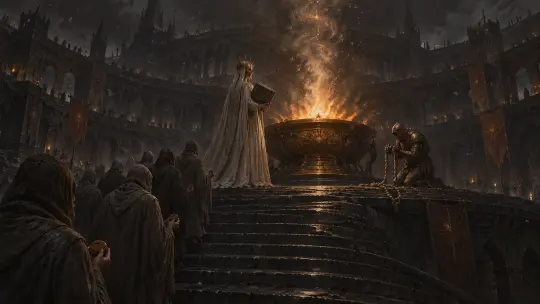
The first test is the world's front door. The brief asks for four planes in one frame: the queue on the stair, the priestess on the top step, the brazier of fire, and the rings of the Citadel behind. GPT Image 2 puts the flame high and slightly right, uses it as the only key light, and lets the bounce describe the basalt on all four sides of the courtyard. The priestess stands with her back to camera holding the ledger closed.
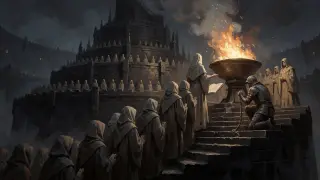
What worked: the stair is wet and uneven, each pilgrim is a separate posture, the bellringer kneels at a rail rather than being chained, and the ledger stayed sealed. What it cost: the render is slower, and the image has more detail than a thumbnail can hold — you will crop it for feed use.
Worked Example 2: Greaves, the Ashless
The second test is the opposite skill. No crowd, no architecture — one figure on a road, and a sentence that is almost impossible to illustrate: a knight made of packed ash inside rusted plate, with nothing inside the helm. GPT Image 2 solves it as a material problem. Ash pours from the gorget, drifts above the hollow helm, settles on the pauldrons and dusts the skulls at his knees. The oath-brand reads as an ember rather than a logo.
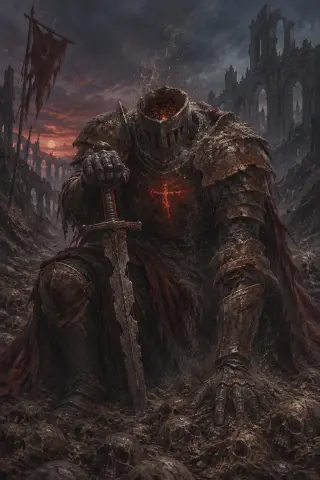
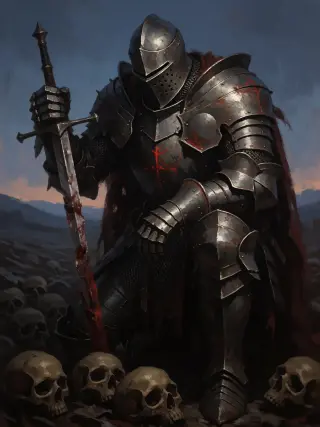
What worked: the plate looks repaired rather than designed, the sword is planted rather than held, and the ash behaves like a physical substance. What it cost: the frame is busy at portrait size, so the silhouette is weaker than Krea 2's cleaner poster knight.
Where GPT Image 2 Breaks
- Two-light drift. Ask for a fire and a sunset and it will happily light both, which breaks tenebrism. Name one source and explicitly say "no second light".
- Prop drift. Ropes become chains, ledgers become open books, brands become crosses. Re-state the prop in the negative list if it matters.
- Symmetry creep. With crowds it tends toward a centred, heraldic arrangement. Ask for an off-centre figure if you want a poster that feels observed.
- Portrait crowding. At 1024×1536 it fills the frame. Reserve the top third if you need room for a title.
None of these are fatal. They are budget lines: plan the frame around what the model is good at, and spend the second pass fixing the one clause it ignored.
GPT Image 2 vs Krea 2 on Identical Briefs
Both Ashen Vigil prompts were run through both models with no edits and no reference images. The pattern is consistent. GPT Image 2 renders an interior with a history; Krea 2 renders a poster with a mood. GPT keeps the sealed ledger and the kneeling bellringer; Krea opens the book and chains the bellringer. GPT makes ash a material; Krea makes it a colour.
The honest conclusion: GPT Image 2 wins any frame that will be inspected, and loses any frame that has to work at thumbnail size on a store shelf. Run both. The comparison is cheaper than a second round of art direction.
Prompt Hygiene Checklist
- One light source, named with a direction and a colour.
- One location card, described as architecture rather than as landscape.
- One transaction, visible as a prop: ledger, brand, rope, hymn book.
- Crowd described by posture and rank, not by headcount.
- Materials named explicitly: packed ash, rusted plate, wet basalt.
- Negative list closed: no text, no letters, no watermark, no logo, no UI.
- Ratio chosen before rendering, not cropped after.
From Frame to World
A key visual is not the end of the pipeline; it is the proof that the world is coherent. In Neta Studio the frame is generated from the same atoms that hold the cast, the locations and the timeline, so the next frame does not start from zero. Publish the render as a work and it gains a share page with its prompt and model attached.
Frame → Work
Publish the render against the world; the share page records the prompt, the model and the atoms it came from.
Frame → Sequence
Reuse the same location card for the next beat: the queue, the ledger, the fire, the forgetting. One style, four posters.
Frame → Fork
A reader inherits the twenty-one atoms and rewrites the debt. The comparison survives the fork because the works stay attached.
Cost and Iteration Budget
The practical workflow that keeps quality high without burning budget is to spend the first pass at medium quality and the second at high. Draft the composition at 1024 wide, read the silhouette, then re-render the winning prompt at 2048×1152. Two passes at two sizes is usually cheaper than five passes at full size.
- Pass 1 — composition: medium quality, 1024 wide, one prompt variant. Check silhouette and prop legibility.
- Pass 2 — finish: high quality, 2048×1152, one prompt variant with the winning clause order.
- Comparison: one Krea 2 render of the same sentence costs a fraction of a GPT pass and tells you whether the brief is legible at all.
Frequently Asked Questions
- Do I need a reference image? No. All four Ashen Vigil works were text-only, which is why they are a fair model comparison.
- Can GPT Image 2 render legible text? Yes, better than most, but a key visual should not depend on type. Add titles in layout, not in the prompt.
- Why does my render look like generic dark fantasy? Usually two light sources and a missing prop. Cut one light and name one object that records a debt.
- How many prompts should I keep? One per frame, stored on the work. The clause order is the useful part of the record.
- Is Krea 2 better? It is better at posters and faster at iteration. On these two briefs it lost the props, so it lost the argument.
Build Your Own Dark Fantasy Frame
Take the six-clause recipe, point it at a world with real atoms, and publish the frame that survives the crop.
The Ashen Vigil world is open: fork it, swap the location, keep the one-light rule, and add your own transaction to the ledger.