
GPT Image 2 Dream-Heist Key Visual Generator — Folded Cities and Zero-Gravity Rooms
A GPT Image 2 workflow for dream-heist key visuals: folded boulevards, rotating hotel corridors and frozen fortresses rendered with real material logic. Built and proven on the Inception: Dreamshare world with four published works.
Generate a Dream-Heist Key Visual
One brief, two models, four published frames: a folded Paris boulevard and a hotel corridor with no floor.
What Is the GPT Image 2 Dream-Heist Key Visual Generator?
This is a working recipe for GPT Image 2, not a wrapper with a logo on it. It turns a world brief into a poster for a dream-heist story: a city folded at ninety degrees, a corridor rotating without gravity, a snow fortress that exists only inside someone's memory. The output is a single frame with real materials, readable geometry and a human witness for scale. The recipe is the combination of three things: a world with atoms specific enough to brief (Inception: Dreamshare), a six-clause prompt template that keeps comparisons honest, and a one-line negative clause that strips out fantasy ornament. GPT Image 2 supplies the structural discipline; the world supplies the nouns.
What It Generates
The generator is tuned for five operations that cover most of the genre. Each one is a verb rather than a mood, which is why a single model can render all of them without a style change. Because the operations are concrete, they survive translation into an image: a prompt that asks for a dreamlike atmosphere gives the model nothing to build, while a prompt that asks for a boulevard folded at a right angle gives it a plane, a hinge and a direction of gravity — and those three facts produce a frame.
Fold a street, a beach or a staircase over itself. Rotate a corridor, a ballroom or a station until the floor becomes a wall. Flood a downtown until the water has no horizon. Collapse a fortress while the sky stays still. Mirror a room so the reflection runs the scene instead of the room.
Why GPT Image 2 for Dream Architecture
Dream architecture is a material problem disguised as a surreal one. The fold only works if the stone looks heavy. The zero-gravity corridor only works if the brass sconces look polished and the carpet looks worn. GPT Image 2 is unusually good at this kind of physical continuity: it keeps street furniture consistent across an impossible seam, renders wet stone with plausible specular structure, and holds fabric and dust at believable weight. It is also disciplined about perspective: a one-point corridor needs converging lines that agree with the door frames, and a fold needs two vanishing systems that meet at a hinge. When those agree, the audience accepts the impossible element immediately, because everything around it is behaving.
Model Settings That Matter
Only three settings change the outcome for this genre: size, quality and format. Size decides whether the composition is a poster or a social card. Quality decides whether the fine architecture survives a crop. Format decides whether the file drops into a page without conversion. Iterate at medium quality on a square frame, then re-render the winner at high quality in the aspect ratio the page actually needs. Re-rendering is not a failure of the process; it is the process: the composition is decided cheaply and the detail is paid for once.
size 1536x1024 for a landscape poster, 1024x1536 for a vertical share card, 1024x1024 for a gallery tile. quality high for hero frames that will be inspected, medium for iteration. output_format png for archival, webp for lighter pages. background opaque — dream architecture needs a sky.
The Prompt Formula
Every frame in this world uses the same six clauses in the same order. Change the nouns; keep the structure. That is what makes a series look like a series instead of six unrelated images, and it is what makes a model comparison meaningful.
Medium and genre
Semi-realistic painterly dream-heist key visual, cinematic wide shot — locks rendering before content.
Place
A real city and a real building type: Paris boulevard, art-deco hotel corridor, alpine hospital.
Operation
Exactly one broken law: folds at a right angle, rotates in zero gravity, floods from below.
Witness
One or two figures at human scale, backs to camera, so the viewer inherits their position.
Physics and light
Wet cobblestones reflecting rooftops, floating dust and paper, brass against deep green, overcast rain.
Negative clause
No text, no logos, no glow, no particles — the clause that keeps the frame out of fantasy.
Example 1: The Folding Boulevard
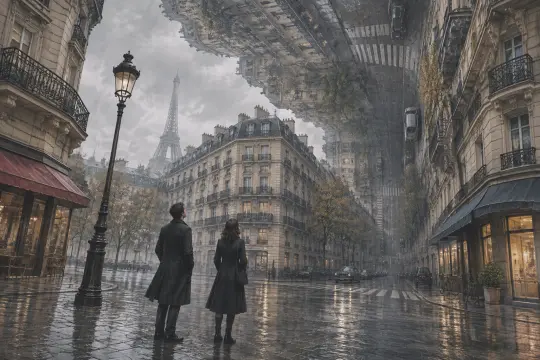
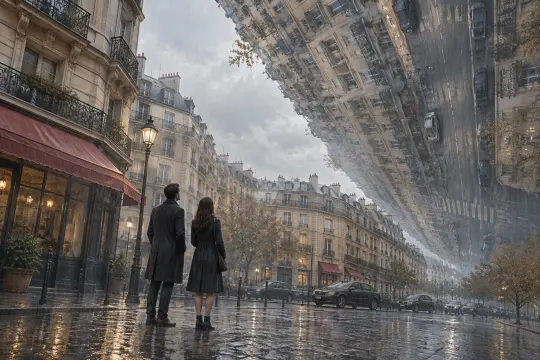
The fold is the hardest operation to keep legible because it doubles every object: a facade has a reflection, a crosswalk has a mirror image, and the hinge has to look engineered. The prompt names the city, the street type, the exact angle, the weather and the two witnesses. GPT Image 2 renders the hinge as a seam rather than a special effect: the awnings keep their sag, the balconies keep their rhythm, and the wet pavement carries the inverted street so convincingly that the fold reads as architecture instead of collage.
Prompt. Semi-realistic painterly dream-heist key visual, cinematic wide shot: a Paris boulevard folding over itself at a right angle, a whole street of Haussmann facades, awnings and parked cars rising vertically into an overcast sky, wet cobblestones reflecting the upside-down rooftops, two small figures in dark coats standing on the pavement looking up, pale grey-blue light, thin rain, muted ochre and slate palette, restrained film grain, no text, no logos.
Example 2: The Corridor With No Floor
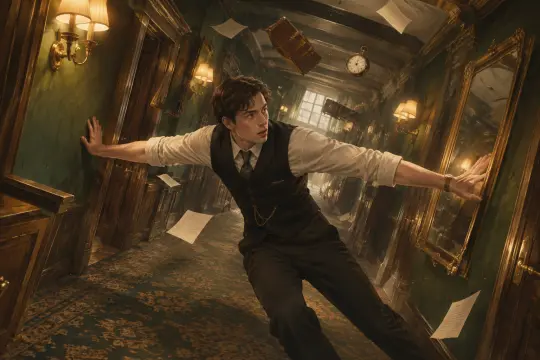
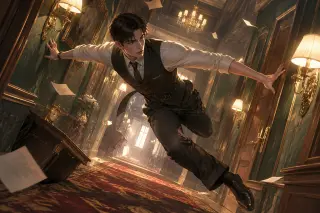
Rotation tests the body. A corridor is a container built around one direction; remove it and the human figure becomes the only stable object. The prompt must specify contact — braced between two walls, arms spread, weight distributed — or the model produces a man flying, which belongs to a different genre. The word braced is load-bearing: it gives the model resistance, muscle and contact, which is what separates a heist frame from a fantasy frame. Floating paper is the second signal — cheap, familiar and instantly readable as suspended gravity.
Prompt. Semi-realistic painterly dream-heist key visual, cinematic interior: an art-deco hotel corridor rotating in zero gravity, doors and framed mirrors tilting away from the floor, a man in a dark waistcoat and rolled shirtsleeves braced between two walls, floating dust and loose sheets of paper, warm brass sconces against deep green walls, patterned carpet sliding sideways, hard one-point perspective, restrained film grain, no text, no logos.
GPT Image 2 vs GPT Image 2.5
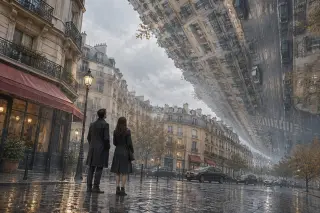
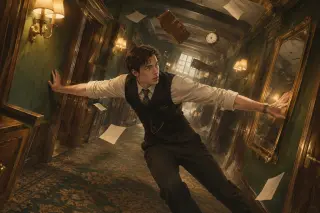
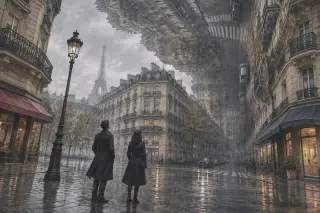
The same two briefs were also run through GPT Image 2.5. The difference is consistent across both scenes. GPT Image 2 gives you a document: correct street furniture, plausible reflections, dust that behaves like matter, fabric with weight. GPT Image 2.5 gives you a poster: a wider gesture, a cleaner diagonal, more air in the sky, a distant landmark for scale, and a composition that still reads at thumbnail size.
What GPT Image 2 Gets Right
Three strengths matter for this genre. First, physical continuity: an object keeps its identity across an impossible seam. Second, perspective agreement: one-point rooms converge correctly, so the rotation reads as a room rather than a collage. Third, restrained rendering: the painterly finish stays close enough to photography that the impossible element feels documented, not illustrated.
Where it needs help: it will sometimes add a second impossible operation if the prompt implies one, and it can soften very fine architectural detail in small crops. Both are prompt problems, not model problems — the first is solved by removing adjectives, the second by raising quality and size.
Four failure modes and their one-line repairs. Fantasy drift — glowing edges and floating islands: add no glow, no particles, overcast daylight. Escher wallpaper — too many impossible planes: restrict to one operation and one street. Floating bodies — no contact: use braced, gripping, shoulders pressed, weight on one foot. Pretty but empty — no witness: add two small figures in dark coats with their backs to camera.
Render and Publish Workflow
Open the world studio, copy the atom you want to visualise, write the six-clause brief and generate. Publish each frame as a work of the world with its prompt and model recorded. The four frames on this page are published works with live share links, which means the comparison can be inspected rather than taken on faith.
Copy the atom
Open the Atelier or the rotating hotel in the world and copy its nouns into the place clause.
Write six clauses
Medium, place, operation, witness, light, negative. Keep every clause concrete.
Generate at the right ratio
Landscape for the boulevard, portrait for a share card, square for a gallery grid.
Publish as a work
Attach the image, prompt and model to the world so the frame inherits the canon.
Compare and iterate
Run the identical brief on GPT Image 2.5, publish both, and let the comparison decide which surface each image serves.
Why Publish to the World
A key visual that lives only in a downloads folder is a dead end. Published as a work, it inherits the world's atoms, appears in the world gallery, and becomes available for remixing. It also makes the prompt auditable: anyone can see which model, which brief and which scene produced the frame. For a genre built on evidence, that is the appropriate format.
Explore the World
Start with the wide shot. It defines the palette, the geometry and the social logic that every later frame will inherit. For this world, the easiest first frame is the folded boulevard at street level; the most useful second frame is the rotating corridor at body level. Publish both, then compare models on the same brief.
Create Your Own Frame
Four published frames, two models, one world — the next one is yours.