
GPT Image 2 Fortnite Key Visual Generator
Generate Fortnite-style battle-royale art from one sentence — stylized key visuals, landmark posters, and atom covers as shareable works on Neta Studio.
From one sentence to a Fortnite-style key visual — stylized battle-royale island posters, landmark art, and atom covers, drafted with GPT Image 2 on Neta Studio
What Is the GPT Image 2 Fortnite Key Visual Generator?
The GPT Image 2 Fortnite key visual generator is the flagship image model on Neta Studio for battle-royale art: give it one sentence about a scene, a character, or a landmark, and it renders a stylized cel-shaded image with photorealism-grade detail — then the studio attaches it to the world as a shareable work with a live router-files URL.
What Makes It the Right Tool for Battle-Royale Art
- Cel-shaded stylized renders — the exact register of modern battle-royale games.
- Photorealism-grade detail — fine textures, complex compositions, and sophisticated lighting.
- World-native — prompts are built from the world's own atom cards, so characters stay consistent.
- Strong prompt discipline — follows complex style sentences like 'stylized Fortnite adventure with saturated colors, crisp cel-shaded forms' without drifting into generic fantasy.
See It Render a World
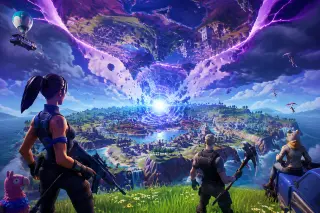
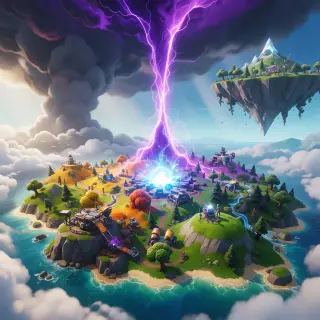
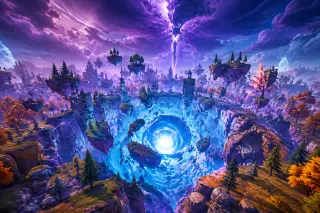
The Fortnite: Fracturefall world below was rendered from a single visual-style brief — 'a stylized battle-royale island caught between realities.' GPT Image 2 produced the flagship key visual of the island with the inverted second island overhead and the Zero Point core at center; Krea 2 drew the expressive comparison pass; both models rendered the Zero Point Crater landmark.
How to Generate Fortnite Art with GPT Image 2
Name the scene and the style
'A stylized battle-royale island torn between realities, an inverted island overhead, a glowing blue-white Zero Point core at the center, saturated colors, crisp cel-shaded forms, no text.'
Let the world draft first
The world reveal drafts the characters and locations first, so the image prompt knows exactly who and where to draw.
Run the model comparison
Send the same brief to GPT Image 2 for the flagship render and to Krea 2 for an expressive alternative.
Publish the work
The studio attaches the render to the world as a shareable work with a live router-files URL.
Fork and remix
Anyone can fork the world and re-run the same pipeline on their own premise.
Prompt Patterns for Battle-Royale Art
The key visual pattern: 'A <landmark> at <time of day>, <signature elements>, <visual style>.' This produced the Fracturefall poster: island in, poster out.
The landmark pattern: 'A <location> where <physics break>, <storm lighting>, <visual style>.' This produced the Zero Point Crater with orbiting debris and a splitting rift-beam.
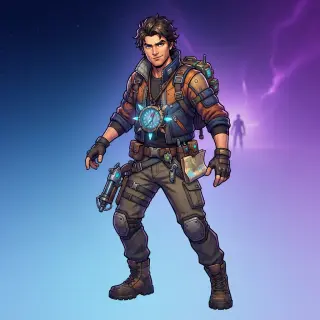
The cover pattern: '<Character or location name>, <signature detail>, cel-shaded stylized key art, no text.' This drives every atom cover in the world.
GPT Image 2 vs Krea 2 — Which to Use
The same key visual brief was rendered by both models in the same studio. GPT Image 2 is the flagship: cleaner renders, finer detail, and stronger fidelity to the cel-shaded game register — the choice for final posters. Krea 2 is the fast, low-cost tier: expressive painterly passes for iteration, mood boards, and stylistic exploration before committing to the final render.
| Dimension | GPT Image 2 | Krea 2 |
|---|---|---|
| Style | Cel-shaded render, fine detail | Expressive painterly pass |
| Best for | Flagship posters, final key art | Iteration, mood boards, variety |
| Speed | Slower, low cost | Fast, lower cost |
| World output | Fracturefall key visual + Zero Point Crater | Comparison passes for both briefs |
Works Generated with This Tool
Capabilities at a Glance
- One-sentence brief → stylized battle-royale key visual
- Photorealism-grade detail and complex compositions
- Auto-generated covers for every character and location atom
- Model comparison: GPT Image 2 · Krea 2
- Works pipeline: key visuals, landmark posters, and more
- Fork-friendly: every world and work is remixable
Technical Specs
- Model: GPT Image 2 (flagship image tier on Neta Studio)
- Companion model: Krea 2
- Output: PNG/WebP images served at live router-files URLs
- Inputs: text prompts; image reference support for editing
- Works: images registered as shareable works on the world
Why GPT Image 2 Is the Model to Watch
GPT Image 2 sits at the center of the current battle-royale art wave: strong natural-language understanding, broad world knowledge, and the discipline to follow complex prompts like 'stylized Fortnite adventure with saturated colors, crisp cel-shaded forms' without drifting into generic fantasy. On Neta Studio, it is the model behind the Fracturefall flagship key visual — one brief, one poster, one live URL.
Start From Your Key Visual
The strongest world starts from its poster. Generate the key visual first with GPT Image 2, then let the world draft around it — the visual-style sentence carries through every cover, poster, and background that follows.
Real Outputs, Real Router-Files URLs
Every asset on this page is a live router-files.neta.art URL from actual generations — the world covers, the landmark posters, the character covers. Nothing is stock, nothing is placeholder, everything is forkable.
Best Practices for Battle-Royale Art
- Lock the style sentence — 'stylized Fortnite adventure with saturated colors, crisp cel-shaded forms' — and reuse it everywhere.
- Name the physics break — 'rocks orbit the crater', 'an inverted island hangs upside down'.
- Give the scene a signature element — the blue-white Zero Point core, the purple rift.
- Generate the key visual first; covers and landmark posters follow its palette.
- Run the comparison — GPT Image 2 and Krea 2 render the same brief differently, and both are worth keeping.
FAQ — GPT Image 2 Fortnite Key Visual Generator
Is GPT Image 2 free? It is a low-cost model on Neta Studio; Krea 2 is even cheaper for fast iteration.
Can it create Fortnite-style art? Yes — it renders canon-inspired art with original execution: no licensed assets are reproduced verbatim, and all images are original.
Can I keep characters consistent? Yes — build the world first, lock the style sentence, and every cover inherits the same visual register.
Generate Your First Key Visual
Fracturefall was drawn from one sentence. Name your scene, your hero, and the light you want — GPT Image 2 renders the poster, and the studio turns it into a shareable work.
One sentence in — <span class="ml-highlight">a battle-royale key visual</span> out, ready to fork
Stylized cel-shaded key visuals, auto-generated covers, and a works pipeline that turns worlds into shareable art.