
GPT Image 2 Fullmetal Alchemist Key Visual Generator
A practical generator for alchemical anime key visuals — seven prompt clauses, real settings, five failure modes and a same-prompt comparison against Krea 2.
GPT Image 2 Fullmetal Alchemist Key Visual Generator
This is a working generator for anime key visuals in a diesel-and-steam alchemical world: a boy in a red coat with steel limbs, a hollow suit of armour, a black eclipse over a white-stone capital, and a village where the grass has grown back over a burnt house. It is built on GPT Image 2 and tested against Krea 2 with the same two prompts, so you can see exactly what the extra detail buys and what it costs.
Everything below comes from the published Fullmetal Alchemist world on Neta Studio: four real works, two prompts, two models, and the settings that produced them. Copy the skeleton, change the scene, and keep the style lock.
What this generator is actually good at
GPT Image 2 is strongest when the image has to explain a place. It separates foreground, subject and background into readable planes, keeps small props legible, and holds architectural scale. That makes it the right model for a world key visual, a background plate, or any frame where the viewer must understand where everyone is standing. It is also good at mechanical detail — automail joints, rifle straps, the seal on a breastplate — which matters in a setting where the machinery is the metaphor.
- Spatial depthIt builds the plaza, the crowd and the skyline as separate planes instead of flattening them into one poster shape. Use it when the image has to carry geography.
- Mechanical and costume detailSteel limbs, leather belts, glove sigils and armour seams survive at full resolution. Use it when a prop is part of the plot.
- Lighting that explainsIt reads a described light source and keeps it consistent across the figure and the ground. One key light, one mood, no accidental second sun.
The seven-clause prompt skeleton
A reliable key-visual prompt has seven clauses, in this order: medium, place, subject, action, costume and props, light, exclusions. The order matters because the model weights the opening most heavily. Put the style first, the place second, the person third, and never bury the exclusion list in the middle of the sentence.
Medium and lineage
“Anime cel-painted key art, 2D illustration, vertical movie-poster composition.” Name the tradition, the dimension and the format before anything else.
Place and hour
“A white-stone capital plaza at eclipse.” One location, one time. Do not describe a montage.
Subject and silhouette
“A short blond alchemist in a long red coat, steel automail right arm raised.” Height, hair, coat, limb, pose. The silhouette should be nameable in one line.
Action and consequence
“Blue transmutation lightning crackling from the glove; a violet circle glowing through the paving.” Say what the action does to the world, not just what the hand is doing.
Second figure and relation
“A towering hollow suit of armour behind him, one huge hand on the boy’s shoulder.” Relation is drama: guard, threat, witness, equal.
Light and palette
“Backlight from the eclipse, hard-edged shadows, dust and embers, clean local colors.” One key, one fill, one accent colour.
Exclusions
“No text, no logos, no watermark.” Repeat this every run. Both models will invent signage if you let them.
The skeleton, filled in
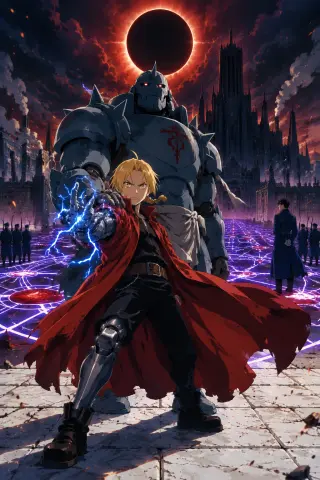
Anime cel-painted key art, 2D illustration, vertical movie-poster composition. The Promised Day in a diesel-and-steam capital city: a short blond alchemist in a long red coat with steel automail limbs stands in the foreground on a white-stone plaza, gold eyes blazing, red coat whipping in the wind, his right arm raised mid-transmutation with blue alchemical lightning crackling around his gloved hand. Behind him a towering hollow suit of armor with red eye-lights above a blood-red seal on its chest stands guard, one huge hand on the boy’s shoulder. Above them a black solar eclipse rings the sky, and beneath the paving stones a colossal nationwide transmutation circle of glowing violet lines and blood-red nodes spreads across the plaza toward the dark towers of Central Command. Blue-uniformed soldiers with rifles and a black-haired colonel in a white-gloved uniform read as small silhouettes at the edges. Flat-color base, designed hard-edged shadows, selective anime line art, limited mid-tones, clean local colors, dramatic backlight from the eclipse, dust and embers in the air, epic scale, no text, no logos, no watermark.
Model: GPT Image 2 · Size: 1024×1536 · Quality: high · Output: PNG
Settings that matter
Two real generations, same brief
The Promised Day prompt was sent unchanged to GPT Image 2 and Krea 2. GPT Image 2 built a place: stone underfoot, a crowd at the edge, towers behind the eclipse, and a circle glowing up through the paving with real perspective. Krea 2 built a poster: the boy centred and small, the armour flattened to a grey silhouette, the riflemen mirrored left and right, and the circle drawn in clean neon lines.
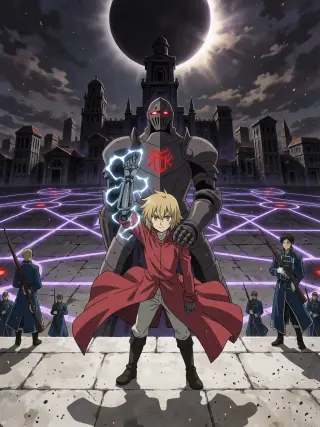
What GPT Image 2 did differently from Krea 2
The difference is not quality; it is a theory of the image. GPT Image 2 assumes the viewer wants to enter the scene, so it gives you doors, distances and a horizon. Krea 2 assumes the viewer wants to recognise the scene at a glance, so it gives you symmetry, contrast and a silhouette that survives a thumbnail. A world set needs both: plates for play, posters for discovery.
- Choose GPT Image 2 whenThe frame must hold a location, a crowd, a machine or a piece of evidence. If a viewer should be able to say where everyone is standing, this is the model.
- Choose Krea 2 whenYou need a fast, cheap, high-contrast read for a cover, a thumbnail or a mood test. Use it first, then rebuild the chosen composition in GPT Image 2.
The village test: a scene with no villain
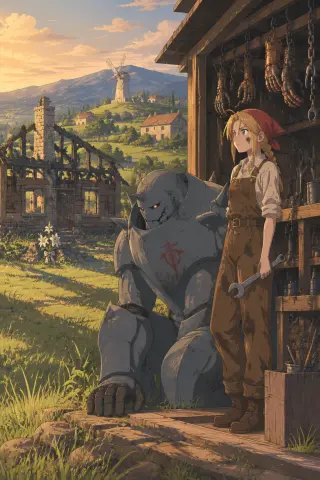
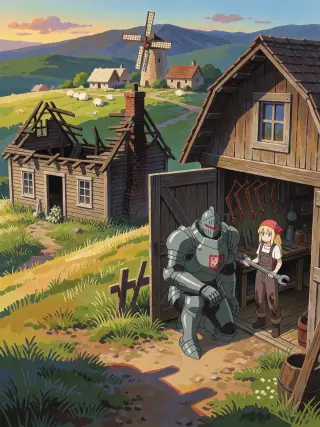
The second prompt removes the battle and keeps the grief: a burnt house, white lilies, a kneeling armour, a mechanic with a wrench, a windmill on the ridge. It is the harder test, because nothing in the frame is threatening. GPT Image 2 makes the village feel inhabited — the workshop’s hanging copper limbs, the chimney standing over charred beams, the long golden light. Krea 2 turns the same village into a book cover: two flat panels, simplified sheep, a posed pair in the doorway.
Five failure modes and the one-line fix
- The image looks like a photograph Your style clause is too weak. Name the line quality, the flat local colour and the hard-edged shadow explicitly, and repeat the same sentence every run.
- The scene has no geography You described a mood, not a place. Add a foreground object, a middle subject and a background landmark, in that order.
- The hands are wrong Give each hand a job — holding, touching, signalling — and say which one is visible. Models fail on decorative hands.
- The circle looks like graffiti Describe it as light through stone with a perspective direction, not as a sticker on top of the image. “Glowing up through the paving toward the towers” works.
- Text appears anyway Check the blackboard, the posters and the shopfronts. Regenerate rather than paint over: a painted-out sign still leaves a rectangle of wrong texture.
A repeatable three-pass workflow
Pass one — explore cheap
Run Krea 2 at 768×1024 to test silhouette and palette. Keep the two or three compositions that read at thumbnail size.
Pass two — rebuild the chosen frame
Send the same prompt to GPT Image 2 at 1024×1536, quality high, with no reference. Add only the blocking corrections the first pass revealed.
Pass three — repair one thing
Regenerate once with a single fix, not five. If the hands are wrong, fix the hands; do not rewrite the light and the costume at the same time.
Publish the pair
Share the GPT Image 2 and Krea 2 versions together. The comparison is useful to readers and keeps you honest about what each model is doing.
Cost, speed and when to use the cheaper model
GPT Image 2 sits at the higher end of the image budget and is relatively slow. That is fine for a hero image or a background plate you will reuse, and wasteful for a contact sheet of ten ideas. The practical workflow is to explore with Krea 2, choose the composition, then rebuild the chosen frame in GPT Image 2 with the same skeleton and a tighter style lock. You get the speed of one model and the depth of the other.
Publishing a set that reads as one world
Four images are enough to prove a look: two prompts, two models. Publish them as a set, with the same style sentence and the same palette across all four. Then write the captions as if they were evidence: what the model saw, what it chose to keep, and what it lost. A set with honest captions is more convincing than ten unlabelled images.
Checklist before you publish
- Does the image explain the place? A viewer should be able to say where the foreground, the subject and the background are without being told.
- Is the story in the hands? Every visible hand should be holding, touching or signalling something. No decorative hands.
- Is there exactly one light idea? One key, one fill, one mood. If you cannot name them, the image is lit by accident.
- Is the text gone? Check the blackboard, the posters, the shopfronts and the corner of the frame. Regenerate if any lettering survives.
- Does it match the set? Compare it side by side with the previous image. If the line weight or the colour temperature has drifted, the style lock slipped.
- Is the share link real? Publish the work and open the share URL. The image on the page should be the exact file you approved, not a re-render.
Questions about this generator
- Do I need a reference image? No for the first image. Yes if a character’s face or a location’s layout has to stay identical across a series. GPT Image 2 accepts references; Krea 2 does not.
- Why does my anime image look like a photograph? Your style clause is too weak. Name the line quality, the flat colour and the hard shadow behaviour explicitly, and repeat the same sentence every run.
- Can I generate text in the image? Avoid it. Both models are unreliable with legible text, and Krea 2 is a known weak case. Add the title in the page layout instead.
- How many images should a world have? Four is enough to prove a look: two prompts, two models. Add more only when a scene needs a new angle or a new character.
Generate your first alchemical key visual
The eclipse and the burnt house are already published in two models. Open the world, copy the prompt skeleton and make the next frame yours.