GPT Image 2 Hollow Knight Key Visual Generator — Painterly Dark Fantasy Covers from One Prompt
From one prompt to a painterly Hollow Knight-style key visual — a lit town on the lip of a well, a drowned capital, a bound vessel in a ring of light, rendered by GPT Image 2 and compared with Krea 2.
Generate a Hollow Knight Key Visual
From one prompt to a painterly dark-fantasy key visual — a kingdom sealed under a well, a capital that rains indoors, a small knight at the edge of the dark, rendered by GPT Image 2
What Is the GPT Image 2 Hollow Knight Key Visual Generator?
It is a GPT Image 2 workflow tuned for buried-kingdom dark fantasy: a single frame that shows a lit surface, a depth below it, and a small figure who has to go down. GPT Image 2 is the detail-first model in the pair — it holds separated value planes, legible landmarks, rain and lamplight, and the kind of small decisions (a lantern on a ledge, a mask half-buried in the dark) that make a painted frame feel inhabited.
Why Use GPT Image 2 for Hollow Knight Covers
- Detail density — a cross-section cover has to hold a town, a capital, a garden, a temple, and an abyss; GPT Image 2 keeps them legible in one frame.
- Landmark discipline — the well, the rain, the black egg, and the pale masks stay where you put them, which is what makes a world recognisable.
- Painterly light — a single restrained direction produces large dark shapes and a focal point instead of a flat illustration.
- Pairing — the same prompt through Krea 2 gives an atmosphere-first alternative for thumbnails and feeds.
The World Behind the Generator
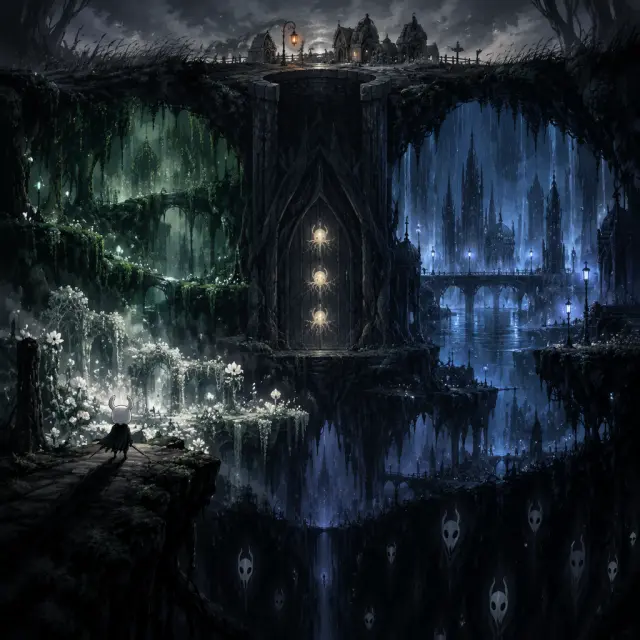
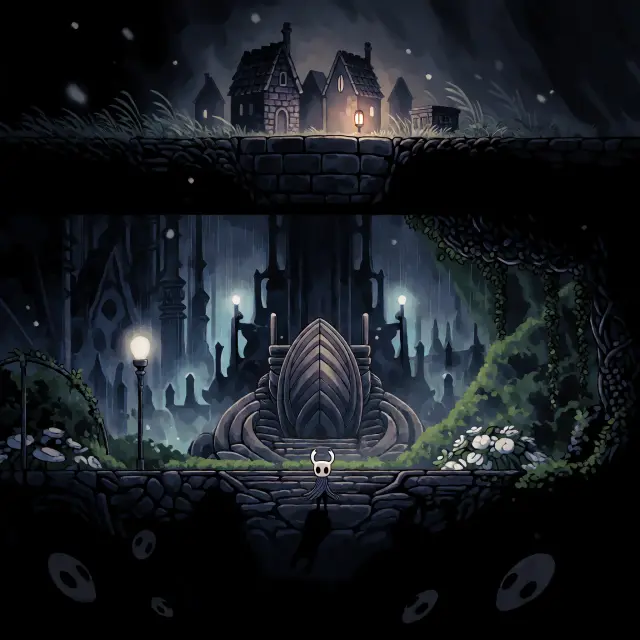
The test world is Hollow Knight — a kingdom of insects under a mountain, sealed three hundred years ago to contain a plague called the Infection. The seed gives the model a fixed vocabulary: Dirtmouth and its one lantern, the rain-drowned City of Tears, the green roads of Greenpath, the Queen’s Gardens, the black Abyss, and the Temple of the Black Egg, where the Hollow Knight holds a door closed from the inside. The palette is cold grey and indigo with bone white and one amber; the mood is quiet, damp, and three hundred years too late.
What Makes a Hollow Knight-Style Key Visual Read
Three things, in order. First, a clear vertical or horizontal line: the surface, the lip of the well, the seal, the temple floor. Second, a single warm light in a cold field: one lantern, one shaft, one candle. Third, a small figure with a clear silhouette: the Knight’s horns, Hornet’s needle, the Hollow Knight’s tall bound shape. If those three are present, the image reads as this world even before the details arrive.
Establish the edge
Put the well, the town, or the temple door on one third — safety on one side, the dark on the other.
Promise the depth
Add a shaft, a stair, a cutaway, or a descending path so the frame implies a kingdom below.
Place one warm light
A lantern, a lit window, a candle, or a crack of infection orange gives the eye a place to land and the image its mood.
Real Outputs from the Generator
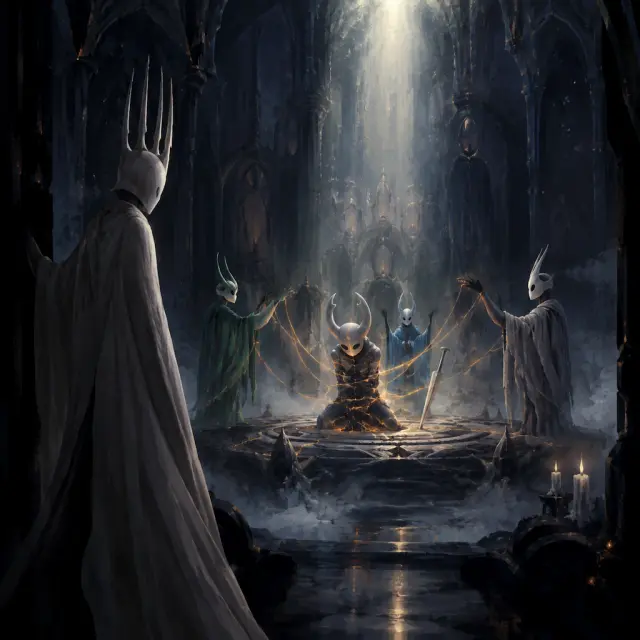
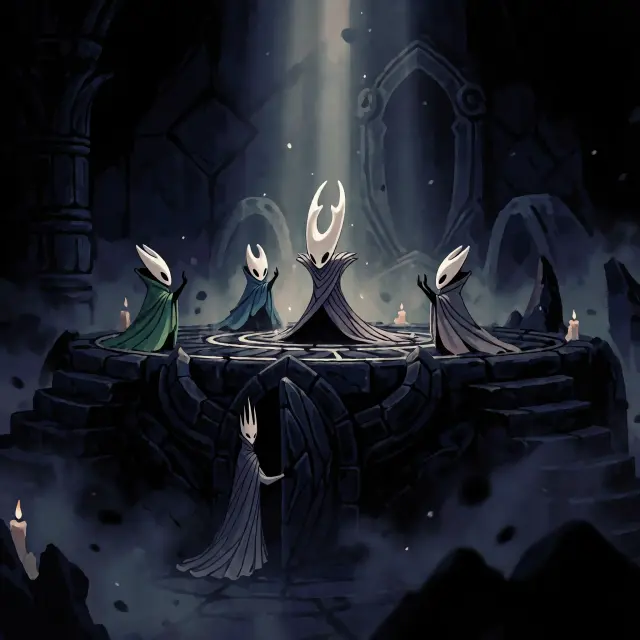
Four works were generated from the world: a world key visual of Hallownest in two models, and the Sealing of Hallownest in two models. The world pair shows the difference between an inventory and an invitation; the event pair shows the difference between a scene and an icon. Both pairs came from the same two prompts, so the comparison is a fair one.
Prompt Anatomy
- Subject and moment — “a small pale horned knight on a ledge above the Abyss” or “the bound Hollow Knight at the centre of a seal”.
- World anchors — Dirtmouth’s well, the City of Tears’ rain, Greenpath’s vines, the Black Egg’s three seals.
- Light — “one narrow shaft of pale light from above”, “one warm lantern against cold grey”, “pale blue rain-light behind a spire”.
- Palette — deep indigo, charcoal, bone white, one restrained amber; infection orange only at a crack.
- Render — “dark tenebrist painterly digital painting, visible brushwork, controlled hard and soft edges, epic scale, no text, no watermark”.
Model Comparison: GPT Image 2 vs Krea 2
GPT Image 2 wins on information density: more layers, sharper landmarks, better rain and lamplight, and a frame that rewards a long look. Krea 2 wins on clarity: fewer elements, stronger silhouettes, a cover that survives a 200-pixel thumbnail. Run both, then choose by where the image will live — storefront or feed. The comparison is not a contest; it is a second opinion you get for free.
The Sealing Event Cover
Event covers are where GPT Image 2 earns its place. The sealing brief has to hold five figures, one idea, and a single light source without turning into a crowd. GPT Image 2 stages it: the Vessel bound at the centre, the infection light bleeding through the shell, the Dreamers at the edge of the seal, the Pale King half in shadow at the door. The result reads as a moment in a story rather than an illustration of a fact.
From Prompt to Published Work
Choose a world → Write the prompt → Render with GPT Image 2 → Compare with Krea 2 → Publish as a work → Fork and remix
Use Cases
Storefront capsules and banner art for metroidvania and dark-fantasy games. Key art for a tabletop campaign set in a buried kingdom. Thumbnails for lore videos and Let’s Plays. Location cards and scene backgrounds for a visual novel or an interactive map. Concept boards for a pitch that needs a mood before it needs a budget.
Who It Is For
Indie studios that need a cover before the art pipeline exists. Solo creators building a world in public. Game masters who want a consistent look for a campaign. Writers who need a visual pitch. Artists who want a detail-first base to paint over, and a cleaner Krea 2 version to compare against.
Limitations
GPT Image 2 is slower and more expensive than lightweight models, and it can over-render small textures if the prompt asks for too much. It does not know the source game’s canon, so names, palette, and rules have to come from the world seed. Krea 2 is faster but simplifies hands, faces, and small props. Neither model replaces the world-building: the image is only as coherent as the atoms behind it.
Frequently Asked Questions
- Is this an official Hollow Knight tool? No — it is a Neta Studio workflow demonstrated on an AI-generated, fan-style world inspired by Hollow Knight.
- Can I generate without the world? Yes, but the world seed is what keeps the palette, cast, and landmarks consistent across images.
- How long does a render take? GPT Image 2 is the slower of the two; expect a detailed frame rather than an instant draft.
- Can I publish the result? Every render publishes as a work of the world, with a shareable page and a fork point.
Start Creating
Fork Hollow Knight, run the prompt through GPT Image 2, and publish the result as a work. If you want a second opinion, run the same prompt through Krea 2 and compare the pair side by side.
Start Creating
Generate your painterly Hollow Knight key visual with GPT Image 2 — cover-ready, canon-consistent, published as a work.