
GPT Image 2 Metroid Character Generator
A documented GPT Image 2 workflow for Metroid-style character key visuals: the six-clause prompt, the real settings, the failure modes, the cost per usable frame, and four published renders from a GPT Image 2 vs Krea 2 comparison on identical briefs.
Six clauses, one hunter, one machine. Start from the GPT Image 2 Metroid character generator recipe and render a character that belongs to a world before you write a line of it.
What This Page Covers
This is a working page for GPT Image 2 used as a Metroid-style character generator. It is not a list of adjectives. It documents the exact brief used for the published renders, the settings behind them, what the model is good at in this genre, where it fails, and what it costs to get a usable frame.
The short version: GPT Image 2 is the stronger model when the character must read as equipment — plating, vents, seals, repairs. Krea 2 is the stronger model when the character must read as an icon. Publish both and let the pair do the explaining.
The four renders on this page are attached to the Metroid world: one character brief and one location brief, each sent to GPT Image 2 and to Krea 2 with no rewrites. Every image is a real asset with a stored prompt.
What GPT Image 2 Does Better Here
GPT Image 2 is not the cheapest image model and it is not the fastest. What it does unusually well is resolve a character as a maintained object. Armour in this genre is not a costume; it is a machine that has been repaired in the field. GPT Image 2 will render a seam, a scuff, a vent with steam coming out of it and a shoulder plate bolted on slightly crooked, and those small failures are what make the character feel like she has a history.
The second strength is scene logic. Ask for a corridor behind the character and you get a vanishing point, a floor with water on it and light that comes from somewhere — which matters because a character key visual is also a location test. Krea 2 will give you a beautiful silhouette in a glowing void; GPT Image 2 gives you a room the character is standing in. The third strength is scale: a generator that cannot place a small figure against a large machine is useless for this canon, where the drama is a human-sized person walking into a structure built by a vanished civilisation.
The Model’s Real Settings
These are the settings behind the four published renders. Nothing exotic: a fixed aspect ratio per shot type, high quality on the published frame, PNG output, and a single text input. No reference image, no style transfer, no second pass.
- Model. gpt-image-2, text-to-image, single text prompt.
- Size. 1024×1536 for character posters, 1536×1024 for location plates. Both are supported natively.
- Quality. high for any frame that will be published; auto while exploring composition.
- Output format. png. The extra weight is worth it for armour edges and thin cable silhouettes.
- Reference images. none. A reference would make the comparison unfair and would hide prompt defects.
- Negative clause. no text, no watermark — repeated verbatim in every brief.
The Six-Clause Character Recipe
The recipe is one sentence with six ordered clauses. The order matters more than the wording: it forces the prompt to decide genre before subject, subject before place, and place before light. When a render fails, the clause that failed is usually identifiable, which is what makes iteration cheap.
Medium and genre
Name the art direction first: stylized semi-realistic 3D game art. Without it, the model drifts toward either photoreal cosplay or cartoon.
Subject and equipment
Name the character, then the objects that identify them: Varia suit, green visor, arm cannon, segmented pauldrons. Objects beat adjectives every time.
Action already in progress
Give the pose a verb that costs something: standing on a catwalk, cannon raised and venting, a corridor behind. A still pose becomes a costume test.
Place and scale object
Say what the room is and what makes it big: ribbed Chozo corridor, cracked containment cylinder, a dais with conduits. Scale is a prop, not a mood.
Light and palette
One warm key and one cold fill: orange armour against teal stone, magenta alarms against bone-white masonry. Two equal keys flatten the politics.
Composition and negatives
Finish with framing — vertical character poster, cinematic wide shot — and a fixed negative clause: no text, no watermark.
Worked Example 1: Samus Aran in the Varia Suit
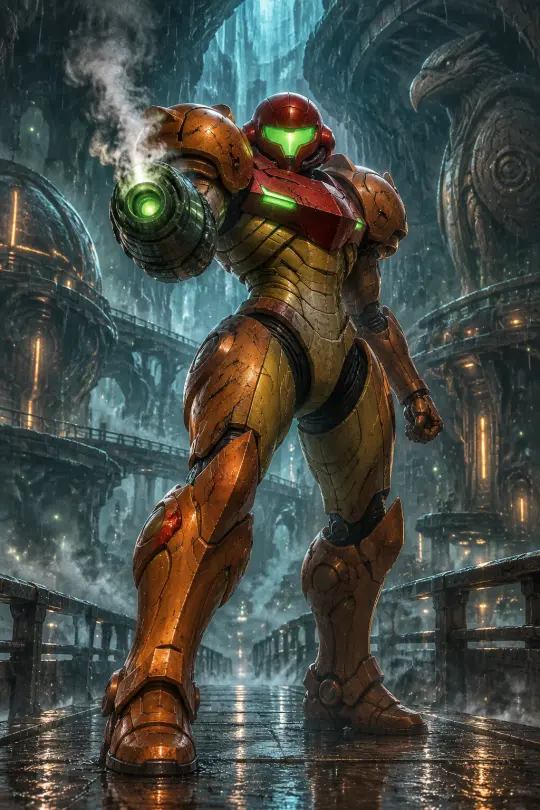
The brief: a vertical character poster of Samus Aran in the orange-and-red Varia suit on a rain-slick Chozo way-station catwalk, visor glowing green, arm cannon raised and venting steam, segmented pauldrons scarred from use, a ribbed corridor of stone and machinery behind her, cold teal backlight against warm armour, volumetric mist, no text, no watermark.
What worked: the cannon is a real object with a barrel and a vent, the pauldrons are asymmetric enough to look repaired, and the floor reflects. What needed a second attempt in earlier versions: the visor collapsing into a generic glowing slit, and the corridor flattening into paneling. Both were fixed by naming geometry — “ribbed”, “segmented”, “catwalk” — rather than adding style adjectives. The frame also passes the thumbnail test, which is the real bar: at 300 pixels wide the silhouette still reads as Samus, cannon left, crest right, orange against teal.
Worked Example 2: Mother Brain in Her Chamber
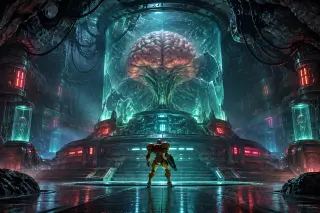
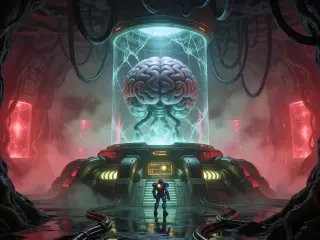
The second brief is a character hidden inside a room: Mother Brain, a Chozo-built organic supercomputer suspended in a cracked glass cylinder above a circular dais, red alert strips, cables hanging like roots, one small armoured figure at the foot of the platform, blue-green bioluminescence against red light, wide cinematic frame, no text.
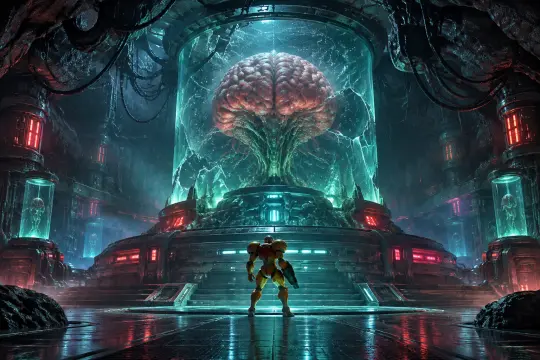
This is the harder of the two, because the character is a brain in a jar and the emotional work is done by scale. GPT Image 2 treats the capsule as a container with thickness, the dais as a structure with steps and the cables as objects with a route — the result is a room that looks governed, which is exactly what Mother Brain is. Notice what the prompt never says: “evil”, “menacing”, “dark”. Menace comes from the arrangement, not the adjectives. If you find yourself adding mood words to a frame like this, remove two objects instead.
Where GPT Image 2 Breaks
Three failures repeat in this genre. First, incidental text: distant stencils, warning labels and HUD fragments appear even when the brief says no text, usually at low contrast where they read as noise. Second, material drift: carved stone becomes generic paneling, and welded steel becomes clean chrome. Third, symmetry collapse: a room that should be severe becomes busy, with cables and pipes added until the dais stops reading as a platform.
- Kill the signage. Put “no text, no watermark, no HUD, no signage” at the end of every brief, and re-render rather than editing text out afterwards.
- Name the material twice. “Carved Chozo stone” in the place clause and “bone-white masonry” in the palette clause. Repetition is cheaper than repair.
- Cap the object count. One dais, one capsule, one figure, one light source. Extra pipes are how a cathedral becomes a corridor.
- Fix the floor. Wet stone with a shallow reflection keeps the frame grounded. If the floor turns to chrome, the genre slides toward glossy sci-fi.
Prompt Hygiene Checklist
- Does the prompt open with medium and genre, not with a character name?
- Are there at least three concrete objects that only exist in this world?
- Is there a verb in the pose, or is the character simply standing?
- Is exactly one warm key specified, with a named cold fill?
- Is the aspect ratio chosen before the prompt is written, not after?
- Is the negative clause identical to the last brief you used?
- If this frame fails, which clause will you change? If you cannot answer, the prompt is too vague.
Cost and Iteration Budget
A practical budget for this genre is two GPT Image 2 attempts per published character frame and one attempt per location plate, plus three cheap Krea 2 explorations for mood. The failure mode is not a bad render; it is six mediocre ones that each cost the same as a good one. The cheaper habit is to lock the six clauses before generating anything: write the brief, read it aloud, and delete every adjective that does not correspond to something visible. A prompt that names a cracked cylinder, a ringed dais, root-like cabling and a venting cannon will produce a usable frame far more reliably than a prompt that names a mood.
GPT Image 2 vs Krea 2 on Identical Briefs
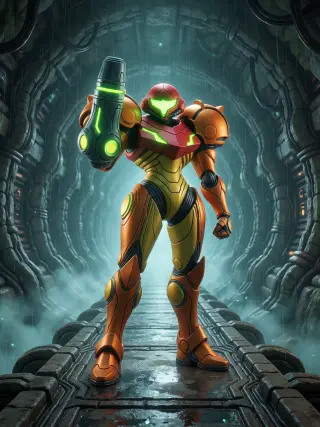
The four renders on this page are two briefs rendered twice. No sentence was rewritten between models, no reference image was used, and both were published whether or not they flattered the model. The useful output is not a winner but a pair that shows what each model sacrificed: GPT Image 2 gives up some graphic punch for physical detail, Krea 2 gives up some object accuracy for atmosphere.
From Character to World
A character frame is a proof, not a product. Once it holds, the same six clauses can be pointed at a room, an event and a faction, and the set will look like one world because the palette, the materials and the negative clause never changed. That is the whole value of generating inside a world instead of a prompt folder.
Character → Cast
Keep the equipment clause and swap the role: a federation commander, a pirate enforcer, a Chozo warlord. The palette holds; only the objects change.
Character → Room
Move the same light logic into a location plate. The character becomes the scale object at the bottom of the frame.
Character → Set
Publish the pair from both models as works of the world, so the comparison is part of the world's documentation rather than a separate post.
Frequently Asked Questions
Is GPT Image 2 the best model for this genre? +
For equipment detail and scene depth, yes among the models tested here. For a poster that has to read at thumbnail size, Krea 2 is usually the better first attempt.
Why 1024×1536 instead of a square frame? +
A character poster needs vertical room for the feet and the crest. A square crop cuts the floor reflection, which is doing half the lighting work.
Can I use a reference image for consistency? +
Yes, for a production set. For a model comparison, no: a reference hides prompt defects and makes the two models incomparable.
How do I stop the model from adding text? +
Put the negative clause at the very end of the brief, keep the scene free of signage-shaped objects, and re-render rather than patching.
Is this an official Metroid tool? +
No. It is a documented workflow applied to a fan-built world. Metroid and its characters belong to Nintendo; treat published frames as fan work.
Generate a Character From This World
Take the six clauses, keep the two materials and the one warm subject, and render a character who looks like she has been repairing that suit for years.
The four renders on this page live in the Metroid world with their prompts and models attached. Open the world, copy the brief, change one object, and compare your result against the pair.