GPT Image 2 Pixel Art Generator — 16-Bit Scenes From a World, Not a Prompt
A pixel art generator built on GPT Image 2 and Krea 2: same prompt, two models, four published frames — and the exact style contract that makes 16-bit art hold together.
Make your own GPT Image 2 pixel art
A pixel art generator built on GPT Image 2 and Krea 2, wired into a world that already holds the cast, the palette and the canon.
GPT Image 2 is a general image model that happens to be unusually good at pixel art — if you tell it, in specific words, what pixel art is. Left alone it drifts toward smooth digital painting with a "retro" filter on top. Given a palette, a logical resolution and a shadow rule, it produces a frame that reads correctly at 32 pixels wide and at 2048 pixels wide. That difference is the entire craft of a pixel art generator.
What GPT Image 2 Actually Does With Pixel Art
Three things separate a real pixel-art render from a filtered illustration. First, the pixel grid is logical: every edge lands on the same square module, so enlarging the image gives you crisp blocks rather than blur. Second, the palette is limited and enforced: shadows are stepped, not blended. Third, detail is chosen rather than averaged — a face is four pixels, a window is two, and the model has to decide what to throw away. GPT Image 2 can do all three, but only when the prompt makes them constraints instead of adjectives.
The constraint sentence that reliably works: "authentic hand-placed 16-bit pixel art, limited 24-colour palette, crisp nearest-neighbour square pixels, three-step pixel shadows, selective dithering, clearly separated value planes, readable at thumbnail size." It is doing the job a shader would do in an engine.
Why a Pixel Art Generator Needs a World
Pixel art is a style; a world is a set of decisions. The style tells the model how to draw. The world tells it what exists: which characters, which props, which architecture, which four colours the setting is allowed to use. Without the second half, every generation is a new art direction, and ten images later you have ten unrelated pictures. With it, the tenth image looks like it belongs to the first — because it was generated from the same canon.
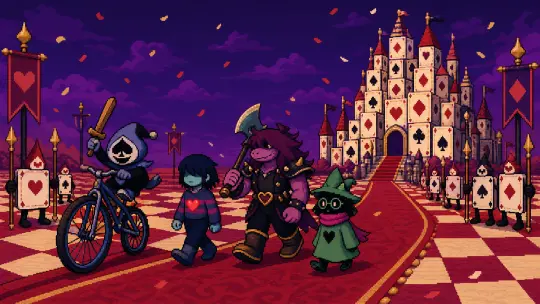
This page uses one concrete world to demonstrate: Deltarune: Fountains of the Dark, 27 atoms, 16-bit pixel style, four published works. Every image below was generated from that world, not from a stock prompt.
What You Get
- Key visuals 2048-wide pixel scenes with a legible depth stack and a fixed palette
- Character frames single figures with silhouette, clothing and prop held constant across renders
- Scene pairs the same prompt through GPT Image 2 and Krea 2, kept side by side
- Sprite-ready crops high-contrast subjects that survive downscaling to 32×32 and 64×64
- World-consistent sets every image inherits the palette and cast from the world, not from a reference upload
The 16-Bit Contract
Pixel art is not one look. 8-bit is four colours and hard tiles; 16-bit is twenty-four colours, stepped shading and dithered gradients; modern indie pixel art adds lighting and particles on top. Deltarune sits in the 16-bit register: chunky square pixels, a narrow palette, selective dithering for the in-between values, and lighting that is drawn rather than rendered. If your prompt does not name a register, the model picks one at random — usually the wrong one.
Name the register explicitly: 16-bit, 24 colours, nearest-neighbour, three-step shadows. Then name the exceptions: one warm light source allowed, no anti-aliasing, no soft gradients, no photographic depth of field.
Same Prompt, Two Models
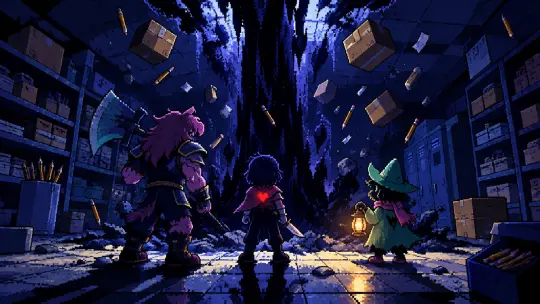
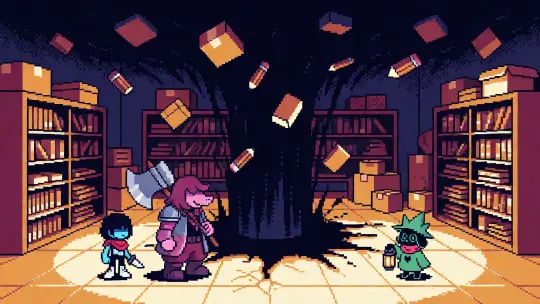
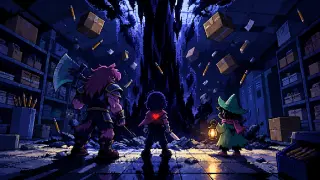
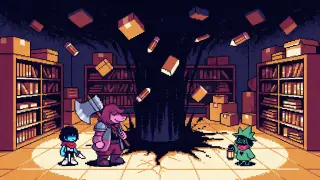
The two images below were generated from an identical prompt, including the palette and the 16-bit constraints. GPT Image 2 returned a scene: shelving receding into shadow, individual pencils caught mid-air, wet floor tiles reflecting the column, and three figures at the correct scale. Krea 2 returned a poster: cream floor, black tear, chunky silhouettes, almost no mid-tones. Neither is wrong. They answer different questions — "what does this place look like" versus "what does this place feel like".
GPT Image 2 vs Krea 2 for Pixel Art
- Depth — GPT Image 2 builds foreground, mid-ground and background; Krea 2 flattens everything to one plane.
- Detail — GPT Image 2 renders individual props and materials; Krea 2 simplifies to shapes.
- Silhouette — Krea 2 wins; its figures read at 64 pixels because there is nothing else to read.
- Colour — Krea 2 is hotter and flatter; GPT Image 2 keeps a wider value range inside the same palette.
- Speed and price — Krea 2 is fast and cheap enough to iterate; GPT Image 2 is slower and costs more per image.
- Prompt length — GPT Image 2 rewards a long, structured prompt; Krea 2 rewards a short one with the style named first.
What People Actually Generate
The Workflow
Open the world
Start from a built world so the cast, palette and props are already decided. In this case: Deltarune: Fountains of the Dark.
Choose one beat
A fountain opening, a parade, a broadcast. One event per image; a key visual cannot carry two.
Write the style contract first
Medium, palette, pixel rule, shadow rule. Put it at the front of the prompt, before the subject.
Generate on both models
GPT Image 2 at 2048×1152 for the scene; Krea 2 at the same aspect for the poster. Keep both outputs.
Judge at thumbnail size
Shrink the image to 128 pixels wide. If the silhouette and the light source still read, the pixel art works.
Example: The Dark Fountain
The prompt described an ordinary supply room, a vertical black column swallowing the ceiling, three small figures at its base, and ordinary objects — boxes, pencils, paper — pulled upward. GPT Image 2 turned that into a depth stack with a light source inside the dark; the wet floor, the shelving and the floating props all do scale work. The same prompt on Krea 2 produced a flatter image where the column reads as a tear in the wall and the cast reads as a title card. Run both, and you have an establishing shot and a poster from one sentence.
Example: The Card Kingdom Parade
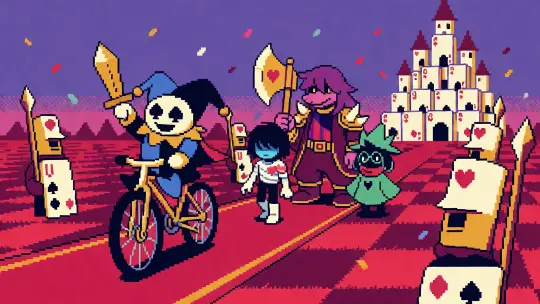
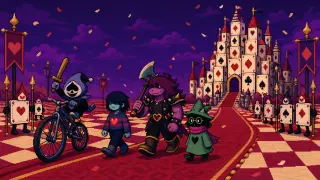
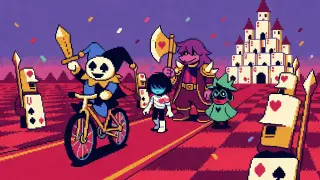
The second subject is a procession: Lancer ahead on a bicycle, the party in the middle, card soldiers framing the edges, a castle of stacked cards on the horizon. This is the test case for depth, because the castle has to stay a silhouette while the characters stay detailed. GPT Image 2 keeps five planes legible and the confetti in the air. Krea 2 collapses the planes and makes the colour do the work — hotter crimson, a magenta sky, a toy-block castle.
Prompt Patterns That Work
Medium and palette → aspect and framing → place and light source → cast block (silhouette first, then clothing, then prop) → motion or weather → negative list (no text, no logo, no watermark, no border). Keep the total under about 200 words; longer prompts start losing the earliest constraints.
Cost, Speed and Iteration
A pixel-art workflow is a search, not a single shot: you generate four to eight candidates per beat and keep one. That changes the model maths. Krea 2 is cheap enough to burn on exploration — composition, palette, silhouette — and GPT Image 2 is worth spending on the final frame, once the composition is already decided. A practical loop is: three Krea drafts, pick one, then one GPT Image 2 render at full size with the same prompt.
The other cost is consistency. Every model drifts between generations; the only reliable fix is to re-paste the same cast and palette block each time. It feels repetitive to write and it is the single highest-leverage habit in the workflow.
Frequently Asked Questions
- Is GPT Image 2 good at pixel art? Yes, when the prompt states the pixel grid, the palette size and the shadow rule. Without those constraints it drifts toward smooth illustration with a retro filter.
- Can it output true 32×32 sprites? Generate large and downscale with nearest-neighbour, or ask for a sprite-style subject on a flat background and reduce it yourself. Native tiny output is unreliable on every current model.
- Does it render text? GPT Image 2 can, but pixel-art text is a known failure mode. Leave the title out of the image.
- What size should I ask for? 2048×1152 for a 16:9 key visual, 1024×1024 for an avatar or a square crop. Pixel art is resolution-independent once the palette is fixed.
- Can I use the images commercially? Check the model terms and the IP rights of the world you are rendering. Fan worlds are not licences.
Start Generating
Open the world, pick a beat, paste the style contract. The cast, the palette and the four laws of the Dark are already in the room — the model only has to draw them.
Generate Pixel Art From a World
GPT Image 2 for depth, Krea 2 for posters — one world, four published frames, two models compared.