
GPT Image 2 Princess Mononoke Key Visual Generator
A detail-first key visual generator for the cedar forest and Iron Town: wolf-girl portraits, godlight, and iron smoke.
GPT Image 2 Princess Mononoke Key Visual Generator
This is a working generator page for one job: turn the Princess Mononoke world into key visuals that look like a place rather than a mood board. GPT Image 2 is the detail-first option — it renders a gate you could walk through, a pelt with weight, a god with a human face — and it accepts the world's cards as a stable brief instead of a new prompt every time.
Everything below was made inside the same world: 26 materials, four published key visuals, and an identical-prompt comparison with Krea 2. The settings, the prompt skeleton and the repair clauses are the ones actually used, not a theoretical guide.
What GPT Image 2 Does Best Here
- Places with depthThe model builds foreground, subject and background as separate planes. That is exactly what Iron Town needs: a walkway in front, a worker in the middle, the furnace and the forest behind. Krea 2 tends to flatten the same brief into bands.
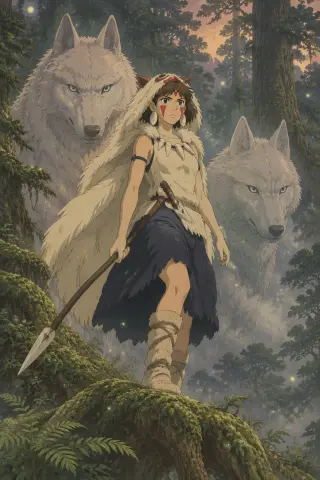
- Costume and propsSeams, lashings, fur break, bone handles. San's pelt reads as an animal hide rather than a hooded cloak, and the spear reads as a tool with a wrapped grip. If the prop has to look usable, this is the model.
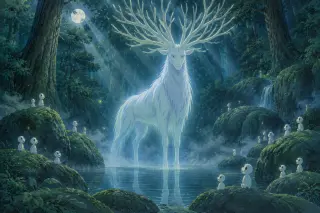
- The unsettling faceThe Forest Spirit has a human face on a deer's body. GPT Image 2 holds that combination instead of resolving it into a gentle animal, which is the entire emotional point of the character.
- Literal lightWhen you ask for dusk, you get a horizon temperature change and cold shadow under the canopy. That literalness is useful: time of day is a story fact in this world, not a filter.
The Exact Settings Used for These Works
| Model | gpt-image-2 |
| Character frame | 1024 × 1536, portrait |
| Location frame | 1536 × 1024, landscape |
| Quality | high |
| Reference images | none — text only |
| Exclusions | no text, no watermark, no modern objects |
Why these numbers: portrait is the poster shape and gives the pelt and spear room to stack vertically. Landscape is the establishing shape and lets the pool hold a far bank, a waterfall and a canopy. High quality matters most on faces and hands; on pure landscape prompts the difference is smaller and you can trade it for iterations.
A Prompt Skeleton for Mononoke Key Visuals
Ten clauses, in this order. Style first, because detail clauses can override a style stated late.
Princess Mononoke [character|location] key visual, hand-painted anime cel style, muted earth palette, [aspect]: [subject and costume]; [props]; [companion or crowd]; [environment and weather]; [one impossible light source]; [camera height and composition]; [palette anchors]; no text, no watermark, no modern objects.
The clause most people skip is the impossible light. In this world it is the godlight — a pale blue-white emission that does not come from the sun and does not fall on everything evenly. Without it the image is a historical forest; with it the image is a myth. The second most-skipped clause is camera height. Low camera makes people small and gods large; high camera makes the town legible and the forest a threat.
Step by Step: San Character Portrait
Open the character card
San: white wolf-pelt hood and cloak, red war paint, bone dagger, spear, raised by Moro. The card also tells you the wolves are larger than she is — that is the composition.
Pick the beat
Dusk on a moss-covered root above a ravine, before a raid. One beat, no montage.
Write the ten clauses
Style, subject, costume, props, companions, environment, light, palette, camera, exclusions. Keep each clause under fifteen words.
Set 1024×1536, high quality
Portrait, not square. A square crop cuts the root and the wolves and turns the poster into a headshot.
Check three things
Hands on the spear, the paint on both cheeks, and whether the wolves are behind rather than beside her. Repair one clause at a time.
Compare with Krea 2
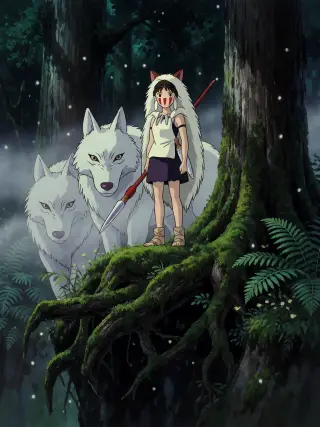
Run the identical prompt on Krea 2 at 768×1024. Keep both; the GPT version is the scene, the Krea version is the poster.
Step by Step: The Sacred Pool
Start from the rule
The Law of the Forest Spirit: gives and takes life, deer by day, walker by night, power in the head. Choose night to get the walker and the glow.
Fix the camera at water level
Low camera turns the pool into a mirror and gives the kodama the viewer's eye height.
Name both light sources
Moonlight through cedar, plus the god's own pale blue emission. If you name only one, the model makes generic blue fog.
Seed the rocks with kodama
Small pale figures on the mossy stones. They give scale and they make the god attended rather than alone.
Set 1536×1024, high quality
Landscape, wide enough for a far bank and a waterfall. A portrait crop turns the god into a character portrait and loses the place.
Check the head
The human face must survive. If it has softened into a deer, repeat "human face" in the subject clause and lower the antler count.
GPT Image 2 vs Krea 2 on the Same Brief
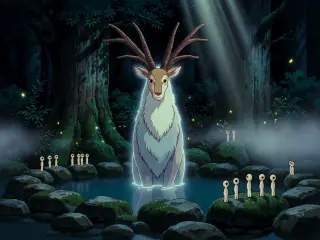
Both models received identical text. GPT Image 2 returned a dusk scene with a warm horizon, three depth planes and detailed props. Krea 2 returned a flatter night poster with a clean silhouette, a red spear shaft and glowing mushrooms. On the pool, GPT Image 2 filled the canopy with antlers and scattered kodama across the frame; Krea 2 moved closer, simplified the crown and lined the kodama up like a chorus.
- Use GPT Image 2 forEstablishing shots, costume sheets, props that need to look usable, and any frame where a viewer has to understand the geography of a place.
- Use Krea 2 forThumbnails, covers, social crops, and fast variation. It is roughly five times cheaper per image and much faster, and its flat shapes survive small sizes better.
- Use both forA hero image and its poster cut. Generate the scene on GPT Image 2, then rerun the same prompt on Krea 2 for a graphic version that can carry type.
- Do not use either forLegible text, captions or typography. Krea 2 is explicitly weak at text; GPT Image 2 can render it but it will look designed rather than painted.
Where GPT Image 2 Drifts
The model over-details non-photoreal styles. Fur can acquire a fine grain that reads as photography, and lighting can become glossy in a way that breaks the cel-paint brief. It also likes to fill empty space: a quiet pool gains extra kodama, a forest gains extra ferns, and a character poster gains a background crowd you did not ask for. The drift is toward illustration density, not toward the wrong subject.
Prompt Repairs That Actually Work
What to Generate First
Start with San on the root. It is the cheapest test of whether the model understands the world: one figure, two animals, one prop, one light. If the pelt has weight and the wolves sit behind her, the model is holding the setting and you can move to Iron Town, which is much harder. If it fails, the failure will be specific — a hood instead of a hide, wolves beside her instead of behind — and you can repair the clause that caused it.
Questions About This Generator
Do the prompts require reference images?
No. Every key visual on this page was text to image. References help for a recurring face, but the world cards already carry the consistency: costume, props, palette and light are written down, so you are not re-describing them from memory each time.
Can I use a different aspect ratio?
Yes, but change the composition with it. A 16:9 San poster needs a second subject or a wider environment, or the figure floats in empty space. A square pool image needs the kodama pulled closer. Aspect is a composition decision, not an export setting.
Why does the Forest Spirit sometimes look like a normal deer?
Because the human face is the least probable part of the design and the model resolves probability toward a deer. Repeat "human face" in the subject clause, reduce the antler count, and describe the face: "a calm human face with dark eyes". Then check at full resolution, not at thumbnail.
Generate a key visual from this world
The brief is already written: 26 cards, four published key visuals, and a prompt skeleton that fits on one screen. Start with San — or open the studio and pick a harder scene.
Model: GPT Image 2. These works were generated inside this world and published with it. Princess Mononoke is an independent, fan-built world in Neta Studio and is not affiliated with Studio Ghibli. The key visuals on this page were generated inside this world; every character, place and event is an editable material rather than canonical text. Open the studio to read every card.