GPT Image 2 Rubber-Hose Horror Generator — 1930s Cartoon Key Visuals from One Prompt
From one prompt to a 1930s rubber-hose cartoon horror key visual — a checkerboard lobby, a flooded corridor, a grinning devil pouring out of a pressure tank — rendered by GPT Image 2 and compared with Krea 2.
GPT Image 2, Tuned for Rubber-Hose Horror
From one prompt to a 1930s rubber-hose key visual with the lights still on — a checkerboard lobby, a flooded corridor, a grinning devil half-poured out of a pressure tank.
What Is the GPT Image 2 Rubber-Hose Horror Generator?
It is a GPT Image 2 workflow tuned for a very specific job: render a 1930s rubber-hose cartoon frame that reads as a place, then let the lighting and the props turn that place into a horror set. GPT Image 2 is the right model for this because the aesthetic depends on information density — peg bars, stacked cels, pressure gauges, hand valves, rivets, a coffee ring that never dried. Krea 2 can give you the mood in seconds, but only GPT Image 2 gives you a room you can inventory.
Why Use GPT Image 2 for This Style
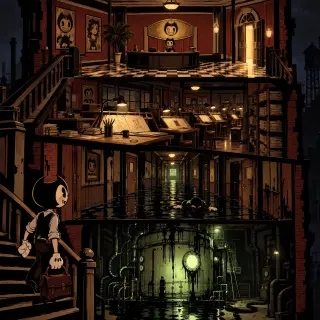
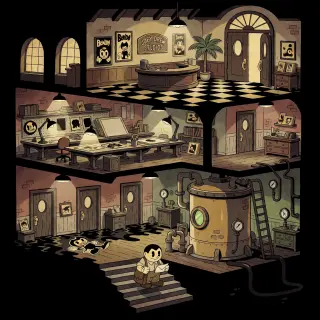
- Detail density — a cross-section cover has to hold a lobby, a drafting floor, a flooded corridor and a basement in one frame. GPT Image 2 keeps those layers separate instead of blending them into soup.
- Material contrast — wet glossy ink against flat cream cel fills against dull riveted iron. That three-way contrast is the whole look, and it is exactly what a detail-first model does well.
- Legible props — gauges, ladders, film reels and poster frames survive at small sizes, so the cover still tells you what kind of building you are looking at when it is 300px wide.
- Light logic — GPT Image 2 will hold one key light per floor and keep the falloff consistent, which is what makes a cutaway read as architecture rather than collage.
- Style lock — with the rubber-hose sentence at the end of the prompt, the cartoon proportions hold even while the ink distorts. The drawing stays a drawing.
The World Behind the Generator
The test world is Bendy and the Ink Machine: Joey Drew Studios, a cartoon house that built a machine in its basement to make its drawings walk. Its star is a grinning devil in a bow tie; its animator, Henry Stein, walked out in 1946 and has been called back by a letter in a dead man’s handwriting. The building has five locations, seven characters, four factions, five events and four hard rules about ink. Every image on this page was rendered from that world, not from a stock description.
What Makes a Rubber-Hose Horror Frame Read
Three things, in order. First, one cartoon truth that is never broken: round head, pie-cut eyes, crescent mouth, noodle limbs, white gloves. Second, one material truth that contradicts it: the floor is wet, the walls are swollen, the air has weight. Third, one human figure at the wrong scale — small enough that the building is clearly in charge. If a frame has all three, it works at any size. If it loses the cartoon truth, it becomes generic horror; if it loses the material truth, it becomes a cute poster.
Cartoon
Lock the drawing style first: bold fluid black outlines, flat vintage fills, pie-cut eyes, white gloves, no gradients on the characters.
Material
Then contradict it: glossy ink, damp cream walls, rusted iron, one hard specular highlight where the light hits the wet.
Scale
Then put one person in it, small, with their back to us, so the building is the subject and the human is the evidence.
Real Outputs from the Generator
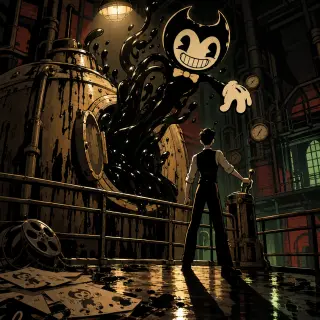
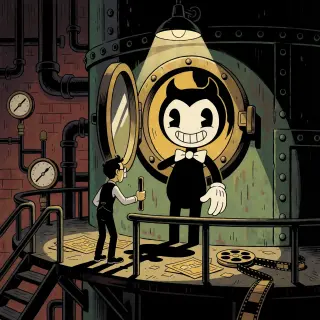
Four works were generated from the world: a world key visual of Joey Drew Studios in two model interpretations, and an event key visual of the machine being switched on in two model interpretations. Each is a published work with its own share page, and each uses the identical prompt as its counterpart — the only variable is the model.
Prompt Anatomy
- Subject and moment — “the instant the porthole swings open”, “a lone figure on the lobby stairs with a letter”. Name the second, not just the scene.
- Architecture — list the floors in order. “Lobby on top, drafting floor below it, flooded corridor below that, tank room at the bottom.” Order is composition.
- Props as evidence of work — peg bars, stacked cels, a pencil cup, a coffee ring, a brass plaque, a potted palm, a work ladder, hand valves, pressure gauges. Twelve small nouns do more than one adjective.
- Ink as material — “glossy black ink beaded on riveted iron”, “ink running down the shell into a black pool”, “ankle-deep ink reflecting the ceiling lights twice”.
- Palette — strictly black, bone cream, muted brick red, one sickly ink-green glow, one hot work-lamp.
- Style lock, last — “1930s rubber-hose cartoon illustration, round heads, pie-cut eyes, huge crescent mouths, noodle-like arms and legs, white gloves, bold fluid black outlines, flat vintage animation fills, no text, no watermark, no logo.”
Model Comparison: GPT Image 2 vs Krea 2
GPT Image 2 wins on information density: more floors, sharper landmarks, better separation between the cartoon fills and the wet materials, and a light rig you can trace. Krea 2 wins on speed and graphic punch: it flattens the same brief into a warm storybook diagram that reads instantly at thumbnail size, at roughly a tenth of the cost. In the world pair, GPT Image 2 gives you four storeys of studio; Krea 2 gives you three rooms and a very clear idea of what the building is for.
The Event Cover
Event covers are where GPT Image 2 earns its place. The “machine switched on” brief has to hold a riveted tank, a torrent of ink, a half-formed cartoon devil and a man at a lever, and keep all four readable. GPT Image 2 builds the weight: the tank has bands and bolts, the ink has volume and specular highlights, the glove is solid while the body is still liquid, and Joey’s shadow is thrown long across the wet floor. Krea 2 answers with staging instead — the hatch becomes a proscenium, the lamp becomes a spotlight, and Bendy arrives fully formed like a vaudeville act. Both are correct; they are selling different things.
From Prompt to Published Work
Choose a world → Write the prompt → Render with GPT Image 2 → Compare with Krea 2 → Publish as a work → Fork or remix
Use Cases
Storefront capsules and banner art for cartoon-horror games. Key art for a tabletop module set in a leaking animation studio. Character covers for a cast of ink-stained cartoons. Backgrounds for a two-minute animated short. Chapter headers for a serialised story. Pitch decks that need one frame to explain a whole building. And social cards, which is where the flat rubber-hose palette quietly outperforms every painted style — because a cream-and-black shape with one green light is still readable in a feed at 200 pixels.
Who It Is For
Indie studios that need a cover before the art pipeline exists. Solo creators running a cartoon-horror series who need twelve consistent thumbnails. Game masters and tabletop designers who want a map that doubles as an illustration. Artists exploring rubber-hose composition without redrawing every cel. And anyone who wants a haunted building that looks like it was drawn in 1929 and flooded in 1963.
Limitations
GPT Image 2 is slower and more expensive than lightweight models, and it will add props you did not ask for — always inspect the frame for stray signage before publishing. It can also over-render: if the prompt lists twenty nouns, it will try to show all twenty, and the composition collapses. Cut the prop list by half and the frame gets stronger. Krea 2, for its part, is weak at legible text and will drift away from a precise floor plan, so do not ask it for architecture you need to be accurate. Finally, neither model knows the official characters; describe the shape — round head, two curved horns, pie-cut eyes, bow tie, white gloves — rather than naming a franchise.
Frequently Asked Questions
- Is this an official Bendy tool? No — it is a Neta Studio workflow built on an AI-generated, fan-style world. It is not affiliated with or endorsed by the rights holders.
- Do I need a reference image? No. A clear scene, one light source and the style sentence are enough for a first render.
- Why does GPT Image 2 suit this style? Because the look depends on inventory: props, materials and floor separation. A detail-first model holds all three at once.
- How many prompts should I write? One per image. Keep the style sentence identical across the series and change only the scene, the subject or the light.
- Can I publish the output? Yes — publish it as a work of the world so it gets a share page, and fork the world if you want a different version of the building.
Start Creating
Fork Bendy and the Ink Machine, run the prompt through GPT Image 2, and publish the result as a work of the world. Then run the same prompt through Krea 2 and keep both — the pair is more useful than either image alone, because it tells you which one your cover actually needs.
Create from This World
Generate your rubber-hose horror key visual with GPT Image 2 — cover-ready detail, one prompt, published as a work of the world.