
GPT Image 2 Samurai Key Visual Generator — Armor, Weather and Weight
A GPT Image 2 workflow for historical samurai key visuals: lamellar armor that behaves like iron, fog with volume and a beach that looks like it existed before the battle. Built and proven on the Ghost of Tsushima world with four published works.
What This Generator Is For
This is a GPT Image 2 workflow for historical samurai key visuals: the kind of frame that has to convince a viewer that a real island existed in a real autumn, that the armor weighed something, and that the weather was not designed for the convenience of the composition. It is built for world covers, lore pages, work cards and store art — anywhere the image will be looked at for longer than a second.
Everything below was tested on the Ghost of Tsushima world: two scenes, two models, four published works. The prompts are real, the settings are real, and the failures are included.
Why the Usual Samurai Prompt Fails
The default prompt — “epic samurai warrior, dramatic lighting, cinematic, 8k” — produces a statue. The armor is clean, the pose is a pose, the background is a gradient, and nothing in the frame has ever been wet. It is a picture of the idea of a samurai rather than a picture of a person standing somewhere specific.
A generator needs a place and an event before it needs a mood. “The minute after a lost battle on a black-sand beach” gives the model a situation. “Epic battle” gives it a genre. The difference in output is not subtle.
Why GPT Image 2 for This World
GPT Image 2 is the strongest choice when the frame has to survive inspection. It understands that a beach is not a flat plane, that a sword blade catches a narrow band of light, and that a fallen helmet should be damaged in a way that implies a person. It also follows long, ordered prompts with unusual fidelity, which makes a fixed six-clause brief practical rather than aspirational.
The Six-Clause Prompt Template
The template is boring on purpose. A fixed order is what makes two generations comparable, and what stops the model from spending its attention on the wrong clause. Put style first, subject second, place third, event fourth, light fifth, refusals last.
Clause one: lock the medium
Semi-realistic painterly cinematic key visual, 16:9, visible brushwork, controlled hard edges, rich mid-tones. Without this, the model defaults to a photograph with a game-trailer grade.
Clause two: dress the body
Battered dark lamellar armor, a torn rain-cloak, a sword held low; or formal white-and-grey harness, a wide straw hat, a katana in a formal guard. Armor is identity.
Clause three: build the place from nouns
Black sand, broken banners, spent arrows, a leaning red maple, a fleet in the mist; or moss-covered graves, wet stone, terraced fields, a stone lantern still burning.
Clause four: one event, stated as fact
“The minute after a lost battle.” “Two men at guard in a graveyard.” Not “epic battle scene.” A fact gives the model something to stage.
Clause five: light as palette
Cold breaking sun against wet charcoal and dried-blood red; or violet twilight, moss green, maple crimson and tarnished gold. Name colors, not lenses.
Clause six: refuse the defaults
No text, no letters, no watermark, no logo, no modern objects, no fantasy armor. GPT Image 2 honors these more reliably than most, but only if you say them.
Size, Quality and Aspect Ratio
Choose the surface before the size. A world cover is 1536×1024 landscape with the subject slightly off-center. A work card is a 3:4 or 1:1 crop of the same frame, so keep the figure out of the outer 15%. A store hero is 2048×1152. A print is 3840×2160. Quality “high” is worth it for a final frame and wasteful for exploration; use “medium” for layout tests.
The Worked Example: Komoda Beach
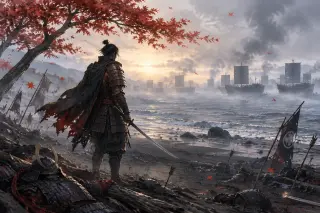
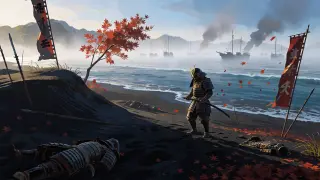
The brief: dawn on Komoda Beach, the morning after the samurai army was destroyed. A lone swordsman stands three-quarters away from camera, sword lowered, on black sand littered with broken banners, spent arrows and a fallen helmet. The sea is a wall of mist with the dark silhouettes of a Mongol fleet. One red maple leans over the dune. Palette of wet charcoal, bone white, dried-blood red and cold sea blue.
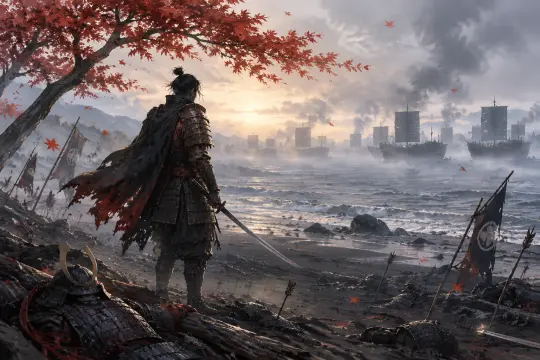
What the prompt did well: it gave the model one body, one event and a finite object list. What it could not control: the exact crest on the banners, which the model simplified into a circular mon. That is acceptable — a mon is a shape, not a language.
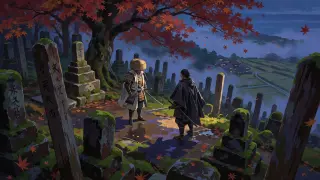
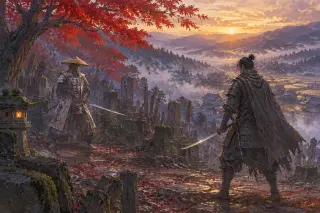
The Worked Example: The Sakai Cemetery
The brief: autumn twilight on a hillside graveyard above Omi. Two samurai face each other alone among moss-covered graves under ancient red maples. The older lord in formal pale armor and a wide straw hat holds a katana in a formal guard; the younger swordsman in dark worn armor and a rain-cloak answers with a half-drawn blade. Long violet shadows, wet stone, drifting leaves, terraced fields and a sea of fog below.
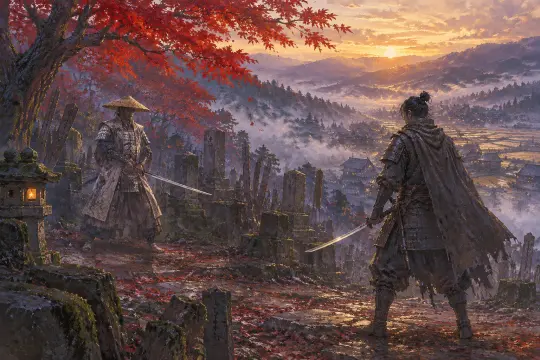
This frame is the better argument for GPT Image 2. The composition is intimate rather than epic, and the model keeps the detail budget on the things that matter: the texture of the straw hat, the wet edge of the grave stones, the last light on the valley. It also respects the prompt's refusal to make the scene a battle. Nobody is mid-swing. That restraint is the model following an instruction, not inventing one.
Inspecting a Result
Inspect in a fixed order and stop at the first failure. Event first: can you name what happened? Scale second: is there a body? Material third: do sand, iron and cloth behave differently? Light fourth: one source, one direction? Text fifth: any invented lettering? Corners last: extra hilts, floating arrows, half-rendered figures. Fix one thing per re-render; changing five clauses teaches you nothing.
Event
Can you name what just happened in one second at 300 pixels wide?
Scale
Is there a human body that tells you how big the fleet, the tree or the castle is?
Material
Do sand, iron, cloth and leaf each behave like themselves?
Light
Is there one source, one direction and no accidental glow?
Text
Are banners, graves and armor plates free of invented lettering?
Corners
Any extra hilts, floating arrows or half-rendered figures at the edges?
The Five Failures That Cost the Most
These survived a second look during the test, which makes them the expensive ones. All five are prompt-fixable, and none require a different model.
The fantasy drift
Horned helmets and lacquer in impossible colors. Repeat the historical armor clause and remove words like “demon” or “legendary.”
The glow problem
Asking for “dramatic lighting” often returns bloom. Ask for “cold low sun, volumetric mist, no glow.”
Text on banners
Even GPT Image 2 will sometimes invent a crest or a character. Say no letters and keep banners partially cropped or turned away.
Too many objects
The model will render all of them, beautifully, and the frame will lose its subject. Six nouns is a scene; sixteen is a catalog.
Ignoring aspect ratio
A 16:9 composition cropped to 3:4 loses its edges. Generate the ratio you will publish, or leave deliberate negative space.
When to Use Krea 2 Instead
Use Krea 2 when you need ten ideas in the time it takes GPT Image 2 to make three, or when the final surface is a thumbnail that will never be viewed at full size. Its compositions are stronger, its color is flatter, and its text weakness does not matter if there is no text in the scene. The mature workflow is Krea for exploration, GPT Image 2 for the final.
Publishing and Measuring
Publish every keeper as a work of the world, with the prompt and the model attached. Keep comparison pairs in the same collection so the next creator can see what changed. Link the work to the world studio, not just to the image file. A published work with its prompt is a reusable asset; a loose PNG is a screenshot.
Then measure the only thing that matters: does the frame still work at the size it will actually be seen? If it does, the detail was worth the cost. If it does not, no amount of extra rendering will save the composition.
Generate from This World
Four published frames, two models, one island under occupation — run the brief yourself.