
GPT Image 2 Satellite Map Key Visual Generator — Orbital Worlds in One Prompt
From one prompt to a planet wrapped in a survey grid: a one-to-one cartographic overlay, brass placemark pins over coastal cities, and a town-sized white hole where the map stopped rendering — rendered by GPT Image 2 and compared with Krea 2 on the original world Ground Truth.
GPT Image 2, Tuned for Orbital Map Key Visuals
From one prompt to a planet wrapped in a survey grid — a one-to-one cartographic overlay, brass placemark pins over coastal cities, and a town-sized white hole where the map stopped rendering.
What Is the GPT Image 2 Satellite Map Generator?
It is a GPT Image 2 workflow tuned for one specific job: render a satellite or orbital view that reads as a place first and an interface second. GPT Image 2 is the right model for this because map imagery depends on information density — cloud decks, coastal shelves, city lights, contour lines, a grid that follows the curvature of a planet, and a pin with its own small shadow. Krea 2 can give you the cartographic mood in seconds, but only GPT Image 2 gives you a planet you can inventory.
The workflow produces three things: an orbital world key visual, a low-aerial event frame, and a set of tile-level assets for thumbnails, chapter headers and in-world documents. Every image in this page was rendered from a real Neta Studio world, Ground Truth, and published as a work of that world.
Why GPT Image 2 for Map-Style Key Visuals
- Detail density — an orbital shot has to hold clouds, coastlines, a grid, pins and one anomaly in a single composition. GPT Image 2 keeps them separate instead of melting them into texture.
- Registered geometry — it will bend a grid over the curve of a planet rather than laying it flat like a screen overlay, which is the difference between a world and a screenshot.
- Photoreal light — a terminator line, a city’s sodium glow and a single brass pin light can coexist without the frame turning into a poster.
- Controlled white — a pure unrendered region is hard to get from models that like to fill space. GPT Image 2 will leave a hole white if you describe its edge.
- Natural-language control — you can specify the anomaly, the palette and the forbidden elements in plain prose, which is exactly the kind of brief a cartographic image needs.
What the Generator Produces
Orbital key visual
A planet-scale establishing shot: grid registered to the curvature, pins over the cities, one white absence, one aircraft or satellite for scale.
Event frame
A low-aerial moment at a specific place: a glacier cut into years, a seam collapse, a blank spreading along a road.
Tile and document assets
Straight-down tiles, survey diagrams and briefing covers — the same world at the zoom level a story prop actually needs.
The Test World: Ground Truth
Ground Truth is a cartographic science-fiction world set in 2026, twenty-one years after the Meridian Survey switched on the Overlay: a layer wrapped around the whole planet at one-to-one scale that renders every place as the version of itself the world collectively remembers. Roads follow the rendering. Pins fix versions. Panorama seams are doors. A movement called the Blank is erasing places on purpose, one road at a time, so that a town can be lived in rather than found. The world holds 27 atoms — seven characters, six locations, five events, four factions and five rules — and four published key visuals.
Reading the World Cover
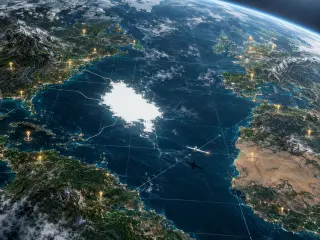
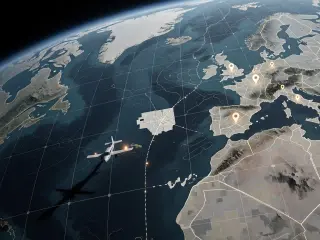
The first brief asks for one thing: the planet as a rendered document. GPT Image 2 answers with an Atlantic that has weather, a grid that follows the horizon, contour lines pressed into the Pyrenees and the Atlas, pins hanging over Lisbon, Casablanca and the Irish coast, and a white absence in the open water whose edge frays like an overexposed photograph. A survey plane crosses the lower right with its shadow thrown across the sea, which is the detail that gives the image its scale. Krea 2 answers the same brief as a colder, flatter document: a square graticule, a desaturated grey-green Europe, dashed seams running offshore, and the erased block reduced to a grid of unrendered white tiles. Both are correct. One is a place; the other is a filing.
The Event Frame: The White Flight
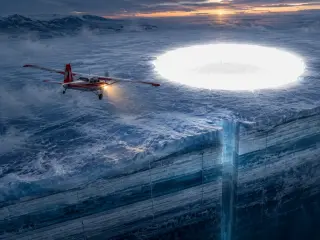
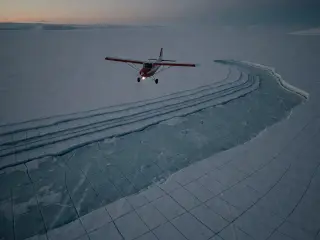
The second brief is harder, because an event frame has to hold a machine, a landscape and an absence in one composition. The prompt asks for a survey plane at dusk over Vatnajökull, a glacier cut open into year-by-year strata, a shaft dropped through the missing year, and a perfect white hole ahead of the wing with the faint silhouette of a town inside it. GPT Image 2 builds the weight: the strata read as real ice with bubbles and fracture lines, the shaft has depth, the hole has a rim, and the landing light is the only warm pixel in a frame of ice blue. That single warm light is what makes the image legible at thumbnail size.
Model Comparison: GPT Image 2 vs Krea 2
GPT Image 2 wins on information density: more geography, sharper landmarks, better separation between map furniture and photoreal terrain, and a lighting rig you can trace from the terminator to the pin glow. Krea 2 wins on speed and graphic punch: it flattens the same brief into a cool cartographic diagram that reads instantly at 300 pixels, at roughly a fifth of the cost and a fraction of the wait. In the world pair, GPT Image 2 gives you an ocean you could fall into; Krea 2 gives you a document you could hand to a committee. In the event pair, GPT Image 2 stages a film still; Krea 2 stages the last photograph taken before the loss.
Prompt Anatomy
Five decisions, in this order. Models allocate detail according to what you name first, so the order is not cosmetic.
- Viewpoint — high orbit at a steep angle, low aerial, or straight down. Say which, and say what is in the foreground.
- Overlay furniture — a translucent tile grid following the curve of the continents, hairline survey seams crossing oceans, glowing placemark pins above cities, thin contour lines on the ranges.
- The anomaly — one town-sized white absence, its edge dissolving into unrendered white, roads bending away from it and stopping. Describe the edge: that is what makes it read as erasure rather than weather.
- Scale figure — a survey aircraft with one warm light on its wing, its shadow on the water. One small object is worth more than any amount of description.
- Palette and bans — deep ocean blue, ash grey, map-cream, one hot brass light; no text, no labels, no watermark, no logo.
A Prompt That Works, Annotated
The exact world prompt used here reads, in one paragraph: a cinematic aerial key visual of a near-future Earth rendered as a living map, seen from high orbit at a steep angle, the surface wrapped in a translucent cartographic overlay, a faint geometric tile grid following the curve of continents, hairline survey seams crossing oceans, glowing placemark pins above cities, thin contour lines on the ranges; in the Atlantic a town-sized region gone blank, a pure white absence shaped like a city block, its edges dissolving, roads bending away and stopping; a small survey aircraft low along the seam, its shadow on the water, one warm light on its wing; deep ocean blue, ash grey, pale map-cream, one hot brass pin light; photoreal satellite imagery blended with precise cartographic linework, subtle scan artefacts, cinematic wide establishing composition, no text, no labels, no watermark, no logo.
Two things make it work. First, the grid is described as following the curve of the continents, which forces the model to treat the overlay as a layer on a sphere. Second, the anomaly is given a shape and an edge — a city block of white with roads bending away — rather than being called a hole. Vague holes become clouds. Shaped absences become deletions.
Settings and Parameters
- Size — 1536×1152 for a hero cover; 2048×1152 for a wide banner; 1024×1024 only when the image will live in a square feed.
- References — GPT Image 2 accepts reference images. Feed it a coastline crop if you need a recognisable geography, but keep the overlay language in text.
- Iteration — change one variable per render: the light, the anomaly or the distance. Changing all three is how a series loses its palette.
- Post — add any interface labels afterwards. Models cannot spell, and a single misspelled label ruins an otherwise credible map.
From Prompt to Published Work
Choose the scale
Orbit for the establishing image, low aerial for the event, straight down for a prop or thumbnail.
Write the five-part prompt
Viewpoint, overlay furniture, one anomaly with an edge, one scale figure, palette plus bans. Keep it one paragraph.
Render with GPT Image 2
Use 1536×1152 for a hero. Inspect the grid for flatness and the absence for stray texture.
Render the identical prompt with Krea 2
Same words, no per-model tuning. The comparison only means something if the prompt is byte-identical.
Publish both as works
Each render becomes a shareable work of the world, giving the image a permanent page and the setting a permanent reference pair.
Pick a world → write the five-part prompt → render GPT Image 2 → render Krea 2 → compare at two sizes → publish as works → fork or remix
Use Cases
- Game key art — an orbital establishing shot for a cartographic thriller, with the map screen already implied.
- Tabletop handouts — a player-facing map with one tile missing, printed or dropped into a VTT.
- Pitch decks — one image that explains a whole setting before anyone reads the logline.
- Serialised fiction — a consistent cover language across twelve chapters, because the grid and palette never change.
- World-building tests — a fast way to check whether your setting has a visual identity at all.
- Editorial and social — square crops of a map anomaly outperform almost every painted style in a feed, because white space reads at any size.
Who It Is For
Indie studios that need a cover before the art pipeline exists. Game masters building a modern setting with no fantasy furniture. Concept artists who want to explore orbital composition without modelling a planet. Writers who think in maps and need to see the map before they can write the road. And designers who want a cartographic look that is generated rather than assembled from stock tiles.
Limitations and Fixes
- Text and labels — both models will attempt interface typography and misspell it. Ban text in the prompt and add labels later.
- Over-rendering — list twenty nouns and GPT Image 2 will try to show all twenty. Cut the prop list in half and the composition gets stronger.
- Flat grids — if the grid sits on top of the planet instead of following it, say “registered to the curvature” and reduce the number of overlay elements.
- Clouds eating the anomaly — put the absence in open water or on ice, where there is no competing texture, and describe its edge explicitly.
- Krea 2 and precision — Krea 2 will drift from an exact coastline and cannot hold legible labels. Use it for mood and iteration, not for geography you need to be accurate.
Frequently Asked Questions
- Is this a Google Earth tool? No. It is a GPT Image 2 workflow for original satellite-map-style key visuals, demonstrated on the original world Ground Truth. It is not affiliated with Google.
- How long does a render take? GPT Image 2 is slower than lightweight models by design; it spends the extra time on detail density. Krea 2 returns in a fraction of the time.
- Can I use real coastlines? Yes, and they help the interface read instantly. Just be aware that the setting only becomes yours once you invent the place the map refuses to render.
- Which model should I ship? GPT Image 2 for hero art and anything printed; Krea 2 for social crops, avatars, rapid exploration and banner variants.
- Do I need the world to use the generator? No, but publishing into a world gives the image a permanent page, a remix path and a consistent set of atoms to render again later.
Start Creating
Generate Your Satellite Map Key Visual
Run the five-part prompt through GPT Image 2, publish the result as a work of Ground Truth, then run the same prompt through Krea 2 and keep the pair.