
GPT Image 2 Sci-Fi World Key Visual Generator
Generate grounded sci-fi world key visuals with GPT Image 2: real settings, a six-clause prompt recipe, two worked examples from Half-Life and an honest Krea 2 comparison.
One sentence, six clauses, one frame. Start from the GPT Image 2 sci-fi world key visual generator and build a place that looks governed.
What This Page Covers
This is a working page for GPT Image 2 as a grounded sci-fi key visual generator. It is not a model review. It covers the settings that matter, the prompt order that produces usable frames, two worked examples from the Half-Life world, the failures that show up repeatedly, and the exact points where Krea 2 beats it.
- What GPT Image 2 does better than other image models in this genre.
- The six-clause recipe, in the order the model actually reads it.
- Two worked examples with the prompts and the results.
- Where it breaks, and how to fix the frame without changing models.
What GPT Image 2 Does Better Here
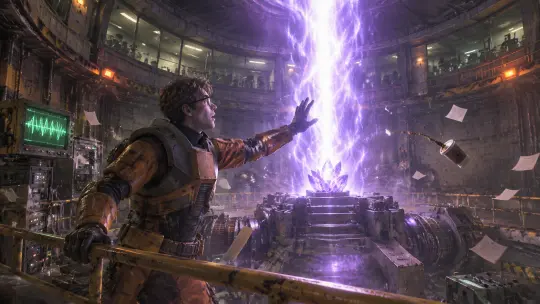
GPT Image 2 is not the fastest image model available and it is not the most stylish. What it does better than the alternatives in this genre is staging: it understands that a room has planes, that a crowd has individuals, and that a prop has a material. Give it a compound brief with a foreground, a middle ground and a background and it will allocate them instead of averaging them.
The second strength is human weight. In the Cascade frame the physicist's front foot carries his body, his glasses catch the rift light, and his hand is open in a gesture that reads as alarm rather than power. That is the difference between a key visual and a wallpaper: somebody in the frame has a body.
The Model's Real Settings
These are the settings that were used for the published works on this page, and they are a good default for grounded sci-fi. Bigger is not always better: a 2048-wide frame that lost its subject at 300 pixels is a worse cover than a 1536-wide frame that kept it.
- Size: 2048×1152 for a 16:9 key visual. The published Cascade frame came back at 1672×941; treat the request as a target, not a promise.
- Quality: high. Medium is fine for iteration, but material detail is the reason to use this model.
- Format: PNG for archive, WebP for delivery. Keep the PNG; you will re-crop it later.
- Reference images: optional and usually unnecessary. Use them for costume continuity, not composition.
- Text: do not ask for it. Legible signage drags the model into graphic design and away from the room.
The Six-Clause Recipe
Style, then subject
Open with the render language — photorealistic 3D CG, physically based rendering — and then the subject in one clause. Style first stops the model from choosing a genre for you.
Place with materials
Concrete, brushed steel, wet asphalt, scratched orange rubber. Materials are the difference between grounded sci-fi and fantasy with cables.
The one impossibility
A violet rift, a black spire, a scanner drone. Exactly one. More than one and the frame stops being about people.
The witness and the cost
A physicist with a stunned expression, a fighter with a scarred hand, a queue that has waited too long. Name the person and what they have already lost.
Light in two colours
One dominant source with a colour, one accent. Amber emergency light against violet rift light is the whole palette of this world.
The negative list
No text, no logos, no watermark, no HUD, no extra limbs, no anime proportions. Say it every time; the model will otherwise add a game interface.
Worked Example 1: The Resonance Cascade
The brief asks for the exact second the sample is inserted into the anti-mass spectrometer. Four planes are specified in one sentence: the physicist on the catwalk, the rift rising from the cart, the chamber around them, the observers behind glass. The prompt also asks for paper lifting and a coffee cup tipping, which is the cheapest way to prove that the air moved.
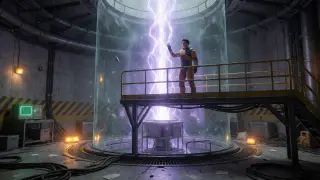
What worked: the rift stayed behind the subject instead of blowing out his silhouette, the catwalk rail gave the frame a floor, and the observation glass read as a crowd rather than a texture. What needed a second pass: the glasses rim and the glove, both of which wanted to merge with the background at low quality.
Worked Example 2: City 17
The second test is the opposite skill. No single room, no single event: a city, a rooftop, a checkpoint and a skyline that has to be legible in one glance. The prompt puts the resistance fighter in the near plane with his back to us, the checkpoint in the middle distance, the patrol in the plaza and the Citadel above everything, half-dissolved in rain.
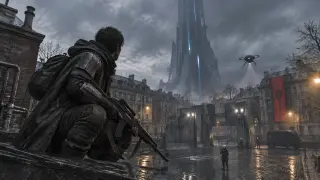
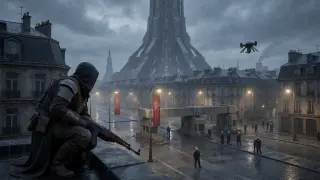
What worked: the depth stack, the wet cobblestones reflecting three different light sources, and the drone reading as a small dark shape rather than a prop. What needed care: the banners. Ask for cloth with weight, or the model will render them as flat graphics and the occupation will look like a festival.
Where GPT Image 2 Breaks
Three failures show up repeatedly in this genre. First, signage: the model wants to invent readable text on barriers and screens, and invented text always looks wrong. Second, hands that hold tools — a rifle stock or a crowbar can fuse with a glove. Third, crowds at distance, which can collapse into a repeating texture if the brief does not give individuals a job.
- Signage: add “no text, no logos, no readable signage” and describe the screen as an unlit panel.
- Hands: reduce the number of objects held, or move the hand out of the near plane.
- Crowds: give three named roles — an officer at the barrier, a citizen with a bag, a child holding a coat. Named roles stay individuals.
- Over-lighting: if the frame looks like a game trailer, remove one light source in the prompt.
Prompt Hygiene Checklist
- Style clause first, subject second, materials third.
- Exactly one impossible element.
- One dominant light with a colour, one accent with a colour.
- One named witness and one visible cost.
- Camera specified: 16:9, eye level, 35–50 mm equivalent.
- Negative list repeated in full, including HUD and watermark.
- No request for legible text, ever.
Cost and Iteration Budget
The practical workflow that keeps quality high without burning budget is to spend the first two renders on composition and the next two on detail. Composition problems cannot be fixed by quality; detail problems cannot be fixed by re-prompting the whole frame. Separate the two budgets and the model stops feeling expensive.
- Pass 1: low or medium quality, exact prompt, check the planes and the silhouette.
- Pass 2: fix composition in words, not in the negative list.
- Pass 3: high quality, final prompt, archive the PNG.
- Comparison: send the final prompt to Krea 2 once. One extra render buys a second work and a paragraph of analysis.
GPT Image 2 vs Krea 2 on Identical Briefs
The four works on this page are two briefs rendered twice. The pattern is consistent enough to plan around. GPT Image 2 builds a frame you can inspect: layered smoke, individual observers, cloth with weight, rain that lands on surfaces. Krea 2 builds a frame you can read at a glance: flat silhouettes, even spacing, one clean light and a composition that survives a thumbnail. On the Cascade brief GPT wins the room and loses the graphic punch. On the City 17 brief Krea wins the poster and loses the fear.
From Frame to World
A key visual is not the end of the pipeline; it is the proof that the world is coherent. If the frame can be described in one sentence that matches the world's rules, the next four frames will be easier. If it needs a paragraph of exceptions, the world is not ready to render yet.
Publish the work against the world
The share page carries the prompt, the model and the world. That is the difference between a portfolio and a demo.
Keep the prompt with the image
A published work with its prompt is reproducible. A published work without one is a mood.
Render the contradiction next
Whatever the frame argues, render the faction that disagrees with it. Worlds get stronger by collision.
Frequently Asked Questions
- Is GPT Image 2 good at sci-fi? Yes, for grounded sci-fi with rooms, crowds and props. It is weaker at graphic poster compositions, where Krea 2 is cleaner.
- What aspect ratio should I use? 16:9 at 2048×1152 for key visuals; 4:5 only for character cards.
- Can I get consistent characters? Use a reference image for costume and face, then keep the prompt’s non-character clauses identical.
- Why does my render look like a game? Probably a HUD, a lens flare or two competing key lights. Remove all three.
- Should I use the newest model? Test it on the same prompt. Model generations drift; the recipe matters more than the version number.
Build Your Own Sci-Fi Frame
Take the six clauses, one room and one cost, and build a frame that looks governed.
The Half-Life world is open: fork it, swap the collapse for your own founding mistake, and keep the rule that one impossibility per frame is enough.