GPT Image 2 Silent Hill Key Visual Generator — Fog, Rust and Pyramid Head
The GPT Image 2 Silent Hill key visual generator renders banner-ready survival-horror art — flooded corridors, oxidised tile, one amber light — proven on a real public world with four published key visuals.
Generate a Silent Hill Key Visual
From one prompt to a fog-drowned horror key visual — rusted helm, flooded tile, one amber light, rendered by GPT Image 2.
What Is the GPT Image 2 Silent Hill Key Visual Generator?
The GPT Image 2 Silent Hill key visual generator is the detail-first image model on Neta Studio, pointed at survival-horror art. Give it one prompt about a room, a figure and a light source, and it returns a painterly frame with readable architecture, wet texture and cinematic contrast — the kind of image that works as a title screen, a store banner or a character poster.
What Makes It the Right Tool for Silent Hill Art
- Detail without noise — tile grout, rust blooms, damp plaster and scratched metal stay legible at banner size.
- Controlled light — one warm source against a desaturated grey field is exactly the Silent Hill palette.
- Wet surfaces — reflections on flooded floors carry the composition instead of breaking it.
- World-grounded prompts — the Silent Hill seed keeps every render on-canon: same fog, same town, same rules.
- Pipeline-ready — every output publishes as a shareable work of the same world, ready to remix.
See It Render a Key Visual
How It Generates a Key Visual
GPT Image 2 reads the whole brief at once — place, figure, light, palette and framing — and resolves it into a single coherent frame. Because the prompt is anchored to a world, the palette and style stay consistent with the characters, locations and events already published from the same atoms. You are not asking for "a scary corridor"; you are asking for this corridor, in this town, at this hour.
Name the room
Brookhaven reception, a flooded ward, the Lakeview lobby, the road into Old Silent Hill.
Cast the subject
A faceless executioner, an overturned wheelchair, a nurse still making rounds.
Set the light
One brass desk lamp, one failing fluorescent tube, grey daylight through fogged windows.
Render and publish
GPT Image 2 returns the frame; the studio publishes it as a shareable work of the world.
Compare and iterate
Run the same prompt through Krea 2, then pick the direction or fork the world.
The Detail Advantage
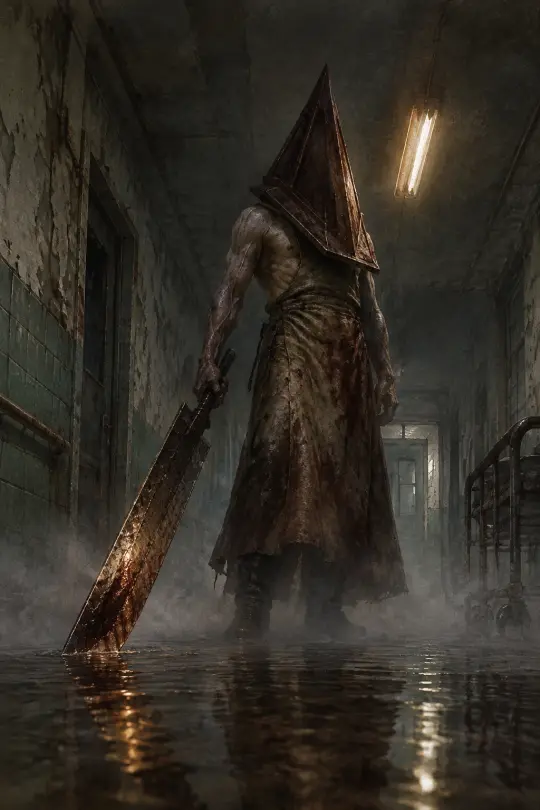
Where GPT Image 2 wins is density that still reads. In the Pyramid Head poster the helm keeps its scraped edges, the apron keeps its weight, the blade keeps its reflection, and the corridor keeps its depth — all at once, without turning into mush. That control is what a storefront image needs: it survives a crop, a thumbnail and a 4K upsell.
Real Outputs from a Real World
The generator was tested on the public Silent Hill world in Neta Studio. Four works were published from two prompts and two models.
- Pyramid Head — GPT Image 2 — a low-angle character poster in a flooded Brookhaven corridor.
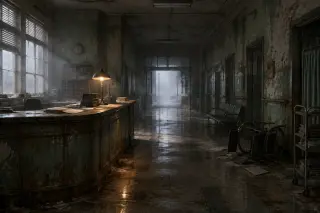
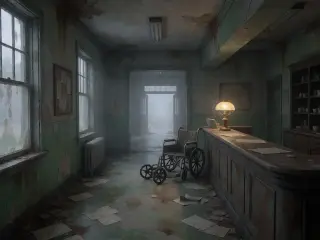
- Brookhaven reception — GPT Image 2 — a stage-lit reception with one brass lamp and fog in the doorway.
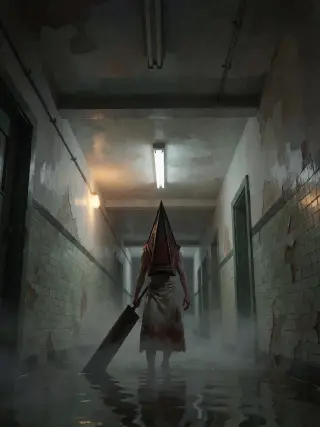
- Two Krea 2 counterparts — the same briefs rendered atmosphere-first, published alongside for comparison.
GPT Image 2 vs Krea 2 — Which Should You Use?
GPT Image 2 for the image that has to sell: crisp costume detail, readable architecture, controlled texture, wet reflections. Krea 2 for the image that has to set a mood: looser brushwork, softer light, faster iteration. The strongest horror workflow runs both from the same prompt and picks a direction — detail for the store page, atmosphere for the trailer frame.
Location Scenes: Brookhaven After the Shift
A location prompt is harder than a monster prompt because nothing is chasing you. The trick is to stage absence: a lit lamp over an empty desk, charts fanned across the counter, an overturned wheelchair, and a doorway that opens onto fog rather than a street. GPT Image 2 builds that as a set with clear depth; Krea 2 answers with window light and a wider tonal range.
Prompts That Work
- Room + one wrong detail — "an abandoned hospital reception, charts on the counter, one brass lamp lit, fog in the doorway, no people".
- Figure + framing — "a faceless executioner in a rusted pyramid helm, low angle, vertical character poster, greatsword dragging in standing water".
- Palette lock — "fog-grey mid-tones, oxidised green tile, rust accents, a single warm amber highlight".
- Texture cues — "peeling paint, damp plaster, wet concrete, fine film grain, visible brushwork".
- Clean frame — "no text, no watermark, no logo" keeps the output usable as a background or cover.
From Key Visual to Pipeline
A key visual is rarely the end — it is the storefront. The same frames can become a game cover, a visual-novel background, a character card or a video first frame, because every render stays attached to the world it came from and inherits the same atoms, style and secrets.
Who Is It For?
Indie horror developers who need banner art before they have an art team. Visual-novel writers who want backgrounds that match their cast. World-builders who want a fog-drowned town that stays consistent across dozens of images. Anyone who needs a poster for the room their players are about to walk into.
Limitations to Know
GPT Image 2 is slower than lightweight models — expect a couple of minutes per render at high quality. Non-photorealistic styles can develop fine texture artifacts on skin; a clearer style cue ("semi-realistic painterly, clean brushwork") or a re-prompt fixes most cases. Violence-adjacent prompts can be refused, so lean on absence and atmosphere. Krea 2 cannot render legible text, so keep typography out of the prompt.
Consistency Tips
- Reuse the palette sentence — the same colour words in every prompt keep the world coherent.
- Reuse the light rule — one warm source, everything else desaturated.
- Name the atom — "Brookhaven reception" beats "a hospital" because the world already knows the room.
- Fix the framing per use — vertical for characters, symmetrical wide for locations.
- Publish both models — the comparison doubles the content and documents your direction.
Start Generating
Fork the Silent Hill world or start from your own one-sentence horror brief. The world ships with 28 atoms and four published key visuals — your next frame is one prompt away.
Generate your first <span class="ml-highlight">Silent Hill key visual</span> with GPT Image 2
Four posters in one session — rendered, published and remixable.