
GPT Image 2 Tactical Dark Fantasy Key Visual Generator
GPT Image 2 as a tactical dark fantasy key visual generator: the real settings, the six-clause recipe, two worked examples from The Ashen Crown, and where the model breaks.
Generate a Tactical Dark Fantasy Key Visual with GPT Image 2
One sentence, six clauses, one frame. Start from the GPT Image 2 tactical dark fantasy key visual generator and build a poster where the law is visible.
What This Page Covers
This is a working page for GPT Image 2 as a tactical dark fantasy key visual generator. It covers the settings that actually matter, the six-clause prompt recipe, two worked examples from The Ashen Crown, the failure modes worth budgeting for, and an honest comparison against Krea 2 on the identical brief.
- Model: GPT Image 2, text-to-image with optional reference images.
- Best at: prop density, crowd staging, material texture, ash, metal and fire.
- Weak at: speed, cheap iteration, silhouette-first graphic posters.
- Use it when: the frame will be inspected, cropped, printed or used as a store-page hero.
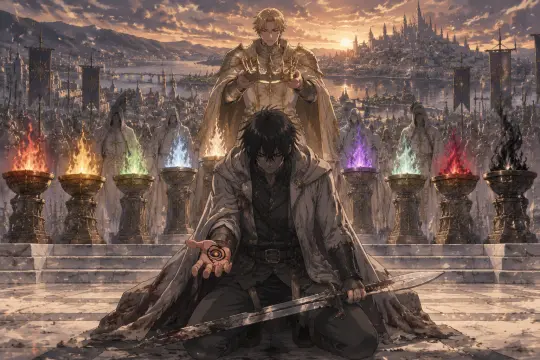
What GPT Image 2 Does Better Than Anything Else Here
GPT Image 2 is not the fastest image model available and it is not the most stylish. What it does better than its competitors is respect a clause. If you write "a black spiral mark on an open palm", you get a mark you can read; if you write "ash falls through the whole composition", you get ash in the air, on shoulders and on the flagstones. For tactical fantasy, where the politics is carried by objects rather than by gore, that literalness is the whole product.
The second strength is crowd staging. A key visual usually needs more than one person — a queue, a congregation, a rank of levies — and most models turn a crowd into a smear of faces. GPT Image 2 gives you separate silhouettes at separate depths, each doing something slightly different, which is exactly what makes a rite read as an institution.
The Model's Real Settings
- Size: request 2048×1152 or 1536×1024 for a 16:9 hero, 1024×1536 for a portrait character frame. Do not upscale a square.
- Quality: high for anything that will be inspected. Medium is fine for iteration; low only for thumbnails.
- Reference images: optional, best used for palette or costume continuity — not for copying composition.
- Output format: PNG for key art, WebP for feed variants. JPEG cannot preserve a transparent background.
- Speed: slower than Krea 2 by a wide margin. Budget two passes, not ten.
- Cost: charged per image and scaled by size and quality, so iterate at medium and finish at high.
The Six-Clause Recipe
Format and ratio
Name the object first: "anime cel-painted tactical dark fantasy key visual, cinematic 16:9" or "location key visual". The model commits to a composition type before it reads anything else.
The institution
One location described as architecture: nine braziers on a white terrace, a basalt gatehouse over a pass, a tower of nine bells. No second location, no establishing sweep.
The transaction
Who is paying and what is being recorded. An heir with a crown, a captain with a mark, a reader with a roll. This clause is the story.
The crowd
Describe the queue by posture: hooded, ranked on the stair, each holding a clay token. Posture is what keeps a crowd from becoming wallpaper.
The material
Name what the world is made of: packed ash, rusted plate, wet basalt, salt-stained wool. Materials are where this model earns its cost.
The light and the palette
One source, one direction. Nine flames on charcoal, a red portcullis, dawn gold on slate blue. Close with the negative list: no text, no logo, no watermark, no UI.
Worked Example 1: The Ash Coronation
The first test is the world's front door. The brief asks for four planes in one frame: the kneeling captain with the mark, the heir with the crown, the row of nine flames, and the lake-city behind. GPT Image 2 puts the captain large and near, uses the braziers as the only key light, and lets the sunset describe the far shore. The heir's hands are cupped around a light where the ninth shard should be, which is a better image than a complete crown.
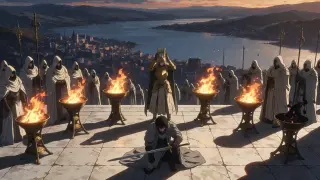
What worked: the mark stayed legible at the nearest plane, the broken sword reads as a broken sword, each brazier has a different flame colour, and the crowd has separate hoods. What it cost: the render is slower, and the image has more detail than a thumbnail can hold — you will crop it for feed use.
Worked Example 2: The Ember Gate
The second test is the opposite skill. No ceremony, no close-up — a gatehouse, a road and a column. GPT Image 2 solves it as a depth problem. The switchback has a real gradient; the Legion is strung along it at different distances; the portcullis glows from below; the scout on the rampart is small enough to make the gate feel enormous. The abandoned siege engine on the left is not in the brief as a hero prop, but it sells the war better than another soldier.
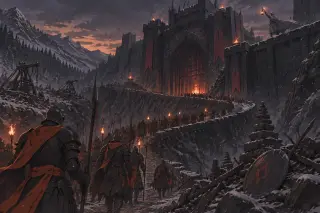
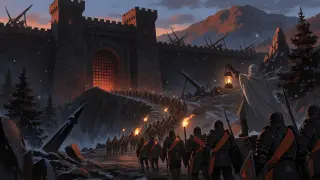
What worked: the fire is visibly under the road rather than inside the castle, and the column gives the gate a scale you can measure in people. What it cost: the frame is busier than a poster should be; Krea 2's version is easier to read at 300 pixels, even though it loses the road.
Where GPT Image 2 Breaks
Three failures show up repeatedly in this genre. First, heraldry: the model will invent crests and letters you did not ask for if you mention banners; keep the negative list close and describe cloth by colour, not by device. Second, two-light blur: sunset plus torches plus a glowing gate is three sources, and the frame turns to mud unless you name one as dominant. Third, over-detail at distance: a crowd of forty will be beautiful at full size and unreadable in a thumbnail, so compose for three silhouettes and let the rest be texture.
- Invented heraldry — say "plain banners" or "no heraldry" when you do not want crests.
- Light pile-up — choose the institutional source: the braziers, the gate, or the lantern. Not all three.
- Detail fog — put three named figures in the crowd and let the rest fall off.
- Text creep — close with no text, no letters, no watermark, no logo, no UI.
Prompt Hygiene Checklist
- One light source, named with a direction and a colour.
- One location, described as architecture rather than landscape.
- One transaction, visible as a prop: crown, mark, roll, bell, lantern.
- Crowd described by posture and rank, not by headcount.
- Materials named explicitly: packed ash, rusted plate, wet basalt.
- Negative list closed: no text, no letters, no watermark, no logo, no UI.
- Ratio chosen before rendering, not cropped after.
Cost and Iteration Budget
The practical workflow that keeps quality high without burning budget is to spend the first pass at medium and the second at high. Draft the composition at 1024 wide, read the silhouette, then re-render the winning prompt at 2048×1152. Two passes at two sizes is usually cheaper than five passes at full size.
- Pass 1 — composition: medium quality, 1024 wide, one prompt variant. Check silhouette and prop legibility.
- Pass 2 — finish: high quality, 2048×1152, one prompt variant with the winning clause order.
- Comparison: one Krea 2 render of the same sentence costs a fraction of a GPT pass and tells you whether the brief is legible at all.
From Frame to World
A key visual is not the end of the pipeline; it is the proof that the world is coherent. In Neta Studio the frame is generated from the same cards that hold the cast, the locations and the timeline, so the next frame does not start from zero. Publish the render as a work and it gains a share page with its prompt and model attached.
Frame → Work
Publish the render against the world; the share page records the prompt, the model and the cards it came from.
Frame → Sequence
Reuse the same location card for the next beat: the crowd, the mark, the crown, the bell. One style, four posters.
Frame → Fork
A reader inherits the houses and rewrites the debt. The comparison survives the fork because the works stay attached.
Frequently Asked Questions
- Do I need a reference image? No. All four Ashen Crown works were text-only, which is why they are a fair model comparison.
- Can GPT Image 2 render legible text? Yes, better than most, but a key visual should not depend on type. Add titles in layout, not in the prompt.
- Why does my render look like generic dark fantasy? Usually two light sources and a missing prop. Cut one light and name one object that records a debt.
- How many prompts should I keep? One per frame, stored on the work. The clause order is the useful part of the record.
- Is Krea 2 better? It is better at posters and faster at iteration. On these two briefs it lost the mark and the road, so it lost the argument.
Build Your Own Tactical Fantasy Frame
Take the six-clause recipe, point it at a world with real rules, and publish the frame that survives the crop.
The Ashen Crown world is open: fork it, swap the house, keep the one-light rule, and add your own transaction to the roll.