
GPT Image 2 Violet Evergarden Key Visual Generator
A detail-first key visual generator for the post-war Continent: silver hands, postal houses, canal light.
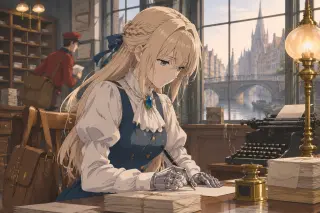
This is a focused tool page for one model and one world. GPT Image 2 is the detail-first option: it reads a long prompt as a production brief, builds the room around the subject, and will draw articulated prosthetic fingers if you ask for them. The world is Violet Evergarden — a post-war continent of postal houses, canal cities and letter-writers.
Below: what the model does well here, the exact parameters used for the published works, a prompt skeleton that survives iteration, and where Krea 2 beats it.
What This Tool Does
It turns a written scene into a key visual inside a fixed world. The model does not know the series; it knows what you tell it. The value of the world is that the telling is already done: character bodies, uniforms, locations, props and tone are written down as materials you can paste into a prompt or attach as a reference.
- Long-prompt comprehensionGPT Image 2 follows multi-clause briefs: body, uniform, object, room, light and one action in a single prompt. That is exactly the shape this world's scenes need.
- Material detailIt renders brass, wool, paper, glass and silver as distinct materials. The postal house is full of small objects; this model makes them legible instead of decorative mush.
- Reference imagesIt accepts uploaded images as references. Use a character cover to lock the face and uniform, then describe only the new scene. Do not rely on the model's memory of the series.
- Text-free disciplineIt will attempt lettering if you let it. Keep 'no text, no logos' in every prompt; the letters in the scene should be suggestion, not readable copy.
Why GPT Image 2 Fits This World
Violet Evergarden is a world of interiors, objects and faces holding back. That is a bad fit for a model that only does spectacle and a good fit for one that can stage a desk. GPT Image 2's density is an asset here: the typewriter, the inkwell, the stack of envelopes and the canal outside the window are not clutter, they are the evidence that a postal house is a real workplace.
The model's weakness is the same density. It will add a second window, a third stack of letters, a decorative lamp you did not ask for. Treat the first render as a draft and remove one object per iteration. The best frames in this world are the ones with the fewest props and the clearest hands.
The Model Card, Read Plainly
The parameters are simple; the discipline is not. For this world, use a landscape frame, high quality, opaque background and a PNG or WebP output. Skip transparent backgrounds: the scenes are rooms, not stickers.
Size: 1536×1024
A 3:2 landscape gives the desk, the subject and the window room to coexist. 16:9 also works for video frames; 1024×1024 crops the room and pushes the image toward portrait.
Quality: high
The prosthetics and the letter stacks need the extra pass. On low or auto, the finger joints soften first, which is the one detail this world cannot lose.
Reference: optional
Attach a character cover when you have one. Describe the new scene in text; let the reference carry the face and uniform. Do not attach a reference and also re-describe the whole character — the two versions fight.
Output: PNG or WebP
PNG for a work that will be edited or printed; WebP for a fast page image. Both keep the flat colour clean. Avoid JPEG for large flat areas.
A Prompt That Produces Violet, Not a Lookalike
The skeleton is fixed: medium → body → uniform → object → room → light → one action → exclusions. Everything else is substitution. The example below is the exact shape used for the published dawn frame, with the room and action swapped for a client commission.
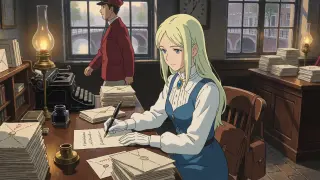
Anime cel-painted key art, 16:9. A slim young woman, pale blonde hair half-pulled back, steady blue eyes, white high-collared blouse, blue bodice and skirt, deep blue brooch; articulated silver prosthetic forearms exposed, white gloves pushed back. She sits across a wooden table from an elderly client in a dark coat; a half-written letter and a brass inkwell between them; one gas lamp, one tall window, rain on the glass; stacks of sealed envelopes at the edge of the frame. Flat colour base, designed hard shadow, limited mid-tones, selective line art. Quiet, tender, elegiac. No text, no logos.
Medium first
Anime cel-painted key art, 16:9. Without this, the model defaults to a photograph or a 3D render with a cinematic grade. The medium is the first thing it must commit to.
Body before mood
Age, build, hair, eyes, prosthetics. The model cannot infer a character from a name you did not give it. Identity is a list of physical facts.
Uniform as colour anchors
White blouse, blue bodice, deep blue brooch. The brooch is the single most reliable colour cue in the design; it keeps the palette from drifting.
One object, one action
A pen in the right hand, a half-written letter under the palm. Do not ask for writing, thinking and looking at the same time. One verb per frame.
Exclusions last
No text, no logos. The model will otherwise fill the letters with pseudo-script that reads as error at full size.
Where GPT Image 2 Beats Krea 2 — and Where It Doesn't
The published works are a fair comparison because the prompts were identical. GPT Image 2 wins on the things this world needs to prove: the hands, the room, the class markers. Krea 2 wins on the things a page needs to survive: silhouette, contrast, thumbnail legibility. The mistake is to treat one as the correct model.
- Use GPT Image 2 for the commissionTwo people, one table, one letter. The model can hold the spatial relationship and the small props. This is the image that tells a reader what the world is about.
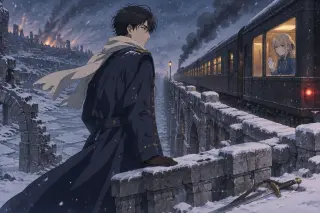
- Use Krea 2 for the posterOne figure, one landscape, one mood. Flat colour and hard shadow compress better, and the composition reads at 300 pixels wide.
- Use GPT Image 2 for prostheticsIf the silver hands must be visible, this is the model. Krea 2 will often render gloves and a shine. Prompt the joints explicitly either way.
- Use Krea 2 for speedIterate the composition cheaply, then move the winning layout to GPT Image 2 for the detailed pass. The two models can be a pipeline, not a contest.

Common Failures and Fixes
The same four failures appear in almost every test render. They are prompt-shaped, not model-shaped. Fix the clause, not the seed.
- Gloves instead of handsSay "articulated silver prosthetic forearms exposed, individual finger joints, white gloves pushed back to the wrist." If the model still hides them, put the hands on the table in the foreground and lower the camera.
- A modern roomName the century through materials: gaslight, brass, wool, stone, canal, airship, 1910s tailoring. "Old office" is not enough; the model will add a laptop.
- Extra peopleState the cast count: "one young woman and one elderly client, no other figures." GPT Image 2 likes background staff; if you do not want a courier, say so.
- Illegible letteringAdd "no readable text, no logos, no captions." Then, if the scene needs a sentence, put it in the work description or the page copy. Do not ask the model to write the letter.
Turn a Still Into a World Asset
A key visual is only useful if it can be reused. In this world, every generated frame is attached to a card: character, location, event or published work. The attachment is what makes the image searchable, citable and safe to build on. A loose file is a draft; a card is canon.
Choose the card
Person, place, event or commission. The card decides which details are identity and which are decoration.
Write a factual caption
Who, where, what object, what light. One sentence a reader could verify. This becomes the alt text and the work summary.
Publish the work
Attach the image to the world's works and give it a title that names the scene and the model. The published work is the unit other pages can cite.
Reuse the prompt skeleton
Keep the medium, body and uniform clauses. Change only the room and the action. That is how a cast stays on-model across a series.
Who Should Use It
Use this tool if you need a detailed, readable frame of a specific post-war world: a commission scene, a postal house interior, a bridge at night. Do not use it if you need a fast flat poster, a stylised icon or a text-heavy layout. The model is slow, dense and literal; those are features here, not bugs.
It is also a good fit for writers who think in images. If you can describe the object on the table and the light on the glass, you can generate the scene you are stuck on. The world supplies the rest.
Generate a Violet Evergarden Key Visual
The world is loaded and the model is chosen. Open the studio, pick a card and write the scene — or start from a blank prompt on neta.art.
Start With the World, Not the Prompt
A model is only as good as the world it is pointed at. GPT Image 2 can draw a postal house, but it cannot invent the three prohibitions that make the postal house matter. That is why this page pairs the model with a built world: eight characters, six locations, five events and four institutions, all editable, all illustrated. Use the tool, but start from the setting.
Model: GPT Image 2. Published works on this page were generated inside the Violet Evergarden world in Neta Studio. Independent fan work; not affiliated with Kyoto Animation. Open the world studio.