
GPT Image 2 Wuthering Waves Key Visual Generator — Resonant Anime Key Art
GPT Image 2 is the detail-first model for Wuthering Waves key visuals: lantern-lit walls that recede correctly, crowd-scale cities, lace and thorn anatomy that survives a crop, and a violet rift you can trace to its source. This page documents its real settings and the exact prompts behind four published works.
Generate a Wuthering Waves Key Visual with GPT Image 2
One sentence, six clauses, one frame. Start from the GPT Image 2 Wuthering Waves key visual generator and build a poster that survives the crop.
What This Tool Page Covers
This is a working page for GPT Image 2 as a Wuthering Waves key visual generator. It covers the settings that matter, the six-clause prompt recipe used to produce the four published works on this page, two worked examples with the full prompt text, and an honest account of where the model fails. The briefs were run unchanged through Krea 2 as well, so the comparison is fair.
- The real parameters — size, quality, format — and when each one changes the result
- The six-clause recipe and why the order matters
- Two worked examples from Solaris-3, with the full prompt
- A side-by-side with Krea 2 on the same brief
- The failure modes you can plan around
Why GPT Image 2 for Wuthering Waves Key Visuals
GPT Image 2 is not the fastest image model and it is not the cheapest. It is, however, unusually good at holding a complex spatial argument together: a wall that recedes correctly, a city that sits on the same ground plane as the foreground, a dragon that reads at the same scale as the gate it coils over.
Wuthering Waves needs exactly that. The subject is architecture plus population plus rule. If the wall bends, the frontier stops reading. If the crowd is missing, the city is a set. If the Echo is not legible, the Resonator is a cosplayer. GPT Image 2 spends its budget on those three things, which is why it is the detail-first choice for this world.
The Model at a Glance
These are the settings that matter for poster work. The goal is a frame that reads at card size and still rewards a full-size look, so favour resolution and quality over speed, and render wide enough to crop.
| Setting | Used here | Why |
|---|---|---|
| Size | 1536×864 (world) / 1024×1536 (character) | 16:9 for the world, 2:3 for a hero poster |
| Quality | high | Lace, thorn and petal detail are the subject |
| Format | png | Lossless crops for store cards |
| Background | opaque | The world is the point; no cutout needed |
Size, Quality and Format Settings That Matter
Wuthering Waves key visuals are wide by default, but the published crop is rarely the rendered crop. Render at 1536×864 or wider, keep the wall and the horizon in the middle third, and crop late. A square render loses the gate and the dragon; a tall render loses the city. For character posters, 1024×1536 gives you room to crop to a card without cutting the Echo off at the shoulder.
| Use | Size | Crop |
|---|---|---|
| Store / world card | 1536×864 | 16:9, crop 10% off the sides |
| Character hero | 1024×1536 | 2:3, keep the Echo in the top third |
| Social | 1088×1920 | 9:16, render taller than you need |
The Prompt Recipe: Six Clauses
The recipe is the same one used to produce both published GPT Image 2 frames in this world. It is ordered on purpose: each clause removes a failure mode from the next. Keep the whole thing to one paragraph and do not add a seventh clause.
Lock the rendering system
“2D anime game key art, crisp selective line art, flat-color base, designed hard cel shadows, limited painted transitions. Bright clear daylight.” Without this, the model drifts to 3D or painterly.
State the format and job
“World key visual” or “Character key visual, vertical hero composition.” The job decides the camera.
Name the subject and the place
A walled frontier city around an ancient loong, or a sealed garden of red funeral flowers. One subject, one place.
Add the physics and props
Grey water falling upward, a wind dragon, thorned vines, a blade of red static. This is where the world’s rules show up.
Set the light and palette
Bright rim light, clean saturated reds and deep greens, sky blue and sunlit greens against a cold violet wound. Light is the faction read.
Close the negative clause
“No text, no watermark, no logo.” Always. Anime key art attracts accidental typography.
Worked Example 1 — Solaris-3, the World Key Visual
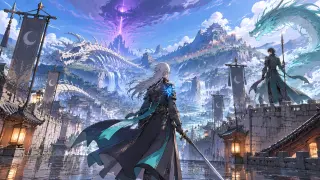
The first brief is the whole planet in one frame. The job is geography: show a city built around the bones of an ancient loong, a wall holding back a Tacet Field, and two Resonators close enough to read as people against architecture the size of weather.
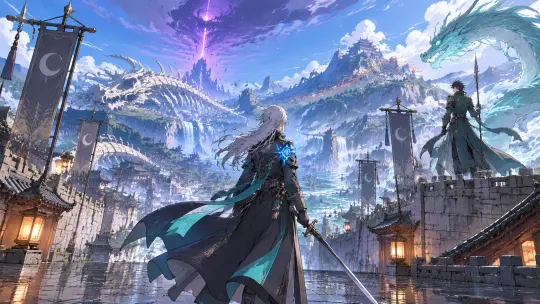
Prompt. 2D anime game key art, crisp selective line art, flat-color base, designed hard cel shadows, limited painted transitions. Bright clear daylight. World key visual of a coastal frontier city built around the bones of an ancient loong: white stone walls and lantern-lit streets in the foreground, tall grey battle banners with a crescent emblem, a rain-slick eastern gate plaza, and beyond the wall a drowned valley where grey water falls upward in slow sheets toward a violet sky torn by a distant resonant frequency rift. A silver-haired traveler in a long dark coat edged in teal light stands with their back to us at the gate, blade lowered, a faint blue echo sigil glowing at their shoulder; a tall spearman in a teal-streaked military coat holds the eastern rampart with a dragon of wind coiling behind him; monks’ prayer ribbons snap on a cloud-wrapped mountain in the far distance. Clean saturated colors, sky blue and sunlit greens against a cold violet wound in the sky. Epic scale, dynamic key-art composition, dramatic atmospheric depth, no text, no watermark, no logo.
Worked Example 2 — The Crimson Bloom
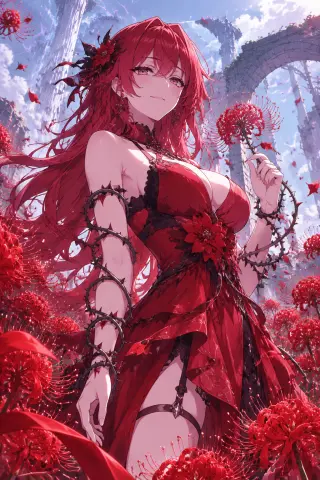
The second brief moves the camera into the garden and changes the job from geography to staging. The subject is the one who walked out of a sealed Tacet Field smiling, and the frame has to imply both the bloom and the cost without turning the vines into a costume.
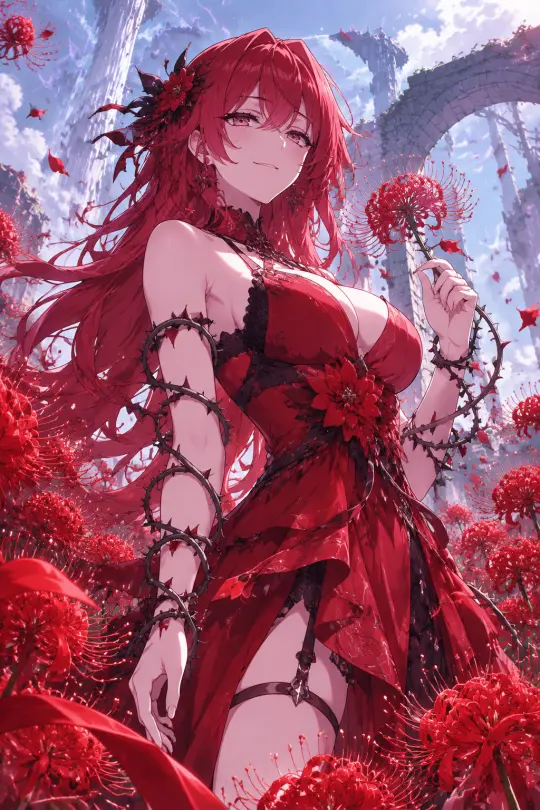
Prompt. 2D anime game key art, crisp selective line art, flat-color base, designed hard cel shadows, limited painted transitions. Bright clear daylight. Character key visual, vertical hero composition: a crimson-haired young woman standing in a sealed garden of oversized red funeral flowers, a red floral dress with black lace trim, thorned vines curling around her forearms and wrists, a lazy knowing smile, pale eyes like pressed petals. Behind her the garden folds into a half-real Tacet Field: floating crimson petals frozen mid-air, a broken stone arch, distant grey water falling upward, faint violet resonance light in the seams of the sky. She holds one black-thorned stem loosely, not as a weapon. Clean saturated reds and deep greens, bright rim light, crisp cel shadows, atmospheric bloom of petals, no text, no watermark, no logo.
GPT Image 2 vs Krea 2 on the Same Brief
The comparison is only useful if the brief is identical. Both models received the same text for both subjects, with only the size parameter changed to fit each model’s supported range. The result is a clean read on what each model spends its budget on.
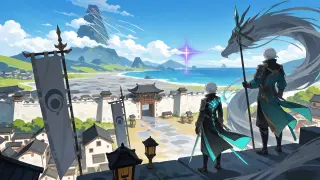
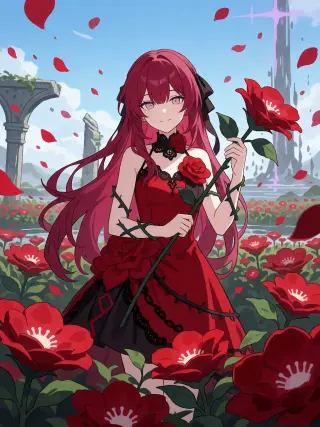
GPT Image 2 spends it on population and texture: merchants with luggage, individual lanterns, a loong skeleton with vertebrae, lace you can count. Krea 2 spends it on structure: a hard horizon, flat colour fields, two silhouettes and a single violet star. For a store page, GPT Image 2; for a poster, Krea 2. For a series, render both and pick the one that matches your crop.
Where GPT Image 2 Breaks
The failures are predictable, which is good news. On Wuthering Waves subject matter GPT Image 2 tends to over-render texture, invent almost-legible signage, and drift toward interface furniture when you say “game”. It also likes to add a seventh character to a crowd that only needs two.
- Accidental UI. Words like “game”, “menu” or “poster” can pull in frames and buttons. Say “key art”, not “gamescreen”.
- Too many extras. Cap the crowd: “two Resonators, distant merchants.” Otherwise you get a festival.
- Muddy violet. The rift can go grey. Ask for “a cold violet wound in the sky” and keep it in the light clause.
- Costume vines. Thorned vines can read as decoration. Add “curling around her forearms, not as a weapon” to keep the cost legible.
A Repeatable Production Loop
Treat the model as one step in a loop, not a slot machine. The loop below is what produced the four published works on this page: one world, two subjects, two models, four frames, all attached to the same atoms.
Pick one atom pair
One event and one location, or one character and one location. Never “the whole world” twice in a row.
Write the six clauses
Rendering system, job, subject, physics, light, negative clause. One paragraph, no seventh clause.
Render wide
1536×864 for the world, 1024×1536 for a hero. Quality high, PNG, opaque.
Compare on a second model
Run the identical brief through Krea 2. Publish both and let the crop decide.
Attach to the world
Publish the frames as works, with the prompt and the world attached, so the next person can fork.
Publishing and Reuse
A published work is more than a file. It carries the world it came from, the atoms it used, and the brief that produced it, so the next person can fork the world and generate a companion frame without guessing. That is the difference between a gallery and a world: the gallery ends at the last image, the world keeps producing them.
Start Creating
Take the six-clause recipe, point it at a world with real atoms, and publish the frame only you would choose.