
GPT Image 2 Xenoblade Character Generator
A documented GPT Image 2 workflow for Xenoblade-style character key visuals: the six-clause prompt, the real settings, the failure modes, the cost per usable frame, and four published renders from a GPT Image 2 vs Krea 2 comparison on identical briefs.
Render a Xenoblade Character in One Pass
Paste the six-clause brief, choose a vertical frame, and GPT Image 2 returns a character key visual with materials, props and titan-scale light already resolved — then send the same sentence to Krea 2 for the poster version.
GPT Image 2 as a Xenoblade Character Generator
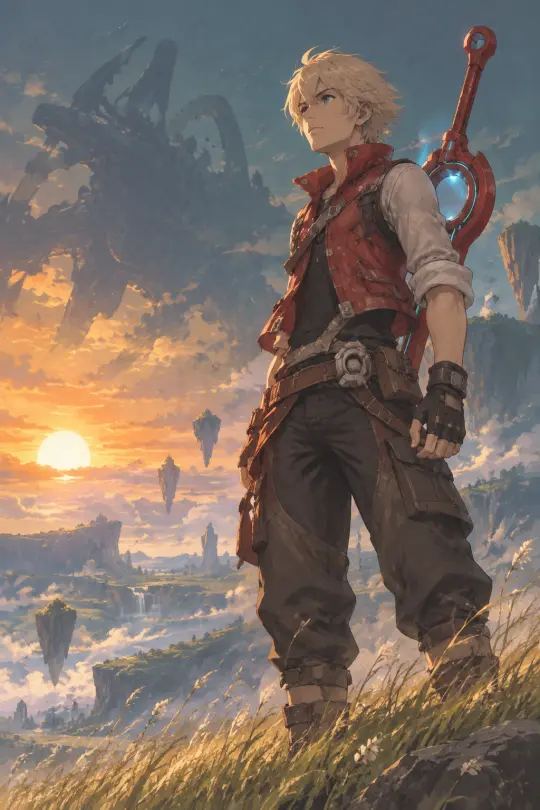
This is a documented workflow, not a demo. Every number below comes from the actual runs that produced the four works on this page: one 1024×1536 character frame and one 1536×1024 location frame on GPT Image 2, each repeated unchanged on Krea 2.
The short version: write the brief as a camera instruction, not a synopsis. Name the costume and props, name the landscape, name the two lights, name the style engine, and close with the same negative clause every time. GPT Image 2 will do the rest — including details you did not ask for and cannot use.
The target look is commercial game painterly: broad visible painted planes, solid brush-shaped hard edges at structural turns and focal points, large connected local colour and value groups, deep-colour shadows and a few saturated accents. That style is not decoration. It is a constraint that keeps grass green, ether blue and Monado red from collapsing into mud.
Why GPT Image 2 for This World
GPT Image 2 is strongest where this world is hardest: material truth at scale. Grass, leather, matte cloth, machined metal, snow and titan-scale atmospheric haze all need to read as different substances in the same frame. The model's detail bias is an asset here, and its known weakness — fine texture creeping into non-photoreal styles — is neutralised by asking for visible painted planes.
It also accepts reference images. For a world with a fixed cast, that means you can feed back an approved frame and keep a face, a vest or a sword consistent across a set. Krea 2 is text-only, so it cannot do that; it is the ideation and poster model, not the continuity model.
The Six-Clause Brief
Every successful frame in this world used the same six clauses. The order matters: the model weights early tokens more heavily, and the costume must arrive before the light.
- Subject and role. “Shulk, an eighteen-year-old Colony 9 engineer and the bearer of the Monado” — a name and a job, not a mood.
- Costume and props. White-blond hair, blue eyes, a red sleeveless vest over rolled shirtsleeves, leather work straps, a tool belt and the red blade of the Monado across his back with a faintly glowing hilt.
- Place. A wind-bent grass ridge on the Gaur Plain at dusk, floating rock spires and drifting pollen, the black silhouette of Mechonis on the horizon.
- Light. Cold teal distance, one warm amber sun low behind him, dramatic rim light, volumetric pollen.
- Style engine. Commercial game painterly, broad visible painted planes, hard brush-shaped structural edges, large connected value groups, deep-colour shadows.
- Negative clause. No text, no letters, no signage, no watermark, no logo, no UI, no HUD.
A Worked Example: Shulk on the Gaur Plain
The character brief produced a frame in which the vest reads as matte cloth rather than plastic, the leather straps have grain, the Monado hilt has machined edges and a cyan ether glow, and Mechonis recedes in believable haze. Those are all consequences of clause two and clause three, not of a lucky seed.
Note what the brief does not contain: no plot, no mention of Fiora, no instruction to look determined. The emotion is carried by the pose, the low sun and the size of the thing behind him. If you write the feeling, the model draws a feeling; if you write the scene, the model draws a scene that produces the feeling.
Settings That Worked
Model
gpt-image-2. The 2.5 variants are faster or higher-fidelity, but this run used the documented base model so the comparison stays honest.
Size
1024×1536 for the character poster, 1536×1024 for the location. Vertical for people, horizontal for architecture.
Quality
high. The difference is in edges, cloth and small props, which is exactly what this style needs.
Prompt length
around 170 words. Long enough for six clauses, short enough that the negative clause is still in context.
Repetitions
one per model per brief. No seed hunting; the comparison is between models, not between lucky draws.
The Comparison Frame
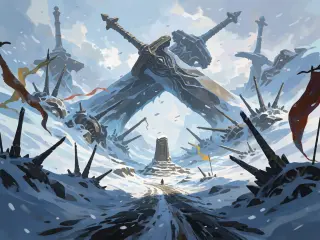
The second image on this page is Krea 2 on the identical sentence. It is faster, cheaper and better at silhouette, and it will not hold a costume detail to save its life. Use it to find the shape, then use GPT Image 2 to build the object.
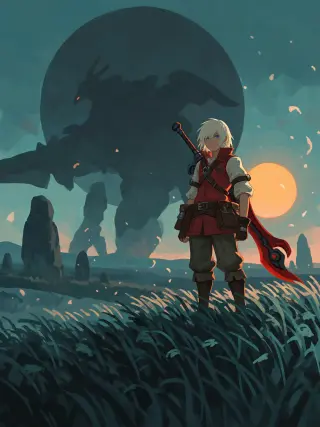
Read them side by side and the division of labour is obvious. GPT Image 2 gives you a reference sheet. Krea 2 gives you a poster. A world needs both, and the same brief produces both for under five cents.
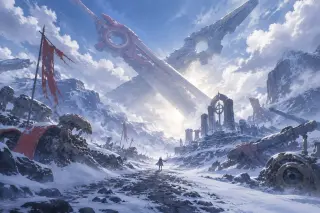
A Worked Example: Sword Valley
The location brief uses the same six clauses with the subject swapped for landscape. It adds one clause that matters: a scale object. A tiny figure on the memorial road is what tells the viewer the crossed swords are the size of weather systems.
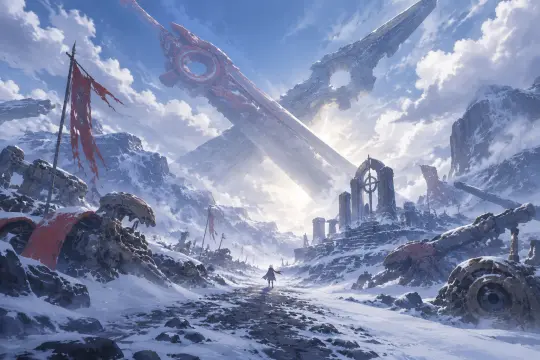
The result is a place that can hold an argument. There is a road someone could desert on, a memorial someone could deface, and a light between the blades that looks less like dawn than like a door.
Documented Settings and Cost
| Run | Model | Size | Billed |
|---|---|---|---|
| Shulk, Gaur Plain | GPT Image 2 | 1024×1536 | $0.0346 |
| Sword Valley | GPT Image 2 | 1536×1024 | $0.0346 |
| Shulk, Gaur Plain | Krea 2 | 768×1024 → 1536×2048 | $0.010 |
| Sword Valley | Krea 2 | 1024×768 → 2048×1536 | $0.010 |
Failure Modes and Fixes
- Muddy greens. A photoreal render turns grass, ether and machine into one brown mass. Fix: name painted planes, broken local colour and visible strokes, and reduce the palette to five values.
- Plastic vest. “Red vest” alone gets you a smooth costume. Fix: “matte red sleeveless vest over rolled shirtsleeves, visible cloth grain and stitched seams”.
- Generic sword. The Monado becomes a fantasy longsword. Fix: “red blade with a mechanical circular hilt, cyan ether light in the ring, no runes or engraving”.
- Accidental signage. Colony scenes invite invented shop signs. Fix: keep the negative clause last and explicit, every time.
- Flat poster. Detail bias can crowd the frame. Fix: one warm object, one cold key, generous negative space on one third.
Prompting the Cast, Not Just the Hero
The same six clauses work for every character in the world. Swap costume, props and place, keep the light and style clauses identical, and the eight characters will look like they were painted by the same hand on the same day.
Where It Still Fails
Hands remain the weak point, especially a hand that has to grip a sword hilt and show a mechanical detail at the same time. Complex hair-plus-weapon silhouettes can merge into a blob at small sizes. Landscapes with many repeated rock spires can develop a wallpaper rhythm. The honest summary: GPT Image 2 is a superb materials engine and a mediocre art director — give it a described scene and it will execute, give it a mood and it will decorate.
Reusable Patterns
Costume before light
Name what the character wears and carries before you describe the sun. The model weights early tokens and will spend them on the vest.
One warm object
A sun, a lamp or a window. A single amber note in a teal landscape is the whole Xenoblade palette in one rule.
Negative clause last
The final sentence of every brief is the same. It is the cheapest quality control in the workflow.
Questions About the Tool
Do I need a reference image? +
No. Both frames here were text-only. Add a reference when you need continuity across a set — a face, a vest, a sword.
Why not use gpt-image-2.5? +
Use it if you want speed or higher resolution. This page documents gpt-image-2 because that is the model that produced the published works, and the comparison had to be honest.
Can I sell what I generate? +
Check your plan and the model terms. This page documents the workflow, not a licence. For fan work, keep it clearly non-commercial and non-official.
Does Krea 2 accept the quality parameter? +
No. Krea 2 only takes size in this workflow; passing quality returns an invalid input error. Drop it and keep the brief identical.
Render Your Own Xenoblade Character
Take the six clauses, change two nouns and render a frame that belongs in the same set. Then send the same sentence to a second model and see what it is for.