Seedance 2.0 Anime Opening Video Generator
Generate anime opening sequences from one sentence — 1080p, synced audio, title-card-ready frames.
Seedance 2.0 Anime Opening Video Generator
From one sentence to a 1080p anime opening beat with synced audio — rendered, published, shareable.
What Is the Seedance 2.0 Anime Opening Video Generator?
The Seedance 2.0 anime opening video generator is the fastest path from a one-sentence brief to a real anime OP beat: a 1080p, 16:9, music-synced video shot with the energy of a modern opening sequence. It accepts text, image, and video inputs, supports resolutions from 480p to 2K, and can chain shots via its last-frame output — which is exactly what an OP needs when you are assembling a 60-second sequence from five beats. In the Sakura Genesis Academy world, Seedance 2.0 rendered the Festival Awakening beat and the Rooftop Promise beat; both are embedded on this page.
What Makes It the Right Tool for Anime Openings
- 1080p up to 2K — final-deliverable resolution for a real opening sequence, not a draft
- Synced audio — generate the shot with its sound design built in
- 16:9 and 9:16 — landscape for OPs, vertical for reels
- Last-frame chaining — every shot returns a frame you can feed into the next beat for seamless cuts
- Image and video inputs — start from your world's key visual or reference video and animate it
- Router-files output — every render lands on a shareable URL instantly
See It Render an OP Beat
The Festival Awakening beat below was generated from a single sentence about the Sakura Genesis Academy world: 1080p, 6 seconds, synced audio, ending on a title-card-ready frame.
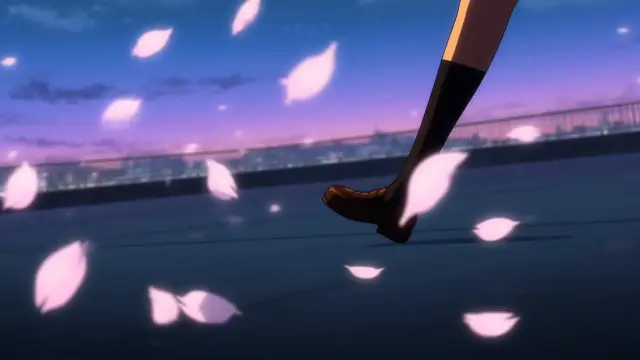
Festival Awakening — Seedance 2.0 · 1920×1080 · 6s · synced audio · one sentence in, an OP beat out.
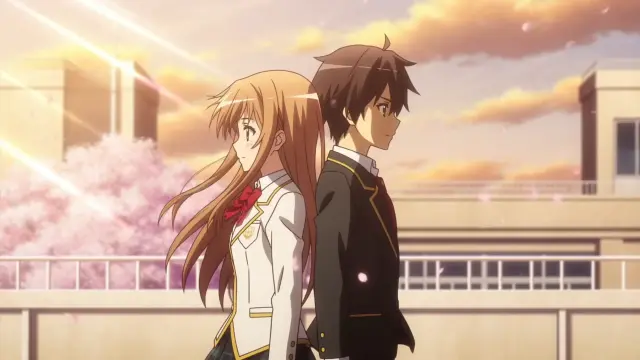
Rooftop Promise — Seedance 2.0 · 1920×1080 · 6s · the OP's emotional core, rendered from the world's canon.
How to Generate an Anime Opening with Seedance 2.0
Write the Beat
One sentence: location + character signature + motion + ending frame. "Aoi sprints across the rooftop, red scarf streaming, petals whip past the camera, transformation glow, fireworks over the torii gate."
Set the Render
1080p, 16:9, 5–8 seconds, audio on. Seedance 2.0 accepts up to 15s if you need a longer single take.
Chain the Shots
Use the returned last frame as the first frame of the next beat — the OP assembles from perfectly matched cuts.
Add the Title Card
Drop your series logotype on the final frame, or have GPT Image 2 design the card from the same art direction.
Share the Router-Files URL
Every output is instantly shareable — embed it in your page, post it, or publish it as a work in the world.
Prompt Patterns for Anime OP Beats
Transformation beat
"Petals swirl into a spiral around her, light bursts from her chest, the camera whip-pans to the fireworks, title-card-ready ending."
Action beat
"Ren and Sora clash at the Starfall Courtyard, ice petals shatter, the pond mirrors the night sky, fast cuts."
Montage opener
"Train doors open at Sakura Line Station, students run through the gate, lanterns light one by one, morning light."
Seedance 2.0 vs Kling — Which to Use
The same festival brief was rendered by both models in the Sakura Genesis Academy world. Seedance 2.0 wins on resolution, audio, and take length — the final deliverable. Kling wins on speed and price — the concept pass. The two cuts side by side are the fastest way to see the difference.
Same brief, Kling · 16:9 · 5s — the fast, affordable validation pass before you commit the beat to Seedance 2.0.
Works Generated with This Tool
Capabilities at a Glance
- Text-to-video — one sentence becomes a 4–15s anime OP beat
- Image-to-video — animate your key visual or any router-files frame
- Video-to-video — reference video input for style and motion transfer
- Last-frame chaining — every shot returns a frame to feed the next beat
- Synced audio — generate the shot with its sound design built in
- 480p to 2K — from concept drafts to final deliverables
Technical Specs
Resolution — 480p, 720p, 1080p, 2K
Duration — 4 to 15 seconds per take
Ratios — 16:9 (OP) and 9:16 (reels)
Frame rate — 1 to 60 fps, 30 by default
Inputs — text, up to 9 images (first/last frame, references), 1 reference video
Output — instant shareable router-files URL + last frame
Why Seedance 2.0 Is the Model to Watch
Seedance 2.0 is the model behind the current anime-video wave: its platform launch expanded AI anime video creation with 4K and mini tiers, and the community has been converting static anime art into motion with it since day one. For opening sequences specifically, its synced audio and last-frame chaining solve the two problems that used to break AI OPs — off-beat cuts and character drift between shots.
Start From Your Key Visual
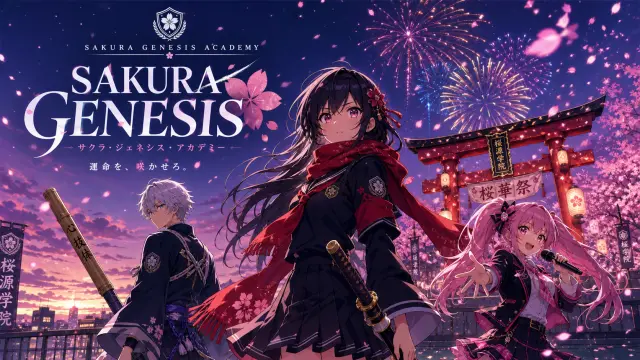
The strongest OP beat starts from the poster: feed the SAKURA GENESIS key visual as the first frame and let Seedance 2.0 animate it — the torii gate glows, fireworks bloom, petals start moving. Image-to-video is the secret to keeping the art direction locked while the camera comes alive.
Real Outputs, Real Router-Files URLs
Every asset on this page — the key visual, both festival cuts, and the rooftop promise — is a real router-files.neta.art URL generated in this session from the Sakura Genesis Academy world. No stock, no placeholders: click, share, publish.
Best Practices for Anime OPs
- Keep characters signature-consistent — one silhouette detail per character (Aoi's red scarf, Ren's bamboo sword) survives across renders
- Use the world's palette — sakura pink, lantern gold, dusk violet; consistent color keeps multi-shot OPs coherent
- End every beat on a still-able frame — you will want the last frame for the title card
- Chain last frames — beat 2's first frame = beat 1's last frame for seamless cuts
- Validate with Kling, deliver with Seedance 2.0 — the fastest cost-quality loop
FAQ — Seedance 2.0 Anime Opening Video Generator
How long can a single OP shot be?
Seedance 2.0 supports takes from 4 to 15 seconds; a full OP is assembled from several chained beats.
Does it generate audio?
Yes — synced audio is on by default; you can disable it and score the OP yourself.
Can I start from an image?
Yes — feed your key visual as the first frame and animate it; image-to-video is supported.
Where do outputs go?
Every render lands on a shareable router-files URL — embed it or publish it as a work.
Generate Your First OP Beat
The festival is the world's favorite opening: petals, lanterns, one transformation, and a title card. Write your sentence, render with Seedance 2.0, and watch Sakura Genesis Academy open itself.
Generate with Seedance 2.0
1080p, synced audio, title-card-ready — one sentence in, an anime OP beat out.