
Sprite Sheet Maker: Free PNG & JSON Atlas Builder
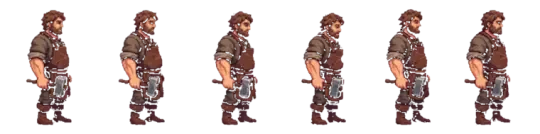

Make your own sprite sheet maker
Combine frames into one sheet — set columns, padding and scale, export a PNG and JSON atlas — or generate a whole animated sheet from a single prompt.
A sprite sheet maker does one job: take a set of individual frames and pack them into a single image at known coordinates. You feed it PNG, JPG or WebP files, choose columns, padding and scale, and it returns a PNG plus a JSON atlas that maps each frame name to an x, y, width and height rectangle. That rectangle is all your renderer needs to draw the right cell.
The term covers two different tools. One is a packer: you already have frames and you want them on one sheet. The other is a generator: you write a prompt and get a full animated character sheet in a consistent style. Neta Studio's browser-based 3D world builder handles both, and the output drops straight into a Three.js scene without a conversion step.
Make a sprite sheet from your frames
This is the packing path. You drop frames in, and the sheet is built deterministically: left to right, top to bottom, in the order you supplied them. The first frame occupies cell (0,0), the second sits one cell to the right, and so on until the row fills, at which point packing wraps to the next row.
Order matters more than anything else here. The packer does not sort by filename, and it does not infer animation groups from names. If your frames are numbered frame_1.png through frame_8.png and you drop them out of order, the exported sheet is wrong and the JSON atlas will faithfully record the wrong order. Sort before you drop, or check the thumbnail strip before you export.
The output is two files. The PNG is the packed image. The JSON is a small object keyed by frame name, each value holding the rectangle and the source size. Most engines can consume that JSON directly; if yours cannot, the numbers are plain enough to remap by hand.
01
Export your frames as PNG with transparency, or JPG/WebP if you do not need an alpha channel. Keep every frame the same pixel dimensions.
02
Drop the frames into the packer in playback order. Verify the thumbnail strip reads left to right the way the animation should play.
03
Set the column count. Leave it on auto if you want a roughly square sheet, or fix it to the frame count for a single wide strip.
04
Set padding and scale. Padding adds transparent pixels between cells; scale multiplies each frame by an integer factor using nearest-neighbour.
05
Export the PNG and the JSON atlas together. Check one rect in the JSON against the visible sheet before you wire it into your renderer.

Generate a sprite sheet from a prompt
The second meaning of sprite maker has nothing to do with grid packing. You describe a character and get a complete sheet back — a full set of poses rendered in one consistent style, already laid out in a grid. There is no source art to drop in, because the art is the output.
The useful part is consistency. Generating eight directions of a walk cycle in one pass keeps the silhouette, palette and proportions aligned across cells. Generating each frame in a separate request does not, and the drift shows up as a character that appears to change mass between frames.
Neta Studio generates 8-direction walk cycles, idle, attack and cast sets. Agent Sprite Forge is the asset in the studio that produces these sheets; you can drop a generated sheet into a world in the 3D game builder and drive it with the same atlas JSON the packer would have produced.
- 8-direction walkOne sheet covering the eight compass directions, so turning the character in the scene maps to a row lookup rather than a new generation.
- Idle, attack, castSeparate action sets generated in the same style as the walk, so you can swap between them at runtime without a visible style break.
- Style carry-overDescribe the character once and the pose sets inherit the palette and proportions, which is the part that usually fails when you generate frames one at a time.
Columns, padding, scale and the JSON atlas
Four settings decide whether a sheet is usable. Get them right at export time, because fixing them afterward means repacking and re-testing every animation that referenced the old coordinates.
The JSON atlas is the contract between the sheet and your code. It stores, per frame, the position and size of the cell. If you change the sheet and do not regenerate the atlas, sprites sample the wrong region and you get a strip of neighbouring frames bleeding into the cell.
- ColumnsFixes how many cells sit per row before wrapping. A wide strip uses columns equal to the frame count; a grid uses something closer to the square root.
- Padding and spacingInsert transparent pixels between cells. This matters when your renderer samples with any filtering, because a neighbouring frame's edge pixels can bleed across a boundary at zero padding.
- ScaleMultiplies each frame by an integer factor using nearest-neighbour. Non-integer scaling with a smooth filter softens pixel edges and destroys the crisp look you exported the frames for.
- JSON atlasMaps each frame name to x, y, width and height. Treat the origin as the character's feet, not the top-left of the image, so placement on the ground plane does not require per-frame offsets.
What is a texture atlas
An atlas is a single texture holding many smaller images, plus a table describing where each one lives. A sprite sheet is the common case where those smaller images are animation frames of the same subject.
The reason atlases exist is draw calls. Binding a separate texture per frame forces the renderer to switch state between each one, and state changes dominate frame time once you have many sprites on screen. Packing everything onto one texture means one bind for the whole group. The geometry still draws per sprite, but the texture does not change.
The trade-off is that editing is coarse. Changing one frame means repacking the sheet and updating the atlas, and any code holding an old rectangle is now wrong. That is why the atlas is exported as data rather than hardcoded coordinates. Our sprite sheet guide covers the packing decisions in more depth.
Sprite sheet generator for RPG, platformer and isometric
The layout you want is mostly determined by the genre. RPGs index by direction and animation phase, so a grid reads naturally. Platformers usually run a single action at a time, so a wide strip is simpler. Isometric worlds need cell dimensions that match the diamond projection or sprites overlap.
Pick the layout before you set columns, and write the lookup code against that layout. Retrofitting a grid into strip-based indexing is a mechanical but tedious change, and it touches every animation call site.
| Genre | Typical layout | Notes |
|---|---|---|
| RPG | 4-direction grid | Rows are directions, columns are frames. Index by direction then phase. |
| Platformer | Wide single strip | One action per sheet. Playback is a linear index, no row math. |
| Isometric | Diamond cells | Cell size must match the projection. Pad more than usual to stop edge bleed. |
Character sprite sheets
Keeping a cast consistent is the hard part once you have more than one character. Individually plausible sheets fail together when palettes drift, proportions shift, or the light direction flips between characters standing in the same scene.
Generate a character's full action set in one pass rather than one action at a time. The palette and proportions carry across poses within a pass; across passes they do not, and the difference is visible the moment two characters share a frame.
Keep cell size identical across every character in the cast, even if the art does not fill the cell. Uniform cells let the scene place any character in any slot without a per-character offset table. The character sprite maker use-case walks through this for a full cast.
Cut an existing sheet apart
If you already have a sheet and need the frames back out, that is slicing, not packing, and it is the reverse operation. The GIF converter and animator handle this path — you supply the sheet, define the cell grid or frame boundaries, and get individual frames.
Two things make slicing fail. Sheets with uneven padding do not divide evenly by a guessed cell size, so measure a known cell rather than dividing the image width by your estimated column count. Sheets exported from a lossy format carry compression artifacts along cell boundaries, and those artifacts become visible once the cells are separated and scaled up.
Walk into the world it belongs to
A sprite is a character with nowhere to stand. The last step is the one nobody else offers: take the sheet you just built and put it in a world someone can walk around in — a small island, a planet, a rainy street corner. Every world on this site was made from one written description and published as a page you can play.
FAQ
What file formats can I use for the source frames? +
PNG, JPG and WebP. PNG is the only one of the three that carries an alpha channel reliably, so use it for anything with transparency.
Why does my sprite sheet look blurry when scaled up? +
You scaled by a non-integer factor, or the renderer is applying a smooth filter. Scale by whole numbers only and set the texture filter to nearest-neighbour.
Do I need padding between frames? +
Usually yes. With zero padding and any texture filtering, the edge pixels of one frame sample into the neighbouring cell, producing a visible seam during animation.
What does the JSON atlas actually contain? +
One entry per frame, holding its x, y, width and height on the sheet. Some exporters also record the source frame size and the origin, which for characters is typically at the feet.
Can I change the column count after exporting? +
Not without repacking. Changing columns moves every frame on the sheet, so the old atlas rectangles no longer point at the right cells and every animation referencing them breaks.
What is the difference between a sprite sheet maker and a sprite sheet generator? +
A maker packs frames you already have into a grid. A generator creates the frames from a prompt — for example a full 8-direction walk set in one consistent style — so the art is the output rather than the input.
Back to the 3D Game Builder
All 31 finished 3D worlds, games and scenes live on one page — every one of them playable.
Start from a library template
Every asset in this library is a transparent, game-ready PNG with a recorded prompt — Sprite resource library and Free sprite sheets, tagged by action, style and subject. Free to browse and download.