PIKACHU — Background Motion: Second-Pass Storm Plate for One Piece — The Grand Line Atlas

Watch PIKACHU — Background Motion, a six-second locked-camera AI storm loop made for One Piece — The Grand Line Atlas. A painted thundercloud churns over a rain-soaked mountain meadow while lightning pulses along the ridge and rain rings open across black puddles. Rendered with Seedance 2.0 Fast from an 848 × 1264 plate, with a native rain-and-thunder audio bed, a transparent character cutout and a second-pass master. Stream or download the MP4 free.
Final Video: PIKACHU — background motion

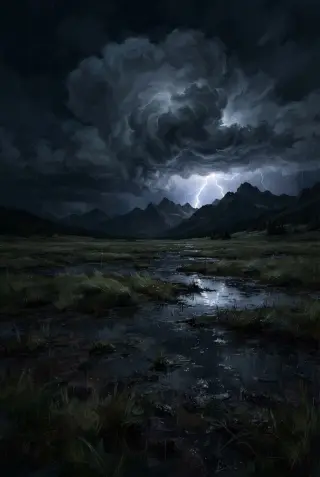

Six seconds. One locked camera. Zero cuts. A thundercloud turns over a rain-soaked mountain meadow, lightning pulses behind the ridge, rain drifts across the grass, and rings open and close across the puddles.
PIKACHU — background motion is the atmosphere half of a two-layer card built inside One Piece — The Grand Line Atlas. The atlas is a creator-facing world bible of 50 characters, 50 places, 41 factions, 81 lore entries and 37 events, all held to one visual system — OP-01 Modern Grand Adventure Painterly. In that world the sea is never neutral: storms, the Calm Belt and the sky islands decide who arrives and who does not.
This clip is not a scene and not a poster. It is a piece of weather that can be reused: the centre of the frame is deliberately left open, the camera never moves, and the final frame is composed to meet the first. Drop a cut-out captain, emperor or wanted-poster face over it and the plate does the rest.
Play the loop: PIKACHU — background motion →
The Video
6.08 seconds · 834 × 1112 (3:4) · 24 fps · H.264 + AAC · 2.55 MB — rendered with Seedance 2.0 Fast in a single image-to-video pass from the painted background plate. A native rain-and-thunder audio bed runs under the loop, and the motion brief allows exactly four things to move: cloud, lightning, rain and grass.
How It Was Made
Production Process Breakdown
Generation Prompt
Full motion prompt — verbatim
“Fixed camera, no camera movement. The thundercloud churns and rolls, distant lightning pulses across the sky, rain drifts across the meadow, the wet grass and puddles tremble. Cinematic painterly storm, no text, no watermark”
Frame lock is the first instruction and the reason the clip loops. “Distant lightning” keeps the flash behind the mountains so it never blows out the centre of the frame. “Rain drifts” and “the wet grass and puddles tremble” give the plate its two scales of movement — weather and ground — without adding a subject. “No text, no watermark” keeps the frame clean for compositing.
Asset Prompts
Reference Frames


Why Choose Neta Studio
One studio, the whole video stack. This loop moved from painted plate to motion to transparent asset without leaving Neta Studio: Seedance 2.0 Fast and Seedance 2.0 for image-to-video with a locked camera, Kling Image-to-Video for subject-motion studies, BiRefNet General for clean alpha extraction, and GPT Image 2 for the 16:9 key art.
The workflow is built for reuse, not one-off clips. A single still can become a seamless background loop, a character study, or a layered card — and every asset keeps its prompt, its poster frame and its source plate alongside it.
No timeline, no keyframes, no render farm. You write the motion brief, choose the plate, and the studio returns a finished MP4 with audio. Then you publish it straight to the web, at full quality, with no player wrapper and no download step.
Start from a world, a plate, or a single sentence. The Grand Line Atlas is open — or bring your own IP and build the same layered system from scratch.
Studio Interior


Start Creating
This loop was generated by Neta Studio AI from a painted plate and one motion brief. The storm took minutes. You can do it too — adapt this world or start fresh from any IP. No coding required, free to start.